MCP server for Purelymail — manage domains, mailboxes, and routing rules from Claude Code or any MCP-compatible AI agent




Disclaimer: This is an unofficial, community-built MCP server. It is not affiliated with, endorsed by, or supported by Purelymail.
What it does
Once installed, you can manage your Purelymail email infrastructure in plain language:
- "Add email for mycompany.com and set up all the DNS records"
- "Create a mailbox for hello@mycompany.com with a strong password"
- "Forward support@ to our team's inboxes"
- "Show me the DNS status for all my domains"
The agent handles the API calls. You describe the outcome.
Works great with mcp-server-cloudflare
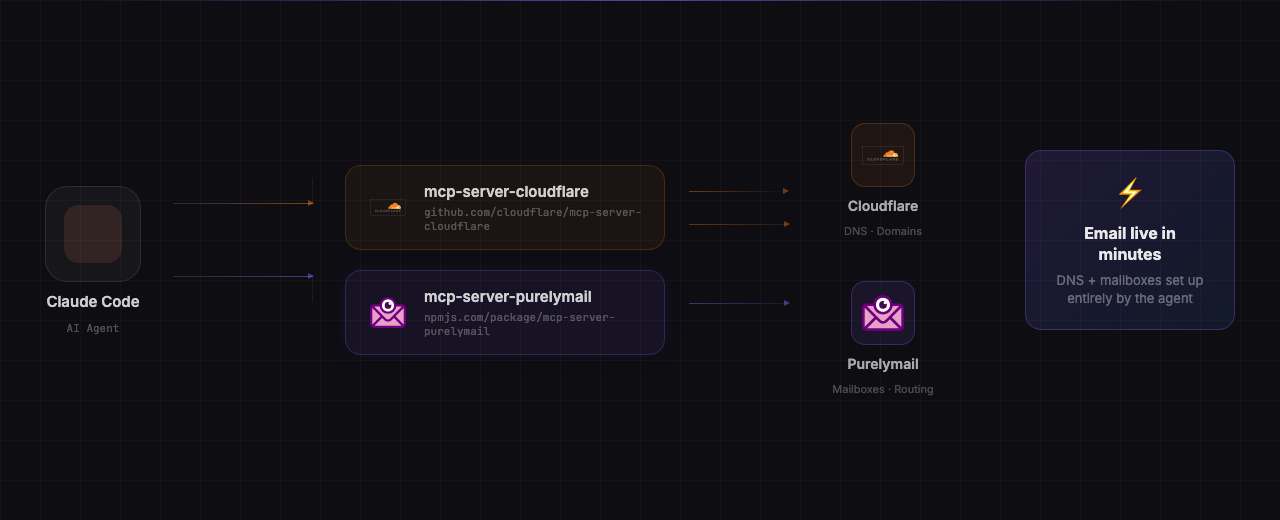
Pair this server with the official mcp-server-cloudflare to let your agent handle the entire email setup end-to-end — DNS records and mailboxes — without you touching a single config panel.
Install both:
# Cloudflare MCP (official)
claude mcp add cloudflare --scope user -- npx mcp-server-cloudflare

# Purelymail MCP (this server)
claude mcp add purelymail \
  --scope user \
  -e PURELYMAIL_API_TOKEN=your-token-here \
  -- npx purelymail-mcp
Then just ask:
"I own acme.com on Cloudflare. Set up professional email for it on Purelymail."
The agent will: verify domain ownership → add MX, SPF, DKIM, and DMARC records to Cloudflare → register the domain on Purelymail → create your first mailbox. Done in minutes, zero copy-paste.
Prerequisites
- Node.js 18 or later
- Purelymail account — sign up at purelymail.com
- API token — generate one at purelymail.com/manage/account
Installation
Claude Code (recommended)
claude mcp add purelymail \
  --scope user \
  -e PURELYMAIL_API_TOKEN=your-token-here \
  -- npx purelymail-mcp
Replace your-token-here with your token from purelymail.com/manage/account.
From source
git clone https://github.com/zinxer/mcp-server-purelymail.git
cd mcp-server-purelymail
npm install
Then register it:
claude mcp add purelymail \
  --scope user \
  -e PURELYMAIL_API_TOKEN=your-token-here \
  -- node /absolute/path/to/mcp-server-purelymail/index.js
Other MCP clients
Add to your MCP client's server config:
{
  "mcpServers": {
    "purelymail": {
      "command": "npx",
      "args": ["mcp-server-purelymail"],
      "env": {
        "PURELYMAIL_API_TOKEN": "your-token-here"
      }
    }
  }
}
Tools
Deliverability
| Tool | Description |
|------|-------------|
| check_deliverability | Run live DNS checks for a domain — MX, SPF, DKIM (all 3 keys), DMARC — with a scored report, issues list, and recommendations |
Domains
| Tool | Description |
|------|-------------|
| list_domains | List all domains with DNS validation status (MX, SPF, DKIM, DMARC) |
| get_ownership_code | Get the TXT record value needed to prove ownership of a new domain |
| add_domain | Add a domain once DNS records are in place |
| delete_domain | Delete a domain and all its associated mailboxes |
Mailboxes
| Tool | Description |
|------|-------------|
| create_user | Create a new email mailbox |
| list_users | List all mailboxes on the account |
| get_user | Get details for a specific mailbox |
| modify_user | Change password, recovery email, or settings |
| delete_user | Delete a mailbox |
Routing
| Tool | Description |
|------|-------------|
| list_routing_rules | List all routing and forwarding rules |
| create_routing_rule | Forward or alias an address to one or more inboxes |
| delete_routing_rule | Remove a routing rule |
Example workflow
Prompt: "Add email for acme.com on Purelymail and set up the DNS in Cloudflare"
The agent will:
- Call
get_ownership_code→ gets the exact TXT record value from the Purelymail API - Add TXT (ownership), MX, SPF, DKIM ×3, and DMARC records to Cloudflare
- Call
add_domain→ registersacme.comonce DNS passes
No copy-pasting. No looking up record values. No manual DNS entry.
Security
- Your API token is never stored in source code — it is passed via environment variable only
- The server runs locally on your machine; no data is proxied through any third party
- Treat your
PURELYMAIL_API_TOKENlike a password — do not commit it to version control
Contributing
Issues and pull requests are welcome.
git clone https://github.com/zinxer/mcp-server-purelymail.git
cd mcp-server-purelymail
npm install
PURELYMAIL_API_TOKEN=your-token node index.js
Please open an issue before submitting large changes.
License
MIT — see LICENSE for details.
Disclaimer
This project was built by Matthew Prag as an open-source community tool. Purelymail is a trademark of its respective owners. This project is independently developed and is not affiliated with, endorsed by, or supported by Purelymail. The Purelymail name is used solely to describe compatibility with the Purelymail service.
For official Purelymail support, visit purelymail.com.