`McpWorker` 是一个围绕 Model Context Protocol 构建的 .NET 工作区。它的核心是 `Zhengyan.McpHost`:一个本地可配置的 OpenAI 兼容网关,用来统一管理模型、Agent、MCP Client 和 MCP Server 工具,并向外提供 `/v1/chat/completions` 与 `/v1/responses` 两套对话接口。 当前仓库还包含四个对话界面项目、多个独立 MCP Server、知识库/文件服务以及一组底层模型、搜索、向量库和通用工具库。
McpWorker





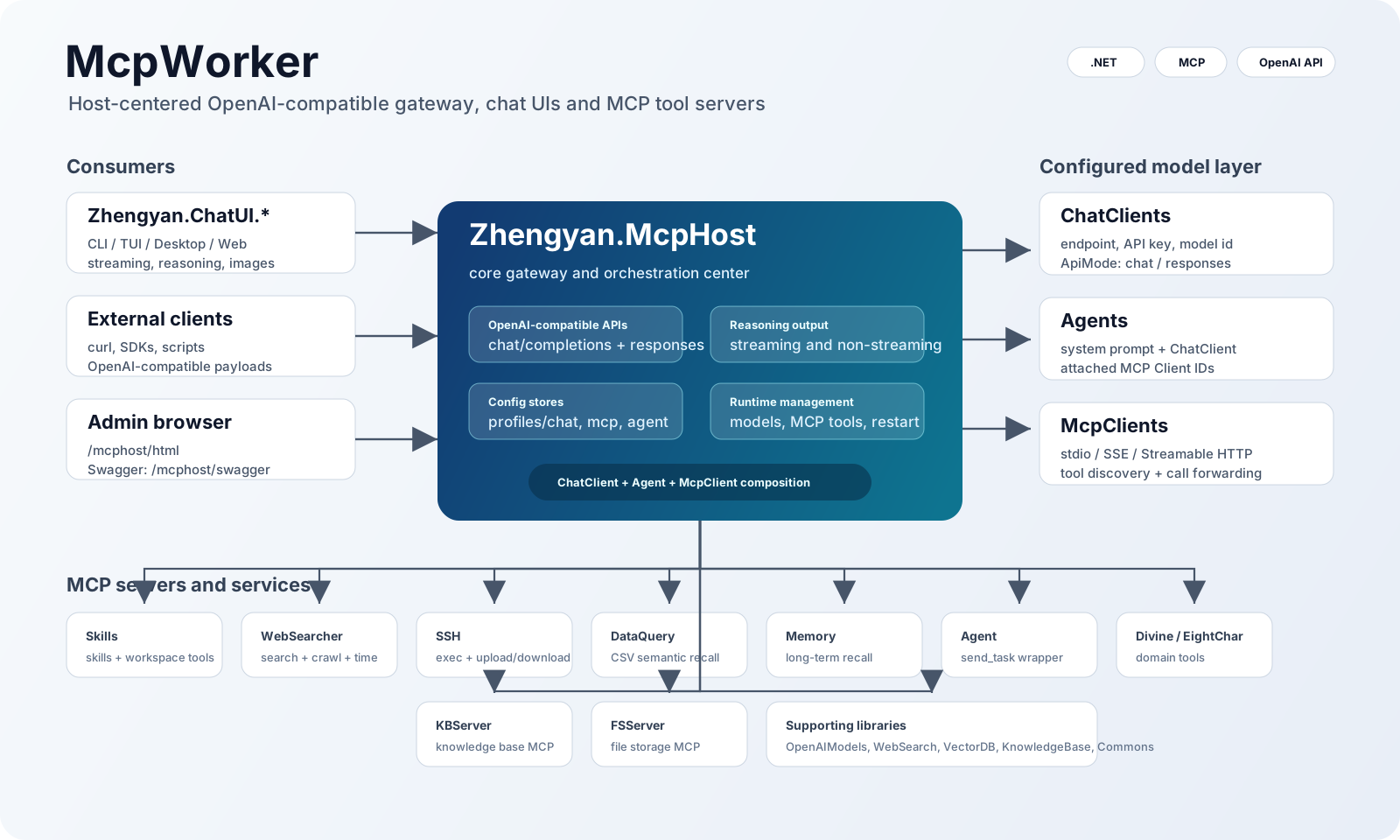
McpWorker 是一个围绕 Model Context Protocol 构建的 .NET 工作区。它的核心是 Zhengyan.McpHost:一个本地可配置的 OpenAI 兼容网关,用来统一管理模型、Agent、MCP Client 和 MCP Server 工具,并向外提供 /v1/chat/completions 与 /v1/responses 两套对话接口。
当前仓库还包含四个对话界面项目、多个独立 MCP Server、知识库/文件服务以及一组底层模型、搜索、向量库和通用工具库。
核心路径
典型调用链如下:
CLI / TUI / Desktop / Web / external OpenAI-compatible clients
        |
        v
Zhengyan.McpHost
        |
        +-- ChatClient: upstream model endpoint, API key, model id, chat/responses mode
        +-- Agent: system prompt + ChatClient + MCP Client list + API key expiration rules
        +-- McpClient: stdio / SSE / Streamable HTTP connection to MCP Servers
        |
        v
Zhengyan.McpServer.* / KBServer / FSServer
McpHost 既可以直接转发到上游模型,也可以根据当前选中的 Agent 组装系统提示词、模型配置和 MCP 工具列表,让普通 OpenAI 兼容客户端也能调用工具增强的 Agent。
快速开始
先构建解决方案:
dotnet build McpWorker.sln
启动核心服务:
dotnet run --project Zhengyan.McpHost\Zhengyan.McpHost.csproj
默认配置来自 Zhengyan.McpHost/profiles/mcphost.json。启动后常用地址是:
| 地址 | 用途 |
| --- | --- |
| http://localhost:9083/mcphost/html | McpHost 静态管理页 |
| http://localhost:9083/mcphost/swagger | Swagger |
| http://localhost:9083/mcphost/api/v1/chat/completions | OpenAI 兼容 Chat Completions |
| http://localhost:9083/mcphost/api/v1/responses | OpenAI 兼容 Responses |
| http://localhost:9083/mcphost/api/v1/models/config | 已配置 Agent/模型列表 |
启动一个 MCP Server,例如 WebSearcher:
dotnet run --project Zhengyan.McpServer.WebSearcher\Zhengyan.McpServer.WebSearcher.csproj -- --mode streamablehttp --urls http://0.0.0.0:5001
然后在 McpHost 的 MCP Client 配置里连接:
http://127.0.0.1:5001/websearcher
启动一个对话界面,例如 Desktop:
dotnet run --project Zhengyan.ChatUI.Desktop\Zhengyan.ChatUI.Desktop.csproj
四个 ChatUI 默认都连接:
http://localhost:9083/mcphost/api/v1
Zhengyan.McpHost
Zhengyan.McpHost 是整个项目的核心。它负责:
- 管理
ChatClient:上游 OpenAI 兼容模型端点、API Key、模型 ID、调用模式。 - 管理
McpClient:连接本地或远程 MCP Server,支持stdio、sse、streamablehttp/http。 - 管理
Agent:把一个 ChatClient 和多个 MCP Client 组合成可对话的模型配置。 - 提供 OpenAI 兼容接口:
/v1/chat/completions、/v1/responses。 - 提供模型列表和切换接口:
/v1/models/config、/v1/models/switch。 - 提供 Web 管理页和 Swagger。
- 同步输出推理过程:流式和非流式接口都会尽量保留上游返回的 reasoning/thinking 内容。
非流式推理输出约定:
- Chat Completions: 放在
choices[].message.reasoning_content。 - Responses: 在
output中插入type: "reasoning"的输出项,并将内容放在summary[].text,兼容百炼千问非流式 Responses 的结构。
更完整的配置、接口和调用示例见 Zhengyan.McpHost/README.md。
对话界面
当前仓库包含四个 Zhengyan.ChatUI.* 项目。它们都面向 McpHost,都支持模型列表、模型切换、chat/completions 与 responses 两种接口、流式输出、推理过程展示和图片输入。
| 项目 | 界面类型 | 说明 | | --- | --- | --- | | Zhengyan.ChatUI.CLI | 命令行 | 交互式 CLI + 单次请求模式,适合脚本、管道和快速验证。 | | Zhengyan.ChatUI.TUI | 终端 UI | 基于 Terminal.Gui 的全屏终端界面,包含设置、会话、Thinking、Additional 面板。 | | Zhengyan.ChatUI.Desktop | 桌面 UI | Avalonia 桌面客户端,适合长期调试和多模态对话。 | | Zhengyan.ChatUI.Web | Web UI | Gradio.Net 浏览器界面,适合局域网或本机快速访问。 |
MCP Server
这些项目可以独立启动,也可以被 McpHost 通过 MCP Client 配置接入。多数 Server 支持:
--mode stdio
--mode sse
--mode streamablehttp
--mode http
--stateless true|false
--urls http://0.0.0.0:<port>
| 项目 | HTTP MCP 路径 | 主要工具 |
| --- | --- | --- |
| Zhengyan.McpServer.Agent | /agent | send_task |
| Zhengyan.McpServer.DataQuery | /dataquery | list_data_sources, query_data, rebuild_data_index |
| Zhengyan.McpServer.Divine | /divine | divine_by_3_numbers, interpret |
| Zhengyan.McpServer.EightChar | /eightchar | calculation, interpret |
| Zhengyan.McpServer.Memory | /memory | remember_memory, recall_memory, list_memories, forget_memory, rebuild_memory_index |
| Zhengyan.McpServer.Skills | /skills | Skills 检索、文件读写、文本搜索、命令执行等工作区工具 |
| Zhengyan.McpServer.Ssh | /ssh | execute-command, upload, download |
| Zhengyan.McpServer.WebSearcher | /websearcher | SearchAsync, CrawlUrlsAsync, GetCurrentTime |
支撑服务和库
这些项目不是 McpHost 的入口,但为 MCP Server、知识库、搜索、向量召回和通用 Web 能力提供支撑。
| 项目 | 说明 | | --- | --- | | Zhengyan.KBServer | 知识库 HTTP + MCP 服务。 | | Zhengyan.FSServer | 文件存储 HTTP + MCP 服务。 | | Zhengyan.OpenAIModels | OpenAI 兼容请求/响应模型。 | | Zhengyan.WebSearch | 搜索引擎适配和网页抓取。 | | Zhengyan.KnowledgeBase | 知识库抽象和本地实现。 | | Zhengyan.VectorDB | 本地向量库封装。 | | Zhengyan.HNSW | HNSW/SmallWorld 近邻搜索实现。 | | Zhengyan.Lunar | 农历、历法和八字相关基础库。 | | Zhengyan.Commons | 通用工具。 | | Zhengyan.Commons.Web | Web 配置、Swagger、静态文件、Serilog 等扩展。 | | Zhengyan.Tests | 手工测试和实验入口。 |
配置约定
仓库大量使用 profiles/*.json 保存配置。关键目录:
| 目录 | 内容 |
| --- | --- |
| Zhengyan.McpHost/profiles/chat | ChatClient 配置。 |
| Zhengyan.McpHost/profiles/mcp | McpClient 配置。 |
| Zhengyan.McpHost/profiles/agent | Agent 配置。 |
| Zhengyan.McpServer.*/profiles | 各独立 MCP Server 的运行配置。 |
| Zhengyan.McpServer.Skills/resources/skills | Skills 服务内置技能。 |
| Zhengyan.McpServer.DataQuery/data | DataQuery CSV 数据源。 |
请把配置文件里的端点、密钥、SSH 凭据、内网地址替换为自己的环境值。正式部署或公开发布前,不要提交真实凭据。
最小联调组合
只验证对话链路:
Zhengyan.McpHost + 任意一个 Zhengyan.ChatUI.*
验证工具调用链路:
Zhengyan.McpHost + 一个 ChatClient + 一个 Agent + 一个或多个 Zhengyan.McpServer.*
验证 Skills 工作区能力:
Zhengyan.McpHost
Zhengyan.McpServer.Skills --mode streamablehttp --urls http://0.0.0.0:5006
McpHost MCP Client: http://127.0.0.1:5006/skills
构建脚本
根目录包含批量脚本:
build_all.bat
build_all.sh
clean_all.bat
clean_all.sh
这些脚本会遍历子项目并调用对应项目自己的构建或清理脚本。日常开发更推荐先用 dotnet build McpWorker.sln 验证整体状态。