Finance & Accounting MCP — invoices, expenses, accounts, journal entries, reconciliation, and reports
mcp-finance




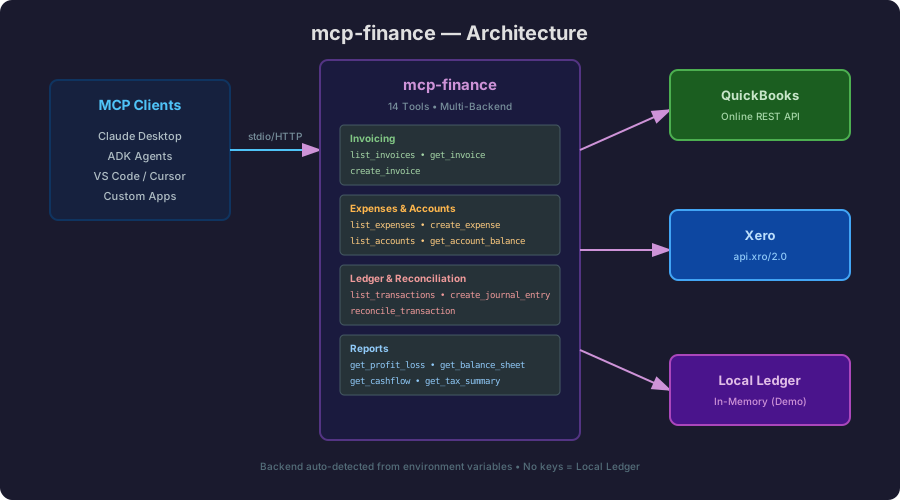
Finance & Accounting MCP Server — invoices, expenses, accounts, journal entries, reconciliation, and financial reports for AI agents. Multi-backend: QuickBooks Online, Xero, and a local in-memory ledger for testing.
Features
- 14 financial tools covering the full accounting lifecycle
- Multi-backend: QuickBooks Online, Xero, or local ledger
- Zero-config demo mode (local ledger with seed data)
- Registry-compliant with
mcp-server.tomlmanifest - Risk-classified tools for governance gates
Tools
| Tool | Description | Risk Level |
|------|-------------|------------|
| list_invoices | List invoices (paid, unpaid, overdue) | read_only |
| get_invoice | Get invoice details by ID | read_only |
| create_invoice | Create a new invoice | internal_write |
| list_expenses | List expenses/bills | read_only |
| create_expense | Record an expense | internal_write |
| list_accounts | List chart of accounts | read_only |
| get_account_balance | Get account balance | read_only |
| list_transactions | List recent transactions | read_only |
| create_journal_entry | Create a journal entry (debit/credit) | financial_action |
| reconcile_transaction | Match transaction to invoice/expense | internal_write |
| get_profit_loss | P&L report for a period | read_only |
| get_balance_sheet | Balance sheet as of date | read_only |
| get_cashflow | Cash flow summary | read_only |
| get_tax_summary | Tax liability summary | read_only |
Backends
| Backend | Env Vars Required | Notes |
|---------|-------------------|-------|
| QuickBooks Online | QUICKBOOKS_ACCESS_TOKEN + QUICKBOOKS_REALM_ID | Full REST API |
| Xero | XERO_ACCESS_TOKEN + XERO_TENANT_ID | api.xro/2.0 |
| Local Ledger | None | In-memory with seed data |
Backend is auto-detected from environment variables. If no credentials are set, the local ledger is used automatically.
Quick Start
# Build
cargo build

# Run (local ledger — no API keys needed)
./target/debug/mcp-finance
Client Configuration
Claude Desktop
{
  "mcpServers": {
    "finance": {
      "command": "/path/to/mcp-finance",
      "env": {
        "QUICKBOOKS_ACCESS_TOKEN": "your-token",
        "QUICKBOOKS_REALM_ID": "your-realm-id"
      }
    }
  }
}
ADK-Rust Agent
{
  "mcpServers": {
    "finance": {
      "command": "/path/to/mcp-finance",
      "env": {}
    }
  }
}
VS Code / Cursor
{
  "mcp": {
    "servers": {
      "finance": {
        "command": "/path/to/mcp-finance"
      }
    }
  }
}
Usage Examples
List unpaid invoices
Tool: list_invoices
Input: { "status": "unpaid" }
Create an invoice
Tool: create_invoice
Input: {
  "customer_name": "Acme Corp",
  "due_date": "2026-06-30",
  "line_items": [
    { "description": "Consulting", "quantity": 10, "unit_price_minor": 15000 }
  ]
}
Get P&L report
Tool: get_profit_loss
Input: { "start_date": "2026-01-01", "end_date": "2026-05-31" }
Create a journal entry
Tool: create_journal_entry
Input: {
  "memo": "Monthly rent",
  "lines": [
    { "account_id": "acc-4", "debit_minor": 200000, "credit_minor": 0, "description": "Rent expense" },
    { "account_id": "acc-1", "debit_minor": 0, "credit_minor": 200000, "description": "Cash payment" }
  ]
}
Registry Compliance
This server ships with mcp-server.toml declaring:
- All 14 tools with descriptions and risk levels
- Credential bindings for QuickBooks and Xero
- Server metadata for ADK registry onboarding
Development
# Build
cargo build

# Run with logging
RUST_LOG=debug cargo run

# Test with QuickBooks
QUICKBOOKS_ACCESS_TOKEN=xxx QUICKBOOKS_REALM_ID=yyy cargo run

# Test with Xero
XERO_ACCESS_TOKEN=xxx XERO_TENANT_ID=yyy cargo run
License
Apache-2.0