Email MCP Server — Gmail and Microsoft Graph for sending, reading, and managing email
Email MCP Server




The most complete multi-backend email MCP server. 24 tools across 5 send backends and 3 read backends — send via SMTP, AWS SES, or SendGrid while reading from any IMAP server. File attachments, OAuth with auto-refresh, single Rust binary with enterprise governance.
Architecture
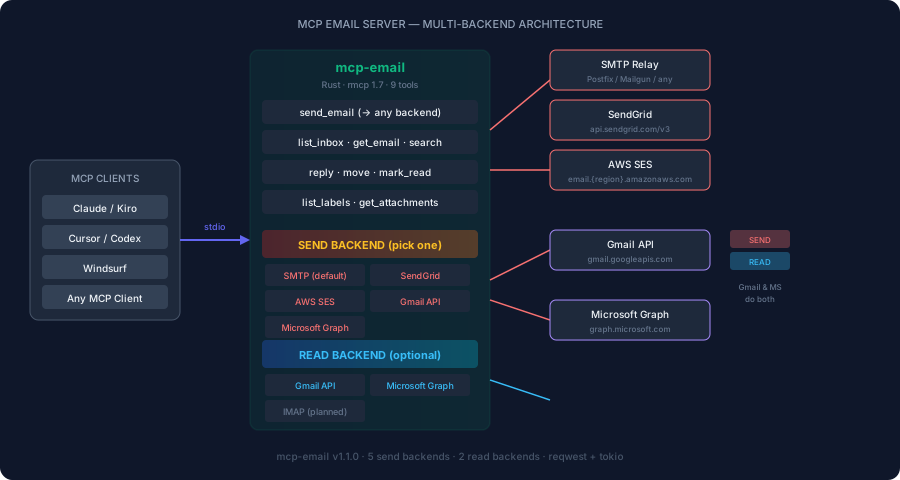
Key Principles
- Multi-backend — 5 send + 3 read backends, mix and match freely
- IMAP-first reading — works with any email provider, no OAuth required
- SMTP-first sending — universal, works with any relay
- Full email lifecycle — send, read, reply, forward, draft, organize, batch, delete
- No credential exposure — tokens stay in env vars, never reach LLM context
- Single binary — no Node.js, no Python, no runtime dependencies
Comparison with Other Email MCP Servers
| Feature | marlinjai/email-mcp | GongRzhe/Gmail-MCP | Ours | |---------|:---:|:---:|:---:| | Send email | ✅ | ✅ | ✅ | | CC/BCC | ✅ | ✅ | ✅ | | HTML email | ✅ | ✅ | ✅ | | Reply | ✅ (reply-all) | ❌ | ✅ | | Forward | ✅ | ❌ | ✅ | | Drafts (create/list/send) | ✅ | ✅ | ✅ | | Attachments send | ✅ | ✅ | ✅ | | Attachments download | ✅ | ✅ | ✅ (base64) | | Threads/conversations | ✅ | ❌ | ✅ | | Full body retrieval | ✅ | ✅ | ✅ | | Search | ✅ | ✅ | ✅ | | Mark read/unread | ✅ | ✅ | ✅ | | Star/flag | ✅ | ❌ | ✅ | | Move to folder | ✅ | ✅ | ✅ | | Delete (trash/permanent) | ✅ | ✅ | ✅ | | Labels (create/delete) | ✅ | ✅ | ✅ | | Batch operations | ✅ | ✅ | ✅ | | Filters | ❌ | ✅ | ❌ | | Multi-account | ✅ | ❌ | ❌ | | SMTP send | ✅ | ❌ | ✅ | | IMAP read | ✅ | ❌ | ✅ | | AWS SES | ❌ | ❌ | ✅ | | SendGrid | ❌ | ❌ | ✅ | | Registry governance | ❌ | ❌ | ✅ | | Risk classification | ❌ | ❌ | ✅ | | Rust / single binary | ❌ (Node) | ❌ (Node) | ✅ | | Tools | 24 | 18 | 24 |
Tools (24)
Sending & Composing (5)
| Tool | Purpose | Risk Class |
|------|---------|------------|
| send_email | Send email with CC/BCC, plain text + HTML | External write |
| reply_to_email | Reply to an email (preserves threading) | External write |
| forward_email | Forward an email to new recipients | External write |
| create_draft | Save a draft without sending | Internal write |
| send_draft | Send a previously saved draft | External write |
Reading & Searching (6)
| Tool | Purpose | Risk Class |
|------|---------|------------|
| list_inbox | List inbox messages | Read-only |
| get_email | Get email metadata (subject, from, date) | Read-only |
| get_email_body | Get full email body (HTML or plain text) | Read-only |
| get_thread | Get entire email thread/conversation | Read-only |
| search_emails | Search by query (Gmail syntax or IMAP SEARCH) | Read-only |
| download_attachment | Download attachment content (base64) | Read-only |
Organization (7)
| Tool | Purpose | Risk Class |
|------|---------|------------|
| list_labels | List all labels/folders | Read-only |
| list_drafts | List saved drafts | Read-only |
| get_attachments | Get attachment metadata for an email | Read-only |
| move_to_folder | Move email to a folder/label | Internal write |
| mark_read | Mark email as read | Internal write |
| mark_unread | Mark email as unread | Internal write |
| star_email | Star/flag a message | Internal write |
Management (3)
| Tool | Purpose | Risk Class |
|------|---------|------------|
| delete_email | Trash or permanently delete | Destructive |
| create_label | Create a new label/folder | Internal write |
| delete_label | Delete a label/folder | Destructive |
Batch Operations (3)
| Tool | Purpose | Risk Class |
|------|---------|------------|
| batch_delete | Delete multiple emails at once | Destructive |
| batch_move | Move multiple emails to a folder | Internal write |
| batch_mark | Mark multiple emails read/unread | Internal write |
Backend Status
| Backend | Send | Read | OAuth | Tested | |---------|:---:|:---:|:---:|:---:| | SMTP 465 | ✅ | — | — | ✅ | | SMTP 587 (STARTTLS) | ✅ | — | — | ✅ | | AWS SES | ✅ | — | — | ✅ | | SendGrid | ✅ | — | — | Ready | | Gmail API | ✅ | ✅ | ✅ auto-refresh | ✅ | | Microsoft Graph | ✅ | ✅ | ✅ auto-refresh | Ready | | IMAP | — | ✅ | — | ✅ |
Send Backends (5)
| Backend | Env Vars | Use Case |
|---------|----------|----------|
| SMTP (default) | SMTP_HOST, SMTP_PORT, SMTP_USERNAME, SMTP_PASSWORD, SMTP_FROM | Any SMTP relay — Postfix, Mailgun, Zoho, Gmail SMTP |
| SendGrid | SENDGRID_API_KEY, SENDGRID_FROM | High-volume transactional email |
| AWS SES | AWS_ACCESS_KEY_ID, AWS_SECRET_ACCESS_KEY, AWS_REGION, SES_FROM | AWS-native workloads |
| Gmail API | GMAIL_ACCESS_TOKEN | Google Workspace (OAuth) |
| Microsoft Graph | MS_GRAPH_TOKEN | Microsoft 365 (OAuth) |
Priority: SMTP → SendGrid → SES → Gmail → Microsoft
Read Backends (3)
| Backend | Env Vars | Use Case |
|---------|----------|----------|
| IMAP (default) | IMAP_HOST, IMAP_PORT, IMAP_USERNAME, IMAP_PASSWORD | Any provider — no OAuth needed |
| Gmail API | GMAIL_ACCESS_TOKEN | Full Gmail features (threads, labels) |
| Microsoft Graph | MS_GRAPH_TOKEN | Full Outlook features (folders, categories) |
Priority: IMAP → Gmail → Microsoft
Common IMAP Hosts
| Provider | Host | Port |
|----------|------|------|
| Gmail | imap.gmail.com | 993 |
| Outlook | outlook.office365.com | 993 |
| Yahoo | imap.mail.yahoo.com | 993 |
| Fastmail | imap.fastmail.com | 993 |
| Zoho | imap.zoho.com | 993 |
| iCloud | imap.mail.me.com | 993 |
| ProtonMail | 127.0.0.1 (Bridge) | 1143 |
Installation
cargo install mcp-email
Or build from source:
git clone https://github.com/zavora-ai/mcp-email
cd mcp-email
cargo build --release
Configuration Examples
SMTP + IMAP (universal — works with any provider)
export SMTP_HOST="smtp.gmail.com"
export SMTP_PORT="587"
export SMTP_USERNAME="you@gmail.com"
export SMTP_PASSWORD="app-password"
export SMTP_FROM="you@gmail.com"
export IMAP_HOST="imap.gmail.com"
export IMAP_PORT="993"
export IMAP_USERNAME="you@gmail.com"
export IMAP_PASSWORD="app-password"
SendGrid (send) + Gmail API (read)
export SENDGRID_API_KEY="SG.xxxx"
export SENDGRID_FROM="noreply@company.com"
export GMAIL_ACCESS_TOKEN="ya29.xxxx"
AWS SES (send) + IMAP (read)
export AWS_ACCESS_KEY_ID="AKIA..."
export AWS_SECRET_ACCESS_KEY="..."
export AWS_REGION="us-east-1"
export SES_FROM="noreply@company.com"
export IMAP_HOST="imap.gmail.com"
export IMAP_PORT="993"
export IMAP_USERNAME="you@gmail.com"
export IMAP_PASSWORD="app-password"
Client Configuration
Claude Desktop
{
  "mcpServers": {
    "email": {
      "command": "mcp-email",
      "args": [],
      "env": {
        "SMTP_HOST": "smtp.gmail.com",
        "SMTP_PORT": "587",
        "SMTP_USERNAME": "you@gmail.com",
        "SMTP_PASSWORD": "app-password",
        "SMTP_FROM": "you@gmail.com",
        "IMAP_HOST": "imap.gmail.com",
        "IMAP_PORT": "993",
        "IMAP_USERNAME": "you@gmail.com",
        "IMAP_PASSWORD": "app-password"
      }
    }
  }
}
Kiro
Add to .kiro/settings/mcp.json:
{
  "mcpServers": {
    "email": {
      "command": "mcp-email",
      "args": [],
      "env": {
        "SENDGRID_API_KEY": "SG.xxxx",
        "SENDGRID_FROM": "noreply@company.com",
        "IMAP_HOST": "imap.gmail.com",
        "IMAP_PORT": "993",
        "IMAP_USERNAME": "you@gmail.com",
        "IMAP_PASSWORD": "app-password"
      }
    }
  }
}
Cursor
Add to .cursor/mcp.json:
{
  "mcpServers": {
    "email": {
      "command": "mcp-email",
      "args": [],
      "env": {
        "SMTP_HOST": "smtp.gmail.com",
        "SMTP_PORT": "587",
        "SMTP_USERNAME": "you@gmail.com",
        "SMTP_PASSWORD": "app-password",
        "SMTP_FROM": "you@gmail.com"
      }
    }
  }
}
Windsurf
Add to ~/.codeium/windsurf/mcp_config.json:
{
  "mcpServers": {
    "email": {
      "command": "mcp-email",
      "args": [],
      "env": {
        "SENDGRID_API_KEY": "SG.xxxx",
        "SENDGRID_FROM": "noreply@company.com"
      }
    }
  }
}
Usage Examples
Send an email with CC
"Send an email to james@company.com, CC sarah@company.com, about the deployment being ready"
→ calls send_email with to, cc, subject, body
Forward an email
"Forward the latest email from the client to the legal team"
→ calls search_emails → forward_email
Draft and review before sending
"Draft a reply to Bob's email but don't send it yet"
→ calls create_draft
"OK send that draft"
→ calls send_draft
Batch organize
"Move all emails from newsletters@company.com to the Archive folder"
→ calls search_emails → batch_move
Read a thread
"Show me the full conversation thread about the budget proposal"
→ calls search_emails → get_thread
Download attachment
"Download the PDF attachment from Sarah's last email"
→ calls search_emails → get_attachments → download_attachment
MCP Server Manifest
server_id = "mcp_email"
display_name = "Email"
version = "1.5.0"
domain = "collaboration"
risk_level = "medium"
writes_allowed = "gated"
transports = ["stdio"]
credentials = ["vault://email-credentials"]
governance_gates = []
environments = ["development", "staging", "production"]
OAuth Setup (one-time)
# Gmail — opens browser for Google consent
mcp-email auth gmail

# Microsoft — opens browser for Microsoft consent
mcp-email auth microsoft
Tokens are saved to ~/.mcp-email/ and auto-refresh before expiry. No manual token management after first auth.
Roadmap
- [ ] Email filters (create/list/delete rules)
- [ ] Multi-account support
- [ ] Webhook for incoming email (SendGrid Inbound Parse)
- [ ] Email templates (Handlebars/Tera)
Documentation
| Document | Description | |----------|-------------| | API Reference | All 24 tools with parameters, types, and examples | | Backends | Configuration for all 8 backends with setup guides | | Security | Credential handling, threat model, risk classification | | Architecture | System diagram | | CHANGELOG.md | Version history | | mcp-server.toml | ADK-Rust Enterprise registry manifest |
Registry Compliance
This server implements the ADK MCP SDK contract:
- HealthCheck — async health probe for registry monitoring
- mcp-server.toml — manifest declaring tools, risk classes, and credentials
- Structured tracing —
RUST_LOGenv-filter for observability
Contributors
| 
James Karanja Maina |
|:---:|
License
Apache-2.0 — see LICENSE for details.
Part of the ADK-Rust Enterprise MCP server ecosystem.
Built with ❤️ by Zavora AI