Device Management MCP — inventory, posture, compliance, health checks, remediation
Device Management MCP Server




Your AI agent becomes a sysadmin. 44 MCP tools that observe, diagnose, and act on real devices — covering device management, endpoint security, and network operations in one server. Cross-platform (macOS, Linux, Windows), no mocks, no hardcoded data. MCP elicitation for destructive actions.
What It Does
Point it at any machine and your agent can answer:
- "Why is my machine slow?" → check stats, find the culprit, kill it
- "Is my machine secure?" → check encryption, firewall, patches, aggregate findings
- "Can I reach the server?" → DNS + ping + HTTP in one call
- "What needs updating?" → patches, brew packages, OS updates
- "Free up disk space" → find large files, empty trash, purge caches
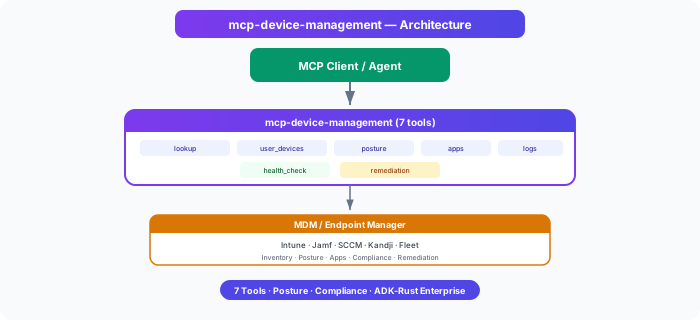
Architecture
Key Principles
- Real system data — reads from actual OS commands, no mocks or seeds.
- Cross-platform — macOS, Linux, Windows. Auto-detects OS and dispatches correct commands.
- Observe → Diagnose → Act — full spectrum from monitoring to remediation.
- MCP elicitation — destructive actions (kill, firewall, restart) prompt for user confirmation via the MCP protocol.
- Enterprise backends — Intune, Jamf, Fleet, Kandji via feature flags.
- Merged scope — covers Device Management (#18), Endpoint Security (#19), and Network (#20) from the ADK-Rust Enterprise inventory.
Tools (44)
Observe (16) — see what's happening
| Tool | What It Does | Example |
|------|-------------|---------|
| lookup_device | Find device by name/serial/ID | "Find my MacBook" |
| list_user_devices | All devices for a user | "What devices does James have?" |
| get_device_posture | Compliance, encryption, AV, risk score | "Is this device compliant?" |
| get_installed_apps | Applications installed | "What's installed?" |
| get_security_status | FileVault/BitLocker, firewall, SIP, Gatekeeper | "Is my machine secure?" |
| get_system_stats | Live CPU, memory, disk, load average | "How's my system doing?" |
| list_running_processes | Top processes by CPU or memory | "What's using my CPU?" |
| get_network_info | IP, WiFi, VPN, active connections | "What's my IP?" |
| get_open_ports | Listening ports and processes | "What's exposed?" |
| collect_device_logs | System info, storage, posture summary | "Give me a device report" |
| run_health_check | Overall health (healthy/degraded/critical) | "Is this device healthy?" |
| get_disk_usage | Per-directory size breakdown | "What's using my disk?" |
| find_large_files | Files over N MB | "Find files over 500MB" |
| list_brew_packages | Homebrew/apt/choco installed or outdated | "What's outdated?" |
| check_os_updates | Pending system updates | "Any updates available?" |
| list_login_items | Startup items and launch agents | "What runs at boot?" |
Diagnose (15) — troubleshoot problems
| Tool | What It Does | Example |
|------|-------------|---------|
| ping_host | Ping with latency and packet loss | "Can I reach 8.8.8.8?" |
| traceroute | Network path to a host | "Trace route to server" |
| dns_lookup | Resolve hostname to IP | "What IP is github.com?" |
| test_url | HTTP GET with status + response time | "Is the API up?" |
| test_connectivity | Comprehensive DNS+ping+HTTP diagnosis | "Why can't I reach X?" |
| check_disk_health | SMART status | "Is my disk failing?" |
| get_recent_crashes | Recent crash reports | "What crashed recently?" |
| get_battery_status | Charge, cycle count, condition | "How's my battery?" |
| get_usb_devices | Connected peripherals | "What's plugged in?" |
| get_patch_status | Pending patches with severity | "What patches are needed?" |
| get_encryption_status | Detailed encryption info | "Is my disk encrypted?" |
| list_security_findings | Aggregate security issues | "What's wrong security-wise?" |
| check_vpn_status | VPN connection details | "Am I on VPN?" |
| check_firewall_rule | Inspect firewall rules | "Is port 443 allowed?" |
| get_network_outages | Multi-host reachability check | "Is anything down?" |
Act (13) — fix things
| Tool | What It Does | Risk | Elicitation |
|------|-------------|------|-------------|
| kill_process | Kill by PID or name | Medium | ✓ Confirmation required |
| restart_service | Restart a system service | Medium | — |
| flush_dns | Clear DNS cache | Low | — |
| renew_dhcp | Get fresh IP address | Low | — |
| empty_trash | Reclaim disk space | Low | — |
| purge_caches | Clear system caches | Medium | — |
| enable_firewall | Turn on the firewall | Medium | ✓ Confirmation required |
| brew_install | Install a package | Medium | — |
| brew_upgrade | Upgrade packages | Medium | — |
| brew_uninstall | Remove a package | Medium | — |
| lock_screen | Lock screen immediately | Low | — |
| restart_machine | Restart the machine | Critical | ✓ Confirmation required |
| create_device_remediation_task | Create tracked remediation | Low | — |
MCP Elicitation (Human-in-the-Loop)
Destructive tools use the MCP elicitation protocol to confirm with the user before executing:
Agent: "I'll kill the runaway process"
  → MCP server sends elicitation request
  → Client shows: "Kill process 'node'? This may cause data loss."
  → User: Accept / Decline
  → Tool proceeds or aborts
This works with any MCP client that supports elicitation (MCP 2025-06-18 spec). If the client doesn't support it, the tool falls back to proceeding with a warning.
Verified Output (Real System)
> get_system_stats()
  load: { 5.95 6.21 6.24 }, disk: 63%, memory: 24GB, os: macos

> list_security_findings()
  2 findings, risk: high
  • Firewall is disabled (high) → enable_firewall
  • 20 ports listening (medium) → review get_open_ports

> test_connectivity(host: "github.com")
  dns: true, ping: true (66ms), http: 200
  diagnosis: "All checks passed — connectivity is healthy"

> get_patch_status()
  • macOS Tahoe 26.5 (7.3GB, recommended, restart required)
  • Command Line Tools for Xcode 26.5 (920MB)

> get_encryption_status()
  method: FileVault 2, enabled: true

> get_network_outages(hosts: ["google.com", "github.com", "nonexistent.invalid"])
  3/4 reachable, 1 down, outage_detected: true
Installation
cargo install mcp-device-management
Or build from source:
git clone https://github.com/zavora-ai/mcp-device-management
cd mcp-device-management
cargo build --release
No configuration needed — auto-detects the local machine on startup.
MCP Client Config
Claude Desktop / Kiro / Cursor / Windsurf:
{
  "mcpServers": {
    "device": {
      "command": "/path/to/mcp-device-management"
    }
  }
}
Cross-Platform Commands
Each tool auto-detects the OS and uses the correct commands:
| Operation | macOS | Linux | Windows |
|-----------|-------|-------|---------|
| System stats | sysctl, df | /proc/loadavg, free | wmic |
| Security | fdesetup, csrutil | ufw, getenforce | netsh, manage-bde |
| Processes | ps aux -r | ps aux --sort=-%cpu | tasklist |
| Network | ifconfig, scutil | hostname -I, nmcli | ipconfig, netsh |
| Packages | brew | apt | choco |
| Kill | kill -9 | kill -9 | taskkill /F |
| DNS flush | dscacheutil | systemd-resolve | ipconfig /flushdns |
| Firewall | socketfilterfw | ufw | netsh advfirewall |
| Restart | shutdown -r | reboot | shutdown /r |
Enterprise Backends
| Backend | Feature Flag | Env Vars | Use Case |
|---------|-------------|----------|----------|
| Local (default) | local | None | Single machine management |
| Intune | intune | INTUNE_TENANT_ID, INTUNE_CLIENT_ID, INTUNE_CLIENT_SECRET | Microsoft 365 fleet |
| Jamf | jamf | JAMF_URL, JAMF_API_TOKEN | Apple device fleet |
| Fleet | fleet | FLEET_URL, FLEET_API_TOKEN | Open-source osquery |
| Kandji | kandji | KANDJI_URL, KANDJI_API_TOKEN | Apple MDM |
cargo build --release --features all-backends
Governance
| Risk Level | Tools | Behavior | |-----------|-------|----------| | Read-only | All Observe + Diagnose | No side effects | | Low | flush_dns, renew_dhcp, empty_trash, lock_screen | Reversible, no data loss | | Medium | kill_process, purge_caches, brew_*, restart_service, enable_firewall | May affect running work | | Critical | restart_machine | Requires explicit confirmation |
Tools marked with ✓ in the Elicitation column use MCP elicitation to confirm before executing.
MCP Server Manifest
server_id = "mcp_device_management"
display_name = "Device Management MCP"
version = "1.4.0"
domain = "it_operations"
risk_level = "medium"
writes_allowed = "gated"
transports = ["stdio"]
governance_gates = ["elicitation_for_destructive_actions"]
Covers Inventory Items
This single MCP server covers three items from the ADK-Rust Enterprise inventory:
- #18 Device Management — inventory, posture, apps, diagnostics, remediation
- #19 Endpoint Security — patches, encryption, findings, compliance
- #20 Network — VPN, DNS, connectivity, firewall rules, outage detection
Contributors
| 
James Karanja Maina |
|:---:|
License
Apache-2.0 — see LICENSE for details.
Part of the ADK-Rust Enterprise MCP server ecosystem.
Registry Compliance
This server implements the ADK MCP SDK contract:
- HealthCheck — async health probe for registry monitoring
- mcp-server.toml — manifest declaring tools, risk classes, and credentials
- Structured tracing —
RUST_LOGenv-filter for observability