MCP for saving AI analysis and conversations
Thread MCP



thread-mcp is the Jupyter notebook for LLM, optimized for natural languages. Thread helps you share, reproduce, update, and resume LLM conversations across different LLM clients.
Features
- Unified Saving: Store conversations locally (Markdown/JSON) or remotely via REST API
- Smart Search: Find threads by ID, title, tags, or full-text search with relevance scoring
- Easy Updates: Append messages by ID or title - no need to track IDs manually
- Resume Conversations: Load previous threads with context optimized for AI continuation
- Rich Metadata: Include timestamps, tags, summaries, and source application info
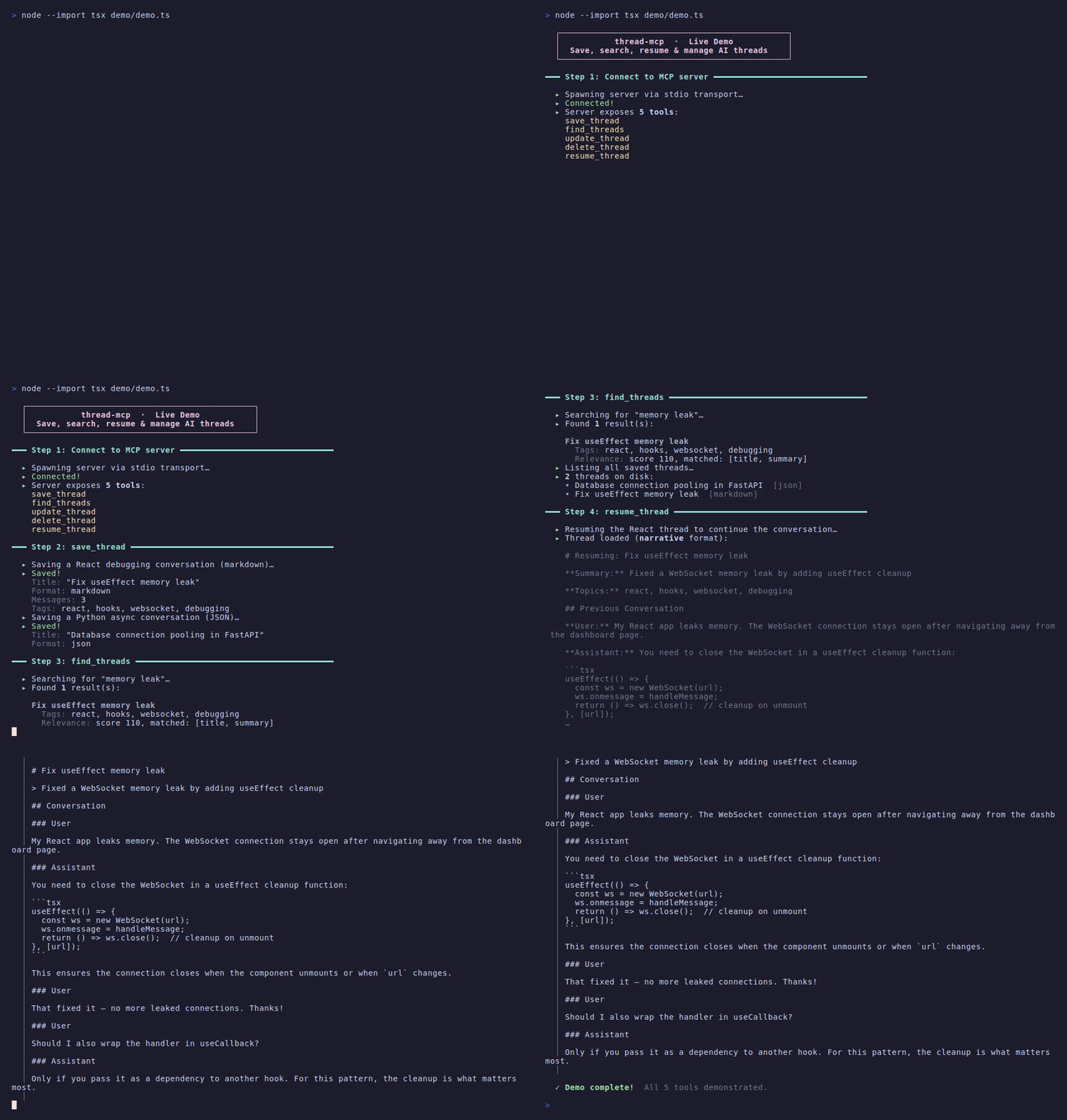
Demo
Installation
npm install thread-mcp
Or install from source:
git clone https://github.com/your-username/thread-mcp.git
cd thread-mcp
npm install
npm run build
Usage
Configure with Claude Desktop
Add to your Claude Desktop configuration file:
macOS: ~/Library/Application Support/Claude/claude_desktop_config.json
Windows: %APPDATA%\Claude\claude_desktop_config.json
{
  "mcpServers": {
    "thread-mcp": {
      "command": "npx",
      "args": ["thread-mcp"]
    }
  }
}
Or if installed from source:
{
  "mcpServers": {
    "thread-mcp": {
      "command": "node",
      "args": ["/path/to/thread-mcp/dist/index.js"]
    }
  }
}
Configure with Claude Code / VS Code
Add a .mcp.json file to your project root:
{
  "mcpServers": {
    "thread-mcp": {
      "command": "npx",
      "args": ["thread-mcp"],
      "env": {
        "THREAD_MCP_STORAGE_DIR": "./thread-mcp"
      }
    }
  }
}
See .mcp.json.example and claude_desktop_config.json.example for templates.
Configuration
Environment Variables
Configure the MCP server with environment variables. These provide defaults that can be overridden per tool call.
| Variable | Default | Description |
| --------------------------- | --------------- | -------------------------------------------------- |
| THREAD_MCP_STORAGE_DIR | ~/.thread-mcp | Default directory for storing conversation threads |
| THREAD_MCP_FORMAT | markdown | Default output format: markdown or json |
| THREAD_MCP_DEFAULT_SOURCE | local | Default storage source: local or remote |
| THREAD_MCP_REMOTE_URL | - | Default remote server URL |
| THREAD_MCP_API_KEY | - | API key for remote server authentication |
| THREAD_MCP_REMOTE_HEADERS | {} | JSON-encoded default headers for remote requests |
Precedence
Configuration values are resolved in this order (highest to lowest priority):
- Tool call parameter - if explicitly provided in the request
- Environment variable - server-level configuration
- Built-in default - hardcoded fallback
Example Configuration
{
  "mcpServers": {
    "thread-mcp": {
      "command": "npx",
      "args": ["thread-mcp"],
      "env": {
        "THREAD_MCP_STORAGE_DIR": "./threads",
        "THREAD_MCP_FORMAT": "markdown",
        "THREAD_MCP_DEFAULT_SOURCE": "local",
        "THREAD_MCP_REMOTE_URL": "https://api.example.com",
        "THREAD_MCP_API_KEY": "your-api-key",
        "THREAD_MCP_REMOTE_HEADERS": "{\"X-Custom-Header\": \"value\"}"
      }
    }
  }
}
Notes:
- Relative paths (e.g.,
./threads) are resolved from the working directory where the MCP server is launched THREAD_MCP_REMOTE_HEADERSmust be valid JSON- Tool call parameters merge with (and override) environment variable headers
Usage Examples
Example 1: Save a conversation and resume it later
User prompt: "Save this conversation about our API redesign so I can pick it up tomorrow."
Thread MCP calls save_thread with the conversation content:
{
  "title": "API Redesign Discussion",
  "messages": [
    {
      "role": "user",
      "content": "Let's redesign the /users endpoint to support pagination."
    },
    {
      "role": "assistant",
      "content": "Good idea. I'd suggest cursor-based pagination with a default page size of 25..."
    }
  ],
  "tags": ["api", "backend"],
  "summary": "Planning cursor-based pagination for the /users endpoint"
}
The next day, the user says: "Resume the API redesign conversation."
Thread MCP calls resume_thread, which returns the full context — title, summary, tags, all messages, and a continuation hint — so the assistant can pick up exactly where you left off.
Example 2: Search across past conversations
User prompt: "Find my previous conversations about database migrations."
Thread MCP calls find_threads with a search query:
{
  "query": "database migrations",
  "includeContent": false
}
Expected output:
{
  "totalResults": 2,
  "threads": [
    {
      "title": "Postgres Migration Strategy",
      "tags": ["database", "postgres"],
      "summary": "Discussed zero-downtime migration approach for production DB",
      "relevance": { "score": 85, "matchedFields": ["title", "content"] }
    },
    {
      "title": "MongoDB to SQL Migration",
      "tags": ["database", "migration"],
      "summary": "Planned schema mapping from MongoDB collections to SQL tables",
      "relevance": { "score": 72, "matchedFields": ["title", "tags"] }
    }
  ]
}
The user can then resume either conversation by title or ID.
Example 3: Continue a multi-session conversation
User prompt: "Add today's follow-up to our onboarding flow discussion."
Thread MCP calls update_thread to append the new messages to the existing thread:
{
  "title": "Onboarding Flow Redesign",
  "messages": [
    {
      "role": "user",
      "content": "We decided to add a progress bar. How should we implement it?"
    },
    {
      "role": "assistant",
      "content": "I'd recommend a stepper component with 4 stages: account, profile, preferences, confirmation..."
    }
  ]
}
Expected output:
{
  "success": true,
  "title": "Onboarding Flow Redesign",
  "messageCount": 8,
  "messagesAdded": 2,
  "mode": "append"
}
The new messages are appended with automatic deduplication, so even if a message was already saved, it won't be duplicated.
Available Tools
save_thread
Save a new conversation thread to local storage or a remote server.
Parameters:
| Parameter | Type | Required | Default | Description |
|-----------|------|----------|---------|-------------|
| title | string | Yes | - | Title for the thread |
| messages | array | Yes | - | Array of messages with role and content |
| destination | string | No | "local" | Where to save: "local" or "remote" |
| format | string | No | "markdown" | Output format: "markdown" or "json" |
| sourceApp | string | No | - | Name of the AI application |
| tags | string[] | No | - | Tags for categorization |
| summary | string | No | - | Summary of the conversation |
| outputDir | string | No | ~/.thread-mcp | Custom directory for local storage |
| remoteUrl | string | Conditional | - | Required when destination is "remote" |
| apiKey | string | No | - | API key for remote authentication |
| headers | object | No | - | Additional HTTP headers for remote |
Example:
{
  "title": "Code Review Discussion",
  "messages": [
    { "role": "user", "content": "Can you review this Python function?" },
    { "role": "assistant", "content": "Sure! Here are my suggestions..." }
  ],
  "sourceApp": "Claude",
  "tags": ["code-review", "python"],
  "format": "markdown"
}
find_threads
Find saved threads by ID, title, search query, or list all threads. Supports filtering and relevance scoring.
Parameters:
| Parameter | Type | Required | Default | Description |
|-----------|------|----------|---------|-------------|
| id | string | No | - | Get a specific thread by ID (returns full details) |
| title | string | No | - | Find thread by exact title match |
| query | string | No | - | Search in titles, summaries, and content |
| tags | string[] | No | - | Filter by tags (must have ALL specified) |
| sourceApp | string | No | - | Filter by source application |
| dateFrom | string | No | - | Filter by creation date (ISO format) |
| dateTo | string | No | - | Filter by creation date (ISO format) |
| includeMessages | boolean | No | false | Include full message content |
| limit | number | No | 50 | Maximum results to return |
| source | string | No | "local" | Source: "local" or "remote" |
| outputDir | string | No | ~/.thread-mcp | Directory for local storage |
| remoteUrl | string | Conditional | - | Required when source is "remote" |
Examples:
List all threads:
{
  "source": "local"
}
Find by ID:
{
  "id": "abc123-def456"
}
Search with filters:
{
  "query": "Python debugging",
  "tags": ["code"],
  "includeMessages": true,
  "limit": 5
}
Response includes relevance metadata:
{
  "totalResults": 3,
  "threads": [
    {
      "id": "abc123",
      "title": "Python Debugging Session",
      "summary": "Discussion about debugging techniques",
      "tags": ["python", "debugging"],
      "messageCount": 12,
      "createdAt": "2024-01-15T10:00:00.000Z",
      "relevance": {
        "score": 85,
        "matchedFields": ["title", "content"],
        "topicHints": ["python", "debugging", "error handling"]
      }
    }
  ]
}
update_thread
Update an existing thread by appending new messages. Find thread by ID or title.
Parameters:
| Parameter | Type | Required | Default | Description |
|-----------|------|----------|---------|-------------|
| id | string | Conditional | - | Thread ID (use this OR title) |
| title | string | Conditional | - | Find thread by exact title (use this OR id) |
| messages | array | Yes | - | New messages to add |
| mode | string | No | "append" | "append" to add messages, "replace" to overwrite |
| deduplicateMessages | boolean | No | true | Skip duplicate messages |
| newTitle | string | No | - | Update the thread title |
| tags | string[] | No | - | Update tags |
| summary | string | No | - | Update summary |
| source | string | No | "local" | Source: "local" or "remote" |
| outputDir | string | No | ~/.thread-mcp | Directory for local storage |
| remoteUrl | string | Conditional | - | Required when source is "remote" |
Example - Append by title:
{
  "title": "Code Review Discussion",
  "messages": [
    { "role": "user", "content": "What about error handling?" },
    { "role": "assistant", "content": "Good point! You should..." }
  ]
}
Example - Update by ID with new metadata:
{
  "id": "abc123-def456",
  "messages": [{ "role": "user", "content": "Follow-up question..." }],
  "tags": ["code-review", "python", "error-handling"],
  "summary": "Extended discussion including error handling"
}
delete_thread
Delete a saved thread by ID or title.
Parameters:
| Parameter | Type | Required | Default | Description |
|-----------|------|----------|---------|-------------|
| id | string | Conditional | - | Thread ID (use this OR title) |
| title | string | Conditional | - | Find thread by exact title (use this OR id) |
| source | string | No | "local" | Source: "local" or "remote" |
| outputDir | string | No | ~/.thread-mcp | Directory for local storage |
| remoteUrl | string | Conditional | - | Required when source is "remote" |
Examples:
{
  "id": "abc123-def456"
}
{
  "title": "Old Discussion to Remove"
}
resume_thread
Load a saved thread to continue the conversation. Returns context optimized for AI continuation.
Parameters:
| Parameter | Type | Required | Default | Description |
|-----------|------|----------|---------|-------------|
| id | string | Conditional | - | Thread ID |
| title | string | Conditional | - | Find by exact title match |
| titleContains | string | Conditional | - | Find most recent thread with title containing this |
| format | string | No | "structured" | Output format (see below) |
| maxMessages | number | No | all | Limit to last N messages |
| includeSummary | boolean | No | true | Include thread summary |
| source | string | No | "local" | Source: "local" or "remote" |
| outputDir | string | No | ~/.thread-mcp | Directory for local storage |
| remoteUrl | string | Conditional | - | Required when source is "remote" |
Output Formats:
"structured"- Organized context with metadata, messages, and continuation hints"narrative"- Human-readable summary suitable for context injection"messages"- Raw message array only
Example - Resume by title:
{
  "title": "Code Review Discussion",
  "format": "structured",
  "maxMessages": 10
}
Structured Response:
{
  "found": true,
  "id": "abc123",
  "format": "structured",
  "context": {
    "title": "Code Review Discussion",
    "summary": "Discussion about Python best practices",
    "tags": ["code-review", "python"],
    "messageCount": 15,
    "startedAt": "2024-01-15T10:00:00.000Z"
  },
  "messages": [...],
  "continuationHint": "The assistant last responded. The user may have follow-up questions.",
  "totalMessages": 15
}
Typical Workflow
-
Save a new thread after an important conversation:
{ "title": "Project Planning", "messages": [...], "tags": ["planning"] } -
Continue later - find and resume:
{ "title": "Project Planning" } // resume_thread -
Add new messages as the conversation continues:
{ "title": "Project Planning", "messages": [new messages...] } // update_thread -
Search across threads to find relevant context:
{ "query": "database schema", "tags": ["planning"] } // find_threads
Output Formats
Markdown
Produces a human-readable Markdown file with YAML frontmatter:
---
id: abc123-def456
title: "Code Review Discussion"
created_at: 2024-01-15T10:00:00.000Z
source_app: Claude
tags: ["code-review", "python"]
---

# Code Review Discussion

> A discussion about Python best practices

## Conversation

### User _(1/15/2024, 10:00:00 AM)_

Can you review this Python function?

### Assistant _(1/15/2024, 10:00:05 AM)_

Sure! Here are my suggestions...
JSON
Produces a structured JSON file:
{
  "id": "abc123-def456",
  "metadata": {
    "title": "Code Review Discussion",
    "sourceApp": "Claude",
    "createdAt": "2024-01-15T10:00:00.000Z",
    "tags": ["code-review", "python"]
  },
  "messages": [
    {
      "role": "user",
      "content": "Can you review this Python function?",
      "timestamp": "2024-01-15T10:00:00.000Z"
    }
  ]
}
Remote Server API
When using remote storage, your server should implement these endpoints:
POST /conversations
Create a new conversation.
Request Body:
{
  "id": "string",
  "title": "string",
  "content": "string (formatted content)",
  "format": "markdown | json",
  "metadata": { ... }
}
Response:
{
  "url": "https://your-server.com/conversations/id"
}
GET /conversations
List all conversations.
GET /conversations/:id
Get a specific conversation.
PUT /conversations/:id
Update a conversation (for update_thread).
DELETE /conversations/:id
Delete a conversation.
Development
Prerequisites
- Node.js 22+
- npm
Setup
npm install
Build
npm run build
Run Tests
npm test                 # Run all tests
npm run test:watch       # Watch mode
npm run test:coverage    # With coverage report
Development Server
npm run dev
Linting & Formatting
npm run lint            # ESLint
npm run format          # Prettier format
npm run format:check    # Check formatting
npm run typecheck       # TypeScript type checking
Project Structure
thread-mcp/
├── src/
│   ├── index.ts           # Entry point
│   ├── server.ts          # MCP server setup
│   ├── types.ts           # TypeScript types & Zod schemas
│   ├── tools/             # MCP tool implementations
│   │   ├── save-thread.ts    # Save new threads
│   │   ├── find-threads.ts   # Search/list/get threads
│   │   ├── update-thread.ts  # Update existing threads
│   │   ├── delete-thread.ts  # Delete threads
│   │   └── resume-thread.ts  # Load threads for continuation
│   ├── formatters/        # Output formatters
│   │   ├── markdown.ts
│   │   └── json.ts
│   └── storage/           # Storage providers
│       ├── local.ts
│       └── remote.ts
├── tests/
│   ├── unit/              # Unit tests
│   └── e2e/               # End-to-end tests
├── package.json
├── tsconfig.json
└── vitest.config.ts
Privacy
Thread MCP is designed with privacy in mind:
- Local by default - All conversation data is stored on your local filesystem. No data is sent to external services unless you explicitly configure remote storage.
- Remote storage is opt-in - Remote storage requires you to provide your own server URL (
THREAD_MCP_REMOTE_URL). You control where your data goes. - Auto-summarize/auto-tag uses MCP sampling - When enabled, these features use the MCP sampling capability, meaning your client's own LLM generates the summaries and tags. No additional external API calls are made by the server.
- No telemetry or analytics - Thread MCP does not collect usage data, send telemetry, or phone home in any way.
- No third-party data sharing - Your conversation data is never shared with third parties.
License
GPL-3.0
Contributing
- Fork the repository
- Create a feature branch
- Make your changes
- Run tests:
npm test - Submit a pull request