MCP server by waverlose
MCP-for-anybody
MCP-for-anybody lets an AI agent use AnyBody Modeling System without opening the GUI.
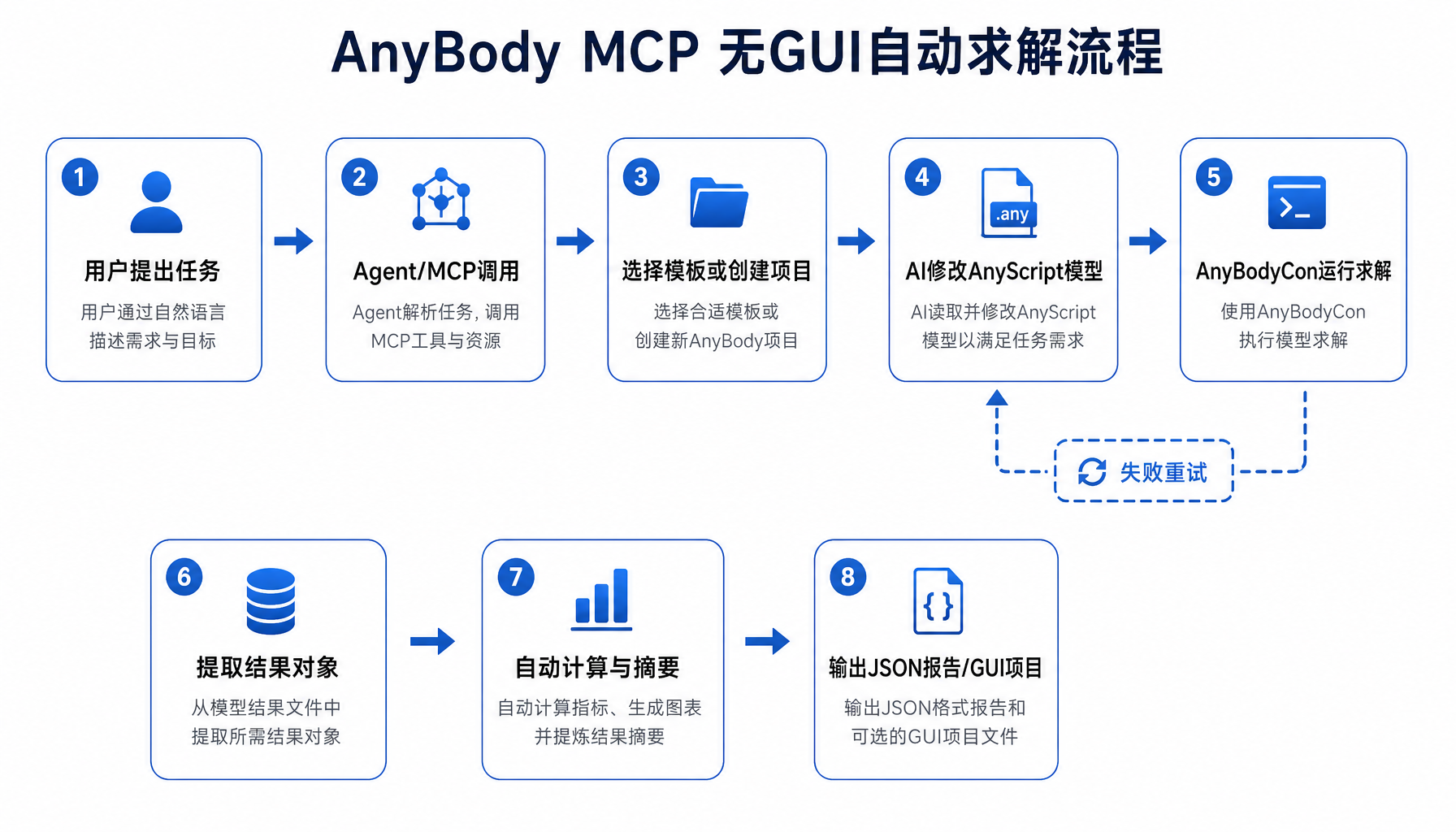
It can:
- create a local AnyBody project copy
- run
AnyBodyCon.exe - extract result objects
- calculate simple summaries such as bilateral knee reaction forces
This repository is a first working version focused on local Windows usage.
Who this is for
If you are new to MCP or AnyBody, start here.
You do not need to understand the full codebase to try it.
What is included
src/anybody_mcp_server.py: MCP serversrc/anybody_runner.py: local AnyBody automation helpersscripts/run_no_gui_workflow.py: no-GUI gait examplescripts/run_new_posture_workflow.py: no-GUI new-posture examplestart-anybody-mcp.bat: one-click local server launchermcp-config.anybody.json: example MCP client configanybody-mcp-workflow.png: workflow diagram
Requirements
This version assumes:
- Windows
- AnyBody is installed locally
AnyBodyCon.exeexists at:C:\Program Files\AnyBody Technology\AnyBody.7.3\AnyBodyCon.exe
Quick Start
1. Start the MCP server
Double-click:
start-anybody-mcp.bat
Or run:
D:\Python projects\anybody-automation\start-anybody-mcp.bat
2. Add this server to your MCP client
Use the example config in:
mcp-config.anybody.json
Its core content is:
{
  "mcpServers": {
    "anybody": {
      "command": "D:\\Python projects\\anybody-automation\\.venv\\Scripts\\python.exe",
      "args": [
        "D:\\Python projects\\anybody-automation\\src\\anybody_mcp_server.py"
      ]
    }
  }
}
3. First test
After your MCP client connects, call:
get_installation_info
If that works, the server is connected correctly.
Easiest demo
The simplest no-GUI demo is the gait workflow.
Run:
D:\Python projects\anybody-automation\.venv\Scripts\python.exe "D:\Python projects\anybody-automation\scripts\run_no_gui_workflow.py" --project-dir "D:\Python projects\anybody-automation\workspace\auto-gait-run" --overwrite
This will:
- create a local gait project
- run it with
AnyBodyCon - extract left/right knee reaction forces
- write a JSON report
Expected report:
workspace\auto-gait-run\Output\knee-force-summary.json
New posture demo
You can also test a new posture without GUI.
Example:
D:\Python projects\anybody-automation\.venv\Scripts\python.exe "D:\Python projects\anybody-automation\scripts\run_new_posture_workflow.py" --project-dir "D:\Python projects\anybody-automation\workspace\auto-posture-run" --preset "forward-lean" --overwrite
Current built-in posture presets:
forward-leanmild-squatstaggered-stance
Main MCP tools
Useful beginner tools:
get_installation_infocreate_named_projectrun_modelget_model_object_value_after_operationsummarize_bilateral_knee_forcesrun_no_gui_gait_knee_force_workflowrun_no_gui_new_posture_workflow
Successful GUI-openable example
If you still want a reference project for manual inspection in AnyBody GUI, use:
workspace\gui-gait-demo\GaitVaughan.main.any
Saved output file:
workspace\gui-gait-demo\Output\GaitVaughan.main.anydata.h5
Files for advanced users
If you want more implementation details, see:
DELIVERY.mdsrc/anybody_runner.pysrc/anybody_mcp_server.py
Current scope
This first version is best at:
- running existing AnyBody examples without GUI
- creating simple new quasi-static postures
- extracting result objects automatically
It is not yet a full automatic solver for every brand-new complex motion.
Workflow Diagram
See:
anybody-mcp-workflow.png