MCP server for tracking AI agent costs in real time. Per-message spending, budget alerts, visual dashboard. Works with Claude Code, Cursor, Windsurf, Codex, Gemini CLI, OpenClaw. Stop overspending on AI APIs.MCP server that tracks AI agent spending in real time. Visual dashboard, budget alerts, 15+ models. Works with Claude Code, Cursor, Windsurf.
agent-cost-mcp
MCP server that tracks AI agent token usage and spending in real time. Budget alerts, per-task cost breakdown, visual dashboard, daily/weekly/monthly reports.
Works with any MCP client: Claude Code, Cursor, Windsurf, Codex, Gemini CLI, and more.



Why?
Every developer using AI agents worries about spending. Most tools don't tell you what each message costs until the bill arrives.
This MCP server tracks it in real time — per message, per model, per day. Set a budget, get alerts, see exactly where your money goes.
Features
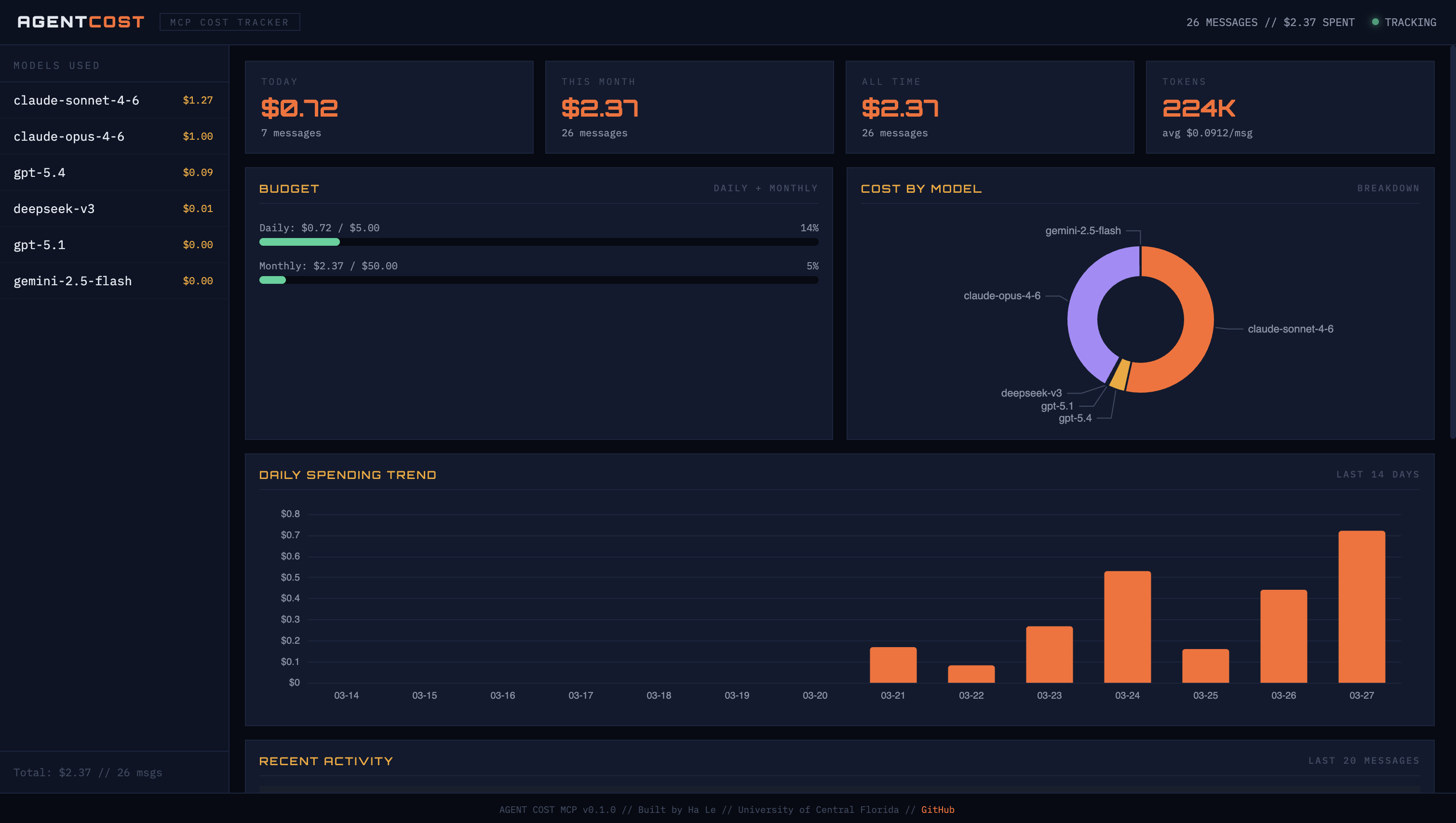
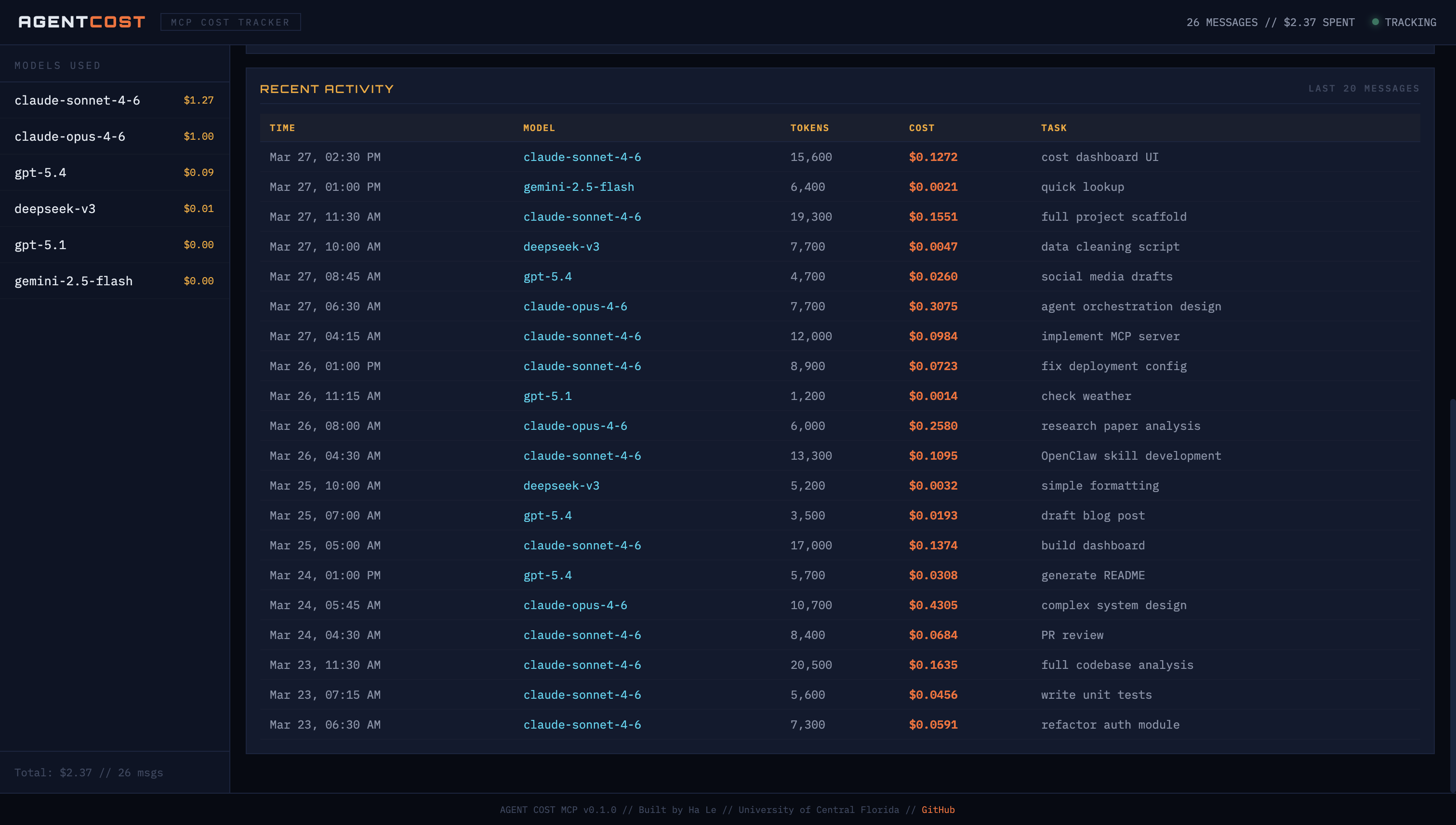
- Visual dashboard — dark-themed web UI with spending charts, budget gauges, and activity log
- Per-message cost logging — see what each AI interaction costs instantly
- Budget alerts — warns when approaching daily/monthly limits
- Cost reports — today, this week, this month, all time
- Model breakdown — donut chart showing which model eats your budget
- Spending trends — 14-day bar chart with color-coded spending
- 15+ models supported — Claude, GPT, DeepSeek, Gemini, Llama
- Estimate before running — check cost before expensive tasks
- Local storage — all data stays on your machine (
~/.agent-cost-mcp/) - Auto-refresh — dashboard updates every 30 seconds
Quick Start
1. Install
pip install agent-cost-mcp
Or with uv:
uv pip install agent-cost-mcp
2. Add to your AI tool
Claude Code — add to ~/.claude/settings.json:
{
  "mcpServers": {
    "agent-cost": {
      "command": "agent-cost-mcp"
    }
  }
}
Cursor — add to .cursor/mcp.json:
{
  "mcpServers": {
    "agent-cost": {
      "command": "agent-cost-mcp"
    }
  }
}
Windsurf — add to MCP config:
{
  "mcpServers": {
    "agent-cost": {
      "command": "agent-cost-mcp"
    }
  }
}
3. Open the dashboard
open dashboard.html
Or serve it locally:
cd ~/.agent-cost-mcp && python3 -m http.server 3456
# Open http://localhost:3456/dashboard.html
The dashboard reads from ~/.agent-cost-mcp/cost-log.json and auto-refreshes every 30 seconds. Leave it open in a browser tab while you work.
MCP Tools
These tools are available to any connected MCP client:
| Tool | What it does | Example |
|------|-------------|---------|
| log_cost | Log token usage and cost for a task | log_cost(model="claude-sonnet-4-6", tokens_in=1500, tokens_out=800, task="code review") |
| cost_report | Get spending report | cost_report(period="today") — also: week, month, all |
| set_budget | Set daily/monthly budget limits | set_budget(daily_limit=5.00, monthly_limit=50.00) |
| cost_trend | Show daily spending chart | cost_trend(days=7) |
| estimate_cost | Estimate cost without logging | estimate_cost(model="claude-opus-4-6", tokens_in=5000, tokens_out=3000) |
| supported_models | List all models + pricing | supported_models() |
How It Works
You use Claude Code / Cursor / Windsurf normally
        ↓
MCP server logs each interaction (model, tokens, cost)
        ↓
Data saved to ~/.agent-cost-mcp/cost-log.json
        ↓
Dashboard reads the JSON and shows charts
        ↓
Budget alerts warn you before you overspend
The MCP server runs as a background process alongside your AI tool. You don't need to do anything extra — it tracks automatically when tools call log_cost.
Example Session
> How much did that last message cost?
Logged: $0.0165 (1,500 in / 800 out, claude-sonnet-4-6)

> Show my spending for today
# Cost Report — Today (2026-03-27)
- Messages: 26
- Tokens: 187,000 (118,000 in / 69,000 out)
- Total cost: $2.14
- Avg cost/message: $0.082

## By Model
  claude-opus-4-6: $0.99 (46%)
  claude-sonnet-4-6: $0.93 (43%)
  gpt-5.4: $0.19 (9%)
  deepseek-v3: $0.01 (1%)
  gemini-2.5-flash: $0.00 (<1%)

## Budget
  Daily: $2.14 / $5.00 (43%)
  Monthly: $12.43 / $50.00 (25%)

> Set my daily budget to $3
Budget set: $3.00/day, $50.00/month
Supported Models
| Model | Input ($/1M) | Output ($/1M) | |-------|-------------|--------------| | claude-opus-4-6 | $15.00 | $75.00 | | claude-sonnet-4-6 | $3.00 | $15.00 | | claude-haiku-4-5 | $0.80 | $4.00 | | gpt-5.4 | $2.50 | $10.00 | | gpt-5.2 | $1.50 | $6.00 | | gpt-5.1 | $0.60 | $2.40 | | gpt-4o | $2.50 | $10.00 | | gpt-4o-mini | $0.15 | $0.60 | | deepseek-v3 | $0.27 | $1.10 | | deepseek-r1 | $0.55 | $2.19 | | gemini-2.5-pro | $1.25 | $10.00 | | gemini-2.5-flash | $0.15 | $0.60 | | llama-4-maverick | $0.20 | $0.60 |
Missing a model? Open an issue or PR.
Data Storage
All data stored locally at ~/.agent-cost-mcp/cost-log.json. Nothing is sent to external services. Your spending data never leaves your machine.
Contributing
PRs welcome. Areas to improve:
- Add more model pricing
- Auto-detect token counts from MCP protocol metadata
- Export reports to CSV/PDF
- Slack/Discord alert integrations
License
MIT
Author
Built by Ha Le — University of Central Florida