MCP server for managing interactive processes. Allows AI agents (Claude Code, etc.) to start long-running interactive programs — SSH sessions, REPLs, installers, impacket tools — and interact with them over multiple turns via read/write operations.
interactive-process-mcp
Give AI Agents Interactive Terminal Capabilities




中文 | English
Introduction
interactive-process-mcp is an MCP (Model Context Protocol) server that enables AI Agents (like Claude Code) to start, control, and manage long-running interactive processes.
Why Do You Need It?
AI Agents can natively only execute one-shot commands — they run and immediately return results. But many real-world scenarios require multi-turn interaction:
- SSH into a remote server, enter a password first, then run commands
- Debug code line by line in a Python REPL
- Answer
[Y/n]prompts in interactive installers - Use terminal-dependent commands like
top,htop - Run security tools (e.g., impacket) for multi-step operations
In these scenarios, the process keeps running, and the AI Agent needs to repeatedly read and write the process's I/O across multiple conversation turns. interactive-process-mcp is the bridge designed precisely for this purpose.
Key Features
| Feature | Description |
|---------|-------------|
| PTY and Pipe dual mode | PTY mode emulates a real terminal (SSH, top, installers all work properly); Pipe mode for simple stdin/stdout interaction |
| Multi-session management | Manage multiple independent processes simultaneously without interference |
| ANSI escape code stripping | Optional automatic removal of terminal control sequences for clean text output |
| Non-blocking reads | Agent reads output at its own pace; timeout returns empty instead of error |
| Atomic send-and-read | send_and_read combines sending + reading in one step |
| Graceful termination | SIGTERM first, then SIGKILL after a configurable grace period |
| PTY resize | Dynamically adjust terminal rows and columns at runtime |
Architecture
Module Structure
src/interactive_process_mcp/
├── server.py            # FastMCP entry point, registers 8 Tool endpoints
├── session_manager.py   # SessionManager — thread-safe session registry
├── session.py           # Session — process lifecycle management (PTY/Pipe dual mode)
├── buffer.py            # OutputBuffer — thread-safe ring buffer (1MB)
├── ansi.py              # strip_ansi — regex-based ANSI escape code removal
├── tools.py             # Optional standalone Tool handler layer (for testing)
├── __init__.py
└── __main__.py          # python -m entry point
Data Flow Architecture
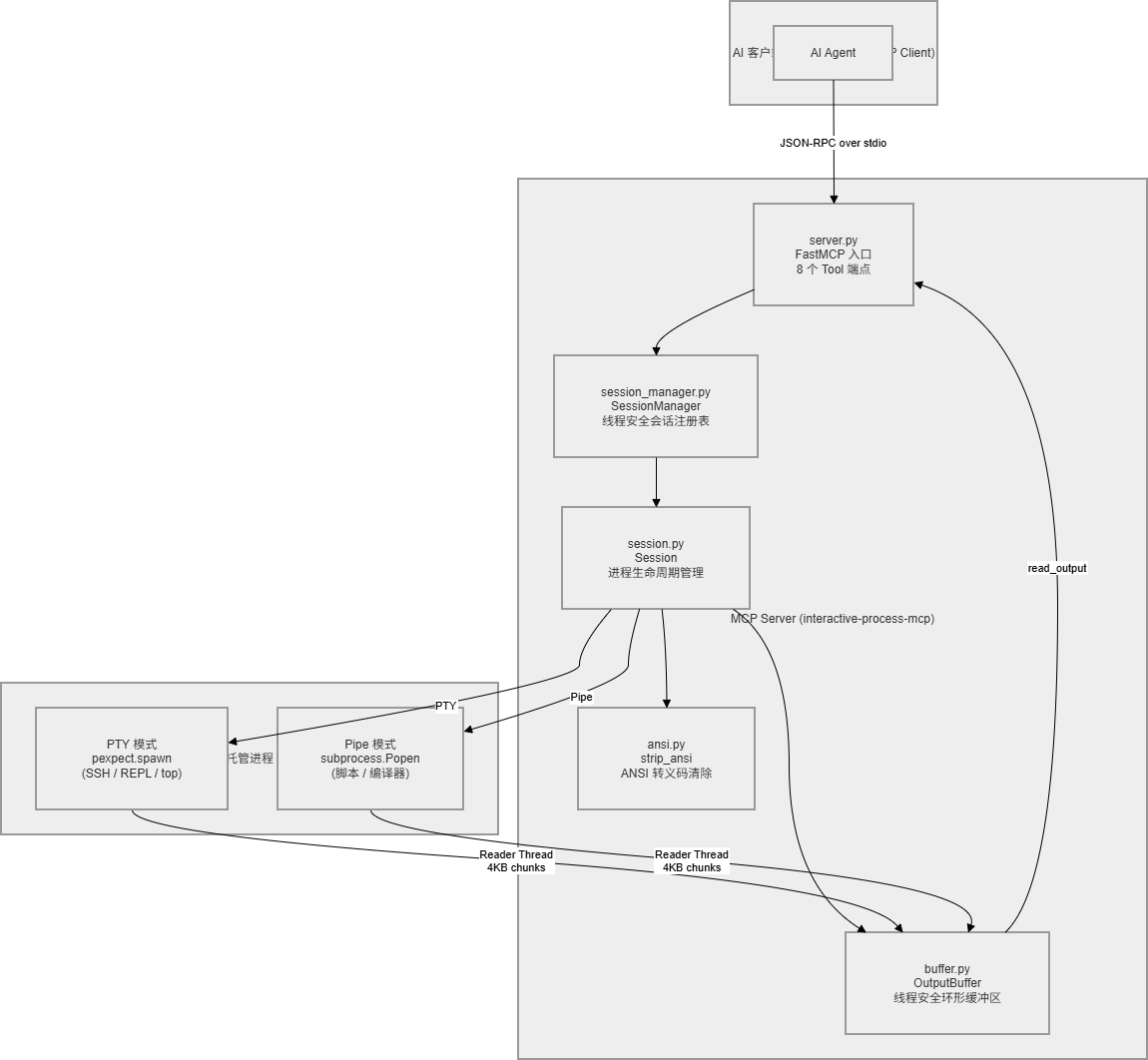
Key Design Decisions:
-
Ring Buffer: Each session maintains a max 1MB output buffer. The Reader Thread continuously writes process output to the buffer in 4KB chunks; the Agent consumes output on demand via
read_output. Consumed data is automatically cleaned up; when capacity is exceeded, the oldest chunks are discarded. -
Thread Model: The main thread handles MCP JSON-RPC requests; each Session has an independent daemon Reader Thread that continuously pumps process output into the buffer. Threads coordinate via
threading.Lock(mutual exclusion) andthreading.Event(new data notification). -
Dual-mode Process Management: PTY mode uses
pexpect.spawn(emulates a real terminal, supports cursor operations and colored output); Pipe mode usessubprocess.Popen(lighter weight, suitable for non-interactive programs).
Workflow
Complete Interaction Flow
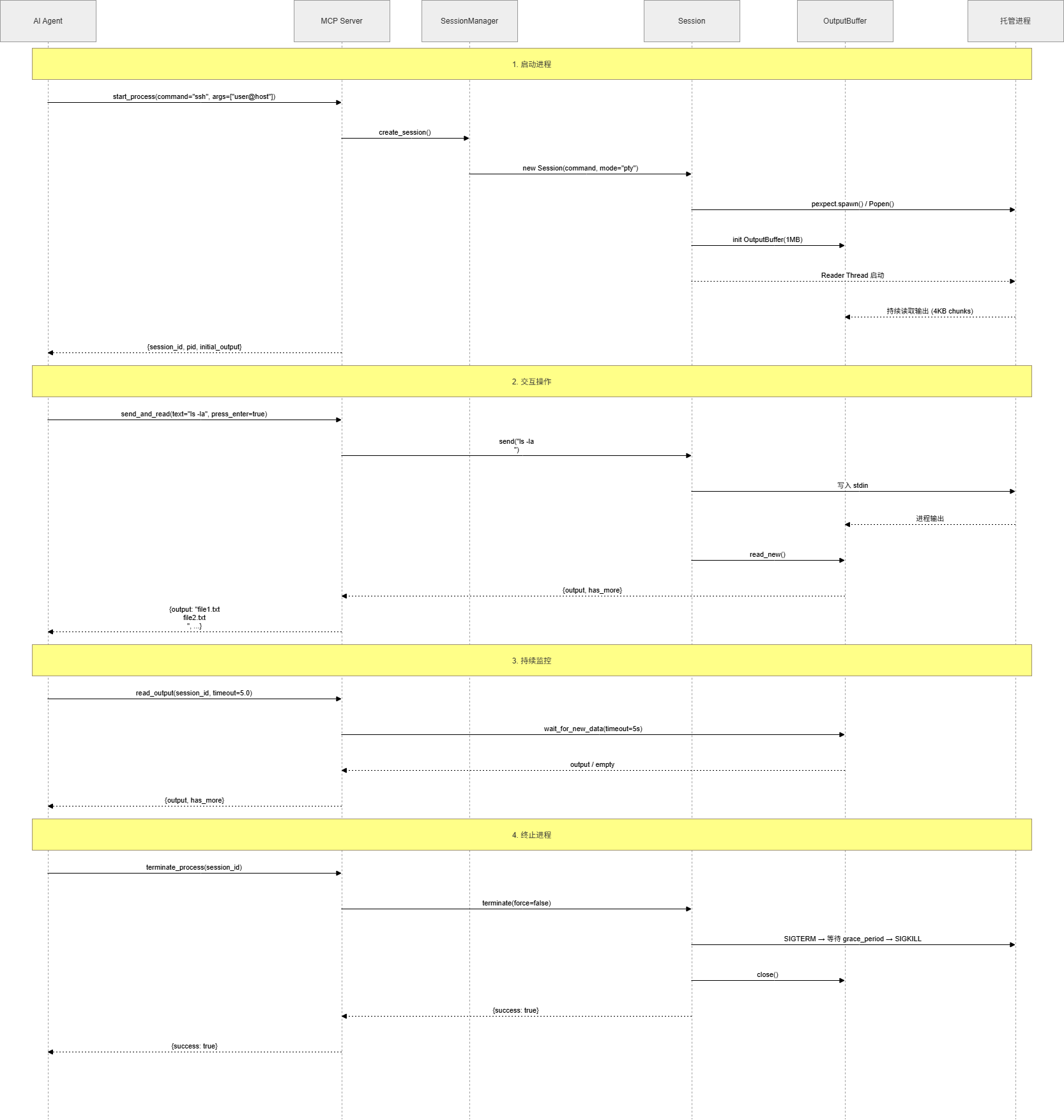
Step Details:
- Start Process — Call
start_process, which creates a Session, starts the process, initializes the Reader Thread, and returnssession_idwith initial output - Interact — Send text to the process via
send_input/send_and_read;press_entercan automatically append a newline - Read Output — Call
read_outputto consume new data from the buffer; supports timeout wait and line count limit - Monitor —
list_sessionsto view all sessions,get_session_infofor individual session details - Terminate —
terminate_processfor graceful shutdown (SIGTERM → wait → SIGKILL)
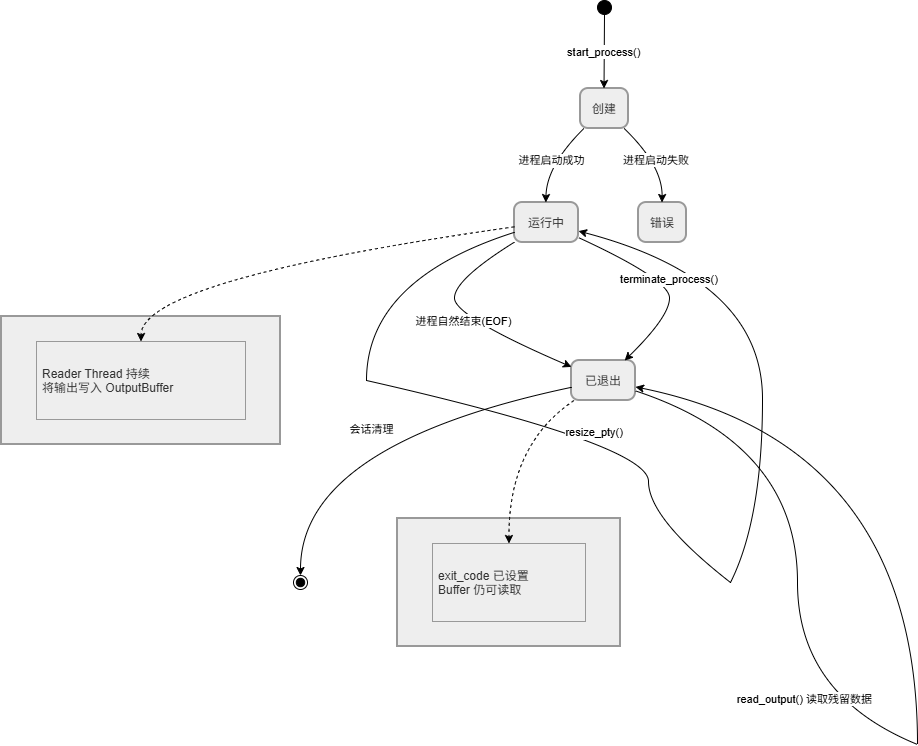
Session Lifecycle
-
Created: Enters running state after
start_process()succeeds -
Running: Read/write operations and PTY adjustments can be performed repeatedly
-
Exited: Process ends naturally or is terminated;
exit_codeis set, remaining buffer data is still readable
Examples
Example 1: SSH Remote Operations
AI Agent Flow                                   Process Output
─────────────────                              ────────────────

start_process(
  command="ssh",
  args=["deploy@192.168.1.100"],
  mode="pty"
)
                                    ←    "deploy@192.168.1.100's password: "

send_and_read(
  text="my_secret_pass",
  press_enter=true
)
                                    ←    "Welcome to Ubuntu 22.04 LTS
                                          Last login: Fri Apr 25 10:30:00 2026
                                          deploy@web-server:~$ "

send_and_read(
  text="df -h",
  press_enter=true
)
                                    ←    "Filesystem      Size  Used Avail Use% Mounted on
                                          /dev/sda1       100G   45G   55G  45% /
                                          deploy@web-server:~$ "

send_and_read(
  text="sudo systemctl restart nginx",
  press_enter=true
)
                                    ←    "[sudo] password for deploy: "

send_and_read(
  text="deploy_password",
  press_enter=true
)
                                    ←    "deploy@web-server:~$ "

terminate_process(session_id="abc123")
                                    →    Process terminated
Example 2: Python REPL Debugging
start_process(command="python3", mode="pty")
                                    ←    "Python 3.10.12\n>>> "

send_and_read(text="data = [1, 2, 3, 4, 5]", press_enter=true)
                                    ←    ">>> "

send_and_read(text="sum(data)", press_enter=true)
                                    ←    "15\n>>> "

send_and_read(text="[x**2 for x in data]", press_enter=true)
                                    ←    "[1, 4, 9, 16, 25]\n>>> "
Example 3: Multi-session Parallel Management
# Run multiple independent processes simultaneously
start_process(command="ping", args=["-c", "5", "google.com"], name="ping-test")
  → session_id: "a1b2c3"

start_process(command="python3", args=["-m", "http.server", "8080"], name="web-server")
  → session_id: "d4e5f6"

start_process(command="tail", args=["-f", "/var/log/syslog"], name="log-monitor")
  → session_id: "g7h8i9"

# View all session statuses
list_sessions()
  → sessions: [
      {id: "a1b2c3", name: "ping-test",    status: "running", pid: 12345},
      {id: "d4e5f6", name: "web-server",   status: "running", pid: 12346},
      {id: "g7h8i9", name: "log-monitor",  status: "running", pid: 12347}
    ]

# Read output from each session on demand
read_output(session_id="a1b2c3")  → ping statistics
read_output(session_id="g7h8i9")  → latest logs

# Terminate when done
terminate_process(session_id="a1b2c3")
terminate_process(session_id="d4e5f6")
terminate_process(session_id="g7h8i9")
Tool Reference
start_process
Start an interactive process.
| Parameter | Type | Required | Default | Description |
|-----------|------|----------|---------|-------------|
| command | string | Yes | — | Command to execute |
| args | string[] | No | [] | Command arguments |
| mode | "pty" | "pipe" | No | "pty" | I/O mode |
| name | string | No | Auto-generated | Session name |
| cwd | string | No | Inherited | Working directory |
| env | object | No | Inherited | Environment variables |
| timeout | number | No | 10 | Startup timeout (seconds) |
| rows | integer | No | 24 | PTY row count |
| cols | integer | No | 80 | PTY column count |
Returns: { session_id, pid, initial_output }
send_input
Send text to a process.
| Parameter | Type | Required | Default | Description |
|-----------|------|----------|---------|-------------|
| session_id | string | Yes | — | Session ID |
| text | string | Yes | — | Text to send |
| press_enter | boolean | No | false | Whether to append a newline |
read_output
Read new output since the last read. Waits up to timeout seconds if no new output is available; returns empty on timeout.
| Parameter | Type | Required | Default | Description |
|-----------|------|----------|---------|-------------|
| session_id | string | Yes | — | Session ID |
| strip_ansi | boolean | No | true | Whether to strip ANSI escape codes |
| timeout | number | No | 5 | Wait time (seconds) |
| max_lines | integer | No | 0 | Max lines (0 = unlimited) |
Returns: { output, has_more, lines_returned, bytes_returned }
send_and_read
Atomic operation: send input + wait + read output. Parameters are the union of send_input and read_output.
list_sessions
List all sessions. Returns: { sessions: [...] }
terminate_process
Terminate a process.
| Parameter | Type | Required | Default | Description |
|-----------|------|----------|---------|-------------|
| session_id | string | Yes | — | Session ID |
| force | boolean | No | false | Whether to use SIGKILL directly |
| grace_period | number | No | 5 | Seconds to wait after SIGTERM |
resize_pty
Resize PTY dimensions (PTY mode only).
| Parameter | Type | Required | Default | Description |
|-----------|------|----------|---------|-------------|
| session_id | string | Yes | — | Session ID |
| rows | integer | No | 24 | Row count |
| cols | integer | No | 80 | Column count |
get_session_info
Get session details. Returns: { id, name, command, args, mode, status, exit_code, pid, created_at }
Installation
pip install -e .
Development mode (with test dependencies):
pip install -e ".[dev]"
Requirements: Python >= 3.10 / Linux
Configuration
Claude Code
Option 1 — CLI command:
claude mcp add --scope user interactive-process -- interactive-process-mcp
Option 2 — Config file (.claude/settings.json or .mcp.json):
{
  "mcpServers": {
    "interactive-process": {
      "command": "interactive-process-mcp"
    }
  }
}
Option 3 — Run from source:
{
  "mcpServers": {
    "interactive-process": {
      "command": "python",
      "args": ["-m", "interactive_process_mcp"]
    }
  }
}
Other MCP Clients
Any MCP client that supports stdio transport can use this server. Entry points:
interactive-process-mcp
# or
python -m interactive_process_mcp
Testing
pip install -e ".[dev]"
pytest tests/ -v
The test suite covers 42 cases, including ANSI stripping, ring buffer, session lifecycle (PTY and Pipe modes), session manager, and Tool integration.
Diagram Resources
Architecture diagrams, workflow sequence diagrams, and session lifecycle diagrams are available in the docs/ directory. Open the HTML files in a browser to edit them in draw.io.
License
MIT