MCP server by Sparx-Fire
mcp-servers-for-revit
Connect AI assistants to Autodesk Revit via the Model Context Protocol.
mcp-servers-for-revit enables AI clients like Claude, Cline, and other MCP-compatible tools to read, create, modify, and delete elements in Revit projects. It consists of three components: a TypeScript MCP server that exposes tools to AI, a C# Revit add-in that bridges commands into Revit, and a command set that implements the actual Revit API operations.
[!NOTE] This is a fork of the original mcp-servers-for-revit project with additional tools and functionality improvements.
Architecture
flowchart LR
    Client["MCP Client<br/>(Claude, Cline, etc.)"]
    Server["MCP Server<br/><code>server/</code>"]
    Plugin["Revit Plugin<br/><code>plugin/</code>"]
    CommandSet["Command Set<br/><code>commandset/</code>"]
    Revit["Revit API"]

    Client <-->|stdio| Server
    Server <-->|WebSocket| Plugin
    Plugin -->|loads| CommandSet
    CommandSet -->|executes| Revit
The MCP Server (TypeScript) translates tool calls from AI clients into WebSocket messages. The Revit Plugin (C#) runs inside Revit, listens for those messages, and dispatches them to the Command Set (C#), which executes the actual Revit API operations and returns results back up the chain.
Requirements
- Node.js 18+ (for the MCP server)
- Autodesk Revit 2020 - 2026 (any supported version)
Quick Start (Using a Release)
-
Download the ZIP for your Revit version from the Releases page (e.g.,
mcp-servers-for-revit-v1.0.0-Revit2025.zip) -
Extract the ZIP and copy the contents to your Revit addins folder:
%AppData%\Autodesk\Revit\Addins\<your Revit version>\After copying you should have:
Addins/2025/ ├── mcp-servers-for-revit.addin └── revit_mcp_plugin/ ├── revit-mcp-plugin.dll ├── ... └── Commands/ └── RevitMCPCommandSet/ ├── command.json └── 2025/ ├── RevitMCPCommandSet.dll └── ... -
Configure the MCP server in your AI client (see below)
-
Start Revit - the plugin loads automatically
MCP Server Setup
The MCP server is published as an npm package and can be run directly with npx.
Claude Code
claude mcp add mcp-servers-for-revit -- cmd /c npx -y @sparx-fire/mcp-servers-for-revit
Claude Desktop
Claude Desktop → Settings → Developer → Edit Config → claude_desktop_config.json:
{
    "mcpServers": {
        "mcp-servers-for-revit": {
            "command": "cmd",
            "args": ["/c", "npx", "-y", "@sparx-fire/mcp-servers-for-revit"]
        }
    }
}
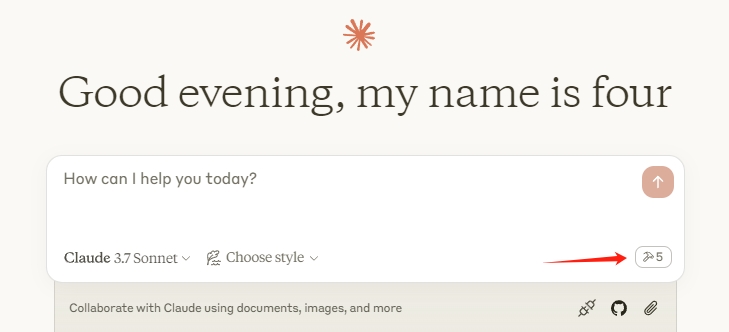
Restart Claude Desktop. When you see the hammer icon, the MCP server is connected.
Revit Plugin Setup
If using a release ZIP, the plugin is already included. For manual installation:
- Build the plugin from
plugin/(see Development) - Copy
mcp-servers-for-revit.addinto%AppData%\Autodesk\Revit\Addins\<version>\ - Copy the
revit_mcp_plugin/folder to the same addins directory
Command Set Setup
If using a release ZIP, the command set is pre-installed inside the plugin. For manual installation:
- Build the command set from
commandset/(see Development) - Inside the plugin's installation directory, create
Commands/RevitMCPCommandSet/<year>/ - Copy the built DLLs into that folder
- Copy
command.json(from repo root) intoCommands/RevitMCPCommandSet/
Supported Tools
| Tool | Description |
| ---- | ----------- |
| get_current_view_info | Get current active view info |
| get_current_view_elements | Get elements from the current active view |
| get_available_family_types | Get available family types in current project |
| get_selected_elements | Get currently selected elements |
| get_material_quantities | Calculate material quantities and takeoffs |
| ai_element_filter | Intelligent element querying tool for AI assistants |
| analyze_model_statistics | Analyze model complexity with element counts |
| create_point_based_element | Create point-based elements (door, window, furniture) |
| create_line_based_element | Create line-based elements (wall, beam, pipe) |
| create_surface_based_element | Create surface-based elements (floor, ceiling, roof) |
| create_grid | Create a grid system with smart spacing generation |
| create_level | Create levels at specified elevations |
| create_room | Create and place rooms at specified locations |
| create_dimensions | Create dimension annotations in the current view |
| create_structural_framing_system | Create a structural beam framing system |
| delete_element | Delete elements by ID |
| operate_element | Operate on elements (select, setColor, hide, etc.) |
| color_elements | Color elements based on a parameter value |
| tag_all_walls | Tag all walls in the current view |
| tag_all_rooms | Tag all rooms in the current view |
| export_room_data | Export all room data from the project |
| store_project_data | Store project metadata in local database |
| store_room_data | Store room metadata in local database |
| query_stored_data | Query stored project and room data |
| send_code_to_revit | Send C# code to Revit to execute |
| say_hello | Display a greeting dialog in Revit (connection test) |
Development
MCP Server
cd server
npm install
npm run build
The server compiles TypeScript to server/build/. During development you can run it directly with npx tsx server/src/index.ts.
Revit Plugin + Command Set
Open mcp-servers-for-revit.sln in Visual Studio. The solution contains both the plugin and command set projects. Build configurations target Revit 2020-2026:
- Revit 2020-2024: .NET Framework 4.8 (
Release R20throughRelease R24) - Revit 2025-2026: .NET 8 (
Release R25,Release R26)
Building the solution automatically assembles the complete deployable layout in plugin/bin/AddIn <year> <config>/ - the command set is copied into the plugin's Commands/ folder as part of the build.
Project Structure
mcp-servers-for-revit/
├── mcp-servers-for-revit.sln    # Combined solution (plugin + commandset)
├── command.json     # Command set manifest
├── server/          # MCP server (TypeScript) - tools exposed to AI clients
├── plugin/          # Revit add-in (C#) - WebSocket bridge inside Revit
├── commandset/      # Command implementations (C#) - Revit API operations
├── assets/          # Images for documentation
├── .github/         # CI/CD workflows, contributing guide, code of conduct
├── LICENSE
└── README.md
Acknowledgements
This project is a fork of the work by the mcp-servers-for-revit team. The original repositories:
- revit-mcp - MCP server
- revit-mcp-plugin - Revit plugin
- revit-mcp-commandset - Command set
Thank you to the original authors for creating the foundation that this project builds upon.