MCP server by shark8848
Ontology RL Commerce Agent

🛍️ Ontology RL Commerce Agent (formerly "Ontology MCP Server") highlights the newest reinforcement-learning-driven closed loop. The system still relies on the Model Context Protocol (MCP) to combine ontology reasoning, e-commerce business logic, memory, and a Gradio UI so you can reproduce a full shopping assistant experience end-to-end.
🤖 RL-powered Agent: Stable Baselines3 PPO training pipeline ships in-tree. It covers the entire flow from data → training → evaluation → deployment, letting the Agent continually learn from real transcripts and tool logs so it automatically discovers safer, more efficient tool-chaining policies.
🚀 Quick Start
Option A: Docker (Recommended)
Requirements
- Docker 20.10+
- Docker Compose 2.0+
- 8 GB+ RAM
-
20 GB disk space
One-click boot
# 1. Clone the repo
git clone <repository-url>
cd ontology-mcp-server-RL-Stable-Baselines3

# 2. Configure environment variables
cp .env.example .env
nano .env  # fill in LLM API keys

# 3. Launch all services
docker-compose up -d

# 4. Tail logs
docker-compose logs -f

# 5. Stop services
docker-compose down
Service endpoints
- MCP Server: http://localhost:8000
- Agent UI: http://localhost:7860
- Training Dashboard: http://localhost:7861
Common commands
# Restart a single service
docker-compose restart agent-ui

# Enter a container for debugging
docker exec -it ontology-agent-ui bash

# Inspect status
docker-compose ps

# Clean and rebuild (use with caution)
docker-compose down -v
docker-compose build --no-cache
docker-compose up -d
GPU support (optional)
Install nvidia-docker, then uncomment the GPU block in docker-compose.yml under training-dashboard.
distribution=$(. /etc/os-release; echo $ID$VERSION_ID)
curl -s -L https://nvidia.github.io/nvidia-docker/gpgkey | sudo apt-key add -
curl -s -L https://nvidia.github.io/nvidia-docker/$distribution/nvidia-docker.list | \
  sudo tee /etc/apt/sources.list.d/nvidia-docker.list
sudo apt-get update && sudo apt-get install -y nvidia-docker2
sudo systemctl restart docker
Option B: Local Development
1. Environment preparation
Requirements
- Python 3.10+
- 8 GB+ RAM for inference/demos (32 GB+ for RL training)
- Linux/macOS/WSL2
- GPU optional (≥12 GB VRAM NVIDIA recommended)
-
40 GB disk (database, Chroma vectors, RL checkpoints)
Install dependencies
git clone <repository-url>
cd ontology-mcp-server-RL-Stable-Baselines3
python3 -m venv .venv
source .venv/bin/activate  # Windows: .venv\Scripts\activate
pip install -e .
2. Initialize the database
Docker deployments run these steps automatically on first launch. Manual steps are for local dev only.
export ONTOLOGY_DATA_DIR="$(pwd)/data"
python scripts/init_database.py        # Create tables
python scripts/seed_data.py            # Seed base users/products
python scripts/add_bulk_products.py    # Optional: +1000 products
python scripts/add_bulk_users.py       # Optional: +200 users
python scripts/update_demo_user_names.py --seed 2025
Sample users
| User ID | Name | Email | Tier | Lifetime Spend | |---------|------|-------|------|----------------| | 1 | 张三 | zhangsan@example.com | Regular | ¥0 | | 2 | 李四 | lisi@example.com | VIP | ¥6,500 | | 3 | 王五 | wangwu@example.com | SVIP | ¥12,000 |
Sample products
- iPhone 15 Pro Max (¥9,999)
- iPhone 15 Pro (¥8,999)
- iPhone 15 (¥5,999)
- AirPods Pro 2 (¥1,899)
- Accessories, etc.
3. Configure the LLM
src/agent/config.yaml supports DeepSeek, OpenAI-compatible APIs, or local Ollama:
llm:
  provider: "deepseek"
  api_url: "https://api.deepseek.com/v1"
  api_key: "your-api-key-here"
  model: "deepseek-chat"
  temperature: 0.7
  max_tokens: 2000
Or via environment variables:
export OPENAI_API_URL="https://api.deepseek.com/v1"
export OPENAI_API_KEY="your-api-key"
export OPENAI_MODEL="deepseek-chat"

# Local Ollama (qwen3:8b example)
export LLM_PROVIDER="ollama"
export OLLAMA_API_URL="http://localhost:11434/v1"
export OLLAMA_MODEL="qwen3:8b"
export OLLAMA_API_KEY="ollama"  # Ollama ignores the value
3.1 Configure MCP base URL
Both the training script (train_rl_agent.py) and the Gradio Agent call MCP over HTTP. Override MCP_BASE_URL if needed:
# Local/dev
export MCP_BASE_URL="http://127.0.0.1:8000"

# Docker/production (container-to-container)
export MCP_BASE_URL="http://ontology-mcp-server:8000"
4. Start services
Option 1: start_all.sh (recommended)
./scripts/start_all.sh
# Logs are streamed to logs/<service>_yyyyMMdd_HHmmss.log
tail -f logs/server_*.log
Stop everything:
./scripts/stop_all.sh
Option 2: Start individually
./scripts/run_server.sh
./scripts/run_agent.sh
./scripts/run_training_dashboard.sh
./scripts/run_tensorboard.sh
Option 3: Manual commands
# Terminal 1: MCP Server (FastAPI)
source .venv/bin/activate
export ONTOLOGY_DATA_DIR="$(pwd)/data"
uvicorn ontology_mcp_server.server:app --host 0.0.0.0 --port 8000

# Terminal 2: Gradio UI
source .venv/bin/activate
export ONTOLOGY_DATA_DIR="$(pwd)/data"
export MCP_BASE_URL="http://127.0.0.1:8000"
python -m agent.gradio_ui

# Terminal 3: RL Training Dashboard
source .venv/bin/activate
export ONTOLOGY_DATA_DIR="$(pwd)/data"
export MCP_BASE_URL="http://127.0.0.1:8000"
python scripts/run_training_dashboard.py

# Terminal 4: TensorBoard
source .venv/bin/activate
tensorboard --logdir data/rl_training/logs/tensorboard --host 0.0.0.0 --port 6006
To change the Gradio bind address/port, set
GRADIO_SERVER_NAMEandGRADIO_SERVER_PORTbefore launching.run_agent.sh/run_training_dashboard.shacceptAGENT_HOST/PORTandTRAINING_DASHBOARD_HOST/PORT; they forward values to Gradio environment variables to keep ports 7860/7861 independent.
5. Access the UI
Visit http://127.0.0.1:7860.
Tabs:
- 💬 Plan: Chat interface + reasoning plan
- 🔧 Tool Calls: Live tool invocation log
- 🧠 Memory: Conversation memory (ChromaDB)
- 🛍️ Commerce Analytics: Quality score, intent tracker, conversation state, recommendation engine
- 📋 Execution Log: Full LLM I/O and tool traces
Memory flow (Mermaid)
flowchart LR
  subgraph Ingest[Ingest & Store]
    direction TB
    U(User input)
    U --> AT(ChromaMemory.add_turn)
    AT --> SUM(generate_summary)
    SUM --> DB((ChromaDB collection))
    AT --> DB
  end

  subgraph Extract[Extraction]
    direction TB
    AT --> EX(UserContextExtractor)
    EX --> UM(UserContextManager)
  end

  subgraph Retrieval[Retrieval & Injection]
    direction TB
    UM --> CTX(get_context_for_prompt)
    CTX --> NOTE_CTX(Inject context + history)
    NOTE_CTX --> AGT(Agent / LLM)
  end

  AGT --> TC(Tool calls)
  TC --> AT
  TC -->|create_order yields ORD...| UM
6. Sample dialogue
User: Hi
AI: Hello! Welcome... (intent: greeting)

User: Recommend a phone?
AI: [commerce.search_products] Returns 4 iPhone models...

User: Is iPhone 15 Pro Max in stock?
AI: [commerce.check_stock] In stock, 50 units...

User: Add to cart
AI: [commerce.add_to_cart] Added... (state: browsing → cart)
7. Optional RL loop
scripts/generate_dialogue_corpus.pyfor the latest 200 fully real scenariospython test_rl_modules.pyto sanity-check RL modulespython train_rl_agent.py --timesteps ...to launch PPO training- Details below in 🧠 Reinforcement Learning (Phase 6)
🔧 MCP Server API
The MCP server exposes HTTP endpoints.
Health Check
curl http://localhost:8000/health
Capability list
curl http://localhost:8000/capabilities
Invoke a tool
curl -X POST http://localhost:8000/invoke \
  -H "Content-Type: application/json" \
  -d '{
    "tool": "commerce.search_products",
    "params": {
      "available_only": true,
      "limit": 5
    }
  }'
21 tools
Ontology tools (3)
ontology.explain_discountontology.normalize_productontology.validate_order
Commerce tools (18)
4. commerce.search_products
5. commerce.get_product_detail
6. commerce.check_stock
7. commerce.get_product_recommendations
8. commerce.get_product_reviews
9. commerce.add_to_cart
10. commerce.view_cart
11. commerce.remove_from_cart
12. commerce.create_order
13. commerce.get_order_detail
14. commerce.cancel_order
15. commerce.get_user_orders
16. commerce.process_payment
17. commerce.track_shipment
18. commerce.get_shipment_status
19. commerce.create_support_ticket
20. commerce.process_return
21. commerce.get_user_profile
🧠 Agent Architecture
Core components
-
ReAct Agent (
react_agent.py)- LangChain ReAct workflow (Reasoning + Acting)
- Auto tool selection and reasoning traces
- Multi-turn dialogue awareness
-
Conversation State (
conversation_state.py)- 8 phases: greeting → browsing → selecting → cart → checkout → tracking → service → idle
- Tracks VIP status, cart state, browsing history
- Auto transition detection from keywords & tool usage
-
System Prompts (
prompts.py)- Ecommerce persona: professional, friendly shopping advisor
- Uses "您" tone in Chinese prompts; avoids system jargon
- Confirms risky operations (payment, cancellation)
- Encourages clarifying questions instead of immediate refusal
-
Conversation Memory (
chroma_memory.py)- Backend: ChromaDB
- Retrieval modes:
recent,similarity,hybrid - Auto-summarizes each turn
- Persisted in
data/chroma_memory/
-
Quality Tracking (
quality_metrics.py)- Conversation quality score (0-1)
- User satisfaction estimation
- Tool efficiency & latency tracking
-
Intent Tracker (
intent_tracker.py)- 14 intents (greeting, search, view_cart, checkout, track_order, ...)
- Confidence scores + history
-
Recommendation Engine (
recommendation_engine.py)- Personalized product recommendations
- Uses browsing/cart history & membership tier
🧠 Reinforcement Learning (Phase 6)
Hardware tips: PPO training benefits from ≥8 cores, ≥32 GB RAM, and ≥1 GPU with ≥12 GB VRAM (RTX 3080/4090/A6000). CPU-only is possible but 100K steps may take 5-8 hours; GPU cuts it to ~1 hour. Reserve ≥15 GB for
data/rl_training/.
Goals & benefits
- Let the ReAct Agent self-improve via Stable Baselines3 PPO.
- Encode user context/intent/tool usage/product info into a 128-dim state.
- Multi-objective rewards (task success, efficiency, satisfaction, safety).
- Gymnasium environment reuses the LangChain Agent without re-implementing business logic.
Module overview (src/agent/rl_agent/)
| File | Role | Notes |
|------|------|-------|
| state_extractor.py | Encode multi-source dialogue into 128-dim vector | Handles embeddings/simple features, tolerant of string/object intents |
| reward_calculator.py | Multi-objective rewards | task/efficiency/satisfaction/safety + episode aggregates |
| gym_env.py | EcommerceGymEnv | 22 discrete actions (21 tools + direct reply) |
| ppo_trainer.py | Training orchestration | DummyVecEnv + eval/checkpoint callbacks + TensorBoard |
| train_rl_agent.py | CLI entry | Configurable steps, eval freq, checkpoints, embeddings |
Scenario corpus data/training_scenarios/sample_dialogues.json includes 200 real conversations referencing real users/orders/products across 5 scenario categories.
Closed loop: Data → Training → Application
-
Data stage
- Ensure database is filled:
add_bulk_products.py,add_bulk_users.py,update_demo_user_names.py --seed 2025. - Generate 200 real scenarios:
python scripts/generate_dialogue_corpus.py. - Optional validation snippet (category counts) shown in README.zh.md.
- Ensure database is filled:
-
Training
source .venv/bin/activate
export ONTOLOGY_DATA_DIR="$(pwd)/data"
export MCP_BASE_URL="http://localhost:8000"
export OPENAI_API_URL="https://api.deepseek.com/v1"
export OPENAI_API_KEY="your-api-key"
export OPENAI_MODEL="deepseek-chat"
export TRAIN_DEVICE="gpu"  # fallback to cpu
python test_rl_modules.py
python train_rl_agent.py \
  --timesteps 100000 \
  --eval-freq 2000 \
  --checkpoint-freq 20000 \
  --output-dir data/rl_training \
  --max-steps-per-episode 12 \
  --scenario-file data/training_scenarios/sample_dialogues.json \
  --device "${TRAIN_DEVICE:-gpu}"
Logs stream to data/rl_training/logs/tensorboard/.
- Evaluation & artifacts
- Best model:
data/rl_training/best_model/best_model.zip - Final model:
data/rl_training/models/ppo_ecommerce_final.zip - Checkpoints:
data/rl_training/checkpoints/ppo_ecommerce_step_*.zip - Episode stats:
data/rl_training/logs/training_log.json
- Deployment
python - <<'PY'
from agent.react_agent import LangChainAgent
from agent.rl_agent.ppo_trainer import PPOTrainer

agent = LangChainAgent(max_iterations=6)
trainer = PPOTrainer(agent, output_dir="data/rl_training")
trainer.create_env(max_steps_per_episode=10)
trainer.load_model("data/rl_training/best_model/best_model.zip")

query = "I need ten flagship Huawei phones, budget around 7000"
action_idx, action_name, _ = trainer.predict(query)
print("RL suggested action:", action_idx, action_name)

result = agent.run(query)
print(result["final_answer"])
PY
RL dashboard (Gradio)
src/training_dashboard/ offers a self-contained console with corpus aggregation, training orchestration, metric visualization, model registry, and hot reload:
- Copy
config/training_dashboard.example.yaml→config/training_dashboard.yamland adjust paths. - Launch via
PYTHONPATH=src python scripts/run_training_dashboard.py. - Tabs: overview (live status, reward/length curves, logs), corpus management (static/log mixes), training control, model management.
Reward breakdown
R_task: +10 for successful orders; missing key info or empty replies deduct.R_efficiency: Fewer tool calls & low latency rewarded; excessive calls penalized.R_satisfaction: Uses live quality score to reward proactive guidance.R_safety: Starts at +1; SHACL failures or unsafe tools subtract up to 10.
Tuning tips
- Enable
--use-text-embeddingif resources allow for richer states. - Adjust
reward_weightsinPPOTrainerto balance success vs. safety. max_steps_per_episode: Short episodes for frequent eval; longer for complete shopping journeys.
🎯 Ontology Rule Coverage
100% of ontology_rules.ttl is implemented in ecommerce_ontology.py.
User tier rules (2)
| Rule | Trigger | Method |
|------|---------|--------|
| VIPUpgradeRule | Total spend ≥ 5000 | infer_user_level() |
| SVIPUpgradeRule | Total spend ≥ 10000 | infer_user_level() |
Discount rules (5)
| Rule | Trigger | Discount | Method |
|------|---------|----------|--------|
| VIPDiscountRule | VIP users | 95% | infer_discount() |
| SVIPDiscountRule | SVIP users | 90% | infer_discount() |
| VolumeDiscount5kRule | Order ≥ 5000 | 95% | infer_discount() |
| VolumeDiscount10kRule | Order ≥ 10000 | 90% | infer_discount() |
| FirstOrderDiscountRule | First-time buyers | 98% | infer_discount() |
Membership discounts and volume discounts do not stack—best discount wins.
Shipping rules (5)
| Rule | Trigger | Shipping | Method |
|------|---------|----------|--------|
| FreeShipping500Rule | Order ≥ 500 | ¥0 standard | infer_shipping() |
| VIPFreeShippingRule | VIP/SVIP | ¥0 standard | infer_shipping() |
| SVIPNextDayDeliveryRule | SVIP | ¥0 next-day | infer_shipping() |
| StandardShippingRule | Regular < 500 | ¥15 standard | infer_shipping() |
| RemoteAreaShippingRule | Remote address | +¥30 | infer_shipping() |
Return/exchange rules (5)
| Rule | Scope | Window | Extra conditions | |------|-------|--------|------------------| | Standard7DayReturnRule | Regular users | 7 days | No reason needed | | VIP15DayReturnRule | VIP/SVIP | 15 days | No reason | | ElectronicReturnRule | Electronics | Tier-based | Device unopened | | AccessoryReturnRule | Accessories | Tier-based | Packaging intact | | ServiceNoReturnRule | Services | N/A | Not returnable |
Combo strategies (2)
| Strategy | Scenario | Behavior | |----------|----------|----------| | DiscountStackingStrategy | Multiple discounts | Picks optimal | | ShippingPriorityStrategy | Multiple shipping options | Applies priority |
SHACL validation
commerce_service.py calls SHACL validation before creating orders to ensure data integrity, logging top violations and triple counts.
📊 Gradio UI Features
- 💬 Plan: Input area, AI response, reasoning plan, live state.
- 🔧 Tool Calls: Tool names/params, timestamps, results, errors.
- 🧠 Memory: History list, summaries, retrieval controls, session management.
- 🛍️ Commerce Analytics: Quality metrics, intent analysis, conversation state, recommendation engine.
- 📋 Execution Log: Full LLM input/output and tool traces.
📚 Documentation
- Phase 3 Completion Report
- Phase 4 Completion Report
- Memory Guide
- Memory Config Guide
- Execution Log Guide
- Gradio UI Guide
- Agent Usage Guide
🧪 Testing
source .venv/bin/activate
python test_memory_quick.py
python test_execution_log.py
python test_phase4_shopping.py
python test_phase4_advanced.py
python test_gradio_ecommerce.py
python test_rl_modules.py

pytest tests/
pytest tests/test_services.py
pytest tests/test_commerce_service.py
python train_rl_agent.py --timesteps 20000 --eval-freq 2000 --checkpoint-freq 5000
⚙️ Configuration
Environment variables
MCP / Data root
export ONTOLOGY_DATA_DIR="$(pwd)/data"
export APP_HOST=0.0.0.0
export APP_PORT=8000
export ONTOLOGY_USE_OWLREADY2=false
Agent & LLM
export MCP_BASE_URL="http://127.0.0.1:8000"
export OPENAI_API_URL="https://api.deepseek.com/v1"
export OPENAI_API_KEY="your-api-key"
export OPENAI_MODEL="deepseek-chat"
export LLM_PROVIDER="deepseek"
Gradio services
export GRADIO_SERVER_NAME=0.0.0.0
export GRADIO_SERVER_PORT=7860
export AGENT_HOST=0.0.0.0
export AGENT_PORT=7860
export TRAINING_DASHBOARD_HOST=0.0.0.0
export TRAINING_DASHBOARD_PORT=7861
export LOG_DIR="$(pwd)/logs"
export TB_LOG_DIR="$(pwd)/data/rl_training/logs/tensorboard"
export TB_HOST=0.0.0.0
export TB_PORT=6006
RL helpers
export TRAIN_DEVICE=gpu
export RL_OUTPUT_DIR="$(pwd)/data/rl_training"
Memory
export MEMORY_ENABLED=true
export MEMORY_BACKEND=chromadb
export CHROMA_PERSIST_DIR="data/chroma_memory"
export MEMORY_RETRIEVAL_MODE=recent
export MEMORY_MAX_TURNS=10
config.yaml example
See src/agent/config.yaml for complete options (DeepSeek/Ollama, memory, agent toggles).
🗄️ Database Schema
SQLite DB data/ecommerce.db contains 12 tables:
users,products,cart_items,orders,order_itemspayments,shipments,shipment_trackssupport_tickets,support_messages,returns,reviews
🎯 Use Cases
- Search & recommendation:
commerce.search_products+ recommendation engine. - Full purchase flow: browsing → selecting → cart → checkout → payment → tracking.
- Order management:
commerce.get_user_orders, cancel/return flows. - Ontology reasoning:
ontology.explain_discountfor contextual discount explanation.
🤝 Contributing
- Fork the project
git checkout -b feature/AmazingFeaturegit commit -m 'Add some AmazingFeature'git push origin feature/AmazingFeature- Open a Pull Request
🏷️ Release Highlights
v1.5.1 (2025-11-23) — Latest
- Inline charts (Markdown + Base64 PNG) with intent/user-context metadata and
_filter_charts_by_intent()privacy guard. analytics_service.pywith five chart data endpoints +analytics_get_chart_dataMCP tool (22nd capability).- Dependency alignment:
plotly>=6.1.0,<7.0.0,kaleido==0.2.1; diagnostic scripts (verify_chart_fix.py,test_chart_feature.py) and data/log backups. - Training dashboard UX: click-to-preview corpus, synchronized JSON view, host/port logs for multi-instance debugging.
v1.2.3 (2025-11-15) — Renaming & acknowledgments
- Rebranded to Ontology RL Commerce Agent; documented RL context.
- Added acknowledgments for Stable Baselines3/Gymnasium/TensorBoard, etc.
- Tooling: order ID validation to avoid
OverflowError; Ollama support forqwen3:8b.
v1.2.2 (2025-11-12) — README RL guide
- Added RL closed-loop description early in the README and emphasized data→training→TensorBoard→deployment.
v1.2.0 (2025-11-11) — Dynamic user context system
- Automatic extraction of user IDs, phone numbers, addresses, order IDs, product IDs.
- Prompt injection ensures continuity; regex engine handles multilingual/width variants.
- Set-based deduplication, strict
ORD...validation, product ID range guard. - Tests:
tests/test_user_context.py.
v1.2.1 (2025-11-11) — Recent order tracking hotfix
create_ordernow forces observation/input parsing for validORD...IDs, callingset_recent_order().
v1.1.0 (2025-11-10) — Gradio UI enhancements
- Ten quick-test buttons (ontology & SHACL actions).
- Streaming responses, proactive button state management, generator fixes.
v1.0.0 (2025-11-08) — Order validation baseline
- Automatic SHACL validation before order creation; detailed violation logging.
- Prompt improvements and 100% rule coverage (discount/shipping/returns/combination).
Base Version (2025-10)
- Phases 1-5 complete: ORM, ontology, 21 tools, ReAct Agent, Gradio UI.
📝 Changelog
See README.zh.md for the detailed Chinese changelog (mirrors the English highlights above).
🙏 Acknowledgments
- LangChain & FastAPI – ReAct agent orchestration + MCP server.
- Gradio – Five-tab ecommerce UI shell.
- ChromaDB & SQLite – Semantic memory + commerce data.
- Stable Baselines3 / Gymnasium / TensorBoard – RL training & visualization.
- DeepSeek – LLM provider.
- RDFLib & PySHACL – Ontology reasoning + SHACL validation.
- SQLAlchemy – ORM foundation.
🧩 Case Study
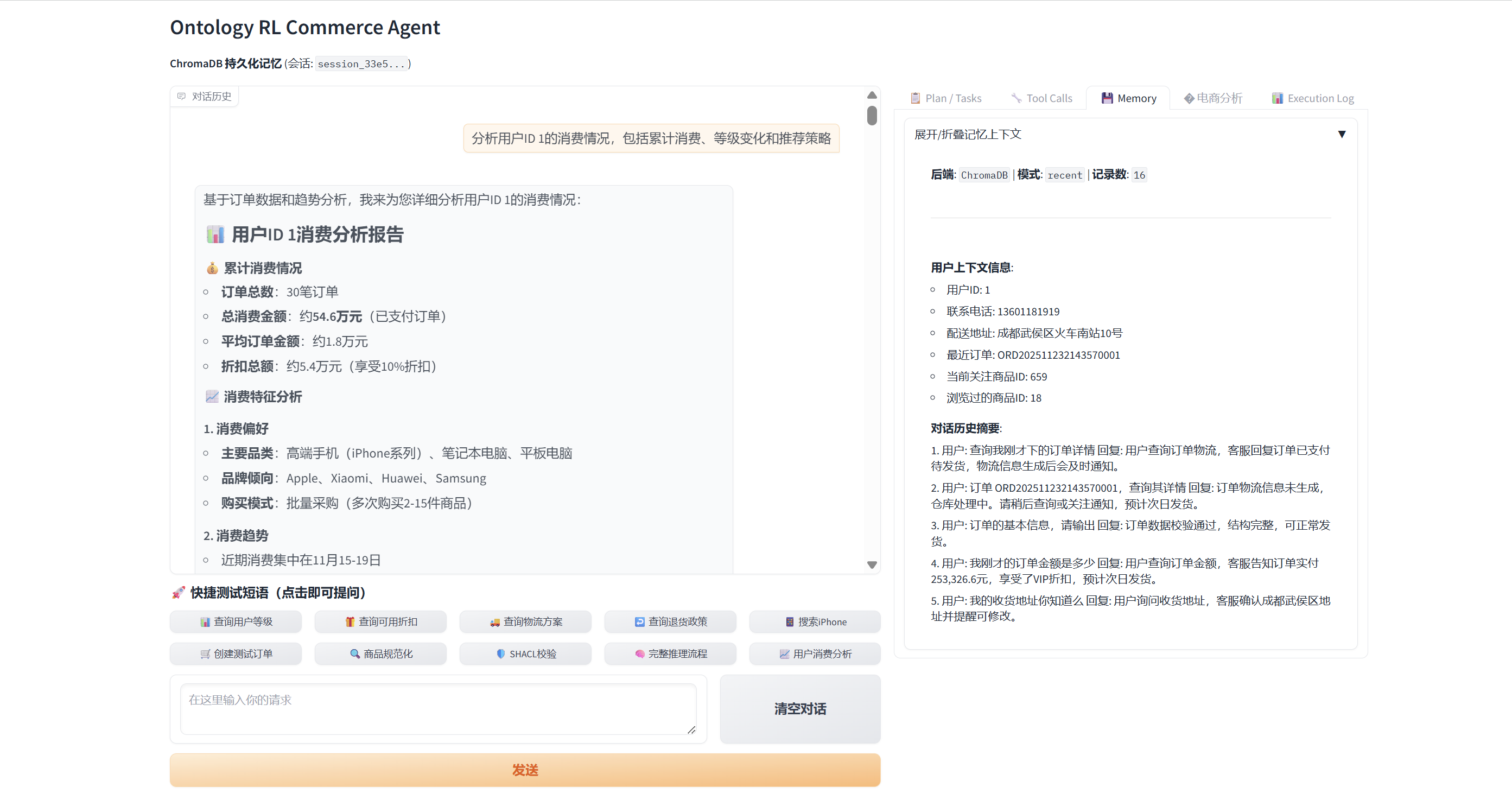
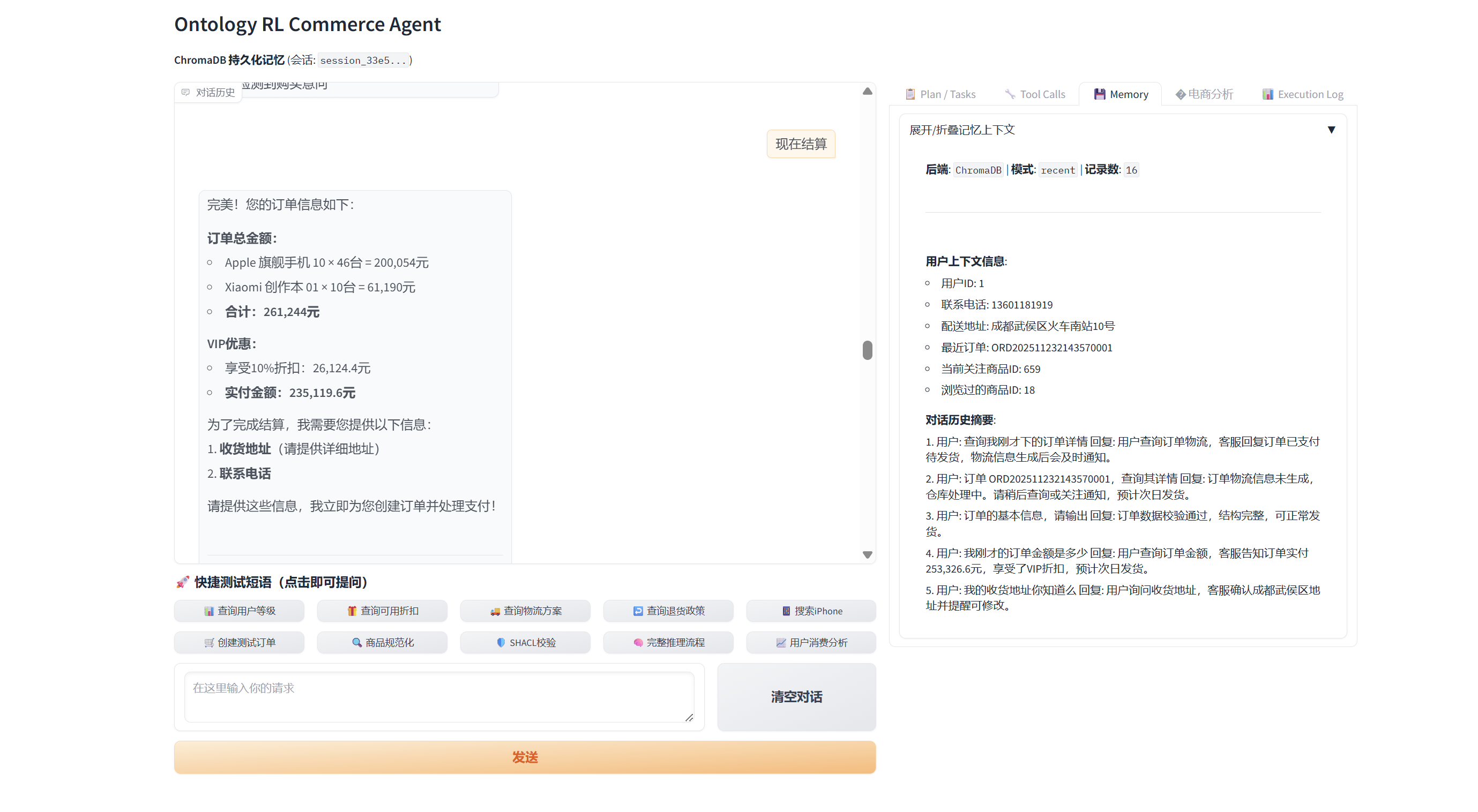
- Scenario: VIP buyer with a ¥200k budget asks the agent to “spend it all” on the most expensive phones, covering insights → recommendations → cart → payment → after-sales tracking.
- Highlights: 16-step memory chain, 22 MCP tools (6 ontology calls, 2 SHACL checks), dynamic charts, automated VIP discounting, cart + checkout orchestration.
- Full walk-through:
docs/VIP_Customer_Case.md.
📖 Citation
@software{ontology_rl_commerce_agent_2025,
  author  = {Shark8848},
  title   = {Ontology RL Commerce Agent},
  year    = {2025},
  url     = {https://github.com/shark8848/ontology-mcp-server-RL-Stable-Baselines3},
  version = {v1.2.3}
}
📄 License
Released under the MIT License. A Simplified Chinese reference translation is available in LICENSE.zh.md.
📧 Contact
Author: shark8848@gmail.com — please star the repo if it helps you!