基于 FastMCP 的安全 HTTP 请求工具,支持原始报文发送、安全控制、HTTP 代理与文件上传。A secure MCP tool for sending raw HTTP/1.1 requests with built-in security controls and proxy support.
HTTP MCP - HTTP 请求工具
发送 HTTP/1.1 请求的 MCP 工具,带有安全控制。
基于 FastMCP 构建。
适用于Web渗透测试、调试。
功能特性
- 支持 HTTP/1.1 协议(暂不支持HTTP/2)
- 支持原始 HTTP 请求报文解析
- 安全控制:
- 域名白名单/黑名单
- 私有 IP 访问控制
- 请求/响应大小限制
- SSL 证书验证控制
- HTTP 方法限制
- HTTP 代理支持
- HTML 标签自动去除(缩短上下文,默认开启)
- 自定义 Host 头和 Content-Length
MCP 工具
http_send_request
发送原始 HTTP 请求报文。
参数:
| 参数 | 类型 | 默认值 | 说明 |
|------|------|--------|------|
| content | string | 必需 | 原始 HTTP 请求报文|
| baseurl | string | 必需 | 完整 URL,如 https://example.com |
| timeout | number | 30 | 超时时间(秒) |
| strip_html | boolean | true | 去除响应中的 HTML 标签 |
| allow_custom_host | boolean | false | 允许自定义 Host 头 |
| allow_custom_content_length | boolean | false | 允许自定义 Content-Length |
原始请求报文格式:
POST /api/users HTTP/1.1
Host: example.com
Content-Type: application/json
User-Agent: Mozilla/5.0

{"name": "test", "value": 123}
使用示例:
# 1. 简单请求
http_send_request(
    content="GET / HTTP/1.1\r\nHost: example.com\r\n\r\n",
    baseurl="https://example.com"
)

# 2. 指定目标服务器
http_send_request(
    content="GET /api HTTP/1.1\r\nHost: example.com\r\n\r\n",
    baseurl="https://api.server.com"
)

# 3. 自定义 Host 头(用于测试 CDN 或虚拟主机)
http_send_request(
    content="GET / HTTP/1.1\r\nHost: custom-host.com\r\n\r\n",
    baseurl="https://example.com",
    allow_custom_host=True
)

# 4. 保留 HTML 标签
http_send_request(
    content="GET /page HTTP/1.1\r\nHost: example.com\r\n\r\n",
    baseurl="https://example.com",
    strip_html=False
)


**注意:** 当使用 `allow_custom_host=True` 时:
- `baseurl` 指定实际连接的服务器
- HTTP 请求头中的 `Host` 使用原始请求中的值
- 如果目标服务器不认识自定义的 Host 头,会返回错误

### http_build_request

从方法、URL、头部和请求体构建原始 HTTP 请求报文。

**参数:**
- `method` (必需): HTTP 方法
- `url` (必需): 完整 URL
- `headers`: 请求头对象
- `body`: 请求体

## 安全提示

⚠️ **默认配置风险说明**:
- `allow_private_ips: true`:默认允许访问内网IP地址,在不可信环境中使用存在SSRF攻击风险,生产环境建议设置为`false`
- `verify_ssl: false`:默认不验证SSL证书,存在中间人攻击风险,生产环境建议设置为`true`
- `follow_redirects: false`:默认不自动跟随重定向,需要时可手动开启
- `http_proxy: ""`:默认不使用代理

代理优先级:环境变量 `HTTP_PROXY`/`HTTPS_PROXY` > `config.json` 中的配置

## 配置

### config.json

```json
{
  "security": {
    "allowed_domains": ["*"],
    "blocked_domains": [],
    "allow_private_ips": true,
    "allow_http": true,
    "max_request_size": 10485760,
    "max_response_size": 52428800,
    "timeout": 30,
    "verify_ssl": false,
    "allowed_methods": ["GET", "POST", "PUT", "DELETE", "PATCH", "HEAD", "OPTIONS"]
  },
  "http": {
    "follow_redirects": false,
    "http_proxy": ""
  }
}
HTTP 代理配置
通过以下方式配置代理:
- 修改
config.json中的http.http_proxy - 设置环境变量
HTTP_PROXY或http_proxy(优先级更高)
环境变量
HTTP_PROXY/http_proxy: HTTP 代理地址HTTPS_PROXY/https_proxy: HTTPS 代理地址
依赖安装
pip install -r requirements.txt
依赖列表:
- fastmcp >= 0.1.0
- hackrequests >= 0.2.0
- beautifulsoup4 >= 4.12.0
测试
# 在项目根目录执行
PYTHONPATH=. python3 http_mcp/test_mcp.py
MCP 配置
添加到你的 .mcp.json 配置文件中,注意替换<你的项目根目录路径>为实际的代码存放路径:
{
  "mcpServers": {
    "http-tool": {
      "command": "python3",
      "args": ["<你的项目根目录路径>/http_mcp/run_server.py"]
    }
  }
}
又或者使用uv:
{
  "mcpServers": {
    "http-tool": {
      "command": "uv",
      "args": ["run", "python3", "<你的项目根目录路径>/http_mcp/run_server.py"]
    }
  }
}
测试
| 测试项 | 状态 | | ---------------------------- | ------ | | GET 请求 | ✅ 正常 | | POST JSON | ✅ 正常 | | POST form-urlencoded | ✅ 正常 | | 自定义 Header | ✅ 正常 | | 状态码 200/404/500 | ✅ 正常 | | 延迟响应 (delay/N) | ✅ 正常 | | PUT/PATCH/DELETE | ✅ 正常 | | OPTIONS 请求 | ✅ 正常 | | Query String 参数 | ✅ 正常 | | 重定向响应 (不跟随) | ✅ 正常 | | 空 Body POST | ✅ 正常 | | UTF-8 中文字符 | ✅ 正常 | | HTTP-MCP/1.0 默认 User-Agent | ✅ 正常 |
MiniMax-M2.5/2.7、doubao-seed-2.0-pro、Kimi k2.5等主流大模型经测试均可正确调用✅。
已知Bug(但暂不打算修复)
🐛 Bug #1: 空 Header 值报错 (HackRequests.py原生bug)
🐛 Bug #2: Chunked Transfer-Encoding 不支持
食用方法
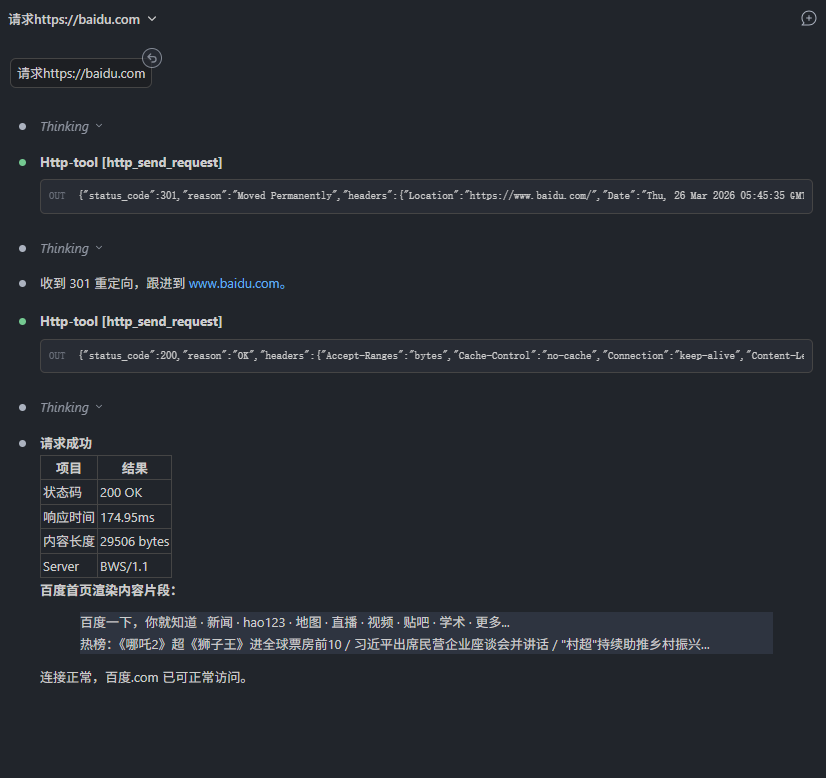
效果演示
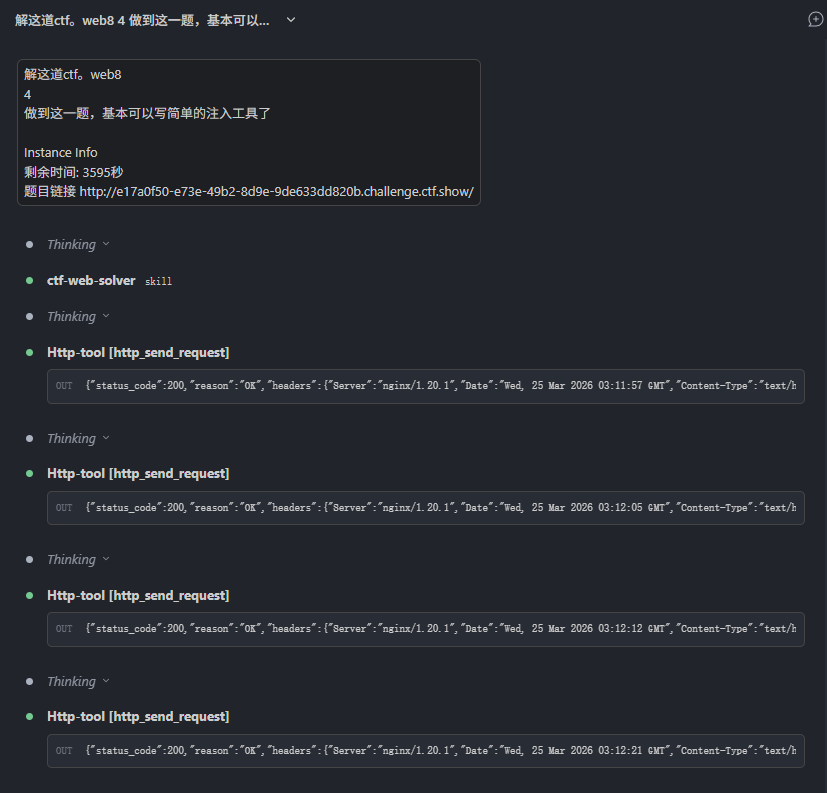
安全最佳实践
- 生产环境务必修改默认安全配置:
- 设置
allow_private_ips: false阻止内网访问 - 设置
verify_ssl: true开启SSL证书验证
- 设置
- 限制
allowed_domains为实际需要访问的域名范围 - 不要在公共环境中暴露MCP服务端口
- 定期更新依赖包修复安全漏洞
License
MIT