Native ROS 2 MCP server for AI-assisted robotics
Amazing ROS 2 MCP Server
A native ROS 2 MCP server for AI-assisted robot development and autonomous agents.
Amazing ROS 2 MCP exposes a ROS 2 graph to LLM agents through the Model Context Protocol. It runs directly on rclpy, so agents can inspect topics, services, actions, nodes, parameters, images, and Nav2 interfaces without requiring rosbridge.
Why This Project
Many ROS agent integrations depend on WebSocket bridges or narrow tool surfaces. This project is designed as a native ROS 2 control harness:
- Native
rclpynode, norosbridgedependency. - Direct support for custom workspace messages and services.
- Broad ROS 2 graph coverage: topics, services, actions, nodes, parameters, images, and Nav2.
- Safety guardrails for write operations, including velocity clamping and topic blocklists.
- Cached publishers for repeated low-latency publishing.
- Structured JSON output suitable for LLM planning loops and robotics debugging.
Architecture
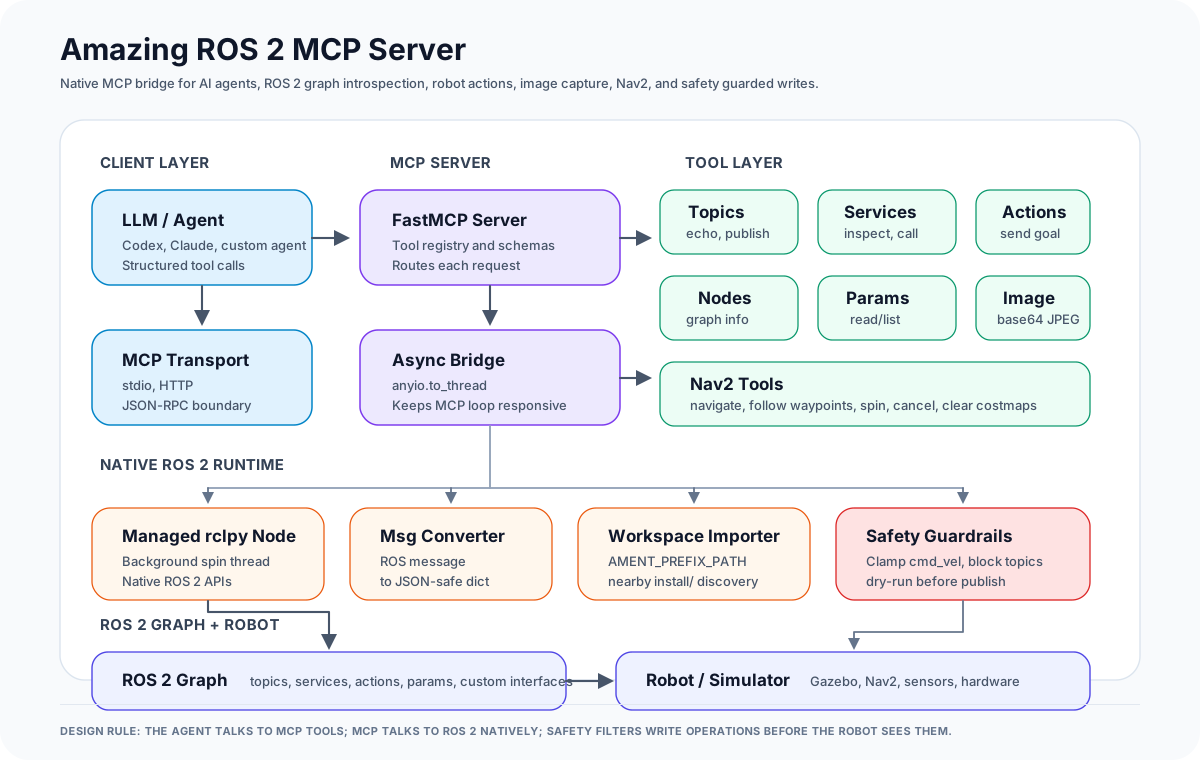
The agent never talks to ROS 2 directly. It calls MCP tools over stdio or HTTP. FastMCP routes the request, blocking ROS work runs through anyio.to_thread, and a managed rclpy node performs native ROS 2 operations. Write paths pass through safety guardrails before reaching the robot or simulator.
Features
ROS 2 Graph Introspection
- List topics, services, actions, and nodes.
- Inspect topic publishers and subscribers.
- Inspect message, service, and action schemas.
- Inspect node publishers, subscribers, services, and clients.
- Read node parameters.
ROS 2 Interaction
- Subscribe once to a topic and return JSON.
- Publish JSON data to a ROS 2 topic.
- Call ROS 2 services.
- Send action goals and wait for results.
- Capture camera images as base64 JPEG data.
Nav2 Support
- Navigate to a pose.
- Follow waypoint sequences.
- Spin in place.
- Cancel active navigation.
- Clear global, local, or all costmaps.
Workspace Support
MCP clients often launch tools in isolated environments. Amazing ROS 2 MCP discovers workspace Python paths from AMENT_PREFIX_PATH and nearby install/ folders so custom interfaces can be imported even when the client did not perfectly source the workspace.
Safety Controls
- Clamp unsafe
/cmd_velvalues before publishing. - Block configured sensitive topics.
- Enable dry-run mode to inspect outgoing writes without publishing them.
Available Tools
Core Graph Tools
| Tool | Purpose |
| --- | --- |
| list_topics | List active topics and types |
| list_services | List active services and types |
| list_actions | List active action servers |
| list_nodes | List nodes and namespaces |
| get_topic_details | Show publishers, subscribers, and topic type |
| get_message_details | Show fields and types for a ROS message |
| get_service_details | Show request and response fields for a ROS service |
| get_action_details | Show goal, result, and feedback fields for a ROS action |
| get_node_info | Show publishers, subscribers, services, and clients for a node |
| list_parameters | List parameters on a node |
| get_parameters | Read selected parameter values |
| detect_ros_version | Report ROS distribution, Python version, and RMW |
Interaction Tools
| Tool | Purpose |
| --- | --- |
| get_topic_message | Read one message from a topic |
| publish_message | Publish JSON data to a topic |
| call_service | Call a ROS 2 service |
| send_action_goal | Send a ROS 2 action goal |
| get_camera_image | Capture an image topic as base64 JPEG |
Nav2 Tools
| Tool | Purpose |
| --- | --- |
| navigate_to_pose | Send a Nav2 goal pose |
| follow_waypoints | Send a waypoint sequence |
| spin_robot | Rotate the robot in place |
| cancel_navigation | Cancel active navigation |
| clear_costmaps | Clear Nav2 costmaps |
Installation
git clone https://github.com/proxi666/amazing-ros2-mcp.git
cd amazing-ros2-mcp
pip install -e .
For Nav2 tools:
pip install -e ".[nav2]"
Usage
Source ROS 2 and your workspace before starting the server:
source /opt/ros/humble/setup.bash
source ~/your_ws/install/setup.bash
python -m amazing_ros2_mcp
HTTP mode:
TRANSPORT_MODE=http HTTP_HOST=0.0.0.0 HTTP_PORT=3001 python -m amazing_ros2_mcp
MCP Client Configuration
Claude Desktop or any stdio MCP client can launch the server with:
{
  "mcpServers": {
    "amazing-ros2-mcp": {
      "command": "bash",
      "args": [
        "-lc",
        "source /opt/ros/humble/setup.bash && source ~/your_ws/install/setup.bash && python -m amazing_ros2_mcp"
      ]
    }
  }
}
Environment Variables
| Variable | Default | Description |
| --- | --- | --- |
| TRANSPORT_MODE | stdio | Transport mode: stdio, http, or streamable-http |
| HTTP_HOST | 0.0.0.0 | HTTP bind address |
| HTTP_PORT | 3001 | HTTP port |
| LOG_LEVEL | INFO | Logging verbosity |
| ROS_NAMESPACE | none | Namespace for the MCP node |
| AMAZING_ROS2_WORKSPACE | none | Optional workspace root for custom package discovery |
Safety Configuration
Safety limits are configured in amazing_ros2_mcp/config.py:
@dataclass
class SafetyConfig:
    max_linear_x: float = 1.0
    max_linear_y: float = 0.5
    max_angular_z: float = 1.5
    blocked_topics: tuple = ("/emergency_stop", "/diagnostics")
    dry_run: bool = False
Comparison Notes
Amazing ROS 2 MCP is intended for native ROS 2 workflows where an AI agent needs more than graph inspection. Compared with rosbridge-based MCP servers, the main differences are:
- Native DDS access through
rclpy. - Custom interface import from local colcon workspaces.
- Nav2-aware tools for mobile robot navigation.
- Safety filtering before robot commands are published.
- Cached publishers for repeated commands.
- Direct image capture for vision-capable agents.
Rosbridge-based servers remain useful for browser-oriented or remote WebSocket workflows. This server is focused on native ROS 2 development and robot-agent control.
Credits
This project synthesizes patterns and inspiration from several excellent community projects:
- robotmcp/ros-mcp-server — Inspiration for tool categorization, FastMCP annotations, and image workflow design.
- kakimochi/ros2-mcp-server — Pioneers of the background spin-thread pattern for native
rclpyintegration. - ajtudela/nav2_mcp_server — Excellent reference for Nav2 integration via
anyio.to_thread.
Contributing
Contributions are welcome. New tool groups should be small, focused, and registered from src/amazing_ros2_mcp/tools/__init__.py.
Suggested additions:
- TF2 inspection tools.
- MoveIt 2 tools.
- Rosbag recording and playback tools.
- Diagnostics and lifecycle management tools.
- Additional safety policies for physical robots.
License
Apache-2.0. See LICENSE.