MCP-FORGE is a modern, extensible Node.js server scaffold for building applications using the Model Context Protocol (MCP). It provides a session management, API key, a live dashboard, and easy tool integration for rapid prototyping.
🛡 MCP-FORGE
A powerful Node.js scaffold for the Model Context Protocol (MCP)
Now with persistent API key management (SQLite), live dashboard with key expiration, and modern TypeScript tooling.
🚀 Overview
MCP-FORGE is a modern, extensible Node.js server scaffold for building applications using the Model Context Protocol (MCP). It provides session management, API key handling, a live dashboard, and easy tool integration for rapid prototyping.
✨ Features
- MCP Server Integration (official MCP SDK)
- Secure API Key Management
- Automatic Session Lifecycle & Cleanup
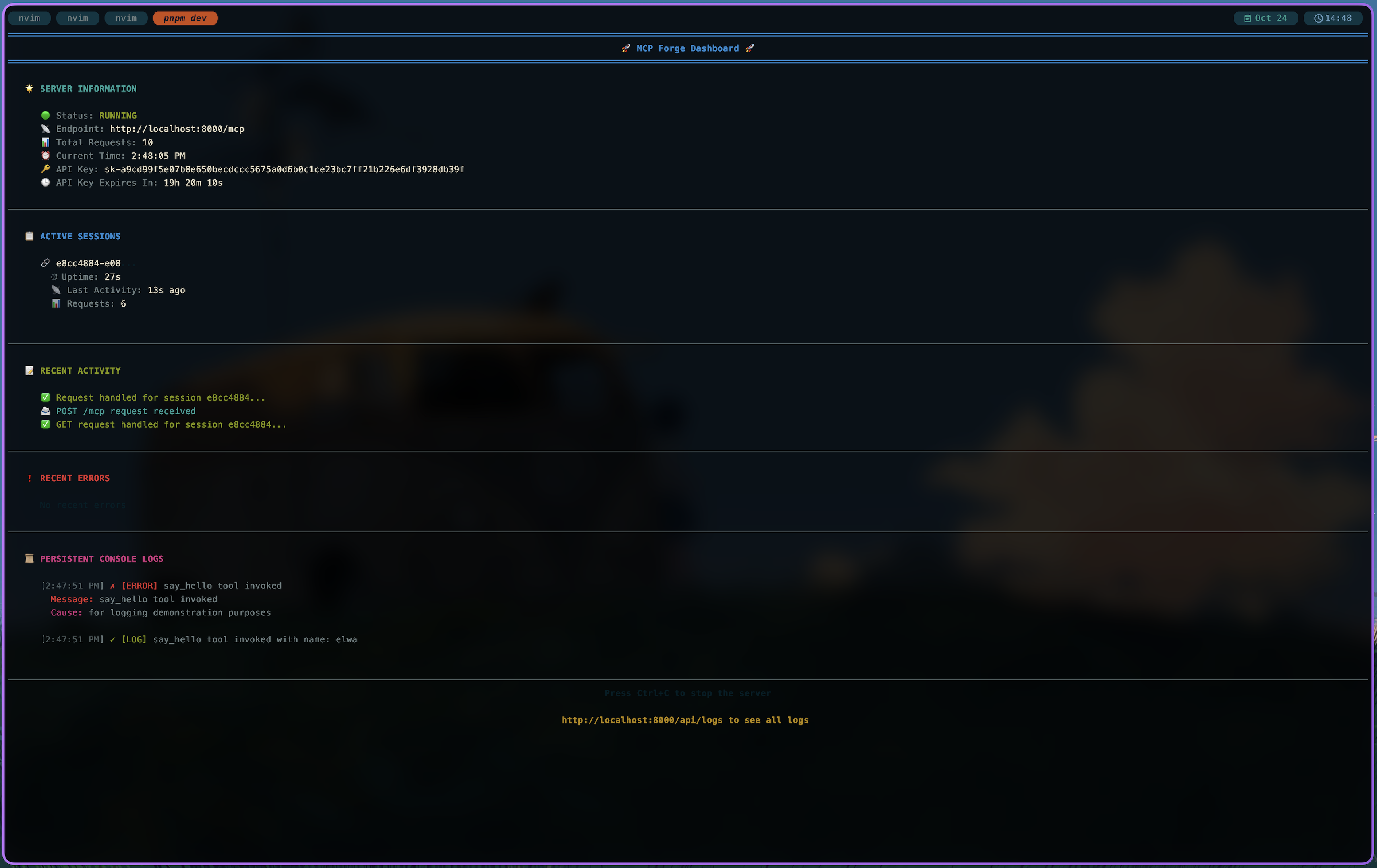
- Real-time Dashboard (server stats, logs, API key expiration)
- Custom Tool System
- Express.js Middleware & Routing
- TypeScript Support
- SQLite database for API keys (
better-sqlite3) - Modern dev workflow with tsx
- Biome for formatting and linting
📋 Table of Contents
- Overview
- Features
- Installation
- Quick Start
- Usage
- Configuration
- API Reference
- Testing
- Code Quality
- Contributing
- License
🛠 Installation
Prerequisites
- Node.js (v18+)
- pnpm (recommended) or npm
Note: The database file mcp.db is auto-created and ignored by git.
Install dependencies
pnpm install
🚀 Quick Start
Development
pnpm run dev
# Uses tsx for fast TypeScript reloading
Production
pnpm start
⚡ Usage
On startup, MCP-FORGE prints your API key:
🔑 API Key for MCP (use as Authorization: Bearer <token>): sk-xxxxxxxx...
🕒 API Key Expires In: 23h 59m 59s
Use this key in the Authorization header for all requests.
Example: Call the Demo Tool
Basic greeting
{
  "method": "tools/call",
  "params": {
    "name": "say_hello",
    "arguments": {}
  }
}
Response: "Hello, world!"
Personalized greeting
{
  "method": "tools/call",
  "params": {
    "name": "say_hello",
    "arguments": {
      "name": "Alice"
    }
  }
}
Response: "Hello, Alice!"
🔧 Configuration
Configure via environment variables or .env file:
| Variable | Default | Description | |----------------------|-----------|--------------------------------| | MCP_API_KEY | generated | API key for authentication | | PORT | 8000 | Server port | | MCP_DISABLE_AUTH | false | Disable API key authentication | | MCP_KEY_PREFIX | sk- | Prefix for generated API keys | | MCP_KEY_BYTE_LENGTH | 32 | Length (bytes) of API key | | MCP_DB_PATH | mcp.db | SQLite DB file for API keys |
API keys are stored and auto-expire after 24 hours.
📦 API Reference
Main Exports
loadConfig()– Loads server configurationgenerateApiKey(prefix, byteLength)– Generates secure API keyssetApiKey(key, createdAt)– Store API key in DBgetApiKey()– Retrieve API key from DBisApiKeyExpired(createdAt)– Check expirationrenewApiKey(config)– Generate and store new keyfindAvailablePort(startPort)– Finds an open portpopulateTools(server)– Registers custom toolscleanupSession(sessionId)– Cleans up sessions
How to Add a Tool
All tools are defined in src/tools.ts. To add a new tool, edit the populateTools function and use server.tool().
🧰 Utility Functions
_makeRequest
Helper for making API requests (GET, POST, custom methods, request body, headers).
Signature:
const _makeRequest = async <T>(
  api_url = API_URL,
  {
    method = "GET",
    headers = {},
    body = undefined,
  }: {
    method?: string;
    headers?: HeadersInit;
    body?: unknown;
  } = {}
): Promise<T | null>
GET Example:
const result = await _makeRequest<MyType>("https://api.example.com/data");
POST Example:
const result = await _makeRequest<MyType>("https://api.example.com/data", {
  method: "POST",
  body: { key: "value" },
  headers: { Authorization: "Bearer TOKEN" }
});
Automatically sets Content-Type: application/json for non-string bodies.
Returns parsed JSON or null on error.
Example: Add a tool that calls an external API
// src/tools.ts
server.tool(
  "get_todos",
  "Retrieve a list of todos",
  {},
  async () => {
    const todos = await _makeRequest<Array<{ id: string; name: string }>>("https://api.example.com/todos");
    if (!todos || todos.length === 0) {
      return { content: [{ type: "text", text: "No todos found." }] };
    }
    return {
      content: [{ type: "text", text: todos.map(t => `ID: ${t.id}, Name: ${t.name}`).join("\n") }],
    };
  }
);
See src/tools.ts for more examples and details.
🧪 Testing
Run all tests:
pnpm test
# All tests are TypeScript and cover DB logic, session management, and API endpoints.
🧹 Code Quality
Format code:
pnpm format
# Uses Biome for formatting
Lint code:
pnpm lint
# Uses Biome for linting
🤝 Contributing
Pull requests and issues are welcome! Please run tests and lint before submitting.
Tip: The codebase is fully TypeScript and uses SQLite for persistent API key management. See src/db.ts for DB logic.
📄 License
MIT
MCP-FORGE — Crafted for scalable, context-driven applications.