Scenic pedestrian routing MCP server — plan walks along parks, rivers, and landmarks via Claude/ChatGPT/etc. Powered by Valhalla, PostGIS, and OSM data. Self-hosted with Docker.
Scenic Routing MCP
A Model Context Protocol server for scenic pedestrian routing based on OpenStreetMap data. Ask Claude to plan a walk along the river, through a park, or past specific landmarks — and get back a GeoJSON/GPX track ready for navigation.
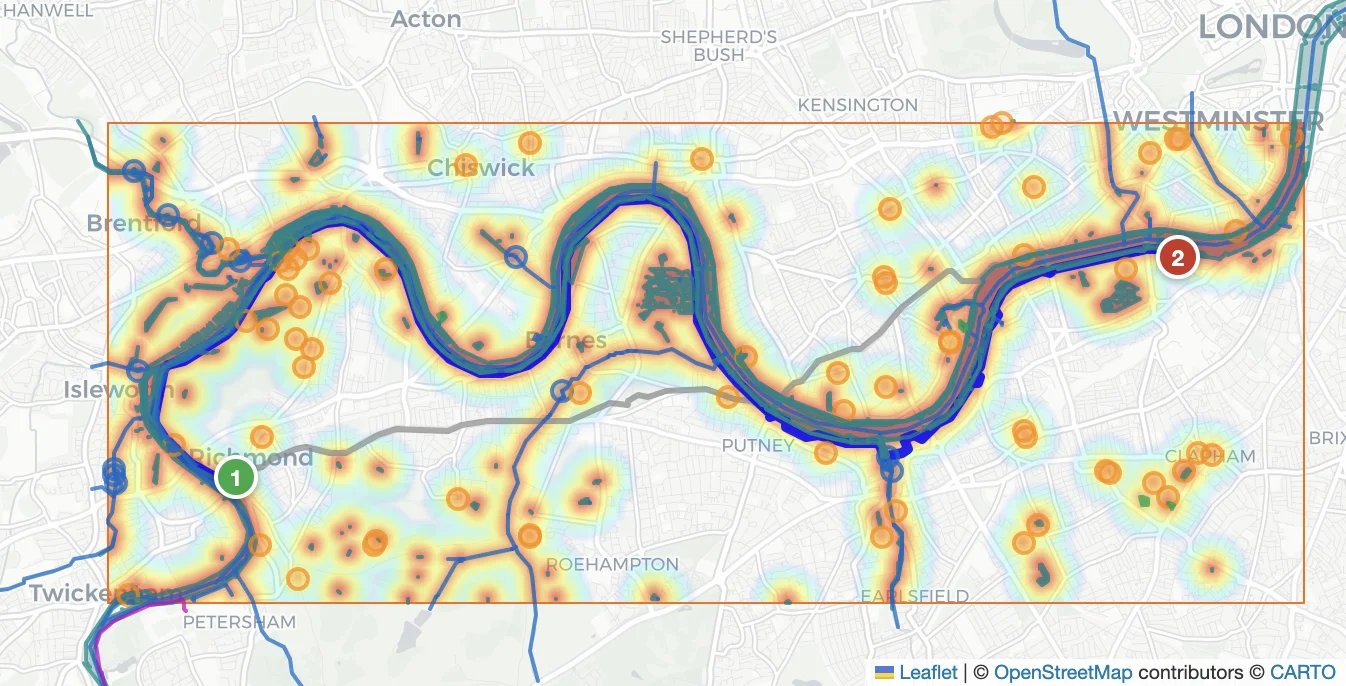
Features
- Scenic routing — routes along parks, rivers, canals, and green spaces
- Flexible POI search — semantic (natural language), OSM tag filters, or fuzzy name matching
- Multiple output formats — GeoJSON, GPX, interactive HTML map preview
- Multi-region support — combine any Geofabrik OSM extracts
- Fully self-hosted — all components run in Docker; no external API keys required
- Daily updates — OSM data refreshed nightly via Geofabrik replication
Architecture
LLM (Claude)
    │  MCP / Streamable HTTP  (port 8080)
    ▼
scenic-routing-mcp  ── planning layer
    ├── Valhalla   :8002   pedestrian routing engine
    ├── PostGIS    :5432   OSM features + pgvector similarity search
    ├── Ollama     :11434  nomic-embed-text embeddings
    └── Redis      :6379   route cache (gob-encoded, configurable TTL)
Data pipeline (nightly, 02:00 UTC):
Geofabrik replication → pyosmium-up-to-date → osm2pgsql → PostGIS
                                             → valhalla_build_tiles → Valhalla tiles
Heatmap and scenic costing
The core of the scenic routing algorithm is a POI-density heatmap that biases Valhalla away from ordinary streets and toward paths through parks, along rivers, and past landmarks.
Heatmap computation (internal/heatmap)
PostGIS returns up to 1000 POI features scored by similarity to the user's query. A geographic grid (50 m/cell) is built over the route bounding box. Each feature contributes a quadratic kernel centred on its geometry:
heat(cell) = max over all features of:  similarity⁴ × (1 − d / cutoff)²

where cutoff = 3σ,  σ = 150 m (fixed for all geometry types)
The kernel is a soft-maximum (plain max, not sum), so dense clusters of similar features do not accumulate unboundedly — the dominant nearest feature wins. Raising similarity to the 4th power sharpens contrast: a feature with 0.9 similarity contributes 0.66× the weight of a perfect match, while a 0.5-similarity feature contributes only 0.06×.
The grid is then normalized to uint8 using the 95th-percentile ceiling (to clip outlier spikes) and passed to Valhalla as a base64-encoded raster alongside its geographic bounds.
Valhalla scenic_pedestrian costing
The MCP server uses a custom Valhalla costing mode scenic_pedestrian. Valhalla receives the heatmap raster + bounds and, during edge evaluation, looks up the heatmap value at the edge midpoint. The edge cost is discounted proportionally:
edge_factor = 1 − scenic_weight × normalised_heat (clamped to [0.1, 1.0])
With scenic_weight = 1.0 (the fixed default), edges in the hottest heatmap areas are up to 10× cheaper than equivalent edges outside scenic zones. Valhalla's shortest-path search therefore naturally threads routes through parks, riverbanks, and other high-density POI corridors.
Explicit peak waypoints
The heatmap discount shifts edge costs softly — it cannot guarantee the route actually passes through scenic areas if the road network offers a shorter alternative nearby. When the heat score along the scenic route is below 0.20 (average normalised heat sampled every 50 m), the soft discount alone was not enough to pull the route into high-density zones. The algorithm then extracts explicit waypoints from the heatmap hot spots and re-routes through them as hard forced waypoints:
- Compute the Gini coefficient over all grid cells. If Gini < 0.50 the heat is too uniform to benefit from explicit waypoints — skip.
- Threshold at the top 25 % of non-zero cells → flood-fill 8-connected components.
- For each component, find the principal axis via weighted PCA. Divide the component along that axis into
k = round(extent / 500 m)buckets; each bucket yields one candidate waypoint (two-pass: weighted centroid, then the cell maximisingheat × Gaussian(distance to centroid)). - Sort candidates by heat, suppress any within 300 m of an already-selected peak, keep the top 10.
- Select the feasible subset of peaks (within the
max_detour_ratiotravel budget) that maximises total heat using bitmask DP (TSP on ≤ 10 nodes). Try progressively larger subsets (3 → 6 → 10 peaks) and stop as soon as the route achieves a heat score ≥ 0.20.
Quick Start
Prerequisites: Docker with Compose plugin, ~8 GB disk, ~4 GB RAM.
# Build the Valhalla base image (once, ~20 min on first run)
make valhalla-base

# Start all services
make up
The first make up downloads OSM data, imports PostGIS, generates embeddings, and builds routing tiles. This takes 20–60 minutes depending on region size and hardware. Subsequent starts are fast — data persists in named Docker volumes.
MCP server is ready at http://localhost:8080/ when the mcp container is healthy.
Custom region
Create a .env file (copy the block below and edit to taste):
# ── OSM data ──────────────────────────────────────────────────────────────────
# Single region (most common setup):
OSM_REGIONS=https://download.geofabrik.de/europe/united-kingdom/england/greater-london-latest.osm.pbf
# Multiple regions — osmium merge runs automatically, PBF_FILE holds the merged result:
# OSM_REGIONS=https://download.geofabrik.de/europe/united-kingdom/england/greater-london-latest.osm.pbf;https://download.geofabrik.de/europe/united-kingdom/england/surrey-latest.osm.pbf
# OSM_PBF_FILE=/data/osm/merged.osm.pbf
# ── Route cache ───────────────────────────────────────────────────────────────
# How long computed routes are kept in Redis before expiry.
ROUTE_TTL=1h
# ── Server ────────────────────────────────────────────────────────────────────
# Base URL that appears in plan_scenic_route reply links.
# Set this to your public hostname when deploying behind a reverse proxy.
PUBLIC_URL=http://localhost:8080
# ── Map tiles (optional) ──────────────────────────────────────────────────────
# Override the tile provider shown in /preview/{id}.
# Default is OpenStreetMap; replace with any XYZ tile URL.
# MAP_TILES_URL=https://tile.openstreetmap.org/{z}/{x}/{y}.png
# MAP_TILES_ATTR=© <a href="https://www.openstreetmap.org/copyright">OpenStreetMap</a> contributors
# ── Logging ───────────────────────────────────────────────────────────────────
LOG_LEVEL=info
Then: docker compose --env-file your.env up -d or simply make up if .env is in the project root.
Configuration
| Variable | Default | Description |
|---|---|---|
| OSM_REGIONS | Greater London URL | Semicolon-separated Geofabrik region URLs |
| OSM_PBF_FILE | /data/osm/region.osm.pbf | Path to the working PBF file inside the container |
| ROUTE_TTL | 1h | Redis TTL for cached routes |
| MAP_TILES_URL | — | Tile URL template ({z}/{x}/{y}) for route preview pages; defaults to OpenStreetMap |
| MAP_TILES_ATTR | — | HTML attribution string shown on preview pages |
| PUBLIC_URL | http://localhost:8080 | Base URL used to build preview links in route summaries |
| LOG_LEVEL | info | Log level: debug, info, warn, error |
| MCP_ADDR | :8080 | Listen address for the MCP HTTP server |
MCP Tools
list_tags
Returns all OSM tags available in the database with English descriptions. Use this before plan_scenic_route to discover valid values for poi_include / poi_exclude.
plan_scenic_route
Plans a scenic pedestrian route between two or more points. Returns a text summary with distance, walking time, scenic spot count, a clickable preview link (PUBLIC_URL/preview/{id}), and an export ID.
points           [[lat, lon], ...]   start, optional waypoints, end
poi_query        string              semantic description: "Victorian docks canals"
poi_include      {key: value}        exact OSM tag filter: {"leisure": "park"}
poi_exclude      {key: value}        exclusion filter: {"access": "private"}
poi_name_query   string              fuzzy name match: "Thames"
max_detour_ratio number              default 1.5 (scenic route ≤ 1.5× direct distance)
min_similarity   number              minimum cosine similarity threshold for POI features
At least one of poi_query, poi_include, or poi_name_query is required.
Optional Valhalla pedestrian costing parameters:
walkway_factor        number   0.1–10    preference for dedicated walkways (default 0.75)
path_factor           number   0.1–10    preference for unpaved paths (default 0.75)
use_tracks            number   0–1       preference for tracks (default 0.5)
use_living_streets    number   0–1       preference for living streets (default 0.5)
use_hills             number   0–1       willingness to use hilly terrain (default 0.5)
step_penalty          number   seconds   extra cost per flight of steps (default 10)
use_ferry             number   0–1       willingness to use ferry connections (default 0)
max_hiking_difficulty number   0–6       maximum sac_scale difficulty (default 1)
HTTP endpoints (not MCP tools)
All three endpoints are linked directly in the plan_scenic_route summary:
| Endpoint | Description |
|---|---|
| GET /preview/{id} | Interactive Leaflet map (tiles from MAP_TILES_URL or OSM) |
| GET /export/{id}.gpx | GPX track download |
| GET /export/{id}.geojson | GeoJSON LineString download |
| GET /debug/{id} | Debug FeatureCollection (heatmap, POI markers, baseline + scenic routes) |
Connecting Claude Code
# Local — server accessible only on localhost (default setup)
claude mcp add --transport http scenic-routing http://localhost:8080/
Verify the connection inside a Claude Code session: /mcp
Public Deployment
By default all ports are bound to 127.0.0.1. To expose the MCP endpoint securely, drop an additional Compose file into docker-compose.d/ — make up / make down / make clean pick it up automatically.
The docker-compose.d/ directory is gitignored (only .example templates are tracked). Copy the template you need, fill in the secrets, then run make up.
Option A — Nginx reverse proxy with API key
An nginx:alpine container validates an Authorization: Bearer <token> header before proxying requests to mcp:8080. The MCP container itself stays on the internal scenic network and is not exposed publicly.
Setup:
cp docker-compose.d/nginx-apikey.yaml.example docker-compose.d/nginx-apikey.yaml
cp docker-compose.d/nginx-apikey.conf.example docker-compose.d/nginx-apikey.conf
Edit docker-compose.d/nginx-apikey.yaml and set MCP_API_KEY to a strong random secret:
openssl rand -hex 32
Open port 8080 in your firewall / cloud security group. Then:
make up
Register in Claude Code:
claude mcp add \
  --transport http \
  --header "Authorization: Bearer <your-token>" \
  scenic-routing \
  http://your-server:8080/
How it works: nginx loads nginx-apikey.conf as a template; the MCP_API_KEY env var is substituted at container startup via envsubst. The map directive matches the exact Authorization header value — no token, wrong token → HTTP 401.
Option B — Cloudflare Tunnel + Access
Routes traffic through Cloudflare's edge network. No inbound ports are opened on your server — cloudflared establishes an outbound-only TLS tunnel to Cloudflare. Cloudflare Access enforces the zero-trust policy in front of the tunnel.
Claude Code  ──HTTPS──►  Cloudflare Edge
                              │  Access: check Service Token headers
                              │  outbound tunnel (cloudflared)
                              ▼
                         your server  ──►  mcp:8080  (internal network)
Prerequisites:
- Cloudflare account with a domain
cloudflaredinstalled on the server
Step 1 — Create the tunnel (run once on the server):
cloudflared tunnel login
cloudflared tunnel create scenic-routing
# Note the tunnel ID printed in the output
Step 2 — Create ./cloudflared/config.yml:
tunnel: <tunnel-id>
credentials-file: /etc/cloudflared/<tunnel-id>.json

ingress:
  - hostname: mcp.yourdomain.com
    service: http://mcp:8080
  - service: http_status:404
Step 3 — Copy the tunnel credentials:
cp ~/.cloudflared/<tunnel-id>.json ./cloudflared/
Step 4 — DNS record (Cloudflare Dashboard):
CNAME mcp.yourdomain.com → <tunnel-id>.cfargotunnel.com (Proxied ✓)
Step 5 — Cloudflare Access application (Cloudflare Dashboard → Zero Trust → Access → Applications):
- Type: Self-hosted
- Application domain:
mcp.yourdomain.com - Policy: Service Auth — allow Service Token
Step 6 — Create a Service Token (Zero Trust → Access → Service Auth → Service Tokens → Create):
Save the CF-Access-Client-Id and CF-Access-Client-Secret — shown only once.
Step 7 — Copy the Compose template and start:
cp docker-compose.d/cloudflare-tunnel.yaml.example docker-compose.d/cloudflare-tunnel.yaml
make up
Register in Claude Code:
claude mcp add \
  --transport http \
  --header "CF-Access-Client-Id: <client-id>" \
  --header "CF-Access-Client-Secret: <client-secret>" \
  scenic-routing \
  https://mcp.yourdomain.com/
Free tier: Cloudflare Tunnel is free with no bandwidth limit. Cloudflare Access allows 50,000 requests/month on the free plan — sufficient for personal use. Paid Zero Trust ($7/user/month) removes the limit.
Debug Web UI
An interactive map interface is available at http://localhost:8081/ for inspecting routes visually.
- Click to place route points, drag to reorder
- Tune all
plan_scenic_routeparameters - Browse available OSM tags with searchable table
- Visualize heatmap, POI markers, and baseline vs scenic route overlay
Rebuild after UI changes:
docker compose up -d --no-deps --build debug
Permalink / autorun: the UI encodes all parameters in the URL hash. Append &run=1 to trigger automatic planning on page load — useful for reproducible test cases:
http://localhost:8081/#pts=51.4633,-0.3011;51.4822,-0.1447&q=river+Thames+water&det=1.5&run=1
Development
Rebuild a single service without touching others
docker compose up -d --no-deps --build mcp
Connect to the database
psql postgresql://scenic:scenic@localhost:5432/scenic
Makefile targets
| Target | Description |
|---|---|
| make up | Start all services (builds valhalla-base image if not present) |
| make down | Stop services, keep data volumes |
| make clean | Stop services and delete all named volumes (full reset) |
| make lint | Run golangci-lint on all Go packages |
| make test | Run all unit tests |
| make cover | Run tests and show per-function coverage |
| make check | Run lint and tests together |
| make dictionary | Rebuild internal/dictionary/osm_tags.csv from taginfo + OSM Wiki |
| make valhalla-base | Build the Valhalla base Docker image from source (~20 min) |
Extending with docker-compose.d
Any *.yaml or *.yml file placed in docker-compose.d/ is automatically merged into the Compose project by make up / make down / make clean. All services share the scenic Docker network, so add-on containers can reach mcp, db, redis, etc. by service name.
Full reset
make clean   # stops containers and removes all named volumes
make up      # re-downloads OSM data and re-imports from scratch
Exporting routes for navigation
| App | Method |
|---|---|
| OsmAnd | Import GPX → Follow Track |
| Organic Maps | Import GPX |
| Google Maps | Import via My Maps (convert GeoJSON → KML with ogr2ogr) |