Multiplex many MCP clients (e.g. multiple Claude Code instances) onto a single chrome-devtools-mcp + Chrome, with per-client tab isolation.
chrome-devtools-mcp-mux

Drop-in replacement for chrome-devtools-mcp that lets many MCP clients share one Chrome instance and one profile without stepping on each other's tabs. Each client — a separate
Claude Code session, for example — gets its own isolated set of tabs, while
they all run against the same single browser and profile.
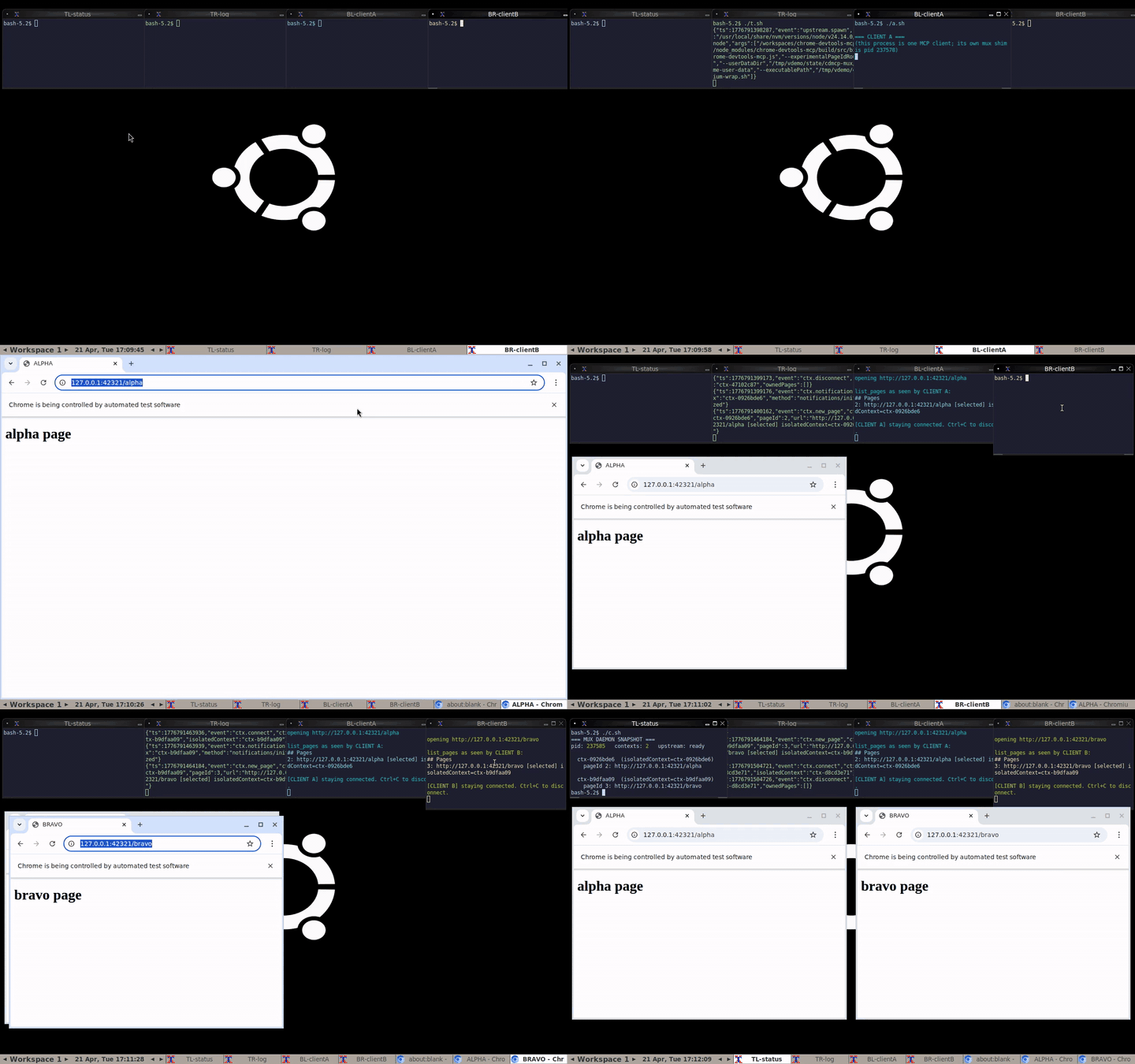
Idle waits auto-compressed to 0.5 s each. Full-resolution mp4s in demo/artifacts/: condensed (9 s) · full 2:26. Reproducer in demo/.
What problem does this solve
chrome-devtools-mcp exposes Chrome DevTools to an MCP client. It works
perfectly for one client, but if two clients connect at once (two Claude Code
windows, a Claude Code plus a Gemini CLI, a coding agent plus a test runner —
anything using the same config) they step on each other's tabs: list_pages
shows everything, select_page races, new_page lands in the wrong window,
close_page can shut down another client's work.
cdmcp-mux sits between the clients and chrome-devtools-mcp and tracks who
owns which tab. Each client sees only its own tabs; cross-client collisions
are rejected before they ever reach the browser.
vs. vanilla chrome-devtools-mcp
| Concern | chrome-devtools-mcp | chrome-devtools-mcp-mux |
|---|---|---|
| Config shape | npx -y chrome-devtools-mcp@latest | npx -y chrome-devtools-mcp-mux@latest — literally one token different |
| Tools exposed to clients | full vanilla surface | identical (pageId stays stripped; isolatedContext still exposed as opt-in) |
| Chrome profile / cookies / logins / extensions | one --userDataDir | same --userDataDir, no forced incognito |
| Headless vs. headful by default | headful | headful (matches vanilla; force headless with CDMCP_MUX_HEADLESS=true) |
| Single client running alone | fine | fine — no behavior change, no overhead worth worrying about |
| Two+ clients against one Chrome | collide: shared list_pages, racy select_page, cross-client close_page | isolated at the tool layer: list_pages per-client, cross-client tool calls rejected |
| new_page's optional isolatedContext | passes through | passes through (you can still opt in to per-tab isolation if you want it) |
| CLI flag pass-through (--viewport, --browserUrl, etc.) | ✓ | ✗ not yet — see drop-in gaps |
| --autoConnect / attaching to a running Chrome | ✓ | ✗ not yet |
| Upstream version | latest every npx | pins a tested chrome-devtools-mcp version per release |
| Maintained by | Chrome DevTools team | this repo (thin wrapper over upstream) |
| Runtime overhead | zero | one long-lived daemon process, one unix socket hop per tool call |
Rule of thumb: if you only ever run one MCP client at a time, stick with vanilla. If you run two or more — different Claude Code sessions, an agent plus your own debugger, parallel test runners, etc. — the mux stops them from corrupting each other's state.
Drop-in gaps
A small number of vanilla behaviors aren't plumbed through the mux yet. Open an issue if one matters to you:
- Arbitrary CLI args passed in
"args"(e.g.--viewport=1920x1080) are currently ignored. The mux spawns upstream with a fixed set of flags. --browserUrl,--wsEndpoint,--autoConnect— the mux always launches its own Chromium; it doesn't yet know how to attach to one that's already running.- Upstream version is pinned per release. If upstream ships a new tool, the mux needs a version bump to expose it.
For anything not on this list, the mux is behaviorally indistinguishable from vanilla for a single client, and strictly better for many.
Install and configure
If your .mcp.json currently looks like this (the canonical upstream setup):
{
  "mcpServers": {
    "chrome-devtools": {
      "command": "npx",
      "args": ["-y", "chrome-devtools-mcp@latest"]
    }
  }
}
change chrome-devtools-mcp@latest to chrome-devtools-mcp-mux@latest and
you're done:
{
  "mcpServers": {
    "chrome-devtools": {
      "command": "npx",
      "args": ["-y", "chrome-devtools-mcp-mux@latest"]
    }
  }
}
The first client to connect auto-spawns a shared daemon; subsequent clients
attach to the same daemon. Each gets its own view of tabs, but they all live
in the same Chrome profile — so your cookies, logins, and extensions are the
same as with vanilla chrome-devtools-mcp.
Local-dev install (building from source)
git clone https://github.com/ochen1/chrome-devtools-mcp-mux
cd chrome-devtools-mcp-mux
npm install
npm run build
npm link           # exposes `cdmcp-mux` on PATH
Then "command": "cdmcp-mux" in .mcp.json.
How to verify it's working
Start two MCP clients with the config above. In each, ask the model to:
- Open a different URL via
new_page. - Run
list_pages.
Each client should see only its own page. On the host, run cdmcp-mux status
to see both contexts side-by-side in the daemon.
For a full scripted demo with a recorded video, see demo/.
Environment variables (optional)
| Variable | Purpose |
|------------------------------|----------------------------------------------------|
| CDMCP_MUX_CHROMIUM | Chromium binary (defaults to bundled Puppeteer) |
| CDMCP_MUX_USER_DATA_DIR | Override Chrome profile directory |
| CDMCP_MUX_SOCKET | Override unix socket path for the daemon |
| CDMCP_MUX_HEADLESS | true forces headless (default: headful, matching vanilla chrome-devtools-mcp) |
| MCP_MUX_DEBUG | 1 logs every rewrite diff |
Debugging
All out-of-band; the mux never exposes debug tools to MCP clients.
| Command | What it does |
|--------------------------|----------------------------------------------------|
| cdmcp-mux status | daemon pid, upstream state, contexts, owned pages |
| cdmcp-mux tail [-f] | stream the structured mux log |
The log lives at ~/.local/state/cdmcp-mux/mux.log.
How it works
flowchart TB
subgraph clients["one process per MCP client"]
direction LR
C1["Claude Code #1"] -- "stdio (MCP)" --> S1["cdmcp-mux shim"]
C2["Claude Code #2"] -- "stdio (MCP)" --> S2["cdmcp-mux shim"]
end
subgraph shared["shared — auto-spawned on first connect"]
direction TB
D["mux daemon<br/><i>per-connection ownership table</i><br/>(socket fd → ctxId → owned pageIds)"]
U["chrome-devtools-mcp subprocess<br/><code>--experimentalPageIdRouting</code><br/><code>--userDataDir <fixed></code>"]
B["Chromium<br/><i>one instance, one profile<br/>cookies shared across clients</i>"]
D -- "stdio (MCP)<br/>rewrite + filter" --> U
U -- "CDP" --> B
end
S1 -- "unix socket" --> D
S2 -- "unix socket" --> D
classDef client fill:#e3f2fd,stroke:#1976d2
classDef shim fill:#fff3e0,stroke:#f57c00
classDef core fill:#f3e5f5,stroke:#7b1fa2
classDef browser fill:#e8f5e9,stroke:#388e3c
class C1,C2 client
class S1,S2 shim
class D,U core
class B browser
Each MCP client spawns its own cdmcp-mux shim (that's how .mcp.json works —
one child per client). The shim is a pure byte pipe between the client's stdio
and a unix socket; the first shim to connect auto-spawns the shared daemon,
later shims attach to it. The daemon owns one chrome-devtools-mcp
subprocess driving one Chromium with one --userDataDir.
The daemon advertises the same tool schemas as vanilla chrome-devtools-mcp.
Every connection gets its own ownership table of pageIds it created; the
daemon filters list_pages to that set and rejects cross-context calls to
close_page, select_page, and other page-scoped tools. pageId is stripped
from the advertised schemas and re-injected internally on every tools/call,
so concurrent calls from different clients always target the right tab —
backed by upstream's --experimentalPageIdRouting.
Tabs are not forced into isolated browser contexts — all clients share the
same Chrome profile, so your cookies and logins work the same as with vanilla
chrome-devtools-mcp. The isolatedContext parameter on new_page stays
exposed exactly like upstream: if a client wants an incognito-style context,
it passes it, and the mux forwards it verbatim. When a client disconnects, the
daemon closes every tab it owned and the rest keep running.
Development notes
This project was written end-to-end by a Claude-Code agent in a single working session, driven by live conversational requirements. The full test plan is tiered for functional correctness (58 tests, ~19 s, all passing), and the multiplexer was then visually demonstrated via a VNC-automated reproducer.
For the PRD-to-test mapping see DEMO.md. For the full agentic
development log — requirements discovery, architecture iteration, test
tiering, and the three takes of the video demo — see
demo/README.md.
Testing
# requires a Chromium binary; the smoke/e2e tests need it
CDMCP_MUX_CHROMIUM=/usr/bin/chromium npm test
Expected: 8 files, 58 tests, all passing.
Releasing
CI runs on every push and PR against main using Node 22 and 24, building,
typechecking, and executing the full 58-test suite (including the real-Chromium
smoke and binary-e2e tests).
Publishing is automated via .github/workflows/publish.yml, which runs on a
GitHub release being published:
- Bump
versioninpackage.json, commit, tag asv<version>. gh release create v<version> --generate-notes.- The workflow builds, tests, and runs
npm publishwith npm provenance (signed via GitHub OIDC, the workflow hasid-token: write).
NPM_TOKEN is the only required repo secret. The package is published with
publishConfig.provenance: true, so the --provenance flag is implicit.
Once this repo is registered as a trusted publisher at npmjs.com, the
NPM_TOKEN secret can be removed entirely.
License
Apache-2.0 — see LICENSE. Same as upstream chrome-devtools-mcp.