BLog post about MPC tooling
How to Create an MCP Server
This guide is for developers who want to build a MCP server. It describes how to implement an MCP for listing and adding users.
What Is an MCP Server?
An MCP server is a wrapper that sits between a Large Language Model (LLM) and an application, wrapping calls from the LLM to the application in JSON. You might be tempted to wrap your application's existing APIs via fastapi and fastmcp, but as described by mostly harmless, this is a bad idea.
The main reason for this is that an LLM performs text completion based on the "downloaded" internet and can focus on a topic for no more than approximately 100 pages of text. It's hard to fill these pages with chat, and you may have never encountered this limit. This also means that you need a user story or tasks to fill this book, including all possible failures and dead ends. In our example, we will add a user "tux" to the system.
The first pages of this imaginary book are already filled by the system prompt and the description of the MCP tool and its parameters. This description is provided by the tool's author, so you can be very descriptive when writing the tool descriptions. A few more lines of text won't hurt.
Every tool call has a JSON overlay, so you also want to avoid too many tool calls. Try to minimize the number of tools and combine similar operations into a single tool. For example, if you had a tool interacting with systemd, you would have just one tool that combines enabling, disabling, starting, and restarting the service, rather than one tool for each operation.
For the tool output, don't hesitate to combine as much information as possible. A good tool's output shouldn't just return the group ID (GID) but also the group name.
The caveat here is that you can easily oversaturate the LLM with too much information, such as returning the output of find /. This would completely fill the imaginary book of the LLM conversation. In such cases, trim the information and provide parameters for tools, like filtering the output.
This boils down to the following points:
- Have a user story for the tools.
- Provide extensive descriptions for tools and their parameters.
- Condense tools into sensible operations and don't hesitate to add many parameters.
- A tool call can have several API calls.
- Avoid overload: LLMs can't ignore output, so you are responsible for trimming information. And also the following bonus point, which I learned along the way:
- Avoid a
verboseparameter; an LLM will always use it.
[!NOTE] Always remember: "Context is King"
Build a Sample MCP Server
User Story
First, we have to come up with a user story. We have to decide what the user should be capable of doing with the tool.
Our user story is quite simple: "I want to add a user to the system."
First Step
We will use Go for this project and start with this simple boilerplate code, which adds the tool "Foo":
package main

import (
	"context"
	"flag"
	"log/slog"
	"net/http"

	"github.com/modelcontextprotocol/go-sdk/mcp"
)

// Input struct for the Foo tool.
type FooInput struct {
	Message string `json:"message,omitempty" jsonschema:"a message for the Foo tool"`
}

// Output struct for the Foo tool.
type FooOutput struct {
	Response string `json:"response" jsonschema:"the response from the Foo tool"`
}

// Foo function implements the Foo tool.
func Foo(ctx context.Context, req *mcp.CallToolRequest, input FooInput) (
	*mcp.CallToolResult, FooOutput, error,
) {
	slog.Info("Foo tool called", "message", input.Message)
	return nil, FooOutput{Response: "Foo received your message: " + input.Message}, nil
}

func main() {
	listenAddr := flag.String("http", "", "address for http transport, defaults to stdio")
	flag.Parse()

	server := mcp.NewServer(&mcp.Implementation{Name: "useradd", Version: "v0.0.1"}, nil)
	mcp.AddTool(server, &mcp.Tool{
		Name:        "Foo",
		Description: "A simple Foo tool",
	}, Foo)

	if *listenAddr == "" {
		// Run the server on the stdio transport.
		if err := server.Run(context.Background(), &mcp.StdioTransport{}); err != nil {
			slog.Error("Server failed", "error", err)
		}
	} else {
		// Create a streamable HTTP handler.
		handler := mcp.NewStreamableHTTPHandler(func(*http.Request) *mcp.Server {
			return server
		}, nil)

		// Run the server on the HTTP transport.
		slog.Info("Server listening", "address", *listenAddr)
		if err := http.ListenAndServe(*listenAddr, handler); err != nil {
			slog.Error("Server failed", "error", err)
		}
	}
}
To run the server, we first have to initialize the Go dependencies with:
  go mod init github.com/mslacken/mcp-useradd
  go mod tidy
Now the server can be run with the command:
go run main.go -http localhost:8666
And we can run a JavaScript-based explorer in an additional terminal via:
npx @modelcontextprotocol/inspector http://localhost:8666 --transport http
This gives us the following screen after the 'Foo' tool with the input 'Baar' was called.
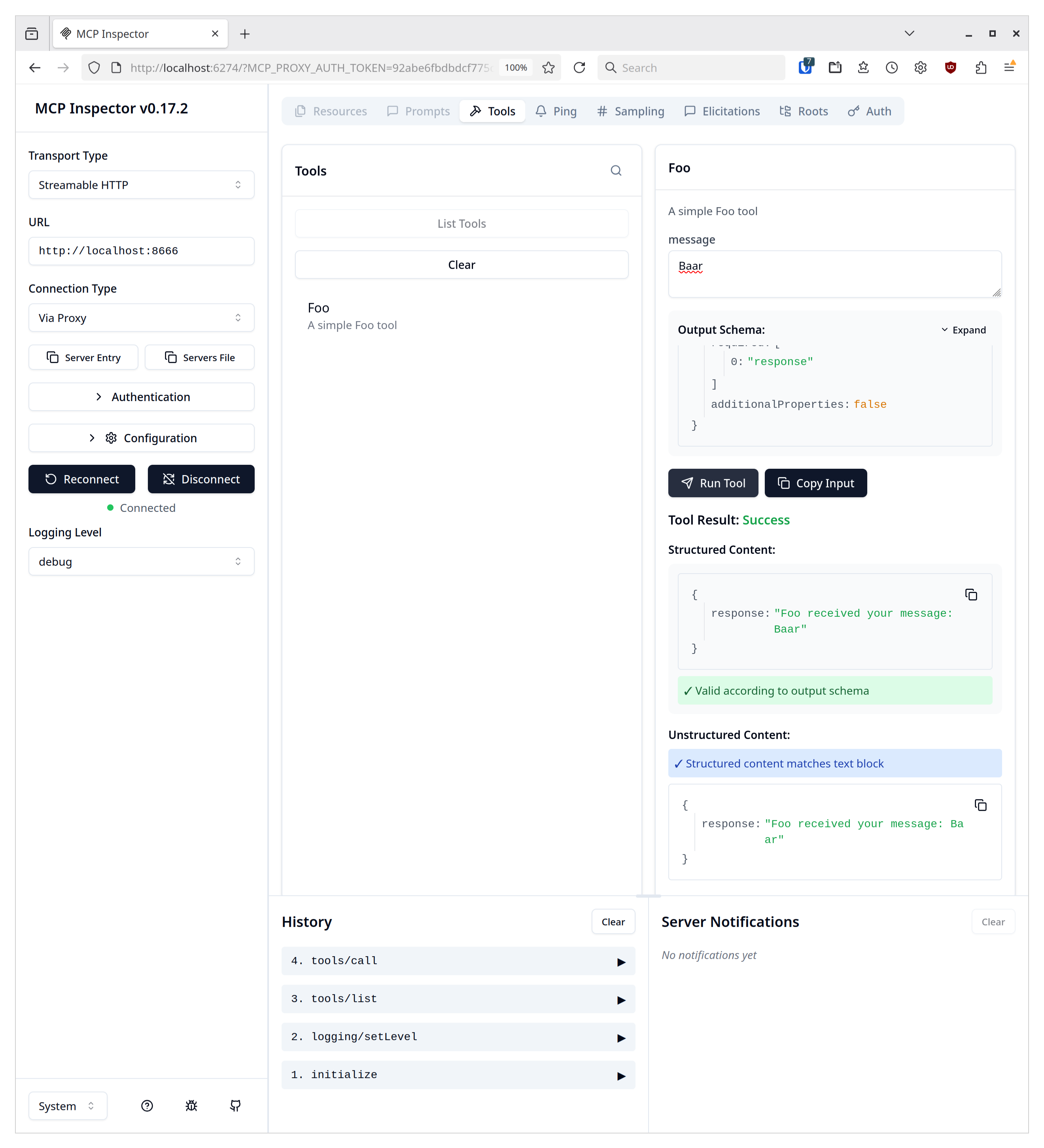
Let's break down our Go code. After the imports, we immediately have two structs that manage the input and output for our tool. Go has a built-in serializer for data structures. The keyword json:"message,omitempty" tells the serialization library to use "message" as the variable's name. More important is the second option, "omitempty," which marks this as an optional input parameter; if empty, the variable won't be in the output. The "jsonschema" parameter describes what this parameter does and what input is expected. Although the parameter's type is deduced from the struct, the description is crucial. The method for the tool returns the message by constructing the output struct and returning it.
The method itself is added to the MCP server instance and also needs to have a name and a description. The description of the tool is also highly important and is the only way for the LLM to know what the tool is doing.
Concretize the tool
The full code of this section can be found in the git commit simple user list
As we don't want to change the system at this early phase and the whole project would need a tool to get the actual users of the system. So let's add the tool get_users.
To keep it simple we just use we will just use the output of getent passwd to fullfill this task.
A function which can do this would look like
// User struct represents a single user account.
type User struct {
	Username string `json:"username"`
	Password string `json:"password"`
	UID      int    `json:"uid"`
	GID      int    `json:"gid"`
	Comment  string `json:"comment"`
	Home     string `json:"home"`
	Shell    string `json:"shell"`
}
func ListUsers(ctx context.Context, req *mcp.CallToolRequest, _ ListUsersInput) (
	*mcp.CallToolResult, ListUsersOutput, error,
) {
	slog.Info("ListUsers tool called")
	cmd := exec.Command("getent", "passwd")
	var out bytes.Buffer
	cmd.Stdout = &out
	err := cmd.Run()
	if err != nil {
		return nil, ListUsersOutput{}, err
	}
	var users []User
	scanner := bufio.NewScanner(&out)
	for scanner.Scan() {
		line := scanner.Text()
		parts := strings.Split(line, ":")
		if len(parts) != 7 {
			continue
		}
		uid, _ := strconv.Atoi(parts[2])
		gid, _ := strconv.Atoi(parts[3])
		users = append(users, User{
			Username: parts[0],
			Password: parts[1],
			UID:      uid,
			GID:      gid,
			Comment:  parts[4],
			Home:     parts[5],
			Shell:    parts[6],
		})
	}
	return nil, ListUsersOutput{Users: users}, nil
}
When you check this method you see that output is just a list (called slice in go) of the users and their porperties.
Although this looks correct this method is missing some important things
- the user type, is it a system or user an user account of a human
- in which groups is the user part of
Asking such type of questions and then providing that information is the most important part when writing an MCP tool. This information isn't known to the LLM but might define the input paramters when adding an user.
In opposite to a real implementation of such a tool will just treat all users with a 'gid < 1000' as system users.
Also we all add a call to getent group to get all groups in which the user is part of.
When now this tools is called it's also sensible to output the group information, as this would enable the LLM to fullfill the taks like "Add the user chris to the system and make him part of the witcher group".
The full code of this section can be found in the git commit better user list
With that information the tool call now likes
// ListUsers function implements the ListUsers tool.
func ListUsers(ctx context.Context, req *mcp.CallToolRequest, _ ListUsersInput) (
	*mcp.CallToolResult, ListUsersOutput, error,
) {
	slog.Info("ListUsers tool called")
	cmd := exec.Command("getent", "passwd")
	var out bytes.Buffer
	cmd.Stdout = &out
	err := cmd.Run()
	if err != nil {
		return nil, ListUsersOutput{}, err
	}
	var users []User
	scanner := bufio.NewScanner(&out)
	for scanner.Scan() {
		line := scanner.Text()
		parts := strings.Split(line, ":")
		if len(parts) != 7 {
			continue
		}
		uid, _ := strconv.Atoi(parts[2])
		gid, _ := strconv.Atoi(parts[3])
		users = append(users, User{
			Username:     parts[0],
			Password:     parts[1],
			UID:          uid,
			GID:          gid,
			Comment:      parts[4],
			Home:         parts[5],
			Shell:        parts[6],
			IsSystemUser: gid < 1000,
			Groups:       []string{},
		})
	}

	cmd = exec.Command("getent", "group")
	var groupOut bytes.Buffer
	cmd.Stdout = &groupOut
	err = cmd.Run()
	if err != nil {
		return nil, ListUsersOutput{}, err
	}
	var groups []Group
	groupScanner := bufio.NewScanner(&groupOut)
	for groupScanner.Scan() {
		line := groupScanner.Text()
		parts := strings.Split(line, ":")
		if len(parts) != 4 {
			continue
		}
		gid, _ := strconv.Atoi(parts[2])
		members := strings.Split(parts[3], ",")
		groups = append(groups, Group{
			Name:     parts[0],
			Password: parts[1],
			GID:      gid,
			Members:  members,
		})
		groupName := parts[0]
		for _, member := range members {
			for i, user := range users {
				if user.Username == member {
					users[i].Groups = append(users[i].Groups, groupName)
				}
			}
		}
	}

	return nil, ListUsersOutput{Users: users, Groups: groups}, nil
}
The result looks now like
This is gives now the LLM much more sensible information about the system and e.g. if I would aks "Add chris to the system and add him to the witcher group" and on the system wouldn't be the group 'witcher' but on called 'hexer' it could find out that it's german system and perhaps 'hexer' would be right group then.
As icing of the cake we now refactor the list method so that a username can be passed as an optional paramater. In such way the output of the tool can be limited. This is important for many subsequent tools calls. For real production garde software the paramter would then also regular expressions or even fuzzy matching. The full code of this section can be found in the git commit filter with a username This transforms the tool call to
// ListUsers function implements the ListUsers tool.
func ListUsers(ctx context.Context, req *mcp.CallToolRequest, input ListUsersInput) (
	*mcp.CallToolResult, ListUsersOutput, error,
) {
	slog.Info("ListUsers tool called")

	users, err := getUsers(input.Username)
	if err != nil {
		return nil, ListUsersOutput{}, err
	}

	if input.Username != "" {
		return nil, ListUsersOutput{Users: users}, nil
	}

	groups, err := getGroups()
	if err != nil {
		return nil, ListUsersOutput{}, err
	}

	for _, group := range groups {
		for _, member := range group.Members {
			for i, user := range users {
				if user.Username == member {
					users[i].Groups = append(users[i].Groups, group.Name)
				}
			}
		}
	}

	return nil, ListUsersOutput{Users: users, Groups: groups}, nil
}

func getUsers(username string) ([]User, error) {
	args := []string{"passwd"}
	if username != "" {
		args = append(args, username)
	}
	cmd := exec.Command("getent", args...)
	var out bytes.Buffer
	cmd.Stdout = &out
	err := cmd.Run()
	if err != nil {
		return nil, err
	}
	var users []User
	scanner := bufio.NewScanner(&out)
	for scanner.Scan() {
		line := scanner.Text()
		parts := strings.Split(line, ":")
		if len(parts) != 7 {
			continue
		}
		uid, _ := strconv.Atoi(parts[2])
		gid, _ := strconv.Atoi(parts[3])
		users = append(users, User{
			Username:     parts[0],
			Password:     parts[1],
			UID:          uid,
			GID:          gid,
			Comment:      parts[4],
			Home:         parts[5],
			Shell:        parts[6],
			IsSystemUser: gid < 1000,
			Groups:       []string{},
		})
	}
	if username != "" && len(users) > 0 {
		groups, err := getUserGroups(username)
		if err == nil {
			users[0].Groups = groups
		}
	}
	return users, nil
}
Still there are many things we could add here as parameter like filtering for non system users only, check for 'pam.d' options which interacts with users...
Adding a user
Just for completeness we now add a tool for adding user, which does this by the SUSE specific useradd call.
The full code of this section can be found in the git commit added user add method
A tool can look like
// Input struct for the AddUser tool.
type AddUserInput struct {
	Username     string   `json:"username" jsonschema:"the username of the new account"`
	BaseDir      string   `json:"base_dir,omitempty" jsonschema:"the base directory for the home directory of the new account"`
	Comment      string   `json:"comment,omitempty" jsonschema:"the GECOS field of the new account"`
	HomeDir      string   `json:"home_dir,omitempty" jsonschema:"the home directory of the new account"`
	ExpireDate   string   `json:"expire_date,omitempty" jsonschema:"the expiration date of the new account"`
	Inactive     int      `json:"inactive,omitempty" jsonschema:"the password inactivity period of the new account"`
	Gid          string   `json:"gid,omitempty" jsonschema:"the name or ID of the primary group of the new account"`
	Groups       []string `json:"groups,omitempty" jsonschema:"the list of supplementary groups of the new account"`
	SkelDir      string   `json:"skel_dir,omitempty" jsonschema:"the alternative skeleton directory"`
	CreateHome   bool     `json:"create_home,omitempty" jsonschema:"create the user's home directory"`
	NoCreateHome bool     `json:"no_create_home,omitempty" jsonschema:"do not create the user's home directory"`
	NoUserGroup  bool     `json:"no_user_group,omitempty" jsonschema:"do not create a group with the same name as the user"`
	NonUnique    bool     `json:"non_unique,omitempty" jsonschema:"allow to create users with duplicate (non-unique) UID"`
	Password     string   `json:"password,omitempty" jsonschema:"the encrypted password of the new account"`
	System       bool     `json:"system,omitempty" jsonschema:"create a system account"`
	Shell        string   `json:"shell,omitempty" jsonschema:"the login shell of the new account"`
	Uid          int      `json:"uid,omitempty" jsonschema:"the user ID of the new account"`
	UserGroup    bool     `json:"user_group,omitempty" jsonschema:"create a group with the same name as the user"`
	SelinuxUser  string   `json:"selinux_user,omitempty" jsonschema:"the specific SEUSER for the SELinux user mapping"`
	SelinuxRange string   `json:"selinux_range,omitempty" jsonschema:"the specific MLS range for the SELinux user mapping"`
}
func AddUser(ctx context.Context, req *mcp.CallToolRequest, input AddUserInput) (
	*mcp.CallToolResult, AddUserOutput, error,
) {
	slog.Info("AddUser tool called")
	args := []string{}
	if input.BaseDir != "" {
		args = append(args, "-b", input.BaseDir)
	}
	/*
	Cutted a lot of command line parameter settings
	*/
	if input.SelinuxUser != "" {
		args = append(args, "-Z", input.SelinuxUser)
	}
	args = append(args, input.Username)

	cmd := exec.Command("useradd", args...)
	var out bytes.Buffer
	cmd.Stdout = &out
	cmd.Stderr = &out
	err := cmd.Run()
	if err != nil {
		return nil, AddUserOutput{Success: false, Message: out.String()}, err
	}
	return nil, AddUserOutput{Success: true, Message: out.String()}, nil
}
For a real MCP server the tool could also be aware of the standard home location and provide the btrfs related option on ly on these and the same holds true if SELinux is enabled or not and then just add these options. But I think it's now clear how the coockie crumbles for MCP tools.