MCP server for Gemini 3 Nano Banana Pro image generation
nano-banana-pro-mcp

MCP server that enables AI agents like Claude to generate images using Google's Gemini image generation models (including Nano Banana Pro - gemini-3-pro-image-preview).
Note: I thought it was cool that Google Antigravity could generate images using nanobanana so I stole the idea.
Example
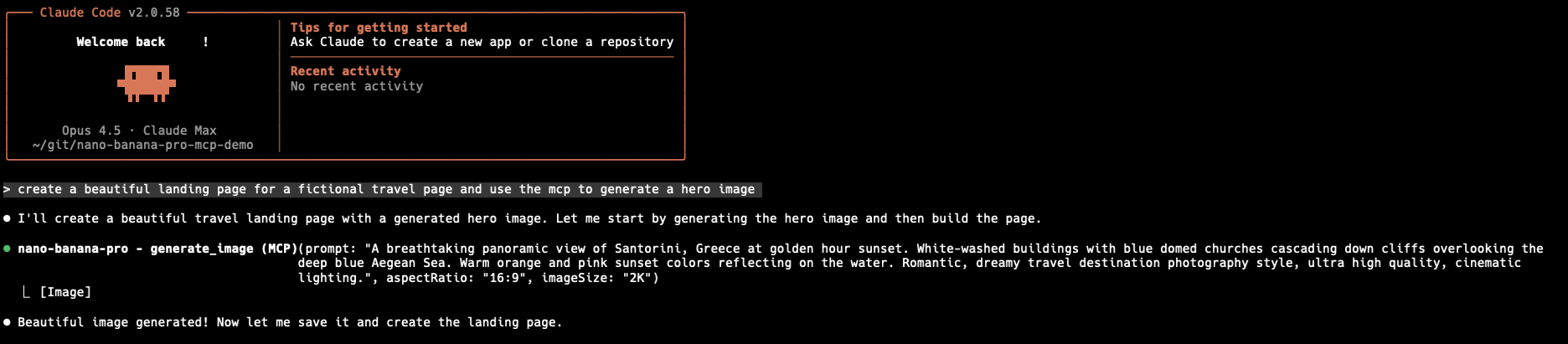
Here's Claude Code using the MCP to generate a hero image for a travel landing page:
And the beautiful result:

Installation
Claude Code CLI
claude mcp add nano-banana-pro --env GEMINI_API_KEY=your_api_key_here -- npx @rafarafarafa/nano-banana-pro-mcp
Replace your_api_key_here with your actual Gemini API key.
Claude Desktop
Add to your Claude Desktop configuration file:
macOS: ~/Library/Application Support/Claude/claude_desktop_config.json
Windows: %APPDATA%\Claude\claude_desktop_config.json
{
  "mcpServers": {
    "nano-banana-pro": {
      "command": "npx",
      "args": ["@rafarafarafa/nano-banana-pro-mcp"],
      "env": {
        "GEMINI_API_KEY": "your_api_key_here"
      }
    }
  }
}
Codex CLI
Create or edit .mcp.json in your project directory (or ~/.mcp.json for global config):
{
  "mcpServers": {
    "nano-banana-pro": {
      "command": "npx",
      "args": ["@rafarafarafa/nano-banana-pro-mcp"],
      "env": {
        "GEMINI_API_KEY": "your_api_key_here"
      }
    }
  }
}
Gemini CLI
Create or edit ~/.gemini/settings.json:
{
  "mcpServers": {
    "nano-banana-pro": {
      "command": "npx",
      "args": ["@rafarafarafa/nano-banana-pro-mcp"],
      "env": {
        "GEMINI_API_KEY": "your_api_key_here"
      }
    }
  }
}
Get an API Key
Get a free Gemini API key from Google AI Studio.
Available Tools
generate_image
Generate an image from a text prompt. Optionally provide reference images to guide the style or content.
Parameters:
prompt(required): Description of the image to generatemodel(optional): Gemini model to use (default:gemini-3-pro-image-preview)gemini-3-pro-image-preview- Nano Banana Pro (highest quality)gemini-2.5-flash-preview-05-20- Nano Banana (fast)gemini-2.0-flash-exp- Widely available fallback
aspectRatio(optional):"1:1"|"3:4"|"4:3"|"9:16"|"16:9"imageSize(optional):"1K"|"2K"|"4K"(only for image-specific models)images(optional): Array of reference images to guide generation- Each image:
{ data: "base64...", mimeType: "image/png" }
- Each image:
outputPath(optional): File path to save the generated image (e.g.,/path/to/image.png)
Example prompts:
Generate an image of a sunset over mountains

Generate a logo in the style of this reference image [with image attached]

Generate a hero image and save it to ./assets/hero.png
edit_image
Edit one or more images based on instructions.
Parameters:
prompt(required): Instructions for how to edit the image(s)images(required): Array of images to edit- Each image:
{ data: "base64...", mimeType: "image/png" }
- Each image:
model(optional): Gemini model to use (default:gemini-3-pro-image-preview)outputPath(optional): File path to save the edited image (e.g.,/path/to/image.png)
Example prompts:
Add sunglasses to this photo

Remove the background from this image

Combine these two images into one scene
describe_image
Analyze and describe one or more images. Returns text only (no image generation).
Parameters:
images(required): Array of images to analyze- Each image:
{ data: "base64...", mimeType: "image/png" }
- Each image:
prompt(optional): Custom analysis prompt (default: general description)model(optional): Gemini model to use (default:gemini-3-pro-image-preview)
Example prompts:
[default] Describe this image in detail

What objects are in this image?

How many people are in this photo?

What's the dominant color in this image?
Development
Setup
npm install
npm run build
Testing
npm test              # Run unit tests
npm run test:watch    # Run tests in watch mode
npm run typecheck     # Type check without emitting
Manual Testing
# Generate a real image and save to test-output.png
GEMINI_API_KEY=your_key npm run test:manual "a cute cat wearing sunglasses"
Testing with MCP Inspector
npx @modelcontextprotocol/inspector node dist/index.js
Then set GEMINI_API_KEY in the inspector's environment and call the generate_image tool.
License
MIT