MCP server for the Noona.app booking platform - check availability, book appointments, and manage bookings at any Noona-powered business
noona-mcp
MCP server for the Noona booking platform. Check availability, book appointments, and manage bookings at any Noona-powered business — barbershops, salons, massage parlors, restaurants, and more.
Uses the official Noona Marketplace API.
Disclaimer
This is an unofficial, personal project. It is not affiliated with, endorsed by, or connected to Noona (Noona Labs ehf.) in any way.
- For personal use only. Do not use this to spam bookings, scrape data at scale, or interfere with the normal operation of the Noona platform.
- The Noona Marketplace API is publicly documented and does not require authentication for standard integrations. This tool uses only the official documented endpoints.
- Use at your own risk. The author is not responsible for any consequences of using this tool, including but not limited to: missed appointments, incorrect bookings, API changes, or ToS violations.
Setup
1. Install
git clone https://github.com/matuspavliscak/noona-mcp.git
cd noona-mcp
npm install
2. Connect to your AI client
Claude Desktop
Open Settings → Developer → Edit Config (or edit ~/Library/Application Support/Claude/claude_desktop_config.json on macOS / %APPDATA%\Claude\claude_desktop_config.json on Windows):
{
  "mcpServers": {
    "noona": {
      "command": "node",
      "args": ["/absolute/path/to/noona-mcp/node_modules/.bin/tsx", "/absolute/path/to/noona-mcp/src/index.ts"]
    }
  }
}
Note: Claude Desktop doesn't have
npxin its PATH, so use the full path totsxinsidenode_modules. Replace/absolute/path/to/noona-mcpwith the actual path where you cloned the repo (e.g./Users/you/projects/noona-mcp).
After saving, restart Claude Desktop. You should see a hammer icon with 6 tools available.
Claude Code (CLI)
Add to ~/.claude/mcp.json:
{
  "mcpServers": {
    "noona": {
      "command": "npx",
      "args": ["tsx", "/absolute/path/to/noona-mcp/src/index.ts"]
    }
  }
}
Other MCP clients
Any MCP-compatible client works. The server uses stdio transport. Run it with:
npx tsx /path/to/noona-mcp/src/index.ts
3. Set up contact info (for booking)
Create ~/.noona/config.json with your booking details:
mkdir -p ~/.noona
cat > ~/.noona/config.json << 'EOF'
{
  "customerName": "Your Name",
  "customerPhone": "123456789",
  "phoneCountryCode": "420",
  "customerEmail": "your@email.com"
}
EOF
chmod 600 ~/.noona/config.json
The book-appointment tool reads this file automatically when contact fields are omitted. This keeps your personal info out of skill files, conversation history, and LLM context. The chmod 600 ensures only your user can read it.
Tools
| Tool | Description |
|------|-------------|
| get-company-info | Look up a Noona company or brand by URL/slug. Discovers locations for multi-branch businesses. |
| get-availability | Check available timeslots. Employee is optional. |
| list-employees | List all employees at a company. |
| list-services | List all services with prices. |
| book-appointment | Book an appointment (reserve + confirm). Contact fields optional if ~/.noona/config.json exists. |
| cancel-booking | Cancel an existing booking by ID. |
Note: Company, employee, and service data is cached in memory for 5 minutes to reduce API calls. If you've just made changes on the Noona side (e.g. added an employee or service), wait a few minutes or restart the MCP server to see updates.
Usage
You can use the tools directly, or create a Claude Code skill for businesses you visit regularly.
Direct usage
Just ask Claude:
"Check availability at noona.app/mybarbershop"
"Book me a haircut at mybarbershop tomorrow at 14:00"
Creating a skill (recommended)
Tell Claude to set one up for you:
"I'd like to create a new skill called /barber to book my appointments at https://noona.app/mybarbershop"
Claude will walk you through a guided setup, one question at a time:
- Location — if the business has multiple branches, pick one as your default
- Service — pick your go-to service from the list
- Barber/employee — pick your favorite or say "no preference"
- Contact info — name, phone, email — saved to
~/.noona/config.json(not in the skill file)
The skill file (~/.claude/skills/barber/SKILL.md) stores only your preferences (location, service, employee) — no personal data. Contact info is read from ~/.noona/config.json by the MCP server at booking time.
From then on, just say /barber and Claude shows availability for your preferred setup. Pick a time and you're booked.
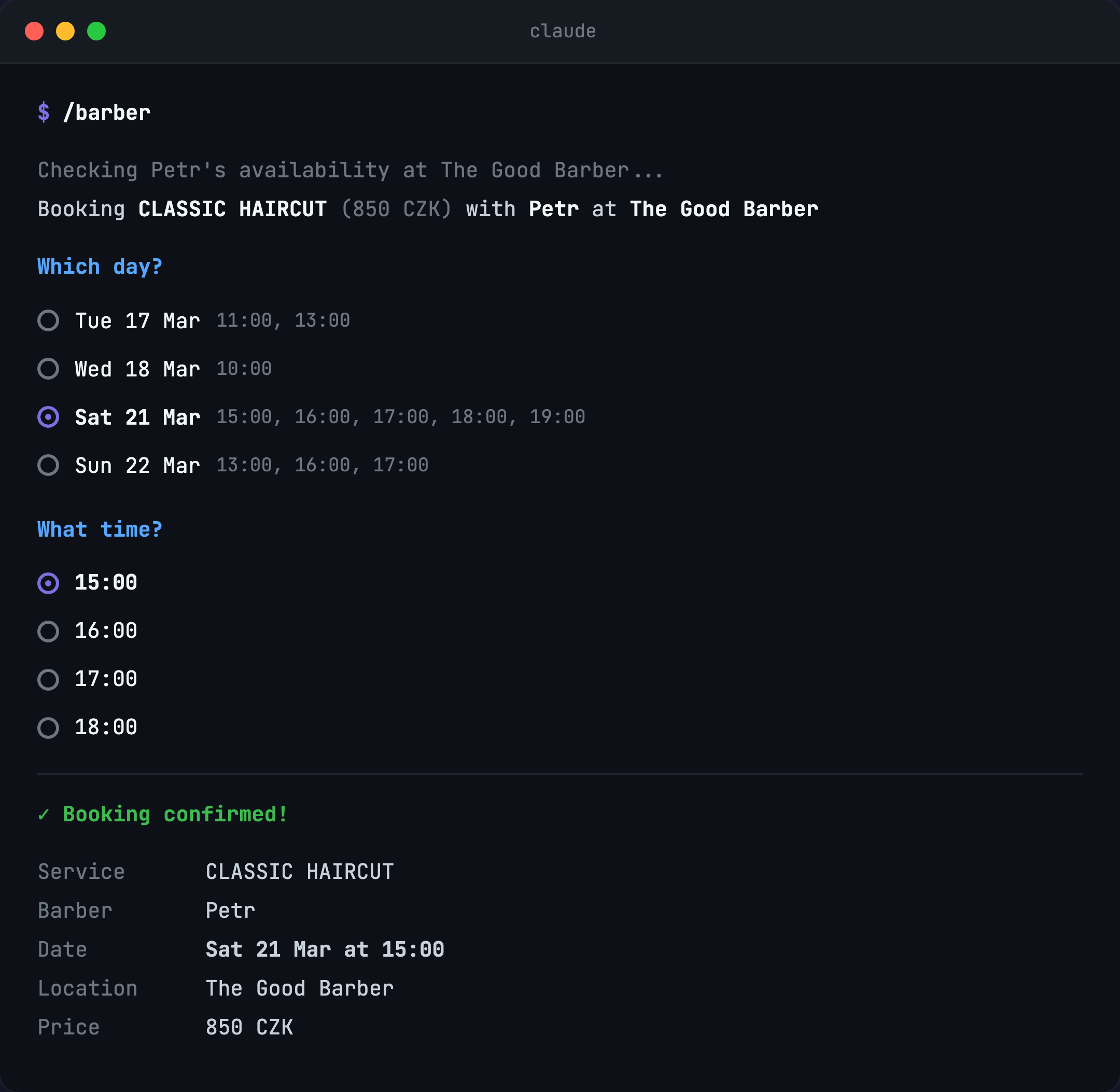
You can create multiple skills — /massage, /nails, /dentist — each pointing to a different Noona business with your preferred settings. They all share the same ~/.noona/config.json for contact info.
Troubleshooting
"Could not find a company or brand"
- Double-check the slug or URL — go to noona.app, search for the business, and copy the URL from the address bar.
- The Noona API might be temporarily unavailable. Try again in a few minutes.
tsx not found
- Make sure you ran
npm installin the project directory. - For Claude Desktop, use the full path to
tsxinsidenode_modules(see setup instructions above).
Stale data (missing employees or services)
- The server caches company, employee, and service data for 5 minutes. Restart the MCP server to force a refresh.
Booking fails with unclear error
- Ensure
~/.noona/config.jsonexists and contains valid JSON withcustomerName,customerPhone,phoneCountryCode, andcustomerEmail. - Check that the date format is
YYYY-MM-DDand time format isHH:MM.
License
MIT