MCP server that splits large images into optimally-sized tiles for LLM vision (Claude, OpenAI, Gemini, Gemini 3)
image-tiler-mcp-server


MCP server that tiles large images for LLM vision analysis.
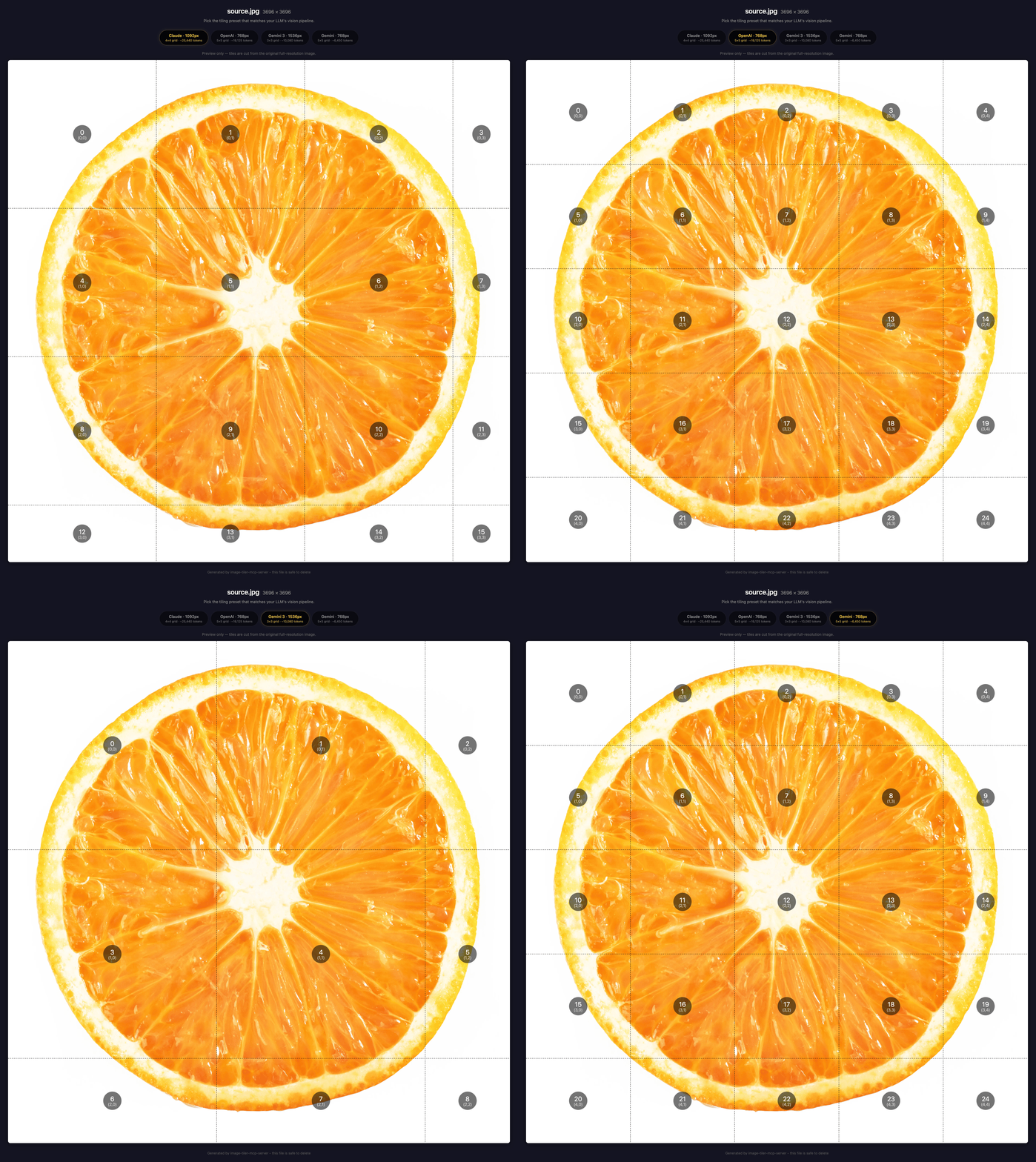 The server generates an interactive HTML preview for every image, showing per-model tile grids and token estimates
Quick Start
Claude Code
claude mcp add image-tiler -- npx -y image-tiler-mcp-server
image-tileris a local alias. You can name it anything you like.image-tiler-mcp-serveris the npm package that gets downloaded and run.
See Claude Code MCP docs for more info.
Codex CLI
codex mcp add image-tiler -- npx -y image-tiler-mcp-server
Or add to ~/.codex/config.toml:
[mcp_servers.image-tiler]
command = "npx"
args = ["-y", "image-tiler-mcp-server"]
VS Code (Cline / Continue)
Add to your VS Code MCP settings:
{
  "image-tiler": {
    "command": "npx",
    "args": ["-y", "image-tiler-mcp-server"]
  }
}
Cursor
Add to ~/.cursor/mcp.json:
{
  "mcpServers": {
    "image-tiler": {
      "command": "npx",
      "args": ["-y", "image-tiler-mcp-server"]
    }
  }
}
Claude Desktop
Add to your Claude Desktop config file:
- macOS:
~/Library/Application Support/Claude/claude_desktop_config.json - Windows:
%APPDATA%\Claude\claude_desktop_config.json - Linux:
~/.config/Claude/claude_desktop_config.json
{
  "mcpServers": {
    "image-tiler": {
      "command": "npx",
      "args": ["-y", "image-tiler-mcp-server"]
    }
  }
}
Restart Claude Desktop after editing.
Global Install (faster startup)
npm install -g image-tiler-mcp-server
Then use the simpler config in any client:
{
  "command": "image-tiler-mcp-server"
}
From Source
git clone https://github.com/keiver/image-tiler-mcp-server.git
cd image-tiler-mcp-server
npm install
npm run build
Then point your MCP config to the built file:
{
  "command": "node",
  "args": ["/absolute/path/to/image-tiler-mcp-server/dist/index.js"]
}
Usage
Tile an image
lets tile ~/Desktop/source.jpg
The server shows you a comparison of supported vision models with tile counts and token estimates. Pick the model that matches your use case, and the server tiles the image and returns them in batches for analysis.
Capture a web page
capture screenshot of https://example.com and analyze the content
The server launches Chrome, captures a full-page screenshot (scroll-stitching pages over 16,384px), then presents the same model comparison. Choose a model and the server tiles the capture for analysis.
To get only the screenshot without tiling, just ask for a screenshot and stop after the comparison step.
Customize tiling
| What | Example prompt | |------|---------------| | Target a specific model | "Tile hero.png for OpenAI" | | Keep full resolution | "Tile banner.png at full resolution, no downscaling" | | PNG output | "Tile diagram.png as lossless PNG" | | Tile from URL | "Download and tile https://example.com/chart.png" | | Tile from base64 | "Tile this base64 image: iVBORw0KGgo..." |
Supported Models
| Model | Default tile | Tokens/tile | Max tile | ID |
|-------|-------------|-------------|----------|-----|
| Claude | 1092px | 1590 | 1568px | claude |
| OpenAI (GPT-4o/o-series) | 768px | 765 | 2048px | openai |
| Gemini | 768px | 258 | 768px | gemini |
| Gemini 3 | 1536px | 1120 | 3072px | gemini3 |
OpenAI note: The
openaiconfig targets the GPT-4o / o-series vision pipeline (512px tile patches). GPT-4.1 uses a fundamentally different pipeline (32x32 pixel patches) and is not currently supported. It would require a separate model config with a different calculation approach.
Gemini 3 note: Gemini 3 uses a fixed token budget per image (1,120 tokens at default resolution, regardless of dimensions). Tiling increases total token cost but preserves fine detail. For cases where detail isn't critical, consider sending a single image instead.
Why tile? What LLMs do to large images
The Problem
You screenshot a full page, paste it into Claude, and Claude rejects it. Your 20,000px full-page screenshot? Claude won't even look at it. Anything over 8,000px on either dimension gets refused outright.
GPT-4o is more forgiving but still destructive: it first scales your image to fit within 2,048px, then scales the shortest side down to 768px, then tiles internally. An 8,192px-wide NASA panorama becomes ~1,456 x 768 before GPT-4o's own tiling even begins.
Gemini 1.5/2.0 handles large images natively at 768px tiles without downscaling. Gemini 3, however, caps each image at a fixed token budget (1,120 tokens at default resolution) regardless of size. Tiling gives each piece its own budget.
Each tile stays within the model's sweet spot, so the LLM processes it at full resolution.
What Happens Without Tiling
Using assets/portrait.png (3,600 x 20,220, a full-page National Geographic capture) as an example:
| Model | What happens | Impact | |-------|-------------|--------| | Claude | Rejected, exceeds 8,000px dimension limit | Cannot analyze the image at all | | GPT-4o | Downscaled to ~365 x 2,048, then internally tiled | ~1% of original pixels survive the downscale | | Gemini 3 | Capped at 1,120 tokens per image (default) | Fixed token budget regardless of image size |
Gemini 1.5/2.0 tiles large images natively at 768px without downscaling. For Gemini 3, tiling multiplies the total token budget by sending each tile as a separate image.
With Tiling
| Model | Tiles | Result | |-------|-------|--------| | Claude | 76 tiles at 1,092px | Every tile under 8,000px and 1,568px limits, full analysis | | GPT-4o | 135 tiles at 768px | Every tile under 2,048px, no pre-downscale needed | | Gemini 3 | 135 tiles at 768px | Each tile gets its own token budget |
Using assets/landscape.png (8,192 x 4,320, NASA image gallery):
| Model | Without tiling | With tiling | |-------|----------------|-------------| | Claude | Rejected (8,192 > 8,000px limit) | 32 tiles at 1,092px, full analysis | | GPT-4o | Downscaled to ~1,456 x 768 (~3% of pixels survive) | 66 tiles at 768px, full resolution | | Gemini 3 | Capped at 1,120 tokens | 18 tiles at 1,536px, 18x token budget |
Based on published model vision documentation as of Feb 2026: Claude vision limits · OpenAI vision guide · Gemini image understanding · Gemini media resolution
How It Works
This MCP server:
- Reads the image dimensions and the target model's vision config
- Calculates an optimal grid that keeps every tile within the model's sweet spot
- Extracts tiles as individual images (WebP default, PNG optional) and saves them to disk
- Returns a metadata summary (grid layout, file paths, token cost, per-tile content hints)
- Serves tiles on demand — call with
tilesDir+start/endto retrieve batches of up to 5 tiles
Auto-downscaling: Images over 10,000px on their longest side are automatically downscaled before tiling (configurable via maxDimension). This keeps tile counts reasonable and improves LLM comprehension by increasing content density per tile. Set maxDimension=0 to disable, or pass a custom value (e.g., maxDimension=5000) for more aggressive downscaling.
Tool Reference
tiler
One unified tool that handles all image tiling operations. The mode is auto-detected from the parameters you provide:
tilesDirpresent → Tile retrieval mode (read-only pagination)urlorscreenshotPathpresent → URL capture mode (screenshot + tile)filePath,sourceUrl,dataUrl, orimageBase64present → Tile-image mode
Mode priority: When multiple mode params are present, the tool resolves by priority:
tilesDir>url/screenshotPath>filePath/sourceUrl/dataUrl/imageBase64. Avoid passing params from different modes in the same call.
Workflow:
The tool uses a two-step process to let you choose the right model before tiling:
- Compare - Call with only the image source. Returns a comparison table showing tile counts and token estimates for each supported model, plus an interactive HTML preview.
- Tile - Call again with the chosen
preset+outputDirfrom step 1, plus:- Image sources: re-include your original source param (
filePath,sourceUrl, etc.) - Captures: use
screenshotPathfrom step 1 (not the originalurl)
- Image sources: re-include your original source param (
Skip the comparison step: Provide
presetandoutputDiron the first call to tile immediately.
Interactive model picker: Clients that support MCP elicitation get a dropdown picker instead of the comparison table.
Parameters - Image Source (tile-image mode)
| Parameter | Type | Required | Default | Description |
|---|---|---|---|---|
| filePath | string | no* | - | Absolute or relative path to the image file |
| sourceUrl | string | no* | - | HTTPS URL to download the image from (max 50MB, 30s timeout) |
| dataUrl | string | no* | - | Data URL with base64-encoded image |
| imageBase64 | string | no* | - | Raw base64-encoded image data |
*At least one image source is required for tile-image mode.
Parameters - URL Capture (capture mode)
| Parameter | Type | Required | Default | Description |
|---|---|---|---|---|
| url | string | no | - | URL of the web page to capture. Requires Chrome/Chromium installed (or CHROME_PATH env var). |
| screenshotPath | string | no | - | Path to a previously captured screenshot. Skips URL capture when provided. |
| viewportWidth | number | no | 1280 | Browser viewport width in pixels (320-3840) |
| waitUntil | string | no | "load" | When to consider the page loaded: "load", "networkidle", or "domcontentloaded" |
| delay | number | no | 0 | Additional delay in ms after page load (max 30000) |
Supports scroll-stitching for pages taller than 16,384px. Automatically triggers lazy-loaded images (loading="lazy") before capture by scrolling through the page. Pages without lazy images are unaffected.
Parameters - Tile Retrieval (pagination mode)
| Parameter | Type | Required | Default | Description |
|---|---|---|---|---|
| tilesDir | string | no | - | Path to tiles directory (returned by a previous tiling call as outputDir) |
| start | number | no | 0 | Start tile index (0-based, inclusive) |
| end | number | no | start + 4 | End tile index (0-based, inclusive). Max 5 tiles per batch. |
| skipBlankTiles | boolean | no | true | Skip blank tiles and return a text annotation instead of an image. Set to false to include all tiles. |
Parameters - Tiling Config (shared across modes)
| Parameter | Type | Required | Default | Description |
|---|---|---|---|---|
| preset | string | no | Auto (cheapest) | Target vision preset: "claude", "openai", "gemini", "gemini3". Auto-selects the most token-efficient preset when omitted. |
| tileSize | number | no | Model default | Tile size in pixels. Clamped to model's supported range with a warning if out of bounds. |
| maxDimension | number | no | 10000 | Max dimension in px (0 to disable, or 256-65536). Values 1-255 are silently clamped to 256. Pre-downscales the image so its longest side fits within this value before tiling. |
| outputDir | string | no | See below | Directory to save tiles. Defaults: for filePath sources, tiles/{name}_vN/ next to source (auto-incrementing: _v1, _v2, ..., _vN); for sourceUrl/dataUrl/imageBase64, {base}/tiles/tiled_{timestamp}_{hex}/; for captures, {base}/tiles/capture_{timestamp}_{hex}/. {base} is ~/Desktop, ~/Downloads, or ~ (first available). |
| page | number | no | 0 | Tile page to return (0 = first 5, 1 = next 5, etc.) |
| format | string | no | "webp" | Output format: "webp" (smaller, default) or "png" (lossless) |
| includeMetadata | boolean | no | true | Analyze each tile using Shannon entropy and return content classification (blank, low-detail, mixed, high-detail) plus entropy and sharpness values per tile |
| model | string | no | - | Deprecated. Use preset instead. Still accepted; emits a deprecation warning in the response. |
Behaviors
- Source conflict: Multiple image source params → highest-precedence source is used with a warning (
filePath>sourceUrl>dataUrl>imageBase64). - Re-entry: If
outputDiralready has a preview from the comparison step, the server skips straight to tiling. - Elicitation cancellation: Cancelling the model picker returns
"Tiling cancelled by user."without tiling. - Versioned output: Repeated tiling of the same source creates
_v1,_v2, ...,_vNdirectories to avoid overwriting. - Tile naming:
tile_ROW_COL.{format}with zero-padded 3-digit indices (e.g.,tile_000_003.webp), row-by-row, left-to-right.
Supported Formats
PNG, JPEG, WebP, TIFF, GIF
Troubleshooting
"Command not found" - Make sure Node.js 20+ is installed: node --version
"File not found" - Use absolute paths. Relative paths resolve from the MCP server's working directory.
"MCP tools not available" - Restart your MCP client after config changes. In Claude Code, run /mcp to check server status.
"Chrome not found" - Install Google Chrome or set the CHROME_PATH environment variable to the Chrome executable (must be an absolute path).
Running as root / in Docker - Set CHROME_NO_SANDBOX=1 to launch Chrome without sandbox (also enabled automatically when running as root).
Security
Local stdio server - runs with the same filesystem permissions as the MCP client that spawns it. No path sandboxing, no SSRF protection on URL downloads.
If deploying remotely: Add path validation, SSRF protection (block private/internal IP ranges), and authentication. This server is not designed for multi-tenant or network-exposed use.
Requirements
- Node.js 20+
- Compatible MCP client (Claude Code, Codex CLI, VS Code, Cursor, Claude Desktop)
Contributing
See CONTRIBUTING.md for how to report bugs, suggest changes, and submit PRs.
Acknowledgments
Built with the help of Claude Code as an AI assistant for code drafting, testing, and documentation.
License
MIT