An MCP server prototype for SWMF.
SWMF MCP Prototype Server
A small, demoable MCP server for SWMF-oriented workflows.
Intro (for friends new to MCP)
If you have never used MCP before, think of this project as a safe translator between a chat assistant and SWMF workflows.
- You ask a question in plain language, like "is my PARAM.in valid?"
- The assistant calls a specific server tool (for example
swmf_validate_param) - The tool runs only the allowed logic and returns structured results
- You get actionable feedback without giving the assistant unrestricted shell access
What MCP means here:
- MCP (Model Context Protocol) is just the bridge that lets an AI assistant call named tools with typed inputs
- This repository implements those tools for SWMF tasks (validation, explanation, setup guidance, quickrun helpers)
- Safety is intentional: narrow tool contracts instead of open-ended command execution
In short: this server makes SWMF support feel conversational while keeping behavior explicit, inspectable, and safer for demos.
This prototype is intentionally narrow and safe:
- no arbitrary shell execution
- no arbitrary file writes
- no repo-wide re-indexing
- focused on SWMF-specific read / validate / suggest workflows
Requirements
- Python 3.11+
uv(recommended) orpip
Install
Using uv (recommended)
uv venv
source .venv/bin/activate
uv sync
Using pip and venv
python -m venv .venv
source .venv/bin/activate
pip install -e .
SWMF source link
Create a soft link to SWMF in the project root:
ln -s /path/to/SWMF SWMF
Usage
Once installed and connected in MCP, you can ask natural-language questions in chat and the assistant will call SWMF tools.
Examples:
- "Validate this PARAM.in for Frontera before I waste a run. Don't try to fix."
- "Explain #COMPONENTMAP"
- "plot the beginning, intermediate and last frames of IH z=0 cut. plot func U. save them as separate images. use swmf-mcp-prototype."
- "Animate U in SC z=0 cuts with swmf-mcp-prototype and save as SC_z=0_U.mp4 video."
- "Prepare a new run for background solarwind with mrzqs1908*.fits GONG map and with AWSoM model in Run_Min folder. Use 1.0e6 for Poynting flux."
VS Code MCP config
IDL extension and MCP for VS Code is recommended. Get it from VS Code extension store.
- Locate your workspace folder.
- Edit
.vscode/mcp.json. Example MCP server config withswmf_root:
{
	"servers": {
		"swmf-prototype": {
			"command": "python",
			"args": ["-m", "swmf_mcp_server.server"],
			"cwd": "/absolute/path/to/swmf-mcp-prototype",
			"env": {
				"swmf_root": "/absolute/path/to/SWMF"
			}
		}
	}
}
- Click on "Start" to start SWMF MCP server.
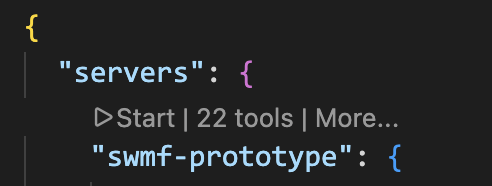
- Now open Github Copilot and chat. You shall see
swmf-prototypeinConfigure Tools..menu.
Implemented tools:
swmf_validate_paramswmf_run_testparamswmf_detect_setup_commandsswmf_apply_setup_commandsswmf_infer_job_layoutswmf_explain_paramswmf_prepare_buildswmf_prepare_runswmf_prepare_idl_workflowswmf_prepare_component_configswmf_explain_component_config_fixswmf_inspect_fits_magnetogramswmf_prepare_sc_quickrun_from_magnetogramswmf_validate_external_inputsswmf_generate_param_from_templateswmf_list_tool_capabilitiesswmf_list_available_componentsswmf_find_param_commandswmf_get_component_versionsswmf_find_example_paramsswmf_trace_param_commandswmf_diagnose_param
Fast Diagnosis Path
swmf_diagnose_param is a diagnosis-first, one-call workflow designed for troubleshooting speed.
Pipeline stages:
- Stage 1: resolve SWMF root, run directory, and PARAM input once.
- Stage 2: run cheap preflight checks (external references + lightweight PARAM parser checks + required component inference).
- Stage 3: run authoritative
Scripts/TestParam.plwhenever possible. - Stage 4: synthesize likely root cause, fastest likely fix, and recommended commands.
Returned diagnosis payload includes:
summaryroot_causesfastest_likely_fixauthoritative_resultrecommended_commandsrecommended_next_stepauthority_by_field
Fast-path behavior:
- If
nprocis omitted and job-layout inference fails, diagnosis falls back tonproc=1to still attempt authoritative validation instead of stopping early. - If only
param_textis provided (noparam_path), preflight still runs, but authoritative execution is marked as not executed with an explicit reason.
Execution context rules:
- SWMF top-level helpers (for example
Scripts/TestParam.pl,Config.pl) are launched with working directory at the resolved SWMF source root. - Run-directory helpers (for example
Restart.pl,PostProc.pl) can run from a run directory when that workflow expects run-local context. - This distinction matters because
TestParam.plexpects top-level SWMF files (for exampleConfig.pl,PARAM.XML) relative to launch context.
Performance notes for authoritative validation:
swmf_run_testparamandswmf_diagnose_paramuse a fast defaultnproc=1whennprocis omitted and nojob_script_pathis provided.- Job-layout inference is only attempted when
job_script_pathis explicitly provided. swmf_run_testparamcaches recent authoritative results for unchanged inputs (swmf_root,param_path, requestednproc) and returnsfrom_cache: trueon cache hits.
Architecture (layered)
Request Flow Diagram
%%{init: {'flowchart': {'curve': 'basis'}}}%%
flowchart TB
    U["User in Chat"] --> A["AI Assistant"]
    A -->|MCP tool call| S["SWMF MCP Server"]

    S --> T["Tool Layer"]
    T --> V["Service Layer"]
    V --> P["Parsing + Discovery + Catalog"]

    P --> X["SWMF Sources"]
    X --> P

    K["Curated Knowledge"] --> V

    T -->|structured response| A
    A --> U

    subgraph Inputs
        K
        X
    end

    subgraph Layers
        T
        V
        P
    end
The server is now a thin MCP adapter over explicit subsystems:
src/swmf_mcp_server/server.py- MCP registration and request mapping only
- no XML parsing, no template scanning, no TestParam subprocess assembly
src/swmf_mcp_server/core/- typed models, authority/source-kind constants, config defaults, error payload helpers
src/swmf_mcp_server/discovery/- SWMF root detection with explicit arg/env/run-dir and workspace symlink-aware heuristics
- filesystem safety helpers and mtime utilities
src/swmf_mcp_server/catalog/- unified source-catalog construction with mtime cache invalidation
- XML command indexing, component/version discovery, script indexing, template/example indexing, IDL macro discovery
src/swmf_mcp_server/parsing/- lightweight PARAM parser
- component-map expansion checks
- external-reference extraction
- scheduler/job layout inference
src/swmf_mcp_server/services/explain_service.py: authoritative-first explain flow with curated enrichmentretrieve_service.py: component/version/command/example retrieval and tracingvalidation_service.py: lightweight validation and unresolved-reference classificationtestparam_service.py: authoritativeScripts/TestParam.plexecution onlybuild_service.py: build/config planning and component-config guidancerun_service.py: starter PARAM generation, setup command detection/execution, job-layout orchestrationtemplate_service.py: template selection and adaptationsolar_quickrun_service.py: isolated non-authoritative solar quickrun heuristicsidl_service.py: IDL and FITS helper workflows
src/swmf_mcp_server/knowledge/curated.py- small hand-authored summaries only (not authoritative semantics)
Source Of Truth Policy
The server explicitly reports source provenance and authority for explain/retrieval outputs.
Source kinds used in responses include:
curatedPARAM.XMLcomponent PARAM.XMLexample PARAM.inTestParam.plmanual/docs(when applicable)
Authority levels:
heuristic: convenience-only or curated fallbackderived: deterministic extraction from examples/templatesauthoritative: direct metadata fromPARAM.XML/ componentPARAM.XML, or TestParam execution
swmf_explain_param behavior:
- first queries indexed authoritative XML sources
- then enriches with curated summaries when available
- returns source paths, source kinds, defaults/ranges/allowed values when extractable
swmf_validate_param behavior:
- remains safe/lightweight parser mode
- distinguishes:
- syntax/structure errors
- inferred issues
- unresolved external references
- explicit
requires_authoritative_validation
- authoritative path remains
swmf_run_testparam
Every major explain/retrieve/validation/testparam response includes:
authoritysource_kindsource_pathsswmf_root_resolved
What Remains Heuristic
These areas are intentionally heuristic and marked in tool outputs:
- quickrun generation from magnetogram metadata
- natural-language IDL visualization request parsing
- template patching suggestions when constructing quick-run PARAM text
Authoritative validation and semantics still require:
Scripts/TestParam.pl- SWMF
PARAM.XMLdefinitions - component-specific docs and real run-time checks
Path-aware inputs for run-directory workflows:
swmf_roottool argumentSWMF_ROOTenvironment variablerun_dirlocal heuristics
What this prototype is for
This server is meant to feel like an SWMF-aware assistant for a group demo.
It focuses on the SWMF workflow around:
Config.plPARAM.inPARAM.XMLScripts/TestParam.plmake rundirRestart.plPostProc.pl
It does not replace real SWMF validation. The authoritative SWMF-side checks still come from:
PARAM.XMLScripts/TestParam.pl
SWMF root resolution
Tools that need SWMF context resolve the source tree in this order:
- explicit
swmf_rootargument SWMF_ROOTenvironment variable- local
run_dirheuristics and workspace-relative symlink candidates:run_dirrun_dir.parentrun_dir.parent.parent- workspace children/symlinks that resolve to SWMF marker layout
The server only accepts a candidate as SWMF root when all of these markers exist:
Config.plPARAM.XMLScripts/TestParam.pl
If resolution fails, tool responses return:
ok: falsehard_error: true- a concise
message how_to_fixguidanceswmf_root_resolved: null
No unrestricted full-filesystem crawl is performed.
Working from a separate run directory
You can call tools while your current shell/editor location is a run directory outside the SWMF source tree.
Recommended approaches:
- pass
swmf_rootexplicitly in the tool call - set
SWMF_ROOTonce in MCP server environment - pass
run_dirso local parent checks can resolve SWMF safely
For swmf_validate_param:
- provide
param_textdirectly, or - provide
param_path - if both are provided,
param_textis used - relative
param_pathresolves relative torun_dirwhen provided, otherwise current working directory - this tool is lightweight parser-only and does not run
TestParam.pl - for authoritative SWMF validation, use
swmf_run_testparam
IDL workflow prepare tools
swmf_prepare_idl_workflow is a safe, demo-focused planner for SWMF IDL macro workflows covered by the IDL manual.
Deterministic calling contract:
- provide
taskwhen possible (recommended for agents) requestis optional helper text- at least one of
taskorrequestis required
Supported workflow families:
- read snapshots (
read_data,show_data) - plot fields (
plot_data, commonplotmodevalues) - animate output files (
animate_data, movie options) - export plots/animations in requested format (
output_format) and artifact namespace (artifact_name) - transform grids (
transformwith regular/polar/unpolar/sphere heuristics) - compare datasets (
compare, optional difference plotting) - read and plot logs (
read_log_data,plot_log_data)
Generic output controls for both IDL tools:
output_format:none,png,jpeg,bmp,tiff,ps,mp4,mov,aviartifact_name: output namespace or basenamepreview: whether to show interactive animation when supportedframe_indices: optional explicit frame index list for animation sampling
Animation/movie optimization in the generic tool:
- when
output_formatismp4,mov, oravi, generated IDL usesvideofileandvideorate - when
output_formatis image-based (png,jpeg,bmp,tiff,ps), generated IDL usesmoviedir
Important plot export note:
- For
task='plot', SWMF IDLset_devicewrites PostScript output. - Non-PS image outputs for plot workflows are produced by converting the generated
.psfile (the tool returns example conversion commands).
For machine introspection and robust agent planning, use:
swmf_list_tool_capabilities
What it does:
- parses a narrow natural-language request (variable, cut plane, movie format)
- suggests shell commands to combine output files into one
.outs - returns an IDL script text that calls
animate_dataand saves MP4 - suggests an execution sequence
What it does not do:
- does not execute shell commands
- does not create files
Example request:
- please visualize and animate U in SC z=0 cuts and save as mp4 video
Typical prepared shell commands:
cd /path/to/run_or_output_dircat *z=0*.out > z=0.outsIDL_PATH="/path/to/SWMF/share/IDL/General:${IDL_PATH:-}" IDL_STARTUP=idlrc idl < animate_z0_u_animation.pro
Example returned IDL script text:
filename='z=0.outs'
func='u'
plotmode='contbar'
plottitle='U in SC z=0 cut'
savemovie='mp4'
videofile='z0_u_animation'
videorate=10
showmovie='n'
animate_data
Notes:
- the tool assumes you run IDL from the directory that contains output files
- if SWMF root cannot be resolved, the tool still prepares output but warns that
IDL_PATHmay need manual setup - patterns for combining files are heuristic and may need manual adjustment for your run
Fixing missing component versions
Validation can fail when PARAM.in references real components (for example SC) but the SWMF build only includes Empty component versions.
Use swmf_prepare_component_config to infer required components from PARAM.in (#COMPONENTMAP, #BEGIN_COMP, and #COMPONENT sections) and return a safe Config.pl suggestion.
Example:
- PARAM.in requires
SC - tool returns
./Config.pl -v=Empty,SC/BATSRUS - then rebuild with
make cleanandmake -j
Deterministic workflow:
- run
swmf_validate_paramfor lightweight structure checks only - run
swmf_run_testparamfor authoritative SWMF validation - if
swmf_run_testparamdetects likely missing compiled component versions, it returnscomponent_config_hintfromswmf_prepare_component_config
swmf_run_testparam returns:
swmf_root_resolvedexit_code,stdout,stderrraw_testparam_outputquick_interpretationlikely_missing_component_versions- no automatic remediation actions unless explicitly requested in a later tool call
Safety:
- these tools do not execute
Config.pl - these tools do not modify files
- no generic shell fallback is used outside MCP server tools
Detecting setup commands in PARAM.in
swmf_detect_setup_commands scans PARAM text for embedded setup/build commands and only accepts a strict whitelist.
Allowed commands:
Config.pl ..../Config.pl ...make cleanmake -j(ormake -jN)
If command-like lines are present but rejected (for example containing pipes or redirection), they are returned in rejected_candidates with reasons.
swmf_validate_param remains lightweight, but now reports:
setup_commands_detecteddetected_setup_commandsrecommended_next_tool(typicallyswmf_apply_setup_commandswhen commands are found)
Applying setup commands safely
swmf_apply_setup_commands can execute setup commands explicitly.
Safety behavior:
- never auto-runs from
swmf_validate_param - executes only whitelisted commands
- runs only in
swmf_root_resolved - no shell pipelines
- no redirects
- no background jobs
- no arbitrary command execution
Execution output includes per-command:
- normalized command
- argv
- cwd
- exit code
- stdout/stderr
Inferring nproc from job scripts
swmf_infer_job_layout reads a job script either from job_script_path or by searching run_dir for likely scripts (job.*, *.slurm, *.sbatch, or files containing #SBATCH).
It extracts/infers:
schedulermachine_hint(for examplejob.fontera->fontera)nodestasks_per_nodentasks_total- launch entries from
ibrun swmf_rank_offsetswmf_nproc
swmf_run_testparam and swmf_prepare_run now support omitting nproc; they attempt job-script inference and report the source.
Example: job.fontera
Given:
#SBATCH -N 30#SBATCH --tasks-per-node 56ibrun -n 1 ./PostProc.pl ...ibrun -o 56 -n $(( (SLURM_NNODES - 1 ) *56 )) ./SWMF.exe ...
Expected inferred values:
- total allocated ranks:
1680 - postproc detected: true
- SWMF rank offset:
56 - SWMF rank count:
1624
Solar quickrun from GONG FITS
The prototype includes deterministic, safety-focused tools to support a quick workflow:
- inspect FITS metadata (
swmf_inspect_fits_magnetogram) - prepare heuristic SC quickrun suggestions (
swmf_prepare_sc_quickrun_from_magnetogram) - verify external file references (
swmf_validate_external_inputs) - run parser validation (
swmf_validate_param) - run authoritative SWMF validation (
swmf_run_testparam)
Safety model for this workflow
- no arbitrary shell execution
- no automatic
Config.plormakeexecution - no automatic
PARAM.inwrites - return structured suggestions and explicit warnings
Tool schemas (new)
swmf_inspect_fits_magnetogram
Input:
{
	"fits_path": "string",
	"run_dir": "string | null",
	"swmf_root": "string | null",
	"read_data": "boolean"
}
Output (stable fields):
{
	"ok": true,
	"message": "FITS metadata inspection completed.",
	"fits_path_resolved": "/abs/path/map.fits",
	"instrument": "GONG",
	"source": "NSO",
	"observation_date": "2026-03-10T00:00:00",
	"map_date": "2026-03-11T00:00:00",
	"carrington_rotation": "2311",
	"dimensions": {"naxis": 2, "naxis1": 3600.0, "naxis2": 1440.0},
	"coordinate_system_hints": {"ctype1": "CRLN-CEA", "ctype2": "CRLT-CEA"},
	"probable_map_type": "synoptic",
	"warnings": [],
	"suggested_next_tool": "swmf_prepare_sc_quickrun_from_magnetogram"
}
swmf_prepare_sc_quickrun_from_magnetogram
Input:
{
	"fits_path": "string",
	"run_dir": "string | null",
	"swmf_root": "string | null",
	"mode": "sc_steady | sc_ih_steady | sc_ih_timeaccurate",
	"nproc": "integer | null",
	"job_script_path": "string | null"
}
Output (stable fields):
{
	"ok": true,
	"heuristic": true,
	"swmf_root_resolved": "/abs/path/SWMF",
	"recommended_components": ["SC/BATSRUS", "IH/BATSRUS"],
	"recommended_config_pl_command": "./Config.pl -v=Empty,SC/BATSRUS,IH/BATSRUS",
	"recommended_build_steps": ["./Config.pl -install", "Config.pl -v=Empty,SC/BATSRUS,IH/BATSRUS", "Config.pl -nodebug -O4", "Config.pl -show", "make -j"],
	"recommended_run_steps": ["make rundir", "mv run quick_sc_ih_steady", "Scripts/TestParam.pl -n=64 quick_sc_ih_steady/PARAM.in", "cd quick_sc_ih_steady"],
	"inferred_nproc": 64,
	"inferred_nproc_source": "job_script_inference",
	"suggested_param_template_text": "...",
	"suggested_param_patch_summary": ["..."],
	"solar_alignment_hints": ["..."],
	"external_input_warnings": ["..."],
	"validation_plan": ["..."],
	"recommended_next_tool": "swmf_validate_external_inputs"
}
swmf_validate_external_inputs
Input:
{
	"param_text": "string | null",
	"param_path": "string | null",
	"run_dir": "string | null",
	"swmf_root": "string | null"
}
Output (stable fields):
{
	"ok": false,
	"missing_files": ["/abs/path/missing_gong.fits"],
	"existing_files": ["/abs/path/RESTART.in"],
	"ambiguous_references": ["$MAG_INPUT"],
	"warnings": ["Solar external input reference detected: gong_synoptic.fits. Confirm coordinate alignment and date/rotation consistency."],
	"suggested_next_tool": "swmf_validate_param"
}
swmf_generate_param_from_template (optional helper)
Input:
{
	"template_kind": "solar_sc | solar_sc_ih",
	"fits_path": "string | null",
	"run_dir": "string | null",
	"swmf_root": "string | null",
	"nproc": "integer | null"
}
Output fields:
{
	"ok": true,
	"template_found": true,
	"template_source": "/abs/path/template/PARAM_SC.in",
	"heuristic": true,
	"suggested_param_text": "...",
	"suggested_param_patch_summary": ["..."]
}
Example: SC-only run from GONG FITS
Request:
{
	"tool": "swmf_prepare_sc_quickrun_from_magnetogram",
	"arguments": {
		"fits_path": "input/gong_synoptic.fits",
		"run_dir": "/path/to/run_demo",
		"swmf_root": "/path/to/SWMF",
		"mode": "sc_steady"
	}
}
Typical highlights in result:
- recommended components include
SC/BATSRUS - output marked
heuristic: true - includes suggested
PARAMtemplate text and validation plan
Example: SC+IH run from GONG FITS
Request:
{
	"tool": "swmf_prepare_sc_quickrun_from_magnetogram",
	"arguments": {
		"fits_path": "input/gong_synoptic.fits",
		"run_dir": "/path/to/run_demo",
		"swmf_root": "/path/to/SWMF",
		"mode": "sc_ih_steady",
		"job_script_path": "job.frontera"
	}
}
Typical highlights in result:
- recommended components include
SC/BATSRUSandIH/BATSRUS inferred_nproc_sourcecan bejob_script_inference- returns
solar_alignment_hintsandexternal_input_warnings
Heuristic vs authoritative checks
Heuristic outputs:
- FITS map classification (
probable_map_type) - quickrun component/layout suggestions
- suggested PARAM template/patch text
Authoritative outputs:
- SWMF parser and semantic checks from
Scripts/TestParam.plviaswmf_run_testparam