Unified mobile E2E MCP — 28 tools (mobile-mcp + Maestro + RN-debugger parity)
🎙️ podium-mcp
One baton. Every instrument.
A single stdio endpoint with 28 tools for iOS-simulator device control, UI automation, end-to-end flows, and React Native debugging — one connection instead of several.






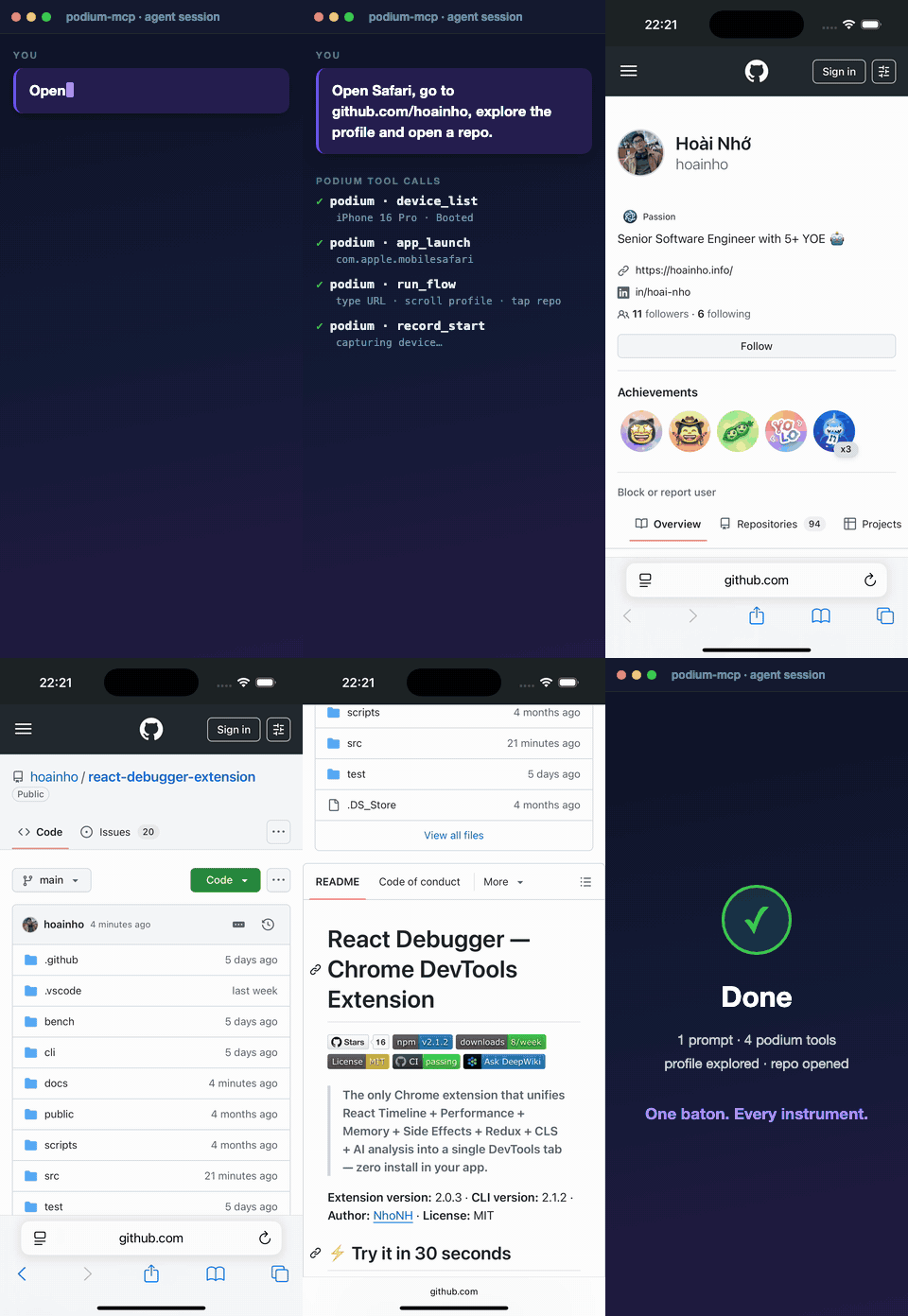
One prompt → podium drives Safari live → types the URL → explores the profile → opens a repo. Footage captured on a live iPhone 16 Pro simulator.
A podium is where a maestro stands — one place to conduct the whole orchestra. This MCP server unifies three capability sets into a single stdio endpoint: device management (via simctl, with graceful adb support), UI inspection, interaction, and declarative end-to-end flows (driven through the Maestro flow engine), and React Native debugging (Metro console logs over CDP + crash reports). Rather than wiring several separate MCP servers into every client config, podium-mcp exposes everything behind one connection, with a shared exec layer, consistent error handling, and a single health-check tool to confirm what toolchain is available on the host machine.
Table of contents
- Why
- Requirements
- Installation
- Usage
- Prompt playbook
- Capability coverage
- Tool reference
- Documented limits
- Architecture
- Development
- Full tool catalog
- Verified end-to-end
- Design ideas
- Contributing
- Security
- License
Why
Driving a React Native app end-to-end usually means juggling three MCP servers — one for device/app control, one for UI flows, one for Metro/debugger logs — each with its own config entry, its own quirks, and its own failure modes. podium-mcp collapses that into one server with:
- a single
execFile-based command runner (no shell — arguments are passed verbatim), - consistent structured errors (a tool never crashes the server),
- automatic retry around Maestro's known iOS-driver flakiness,
- graceful degradation when a toolchain (e.g.
adb) is absent.
Requirements
- macOS with Xcode command-line tools (
xcrun,simctl) - Node.js ≥ 22 (uses native
fetchandWebSocket) - Maestro on
PATH(or at~/.maestro/bin) for flow/interaction tools - (optional) Android SDK +
adb— adb paths degrade gracefully when absent - (optional) a running Metro bundler for the
metro_*debugging tools
Installation
git clone git@github.com:hoainho/podium-mcp.git
cd podium-mcp
npm install
npm run build
Usage
Register the built server with any MCP client. Claude Code (.mcp.json):
{
  "mcpServers": {
    "podium": {
      "type": "stdio",
      "command": "node",
      "args": ["/absolute/path/to/podium-mcp/dist/index.js"]
    }
  }
}
Quick manual smoke test over raw stdio (lists the registered tools):
printf '%s\n' \
  '{"jsonrpc":"2.0","id":1,"method":"initialize","params":{"protocolVersion":"2024-11-05","capabilities":{},"clientInfo":{"name":"smoke","version":"0"}}}' \
  '{"jsonrpc":"2.0","method":"notifications/initialized"}' \
  '{"jsonrpc":"2.0","id":2,"method":"tools/list"}' | node dist/index.js
Then call podium_health first to confirm which toolchain is available on the host.
Prompt playbook
Copy-paste prompts for common React Native testing & debugging tasks — e2e flows,
test cases, feature verification, bug fixing, and device control — live in
prompts/. Each prompt names the podium tools it drives and was
validated against a real simulator. Start with
prompts/README.md.
Capability coverage (the 5 requirements)
| # | Requirement | podium tools | Verified on a real RN app |
|---|---|---|---|
| 1 | Read all info from device | device_list, screen_size, orientation_get, app_list, app_state, podium_health | ✅ screen 1206×2622, app_list resolves bundle id + name |
| 2 | Control device | app_launch/terminate/install/uninstall, tap_on, swipe, input_text, press_key, set_location, orientation_set, open_url | ✅ tap, key, location, orientation all pass |
| 3 | Screenshot / capture | screenshot, record_start/record_stop (video) | ✅ PNG + QuickTime .mp4 |
| 4 | Make e2e | run_flow, inspect_screen, cheat_sheet + gestures | ✅ flow pass with per-step results |
| 5 | Everything behind one connection | all 28 tools below — device, automation, capture, and debugging in a single endpoint | ✅ see tool catalog |
Tool reference (28 tools)
| Tool | Key params | Backing engine | Failure behavior |
|---|---|---|---|
| podium_health | — | which probes | Never fails; booleans for xcrun / maestro / adb |
| device_list | — | simctl list --json + adb devices | adb absent → android: { available: false } (graceful) |
| device_boot | udid | simctl boot | Structured tool error |
| app_install | udid, path | simctl install | Structured tool error |
| app_launch | udid, bundleId | simctl launch | Structured tool error |
| app_terminate | udid, bundleId | simctl terminate | Structured tool error |
| screenshot | udid, saveTo? | simctl io screenshot | Returns path + byteSize (no base64 bloat) |
| open_url | udid, url | simctl openurl | Structured tool error |
| set_location | udid, latitude, longitude | simctl location set | Codifies the QA geo-spinner fix |
| app_state | udid, bundleId | simctl listapps + launchctl list | { installed, running } |
| app_list | udid | simctl listapps + plutil JSON | { count, apps: [{bundleId, name, type}] } |
| app_uninstall | udid, bundleId | simctl uninstall | Structured tool error |
| screen_size | udid | simctl io screenshot + sips | { widthPx, heightPx } (real pixels) |
| orientation_get | udid | screenshot aspect ratio | { orientation, widthPx, heightPx, basis } (heuristic — no direct sim query) |
| orientation_set | udid, bundleId, value | ephemeral Maestro setOrientation | PORTRAIT / LANDSCAPE_LEFT / LANDSCAPE_RIGHT / UPSIDE_DOWN |
| record_start | udid, saveTo? (.mp4) | detached simctl io recordVideo | { ok, path, pid }; one recording per udid |
| record_stop | udid | SIGINT the recorder + flush | { ok, path, sizeBytes } |
| inspect_screen | udid | maestro hierarchy | Structured error incl. unsupported-version detection |
| tap_on | udid, bundleId, text|id|x+y, double?, long? | ephemeral Maestro flow | Validation before exec; idb retry (below) |
| input_text | udid, bundleId, text, submit? | ephemeral Maestro flow | idb retry |
| swipe | udid, bundleId, direction, start/end? | ephemeral Maestro flow | idb retry |
| press_key | udid, bundleId, key | ephemeral Maestro flow | idb retry; back/power/tab are Android-only |
| run_flow | udid + exactly one of yaml/files/dir(+tags), env? | maestro test | Exactly-one-of validated before exec; per-step results |
| cheat_sheet | — | bundled assets/maestro-cheat-sheet.yaml | Fully offline |
| metro_apps | port? (8081) | GET http://localhost:<port>/json | Metro down → structured metro not running |
| metro_logs | webSocketDebuggerUrl? / port?, durationMs?, maxLogs? | native WebSocket + CDP Runtime.enable | Auto-discovers first app when URL omitted |
| crash_list | processName?, sinceHours?, udid? | ~/Library/Logs/DiagnosticReports + sim container | Empty list when dir unreadable |
| crash_get | id, udid? | same | Path-traversal-safe (basename only); truncates honestly |
Ephemeral-flow interaction model
Imperative gestures (tap_on, input_text, swipe, press_key) are implemented by generating a minimal Maestro flow with launchApp: { stopApp: false } — the app is foregrounded without restarting, so sequential interactions preserve app state. One flow engine backs both declarative flows and one-off gestures.
Known idb flakiness — retry policy
Maestro's iOS driver intermittently fails with Failed to connect to 127.0.0.1:<port> / java.net.ConnectException. All flow executions automatically retry up to 2 times with 2s / 5s backoff and report the retries count in the result. If the error persists after retries, the structured failure includes the raw output — the usual remedies are rebooting the simulator (device_boot after shutdown) or restarting the Maestro daemon.
Documented limits (by design, not bugs)
- WebGL canvas content is un-automatable — no DOM/hierarchy; taps don't reach the canvas.
inspect_screenreturns the native layer only. - No Android SDK assumption — every adb-backed path degrades to a structured "adb not found" result instead of failing.
- WebView content-process memory is unreadable from the app sandbox (iOS/Android platform limit) — use indirect signals (memory warnings, process terminations).
- Maestro
text:matcher is full-string regex (IGNORE_CASE) — partial strings don't match; copy hierarchytextverbatim or anchor with.*. record_start/record_stopkeep recorder state in-process (one Map per udid, server is long-lived). Clients must serializestart→ … →stopon the same connection; firing both in one un-awaited batch races. One active recording per udid.orientation_getis a screenshot-aspect heuristic — iOS simulators expose no direct orientation query, so it infers portrait/landscape from pixel dimensions (basisfield states this).
Architecture
src/
  index.ts          # MCP server entry — registers every tool group
  lib/
    exec.ts         # execFile-based command runner (NO shell) + commandExists
    result.ts       # shared ok/error MCP content helpers
    simctl.ts       # xcrun simctl wrappers (device + app + screen)
    maestro.ts      # Maestro engine: flow runner, idb retry, hierarchy
    metro.ts        # Metro CDP — app discovery + console log capture
    crash.ts        # DiagnosticReports crash listing/reading
    recording.ts    # detached screen recording lifecycle
  tools/            # one file per tool group (health, device, screen, flow, debug)
assets/             # bundled offline Maestro cheat sheet
docs/               # tool catalog + e2e transcript
Development
npm run build       # tsc
npm run typecheck   # tsc --noEmit
npm test            # vitest run (61 tests; exec/network layer mocked — no sim needed)
Standards: TypeScript strict, no as any / @ts-ignore, no shell execution
(all commands via lib/exec.ts), tools return structured errors instead of throwing.
See CONTRIBUTING.md for the full guide and the "add a new tool" checklist.
Full tool catalog
See docs/tool-catalog.md for the authoritative tool-by-tool reference — every tool with its parameters, backing engine, and fallback behavior, plus the items deferred to a future version (cloud execution, live viewer).
Verified end-to-end
See docs/e2e-demo.md for a real transcript against a booted iPhone 16 Pro simulator running a production React Native app.
Platform note: macOS + iOS Simulator is the primary target. Android degrades gracefully — tools check for
adbat runtime and return informative errors when the Android SDK is absent rather than failing hard.
Design ideas
podium-mcp is built around a few deliberate principles:
- One podium, one connection. A single server fronts every mobile capability — device, UI, flows, capture, and debugging — so an agent configures one endpoint and discovers all 28 tools at once, instead of stitching together several servers.
- Safe by construction. Every external command runs through an
execFilelayer with an explicit argument array — never a shell string — so tool inputs (udids, paths, selectors, flow YAML) can't be interpreted as commands. - Never crash the conductor. Tools return structured results and errors instead of throwing; one bad call can't take the server down.
- Degrade, don't fail. A missing toolchain (e.g. Android's
adb) yields an informative result rather than a hard error. - Resilient automation. Flaky simulator drivers are retried with backoff, and every result reports exactly what happened (including the retry count).
How to use it, in order
podium_health— confirmxcrunandmaestroare available on the host.device_list— pick a booted simulatorudid.- Read state —
app_list,app_state,screen_size,orientation_get. - Drive the device —
app_launch, thentap_on/input_text/swipe/press_key, plusset_locationandorientation_set. - Author end-to-end checks —
inspect_screento discover element text/ids, thenrun_flow(inline YAML or a.maestrofile). - Capture & debug —
screenshotorrecord_start→record_stopfor video;metro_logsfor live RN console output;crash_list/crash_getfor diagnostics.
Contributing
Contributions are welcome — see CONTRIBUTING.md and our Code of Conduct. Use the issue templates for bugs and feature requests.
Security
Please report vulnerabilities privately per SECURITY.md — do not open a public issue.
License
MIT © 2026 hoainho