Nano Banana 🍌 API MCP server
Nanobanana API MCP





MCP (Model Context Protocol) server for generating and editing images using Google Gemini API.
Features
- generate_image: Generate images from text prompts using Google Gemini AI
- edit_image: Edit existing images based on text descriptions
- Support for reference images to guide generation/editing
- Multiple model options (Pro and Normal)
- Built with TypeScript for type safety
- Flexible configuration via CLI arguments or environment variables
Image Generation Example
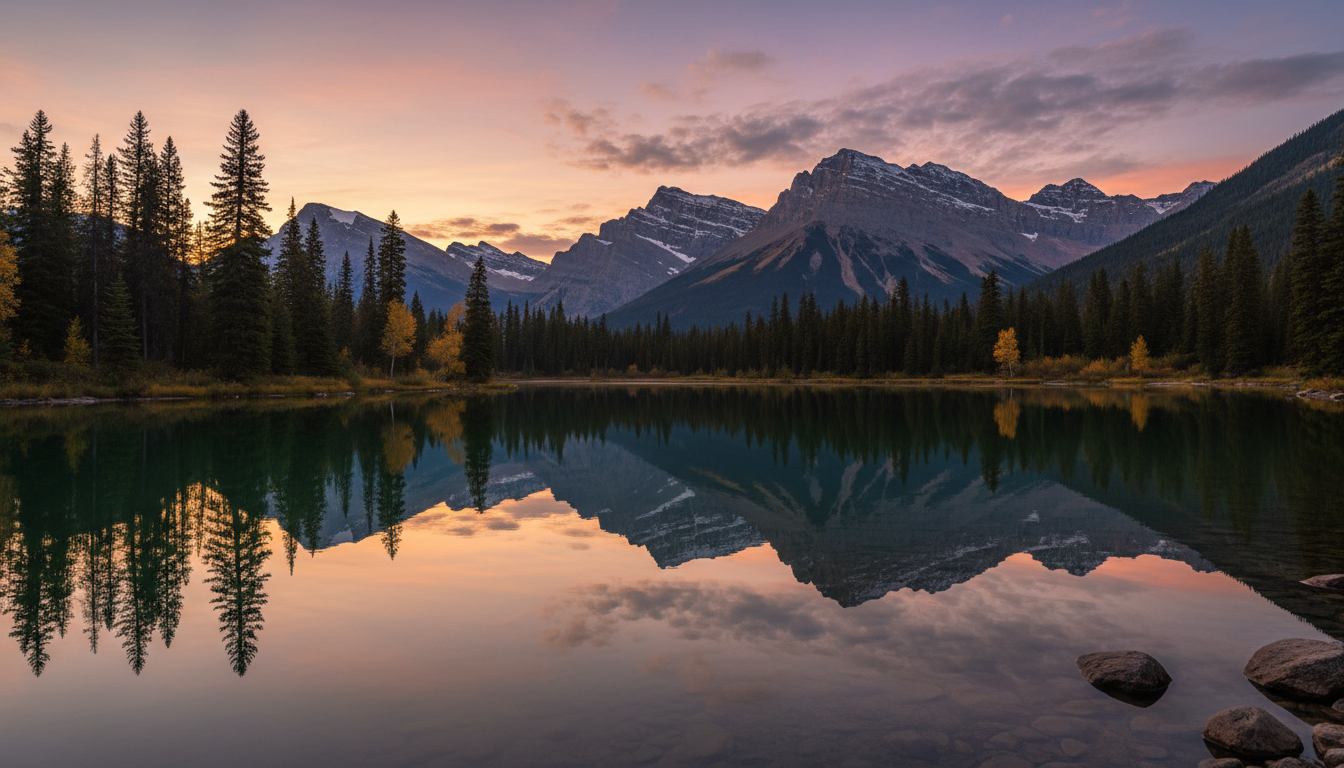
Generated image: "A serene mountain landscape at sunset with a lake in the foreground"
Installation
NPM
npm install -g nanobanana-api-mcp
Smithery
To install Nanobanana MCP Server for any client automatically via Smithery:
npx -y @smithery/cli@latest install nanobanana-api-mcp --client <CLIENT_NAME>
Available clients: cursor, claude, vscode, windsurf, cline, zed, etc.
Example for Cursor:
npx -y @smithery/cli@latest install nanobanana-api-mcp --client cursor
This will automatically configure the MCP server in your chosen client.
Prerequisites
You need a Google API key with access to Gemini models. Get your API key from Google AI Studio.
You can provide the API key via CLI argument:
nanobanana-api-mcp --apiKey "your-api-key-here"
Or set it as an environment variable:
export GOOGLE_API_KEY="your-api-key-here"
nanobanana-api-mcp
MCP Client Integration
Nanobanana MCP can be integrated with various AI coding assistants and IDEs that support the Model Context Protocol (MCP).
Requirements
- Node.js >= v18.0.0
- Google API key with Gemini access
- An MCP-compatible client (Cursor, Claude Code, VS Code, Windsurf, etc.)
Install in Cursor
Go to: Settings -> Cursor Settings -> MCP -> Add new global MCP server
Add the following configuration to your ~/.cursor/mcp.json file:
{
  "mcpServers": {
    "nanobanana": {
      "command": "npx",
      "args": ["-y", "nanobanana-api-mcp", "--apiKey", "your-api-key-here"]
    }
  }
}
Optionally, you can fix the model to use for all operations:
{
  "mcpServers": {
    "nanobanana": {
      "command": "npx",
      "args": [
        "-y",
        "nanobanana-api-mcp",
        "--apiKey",
        "your-api-key-here",
        "--model",
        "pro"
      ]
    }
  }
}
Install in Claude Code
Run this command with your API key:
claude mcp add nanobanana -- npx -y nanobanana-api-mcp --apiKey your-api-key-here
Or with a fixed model:
claude mcp add nanobanana -- npx -y nanobanana-api-mcp --apiKey your-api-key-here --model pro
Install in VS Code
Add this to your VS Code MCP config file. See VS Code MCP docs for more info.
"mcp": {
  "servers": {
    "nanobanana": {
      "type": "stdio",
      "command": "npx",
      "args": ["-y", "nanobanana-api-mcp", "--apiKey", "your-api-key-here"]
    }
  }
}
Install in Windsurf
Add this to your Windsurf MCP config file:
{
  "mcpServers": {
    "nanobanana": {
      "command": "npx",
      "args": ["-y", "nanobanana-api-mcp", "--apiKey", "your-api-key-here"]
    }
  }
}
Install in Cline
- Open Cline
- Click the hamburger menu icon (☰) to enter the MCP Servers section
- Choose Remote Servers tab
- Click the Edit Configuration button
- Add nanobanana to
mcpServers:
{
  "mcpServers": {
    "nanobanana": {
      "command": "npx",
      "args": ["-y", "nanobanana-api-mcp", "--apiKey", "your-api-key-here"]
    }
  }
}
Install in Claude Desktop
Open Claude Desktop developer settings and edit your claude_desktop_config.json file:
{
  "mcpServers": {
    "nanobanana": {
      "command": "npx",
      "args": ["-y", "nanobanana-api-mcp", "--apiKey", "your-api-key-here"]
    }
  }
}
Install in Zed
Add this to your Zed settings.json:
{
  "context_servers": {
    "nanobanana": {
      "source": "custom",
      "command": "npx",
      "args": ["-y", "nanobanana-api-mcp", "--apiKey", "your-api-key-here"]
    }
  }
}
Install in Roo Code
Add this to your Roo Code MCP configuration file:
{
  "mcpServers": {
    "nanobanana": {
      "command": "npx",
      "args": ["-y", "nanobanana-api-mcp", "--apiKey", "your-api-key-here"]
    }
  }
}
Available Tools
Nanobanana MCP provides the following tools that can be used by LLMs:
generate_image
Generates an image based on a text prompt using Google Gemini API.
Parameters:
prompt(string, required): Text description of the image to generateoutput_path(string, optional): Absolute path where the generated image will be saved. If not provided, returns base64 encoded image data insteadmodel(enum, optional): Model to use - "pro" (default) or "normal" (not shown if --model is provided via CLI)pro: gemini-3-pro-image-preview (higher quality)normal: gemini-2.5-flash-image (faster)
reference_images_path(string[], optional): Array of absolute reference image paths to guide the generationaspect_ratio(enum, optional): Aspect ratio for the image - "1:1", "2:3", "3:2", "3:4", "4:3", "4:5", "5:4", "9:16", "16:9" (default), "21:9"
Example (save to file):
{
  "prompt": "A serene mountain landscape at sunset with a lake in the foreground",
  "output_path": "/absolute/path/to/generated_image.png",
  "model": "pro",
  "aspect_ratio": "16:9"
}
Example (return base64):
{
  "prompt": "A serene mountain landscape at sunset with a lake in the foreground",
  "model": "pro",
  "aspect_ratio": "16:9"
}
With reference images:
{
  "prompt": "An office group photo of these people, they are making funny faces",
  "output_path": "/absolute/path/to/group_photo.png",
  "model": "pro",
  "reference_images_path": [
    "/absolute/path/to/person1.jpg",
    "/absolute/path/to/person2.jpg"
  ]
}
edit_image
Edits an existing image based on a text prompt using Google Gemini API.
Parameters:
path(string, optional): Absolute path to the image to edit. Eitherpathorimage_base64must be providedimage_base64(string, optional): Base64 encoded image data to edit. Eitherpathorimage_base64must be providedmime_type(string, optional): MIME type of the base64 image (e.g., "image/png", "image/jpeg"). Required when usingimage_base64prompt(string, required): Text description of the edits to makeoutput_path(string, optional): Absolute path where the edited image will be saved. If not provided:- When using
path: defaults to overwriting the input file - When using
image_base64: returns base64 encoded image data instead
- When using
model(enum, optional): Model to use - "pro" (default) or "normal" (not shown if --model is provided via CLI)reference_images_path(string[], optional): Array of absolute additional reference image paths to guide the editingaspect_ratio(enum, optional): Aspect ratio for the image - "1:1", "2:3", "3:2", "3:4", "4:3", "4:5", "5:4", "9:16", "16:9" (default), "21:9"
Example (path input, save to file):
{
  "path": "/absolute/path/to/original_image.png",
  "prompt": "Add a blue sky with fluffy clouds in the background",
  "output_path": "/absolute/path/to/edited_image.png",
  "model": "pro"
}
Example (path input, overwrite original):
{
  "path": "/absolute/path/to/image.png",
  "prompt": "Make the colors more vibrant and increase contrast"
}
Example (base64 input, return base64):
{
  "image_base64": "iVBORw0KGgoAAAANSUhEUgAA...",
  "mime_type": "image/png",
  "prompt": "Add a sunset filter to this image"
}
Example (base64 input, save to file):
{
  "image_base64": "iVBORw0KGgoAAAANSUhEUgAA...",
  "mime_type": "image/png",
  "prompt": "Add a sunset filter to this image",
  "output_path": "/absolute/path/to/output.png"
}
With reference images:
{
  "path": "/absolute/path/to/portrait.jpg",
  "prompt": "Apply the style and lighting from these reference images",
  "output_path": "/absolute/path/to/styled_portrait.jpg",
  "reference_images_path": [
    "/absolute/path/to/style_ref1.jpg",
    "/absolute/path/to/style_ref2.jpg"
  ]
}
Usage Examples
Example 1: Generate a simple image
In Cursor/Claude Code:
Generate an image of a futuristic cityscape with flying cars and save it to ./cityscape.png
Result: The above command would generate an image similar to our demo:
Example 2: Edit an existing image
In Cursor/Claude Code:
Edit the image at ./photo.jpg and add a sunset sky background, save it as ./photo_sunset.jpg
Example 3: Generate with reference images
In Cursor/Claude Code:
Create an office group photo using the face images at ./face1.jpg, ./face2.jpg, and ./face3.jpg.
Make them look like they're at a fun team meeting. Save to ./team_photo.png
Command Line Usage
Run the server directly:
# Using CLI argument for API key (recommended)
nanobanana-api-mcp --apiKey "your-api-key-here"

# Using environment variable for API key
export GOOGLE_API_KEY="your-api-key-here"
nanobanana-api-mcp

# Fix model for all operations
nanobanana-api-mcp --apiKey "your-api-key-here" --model pro

# Using HTTP transport
nanobanana-api-mcp --apiKey "your-api-key-here" --transport http --port 5000
CLI Options:
--apiKey <key>: Google API key for image generation (can also use GOOGLE_API_KEY env var)--model <pro|normal>: Fix the model for all operations (optional, hides model parameter from tools)--transport <stdio|http>: Transport type (default: stdio)--port <number>: Port for HTTP transport (default: 5000)
Development
# Install dependencies
npm install

# Run in development mode
npm run dev

# Run tests
npm test

# Build
npm run build

# Type check
npm run typecheck

# Lint
npm run lint
Architecture
The project follows a modular architecture:
- services/: Image generation and editing service using Google Gemini API
- tools/: MCP tool implementations (generate_image, edit_image)
- types/: TypeScript type definitions
- server.ts: Main MCP server setup and configuration
Supported Image Formats
- JPEG (.jpg, .jpeg)
- PNG (.png)
- GIF (.gif)
- WebP (.webp)
License
MIT
Contributing
Contributions are welcome! Please feel free to submit a Pull Request.
Author
choesumin
Acknowledgments
This project uses the Google Generative AI SDK for image generation and editing capabilities.