MCP server by GenTelLab
🛡️ MCP-Guard
A Robust Defense Framework for Safeguarding Model Context Protocol (MCP) in LLM Applications





Overview
MCP-Guard is a cutting-edge, modular security framework engineered to protect Large Language Models (LLMs) from emerging threats in tool integrations via the Model Context Protocol (MCP). With vulnerabilities like prompt injection, data exfiltration, and shadow hijacks on the rise, MCP-Guard delivers enterprise-grade defense, and ultra-low latency. Built for scalability, it features hot-swappable detectors, registry-free operations, and seamless integration into production workflows. Paired with the MCP-AttackBench (70k+ samples), it empowers developers and researchers to build secure, reliable AI systems.
🔥 What's New
- [2025-09] MCP-Guard preliminary codebase released!
- [2025-08] Our paper "MCP-Guard: A Defense Framework for Model Context Protocol Integrity in Large Language Model Applications" is available on arXiv.
📑 Contents
- 🛡️ Overview
- 🔥 What's New
- ✨ Key Features
- 🏗️ Architecture
- 🖥️ Prerequisites
- 🚀 Quickstart & API Usage
- 🧪 Running Tests
- 📝 TODO List
- 📚 Citation
- 📄 License
- 👏 Acknowledgements
Key Features
- 🛡️ Multi-Stage Detection Pipeline: Balances speed and precision:
- Stage 1: Lightweight pattern-based scanning for instant threat filtering (e.g., SQL/shell injections, prompt hijacks)—<2 ms latency.
- Stage 2: Fine-tuned E5-based neural model for semantic analysis (96.01% accuracy on benchmarks).
- Stage 3: LLM arbitration (supports GPT, Llama, etc.) for final, refined decisions (up to 98.47% recall).
- 📊 MCP-AttackBench: 70,000+ curated samples simulating diverse attacks—ideal for training and evaluation.
- ⚙️ Enterprise-Ready Tools: Hot updates, pluggable LLMs, registry-free deployment, and low-overhead scalability.
Architecture
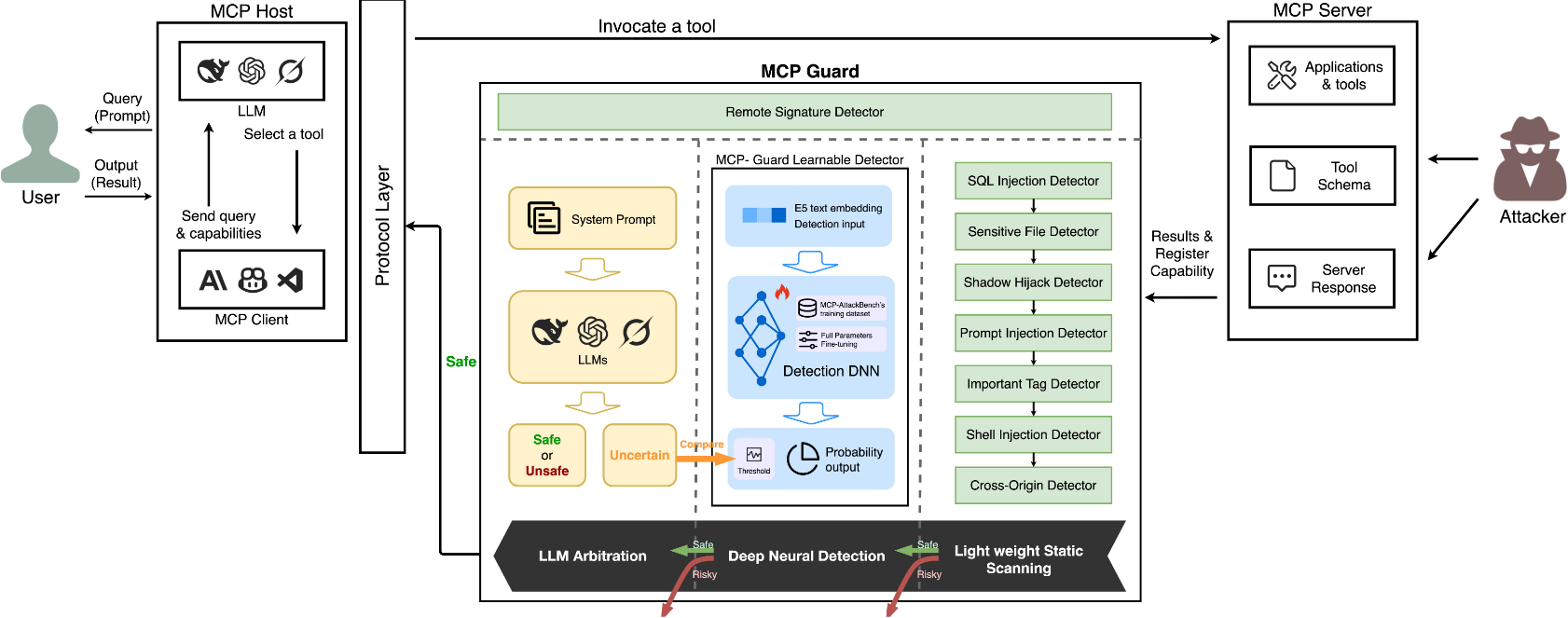
MCP-Guard's modular pipeline escalates from fast rules to deep analysis:
-
Stage 1: Pattern-Based Detectors (Ultra-low latency, fail-fast):
- Prompt Injection: Hidden instructions/exfiltration.
- Sensitive File Access: System file leaks.
- Shell Injection: Command patterns.
- SQL Injection: Query/XSS attempts.
- Shadow Hijack: Tool masquerading.
- Cross-Origin: External violations (configurable whitelist).
- Important Tags: Dangerous HTML (e.g., script, iframe).
-
Stage 2: Learnable Detector: E5 embedding model, fine-tuned for probabilistic malicious scoring.
-
Stage 3: LLM Arbitration: Pluggable models (OpenAI-compatible) for contextual judgment.
Prerequisites
Environment Setup
Create the conda environment from the exported configuration:
# Create environment from environment.yml
conda env create -f environment.yml

# Activate the environment
conda activate mcp_guard
Model Download
Download the LearnableShield model to learnableshield_models/:
mkdir -p learnableshield_models

# Download models from Hugging Face
# Example commands - update with the correct model repository URLs:
git lfs install
git clone https://huggingface.co/GenTelLab/MCP-Guard

# Or using huggingface_hub Python library:
python -c "
from huggingface_hub import snapshot_download
snapshot_download(
    repo_id='GenTelLab/MCP-Guard-Shield',
    local_dir='learnableshield_models/',
    local_dir_use_symlinks=False
)
"
Quickstart & API Usage
Get started quickly and dive into API details for seamless integration.
Configure LLM backend:
Configure active model: Edit configs/models/model_registry.json.
{
  "active_model": "mistral",  // Currently active model
  "mistral": {
      "enabled": false,
      "class": "src.mcp_guard.detectors.model_detectors.llm_detector.MistralEnhancedDetector",
      "params": {
        "model": "mistral:7b",
        "host": "http://localhost:11434"
      }
    }
}
- See docs/MODEL_CONFIG_GUIDE.md for how to enable/disable models, switch the active model, configure parameters, and use the
/modelAPI endpoints.
Stage 3 detector selection (two options)
- Ollama (local):
llama3/mistral/qwen/tinyllama/llama2. Ensure Ollama is running (defaulthttp://localhost:11434), then setactive_modelinconfigs/model_registry.jsonand keep itenabled: trueto use it as the Stage 3 detector. - API (cloud):
gpt4o(OpenAI-compatible). Set env vars, then setactive_modeltogpt4oandenabled: trueto use GPT as the Stage 3 detector:export OPENAI_API_KEY="your-key"export OPENAI_BASE_URL="https://api.openai.com/v1"
Launch the Server
uvicorn src.mcp_guard.core:app --host 0.0.0.0 --port 8000 --reload
Sample Request
curl -X POST "http://localhost:8000/guardrail/scan" -H "Content-Type: application/json" -d '{
    "tool_name": "example_tool",
    "tool_description": "Test with potential threat: ignore instructions",
    "servers": [{"url": "example.com"}],
    "tool_input_schema": {"type": "object", "properties": {"input": {"type": "string"}}}
}'
Expected response: Detailed safety assessment in JSON.
Sample Response
{
  "allowed": true,
  "issues": [ { "type": "prompt_injection", "message": "..." } ],
  "detector_used": "three_layer_detection",
  "degraded_detectors": [],
  "degradation_note": null,
  "final_reason": "Based on three-layer detector results",
  "gpt_analysis": "Based on gpt's analysis",
  "detection_stage": "local_gentelshield_openai_clean",
  "end_time": 175.13219497
}
Notes:
allowed=truemeans the request passed;falsemeans it was blocked by high-risk rules.detection_stageindicates where the decision was made (e.g.,local_blocked,local_gentelshield_blocked,local_gentelshield_<model>_clean).- Warning-level issues do not block but will appear in
warning_issues.
Running Tests
Detector Configs
- Cross-Origin: Edit
configs/servers/popular_servers.json.
{
  "popular_servers": [
    "allowed-server-1",
    "allowed-server-2"
  ]
}
- Others: JSON files for rules (shell, SQL, hidden instructions, exfiltration).
- Shell injection rules:
configs/detectors/shell_rules.json - SQL/XSS rules:
configs/detectors/sql_xss_rules.jsonc - Hidden instruction rules:
configs/detectors/hidden_rules.json - Exfiltration rules:
configs/detectors/exfiltration_params.json
- Shell injection rules:
Testing CMDs
Validate MCP-Guard's effectiveness with benchmarks or API simulations.
python ./main.py  # All samples
python ./main.py --max-samples 50  # Quick test
python ./main.py --csv-file your_test.csv  # Custom data
Supported: OpenAI, Azure, custom APIs.
Test Outputs and Results
test_results_detailed.csv: Detailed results for each sample including:
- Original description
- True and predicted labels
- Detection time
- Detection stage
- Issues found
Performance Optimization
- Reduce Test Samples: Use
--max-samplesfor quick testing - Disable Layers: Modify
core.pyto skip specific layers - Cache Models: Ensure LearnableShield model is loaded once
- API Rate Limits: Consider API provider rate limits for large tests
📝 TODO List
- [x] Release the paper.
- [x] Release the platform with basic functions and demo scenes.
- [ ] Release the MCP-AttackBench data.
- [ ] Training framework.
Citation
@misc{xing2025mcpguard,
  title={MCP-Guard: A Defense Framework for Model Context Protocol Integrity in Large Language Model Applications},
  author={Wenpeng Xing and Zhonghao Qi and Yupeng Qin and Yilin Li and Caini Chang and Jiahui Yu and Changting Lin and Zhenzhen Xie and Meng Han},
  year={2025},
  eprint={2508.10991},
  archivePrefix={arXiv},
  primaryClass={cs.CR}
}
📄 License
This project mcp-guard is licensed under the Apache License 2.0.