A production-ready MCP (Model Context Protocol) server that gives Claude, OpenClaw, Hermes, and any MCP-compatible AI agent full control over EVM and Solana wallets — generate, fund, scan, manage, all via natural language.
wallet-mcp
Multi Wallet Generator + Manager — MCP Server for AI Agents




A production-ready MCP (Model Context Protocol) server that gives Claude, OpenClaw, Hermes, and any MCP-compatible AI agent full control over EVM and Solana wallets — generate, fund, scan, manage, all via natural language.
Architecture
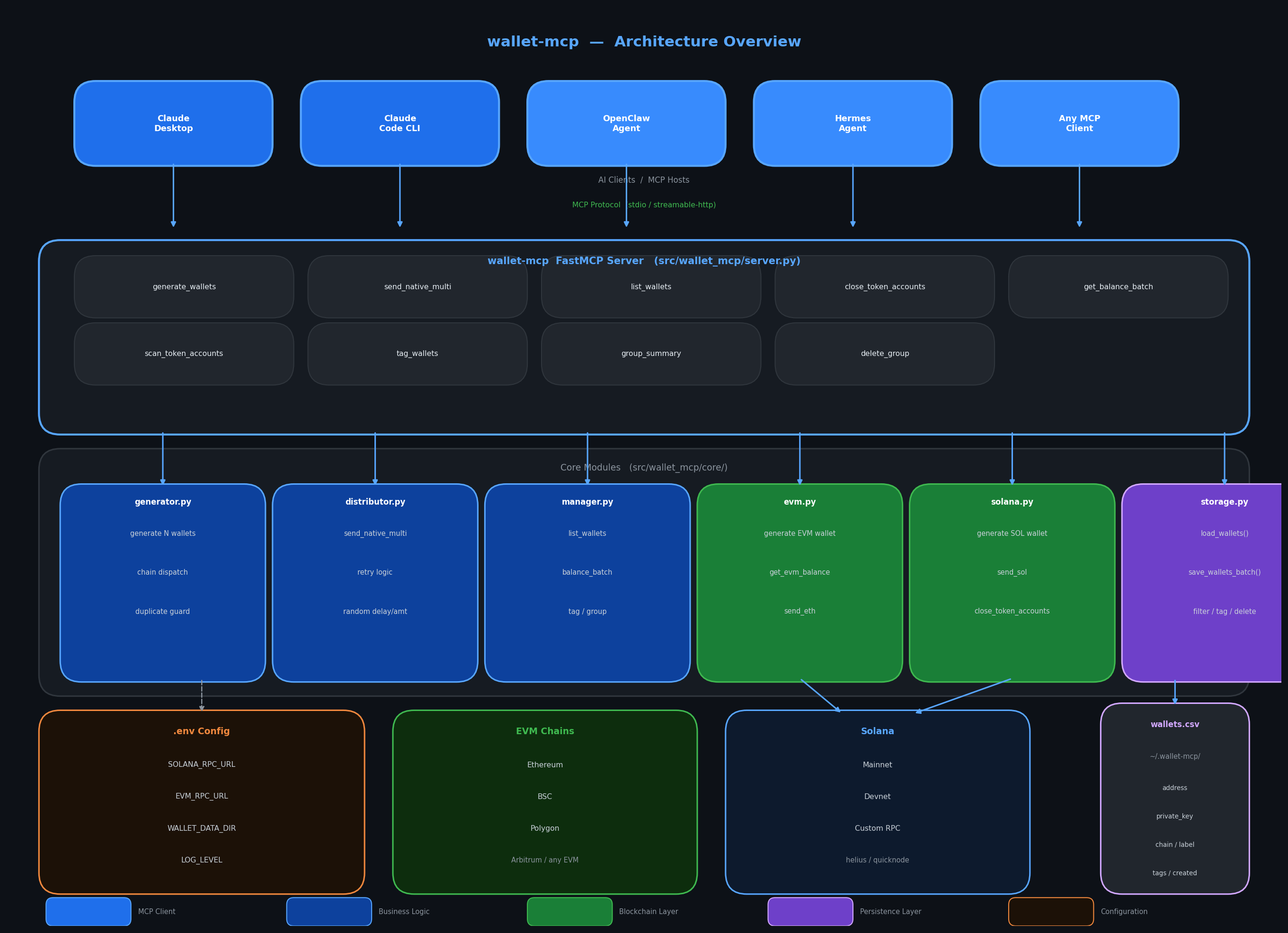
Full architecture docs → assets/architecture.md
Tools
| Tool | Description |
|---|---|
| generate_wallets | Generate N wallets (Solana or EVM), save to local CSV |
| send_native_multi | Send SOL / ETH from one wallet to a labeled group |
| list_wallets | List wallets with chain / label / tag filters |
| get_balance_batch | Fetch native balances for a wallet group |
| close_token_accounts | Close empty SPL token accounts, reclaim rent SOL |
| scan_token_accounts | Scan SPL token accounts (read-only) |
| tag_wallets | Add a tag to all wallets in a label group |
| group_summary | Show wallet groups and counts per chain |
| delete_group | Permanently delete all wallets in a group |
Quickstart
# Install with uv (recommended)
uv tool install git+https://github.com/genoshide/wallet-mcp.git

# Or install from local clone
git clone https://github.com/genoshide/wallet-mcp
cd wallet-mcp
uv sync
See INSTALLATION.md for full setup including Claude Desktop config.
Claude Desktop Integration
Add to your claude_desktop_config.json:
macOS: ~/Library/Application Support/Claude/claude_desktop_config.json
Windows: %APPDATA%\Claude\claude_desktop_config.json
Linux: ~/.config/Claude/claude_desktop_config.json
{
  "mcpServers": {
    "wallet-mcp": {
      "command": "uv",
      "args": [
        "tool", "run", "--from",
        "git+https://github.com/genoshide/wallet-mcp.git",
        "wallet-mcp"
      ]
    }
  }
}
Or if installed locally:
{
  "mcpServers": {
    "wallet-mcp": {
      "command": "uv",
      "args": ["--directory", "/path/to/wallet-mcp", "run", "wallet-mcp"]
    }
  }
}
Example Conversations
"Generate 50 Solana wallets for my airdrop campaign"
→ generate_wallets(chain="solana", count=50, label="airdrop1")
"Send 0.01 SOL to all airdrop1 wallets with random delays"
→ send_native_multi(from_key="...", label="airdrop1", amount=0.01,
                    chain="solana", randomize=True, delay_min=2, delay_max=15)
"How much SOL do the airdrop1 wallets have in total?"
→ get_balance_batch(label="airdrop1", chain="solana")
"Close all empty token accounts on my main wallet and tell me how much SOL I reclaimed"
→ close_token_accounts(private_key="...")
"Show me all my wallet groups"
→ group_summary()
See EXAMPLES.md for more.
Data Storage
Wallets are stored at ~/.wallet-mcp/wallets.csv:
address,private_key,chain,label,tags,created_at
So1ana...abc,5Kd3N...,solana,airdrop1,,2024-01-01T00:00:00Z
0xABCD...,0x1234...,evm,test,vip|batch1,2024-01-01T00:00:00Z
Override storage location:
export WALLET_DATA_DIR=/secure/encrypted/path
Keep your wallets.csv secure. It contains private keys.
chmod 600 ~/.wallet-mcp/wallets.csv
Environment Variables
Copy .env.example → .env:
SOLANA_RPC_URL=https://api.mainnet-beta.solana.com
EVM_RPC_URL=https://mainnet.infura.io/v3/xxx
WALLET_DATA_DIR=~/.wallet-mcp
LOG_LEVEL=INFO
Project Structure
wallet-mcp/
├── pyproject.toml
├── .env.example
├── README.md
├── INSTALLATION.md
├── EXAMPLES.md
└── src/
    └── wallet_mcp/
        ├── __init__.py
        ├── server.py          ← FastMCP server, all tool definitions
        └── core/
            ├── evm.py         ← EVM: generate, balance, send
            ├── solana.py      ← Solana: generate, balance, send, token accounts
            ├── generator.py   ← Multi-chain wallet generator
            ├── distributor.py ← Multi-send with retry + randomization
            ├── manager.py     ← list, balance batch, tag, group summary
            ├── storage.py     ← CSV load/save/filter
            └── utils.py       ← delays, retry, logging, helpers
License
MIT License — see LICENSE for details.
Disclaimer: This tool is for educational and research purposes only. It does not constitute financial advice. Always do your own research before making investment decisions.