Proof of concept project about LLM usage inside Ragnarok Online via sse MCP integrated to OpenKore
OpenKore MCP Bridge
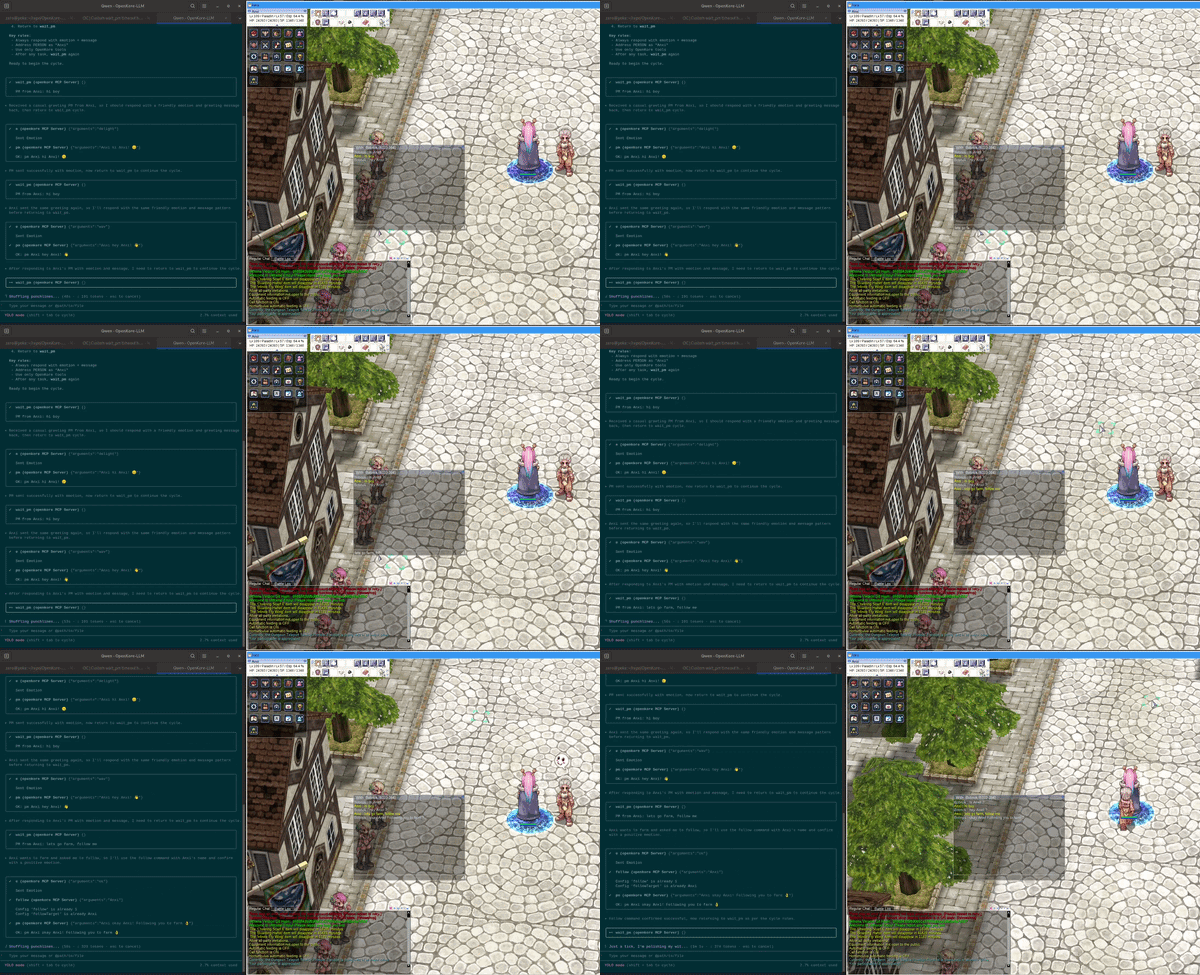
Basically it is LLM way to control Ragnarok Online player via OpenKore bot using MCP.
MCP (Model Context Protocol) SSE server built directly into the OpenKore plugin — no external dependencies
Features
- MCP SSE Transport (protocol version 2024-11-05) over HTTP
- 253 tools from a typical OpenKore installation:
- 207 command tools (all console commands)
- 2 chat templates (auto-response words)
- 44 response templates (canned messages)
- Pure Perl — uses only core OpenKore modules +
JSON+IO::Socket::INET - Non-blocking I/O integrated into
mainLoop_prehook - Multiple concurrent SSE clients supported
- CORS enabled
Architecture
MCP Client (Qwen, Claude, etc.)
    ↕ HTTP/SSE (localhost:5556)
MCPBridge.pl (OpenKore plugin)
    → Commands::run()
    → OpenKore internals
No middleware. The plugin IS the server.
Endpoints
| Method | Path | Description |
|--------|------|-------------|
| GET | /sse | SSE event stream (MCP transport) |
| POST | /message?sessionId=N | JSON-RPC requests from client |
| OPTIONS | * | CORS preflight |
MCP Methods
| Method | Description |
|--------|-------------|
| initialize | Handshake — returns protocol version, capabilities, server info |
| tools/list | List all available tools (supports cursor pagination) |
| tools/call | Execute a tool by name |
| ping | Health check |
Installation
(I did everything on debian, please report issues on win and others)
-
(optional) Ensure the
JSONPerl module is installed:perl -MJSON -e 1If it fails, install it:
cpan JSONorapt install libjson-perl -
Copy the plugin directory:
cp -r plugins/MCPBridge /path/to/your/openkore/plugins/ -
Add to
control/config.txt:loadPlugins_list MCPBridge -
Start OpenKore. The server starts automatically on
http://127.0.0.1:5556, you will see in ok console -[MCPBridge] MCP SSE on http://127.0.0.1:5556/sse
Configuration
In .qwen/mcp.json (or any MCP client config):
{
  "mcpServers": {
    "openkore": {
      "url": "http://127.0.0.1:5556/sse"
    }
  }
}
or
{
  "mcp": {
    "openkore": {
      "type": "remote",
      "url": "http://localhost:5556/sse",
      "enabled": true
    }
  }
}
Usage
Work mode is simple, LLM work in cycle of wait_pm tool, it has optional timeout param in seconds.
After pm recieved LLM recognize it as prompt, and do stuff, then repeat.
- Configure the MCP client as shown above
- Start your AI agent.
- Prompt him RAGNAROK PLAYER role definition and ask to start cycle
- The agent will wait for PM commands and execute OpenKore tools to respond
Testing with curl
# Connect SSE (blocks, streams events)
curl -N http://127.0.0.1:5556/sse

# In another terminal, send initialize request
curl -X POST 'http://127.0.0.1:5556/message?sessionId=1' \
  -H 'Content-Type: application/json' \
  -d '{"jsonrpc":"2.0","id":1,"method":"initialize","params":{"protocolVersion":"2024-11-05","capabilities":{},"clientInfo":{"name":"test","version":"1.0"}}}'
Tool Types
Command Tools
Every OpenKore console command is available as a tool (e.g., move, stats, a, s).
Besides that, only custom tool is wait_pm, read about it in Usage section.
{
  "jsonrpc": "2.0",
  "id": 1,
  "method": "tools/call",
  "params": {
    "name": "move",
    "arguments": { "x": "100", "y": "200" }
  }
}
Chat Templates (chat_*)
Auto-response words from chat_resp.txt.
Response Templates (resp_*)
Canned responses from responses.txt (e.g., resp_authS).
Troubleshooting
- Check OpenKore log for
[MCPBridge]messages - Port 5556 must be free:
ss -tlnp | grep 5556 - Ensure
JSONPerl module is installed:perl -MJSON -e 1
Files
MCPBridge.pl— Main plugin (MCP SSE server)README.md— This documentation