MCP Server for Autodesk Maya
maya-mcp-server
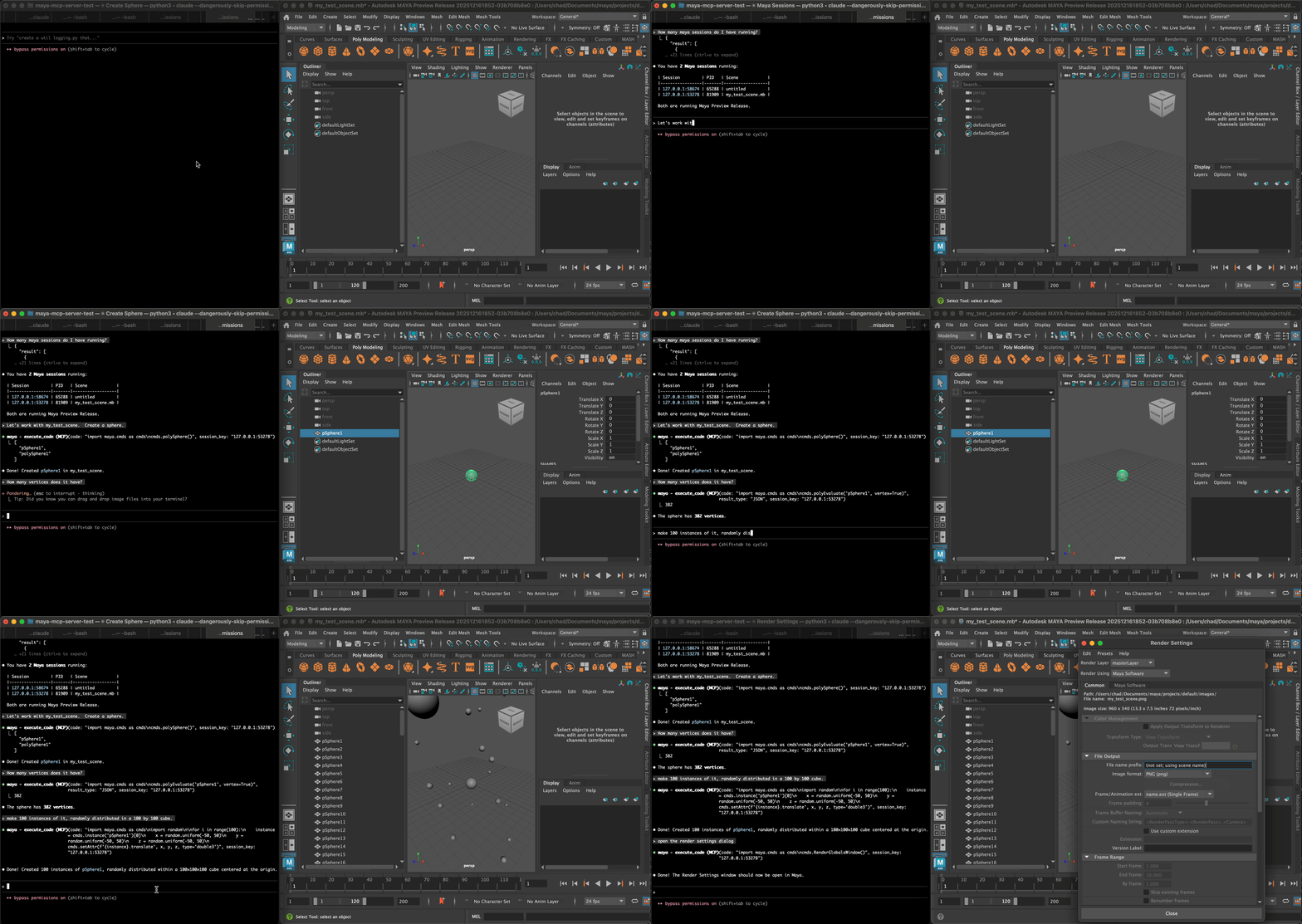
MCP server for interacting with Autodesk Maya sessions.
Features
- Multi-session support: Manage multiple Maya sessions from a single MCP server. The server scans for new Maya sessions that have been started and shutdown by the user.
- Full Python expressiveness: Execute arbitrary Python code. Agents can create virtual python modules to expose functions for execution, including by the user.
- Streaming output: Capture stdout/stderr from Maya sessions via MCP resources. Agents can monitor output from their code or user activity.
- Simple Maya-side setup: No modules to install in Maya: leverages Maya's command port to bootstrap itself.
- Easy installation: Install and run via
uvx maya-mcp-server
Installation
# Using uvx (recommended)
uvx maya-mcp-server

# Or install with pip
pip install maya-mcp-server
Usage
Claude Code Configuration
Add to your Claude Code MCP configuration, run:
claude mcp add --transport stdio maya -- uvx maya-mcp-server
The default scope is "local", which adds it to your ~/.claude.json keyed to a particular project directory. Setting --scope=user adds to ~/.claude.json across all projects, and --scope=project to add the configuration into a .mcp.json in the current project directory, so that it can be commited to your repo.
For local development use:
claude mcp add --transport stdio maya -- uv run --directory /path/to/maya-mcp-server/ maya-mcp-server
Maya Setup
The server automatically discovers Maya sessions via command ports. To enable a Python command port in Maya:
import maya.cmds as cmds
cmds.commandPort(name=":7002", sourceType="python")
Or add to your userSetup.py for automatic startup.
Tools
Tools accept an optional session_key parameter for targeting specific sessions.
If only one Maya session exists, it will be auto-selected.
Session keys are returned by list_sessions and add_session.
| Tool | Description |
|------|-------------|
| list_sessions | List all active Maya sessions. Returns session info including session_key for use with other tools/resources. |
| add_session | Manually add a Maya session at a specific host:port. Use when auto-discovery doesn't find your session. |
| write_module | Create a virtual Python module in Maya. Useful for defining reusable functions. |
| execute_code | Execute Python code in a session. Supports result capture modes: NONE, JSON, RAW. |
Resources
| Resource | Description |
|----------|-------------|
| maya://sessions/{session_key}/info | Session information (pid, user, maya_version, scene_name, scene_path) |
| maya://sessions/{session_key}/output | Captured stdout/stderr output from the session |
Similar tools
MayaMCP
This looks to be the first publicly available MCP server for Maya and I was inspired by a few aspects of this tool, especially the goal of zero Maya-side setup.
Disadvantages:
- The MCP server is bound to a single Maya session running on the default port.
- It is limited to a bespoke set of tools. This could be seen as a security advantage, but it cripples the ability of an agent to do just about anything.
- No support for reading stdout or stderr, so the agent is blind to what's happening in the Maya session.
- Less robust approach to capturing command output (e.g. does not check if code is indented within a
forloop or function) - Can't run via
uvx, orpip installfrom pypi.
ChatGPT4Maya
This is the original LLM integration for Maya, which embeds ChatGPT directly in a PySide window and enables the LLM to respond to user commands and queries by executing code in the session.
Disadvantages:
- Not an MCP server, so it cannot take full advantage of agentic workflows.
- Only works with ChatGPT.
Jupyter MCP Server
This provided an interesting reference for how to create an MCP server in python that works with multiple remote sessions (in this case, notebooks) to execute arbitrary code.
Development
# Install dev dependencies
uv sync --dev

# Run tests
uv run pytest

# Run the server
uv run maya-mcp-server
License
MIT
TODO
- [ ] Provide an option to
executeto run in global or private context. - [ ] Yield output as it's printed?
- [ ] Add tools to simplify interaction with UI: shelves, hotkeys, menus
- [ ] Plugins to extend session info, e.g. with custom pipeline info
- [ ] Investigate RPC for extensibility, implementation of custom tools
- [ ] Use a dispatch function for command port mode, to further harmonize. Create a shared type safe collection of tools that hold name and arguments.
- [ ] Return stdout and stderr lines interleaved (and prefixed with
STDOUT:STDERR:) so that the agent can determine order? - [ ] Cleanup command ports when complete. This won't be necessary if we default to the Qt command server.