MCP server by ch998244353
Thread Contract MCP Server
Thread-scoped runtime contracts for AI coding agents.
What Is Thread Contract?
Thread Contract is a local runtime contract layer for AI coding-agent threads. It lets users pin explicit, thread-scoped rules such as "do not commit unless I ask" or "read PLAN.md before editing" without turning those rules into project policy or long-term memory.
It stores rules in local SQLite, exposes management tools through MCP, provides
a small local Web UI, and can inject active rules before every Codex or Claude
Code user turn through a UserPromptSubmit hook.
Use it when an instruction should survive a long coding-agent conversation, but should not become a permanent repository rule or hidden memory.
30-Second Demo
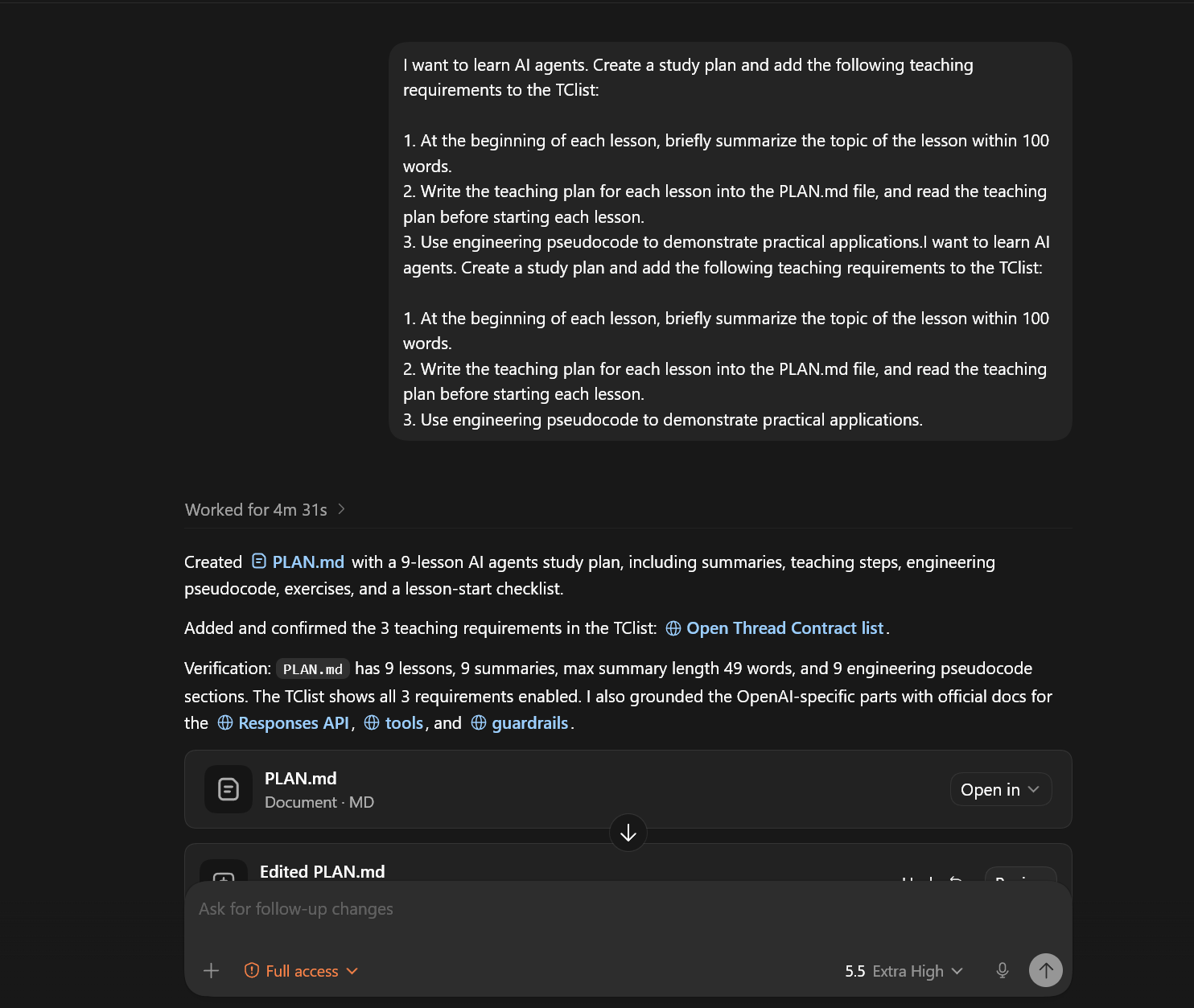
- Add temporary rules from a coding-agent thread.
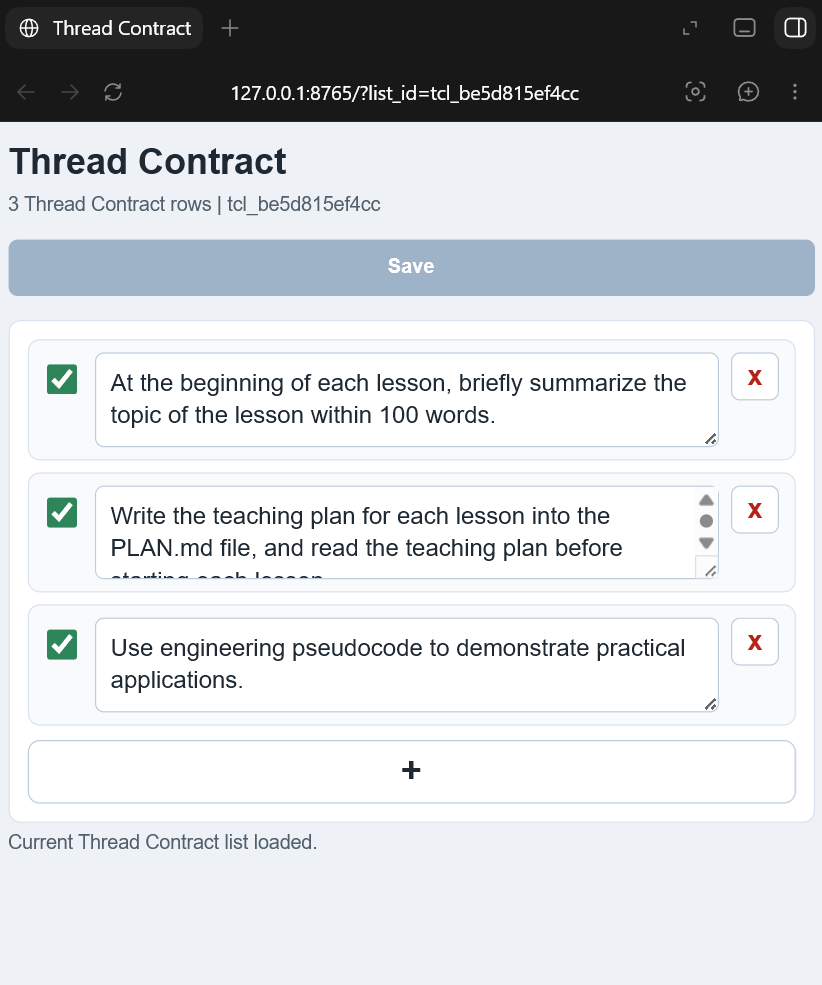
- Review, edit, enable, disable, or delete the same list in the local Web UI.
- On later turns, the hook injects only the active rules for that same thread.
Thread Contract rules can be added and confirmed from a coding-agent thread:
The same list can be edited in the local Web UI:
Install
Version 0.1.0 is source-install first. PyPI publishing, MCP Registry
publishing, Docker images, and hosted sync are intentionally out of scope for
this release.
Requirements:
- Python 3.10 or newer.
- Codex or Claude Code for host integration.
- Optional:
mcpPython package only if you want the alternate SDK-backed MCP server entrypoint.
Clone and install:
git clone https://github.com/ch998244353/Thread-Contract-mcp.git threadcontract-mcp
cd threadcontract-mcp
python -m pip install -e .
Run the handwritten stdio MCP server:
threadcontract-mcp
Run the local Web UI:
threadcontract-web --port 8765
Open:
http://127.0.0.1:8765/
By default, Thread Contract stores SQLite data at:
~/.codex/threadcontract.sqlite3
Override it with THREADCONTRACT_DB:
$env:THREADCONTRACT_DB = "$HOME\.codex\threadcontract-dev.sqlite3"
Use With Codex
For source/plugin development, this repository includes:
.codex-plugin/plugin.json
.codex-mcp.json
hooks/codex_hooks.json
hooks/user_prompt_submit.py
Use the helper script to add this checkout as a local Codex plugin marketplace:
.\scripts\install-codex-plugin.ps1
Then restart Codex, install or enable the Thread Contract plugin from the
local marketplace, open /hooks, review the bundled hook, and trust it. Codex
does not run non-managed plugin hooks until the current hook definition is
trusted.
For MCP-only setup, add this to ~/.codex/config.toml after installing the
package:
[mcp_servers.threadcontract]
command = "threadcontract-mcp"
enabled = true
startup_timeout_sec = 10
tool_timeout_sec = 30
enabled_tools = [
  "threadcontract_open_turn",
  "threadcontract_commit_turn_list",
  "threadcontract_list_turn",
  "show_threadcontract_list",
  "threadcontract_add_turn_item",
  "threadcontract_update_turn_item",
  "threadcontract_copy_list_text",
  "threadcontract_get_list_web_url",
  "threadcontract_delete_thread_list",
]
See docs/codex-adapter.md and docs/mcp-config.md.
Use With Claude Code
The Claude Code plugin files live at the repository root:
.claude-plugin/plugin.json
.mcp.json
hooks/claude_hooks.json
hooks/claude_user_prompt_submit.py
Validate locally:
claude plugin validate . --strict
Run a development session:
claude --plugin-dir .
Use As Python SDK
The importable SDK is for local agent runtimes that want Thread Contract without MCP:
from threadcontract_sdk import ThreadContractClient

client = ThreadContractClient(db_path="threadcontract.sqlite3")
thread = client.open_thread(
    thread_id="thread-a",
    workspace="/path/to/repo",
    user_message="start",
)
client.add_item(thread=thread, content="Answer with the conclusion first.")
client.commit_items(thread=thread)

context = client.build_context(thread=thread, user_message="next request")
print(context)
The stable public SDK exports only:
ThreadContractClientThreadContractThread
What It Provides
- Stdio MCP server with Thread Contract management tools.
- Codex plugin manifest, bundled MCP config, and
UserPromptSubmithook. - Claude Code plugin manifest, bundled MCP config, and hook adapter.
- Local Web UI for viewing and editing a Thread Contract list.
- Importable Python SDK for custom local agent runtimes.
- SQLite storage with cleanup for stale lists and capped local data size.
The server exposes these MCP tools:
threadcontract_open_turnthreadcontract_commit_turn_listthreadcontract_list_turnshow_threadcontract_listthreadcontract_add_turn_itemthreadcontract_update_turn_itemthreadcontract_copy_list_textthreadcontract_get_list_web_urlthreadcontract_delete_thread_list
Alternate MCP SDK Server
The default plugin config uses src/server.py, a small handwritten stdio MCP
server with no runtime dependency outside the standard library.
An alternate server using the MCP Python SDK is available:
python -m pip install -e ".[sdk-server]"
threadcontract-mcp-sdk-server
Repository Layout
threadcontract-mcp/
  .codex-plugin/plugin.json      # Codex plugin manifest
  .claude-plugin/plugin.json     # Claude Code plugin manifest
  .codex-mcp.json                # Codex bundled MCP server config
  .mcp.json                      # Claude Code bundled MCP server config
  hooks/                         # Codex and Claude Code hook adapters
  src/                           # MCP server, service layer, Web API, SDK
  web/                           # Source Web UI assets for plugin/source runs
  docs/                          # Installation, architecture, security docs
  examples/                      # MCP, Codex, Claude Code, and SDK examples
  scripts/                       # Local install helpers
  tests/                         # Unit, hook, stdio, Web UI, and acceptance tests
Tests
Run the unit suite and acceptance smoke:
python -m unittest discover -s tests -v
python testscceptance.py
Build verification:
python -m pip install -e ".[dev]"
python -m build
Security And Privacy
Thread Contract is local-first. It stores explicit user-created rules and audit events in SQLite. It does not capture conversation history automatically and it does not create cross-thread long-term memory.
Hooks can inject extra context before a prompt is sent to the model. Review and trust hook code before enabling it. See SECURITY.md and docs/security.md.
Documentation
- docs/install.md
- docs/quickstart.md
- docs/mcp-config.md
- docs/codex-adapter.md
- docs/architecture.md
- docs/security.md
License
MIT. See LICENSE.