Remote MCP server for semantic search over Cloudflare developer documentation. HyDE-powered, 28k+ chunks, free to use.
cf-docs-mcp
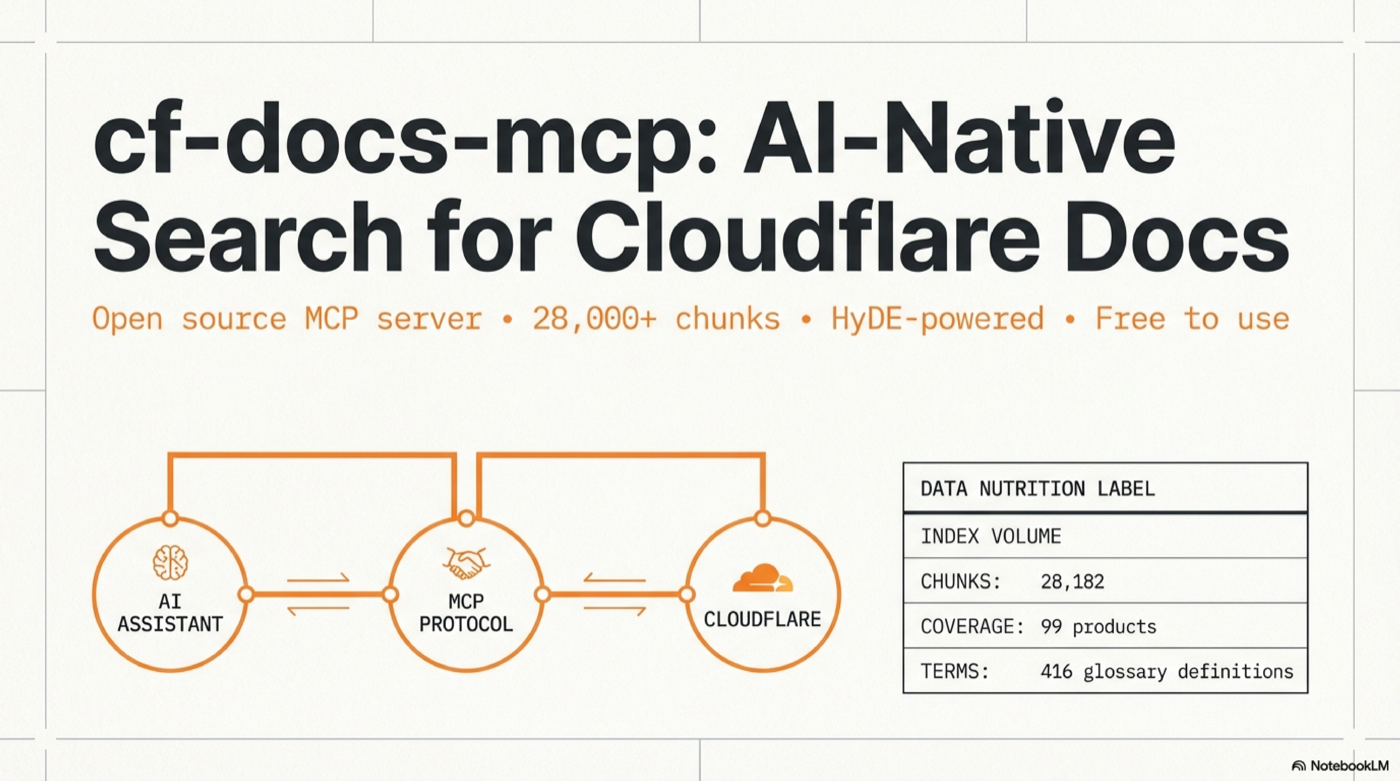
A remote MCP server that provides semantic search over the entire Cloudflare developer documentation. Connect it to any AI coding tool and get instant, high-quality documentation search — no API keys required for the hosted version.
MCP (Model Context Protocol) lets AI tools call external data sources as "tools". This server speaks Streamable HTTP transport — most modern clients support it natively.
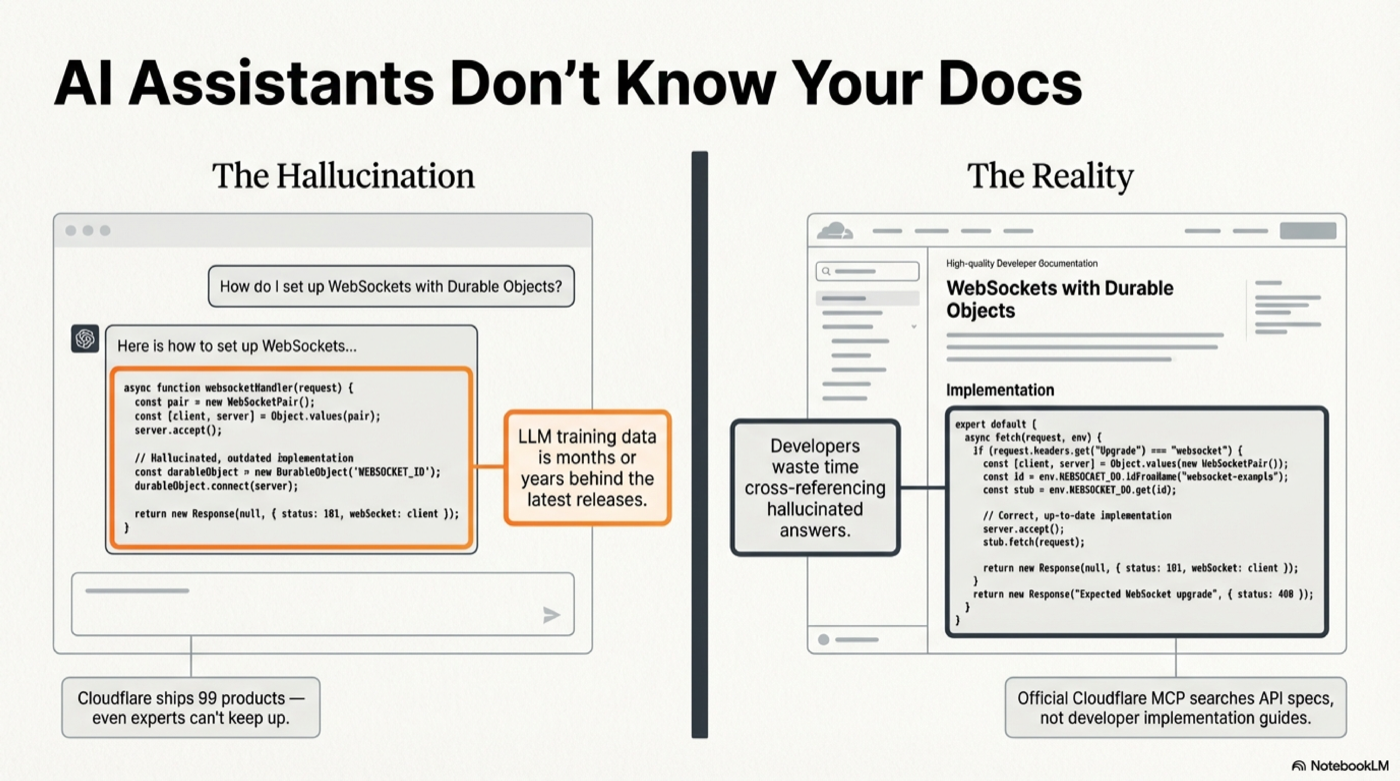
Try it in 30 seconds
This project is in super alpha. There is no authentication yet. Future plans: auth will be added — probably within the day. The public demo endpoint below will likely only stay up for a limited time so people can try it out. After that, deploy your own (4 steps, see below).
Claude Code:
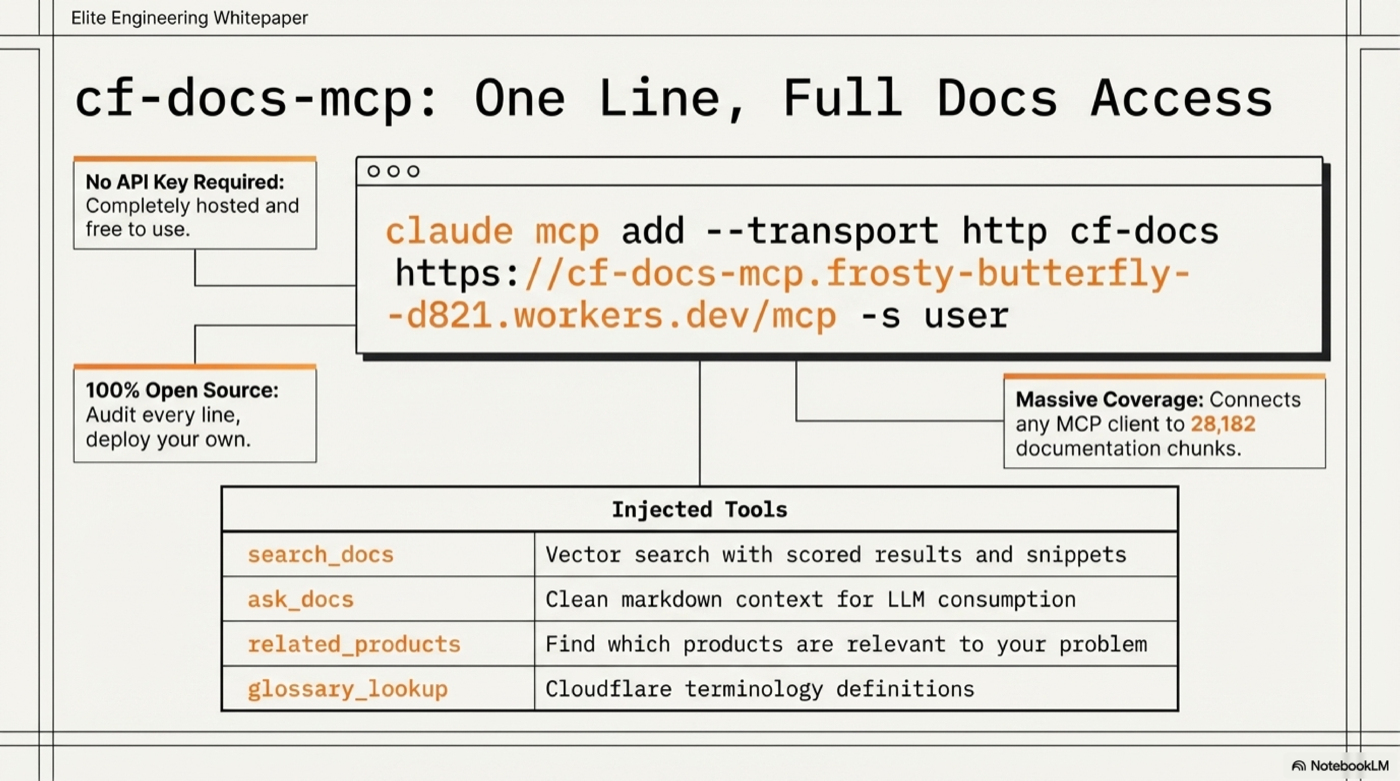
claude mcp add --transport http cf-docs https://cf-docs-mcp.frosty-butterfly-d821.workers.dev/mcp -s user
Then ask: "How do I use Durable Objects with WebSockets?" — your AI assistant now searches 28,000+ Cloudflare doc chunks with vector embeddings.
Connect Your Client
All configs point to: https://cf-docs-mcp.frosty-butterfly-d821.workers.dev/mcp
Claude Code (CLI)
claude mcp add --transport http cf-docs https://cf-docs-mcp.frosty-butterfly-d821.workers.dev/mcp -s user
Claude Desktop
File: ~/Library/Application Support/Claude/claude_desktop_config.json (macOS) or %APPDATA%\Claude\claude_desktop_config.json (Windows)
{
  "mcpServers": {
    "cf-docs": {
      "url": "https://cf-docs-mcp.frosty-butterfly-d821.workers.dev/mcp"
    }
  }
}
Cursor
File: ~/.cursor/mcp.json
{
  "mcpServers": {
    "cf-docs": {
      "url": "https://cf-docs-mcp.frosty-butterfly-d821.workers.dev/mcp"
    }
  }
}
Windsurf
File: ~/.windsurf/mcp.json
{
  "mcpServers": {
    "cf-docs": {
      "serverUrl": "https://cf-docs-mcp.frosty-butterfly-d821.workers.dev/mcp"
    }
  }
}
Cline (VS Code)
File: VS Code settings or ~/Library/Application Support/Code/User/globalStorage/saoudrizwan.claude-dev/settings/cline_mcp_settings.json
{
  "mcpServers": {
    "cf-docs": {
      "url": "https://cf-docs-mcp.frosty-butterfly-d821.workers.dev/mcp",
      "disabled": false
    }
  }
}
Continue.dev
File: ~/.continue/config.json
{
  "experimental": {
    "mcpServers": {
      "cf-docs": {
        "transport": "http",
        "url": "https://cf-docs-mcp.frosty-butterfly-d821.workers.dev/mcp"
      }
    }
  }
}
Zed
File: ~/.config/zed/settings.json
{
  "context_servers": {
    "cf-docs": {
      "settings": {
        "url": "https://cf-docs-mcp.frosty-butterfly-d821.workers.dev/mcp"
      }
    }
  }
}
Any MCP client (curl)
curl -X POST https://cf-docs-mcp.frosty-butterfly-d821.workers.dev/mcp \
  -H "Content-Type: application/json" \
  -H "Accept: application/json, text/event-stream" \
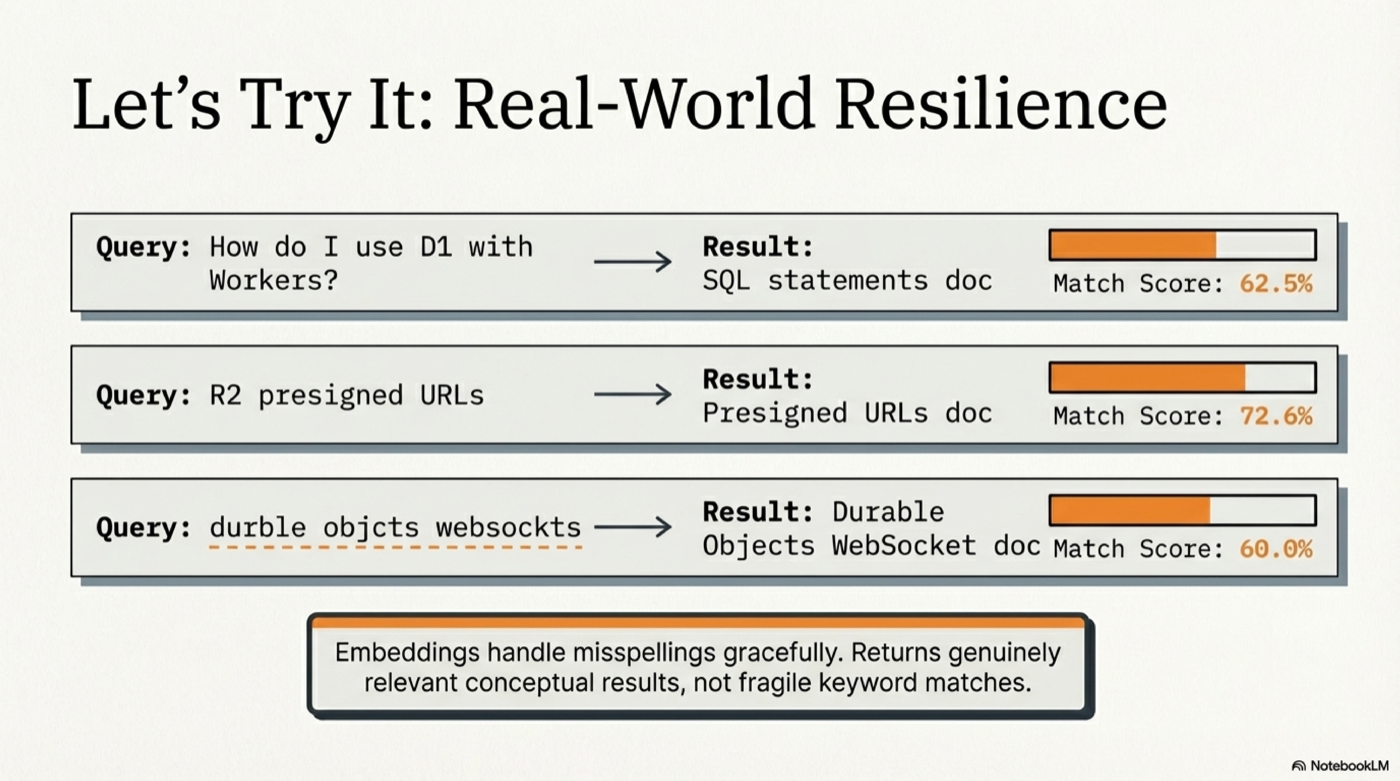
  -d '{"jsonrpc":"2.0","id":1,"method":"tools/call","params":{"name":"search_docs","arguments":{"query":"R2 presigned URLs"}}}'
Example Output
Query: "How do I use D1 with Workers?"
Found 10 results (searched 28182 chunks, HyDE: yes, 0ms)

## Glossary Matches

**D1** (Workers) — score: 0.679
D1 is Cloudflare's managed, serverless database with SQLite's SQL semantics.

## Documentation Results

### [62.5%] SQL statements
Section: [d1] SQL statements
Product: d1 | URL: https://developers.cloudflare.com/d1/...

### [62.4%] Query a database
Section: [d1] Query a database > Use SQL to query D1
Product: d1 | URL: https://developers.cloudflare.com/d1/...
Tools
| Tool | Description |
|------|-------------|
| search_docs | Vector search with scored results, titles, URLs, and content snippets |
| ask_docs | Clean markdown context for LLM consumption |
| related_products | Find which Cloudflare products are relevant to your problem |
| glossary_lookup | Look up Cloudflare terminology definitions |
Example prompts
- "How do I deploy a Worker?"
- "R2 presigned URL expiration settings"
- "Difference between KV, D1, and R2"
- "Durable Objects WebSocket hibernation"
- "Migrate from AWS Lambda to Workers"
- "Zero Trust SAML SSO configuration"
Hosted Server — Always Up to Date
The hosted instance is actively maintained. As Cloudflare updates their documentation, the enrichment pipeline is re-run to keep the search index current. You don't need to deploy anything to benefit from this.
- No API key required to search
- Rate limited to 30 requests/minute per IP
- ~1-2 second response time (dominated by embedding API call; cached queries are instant)
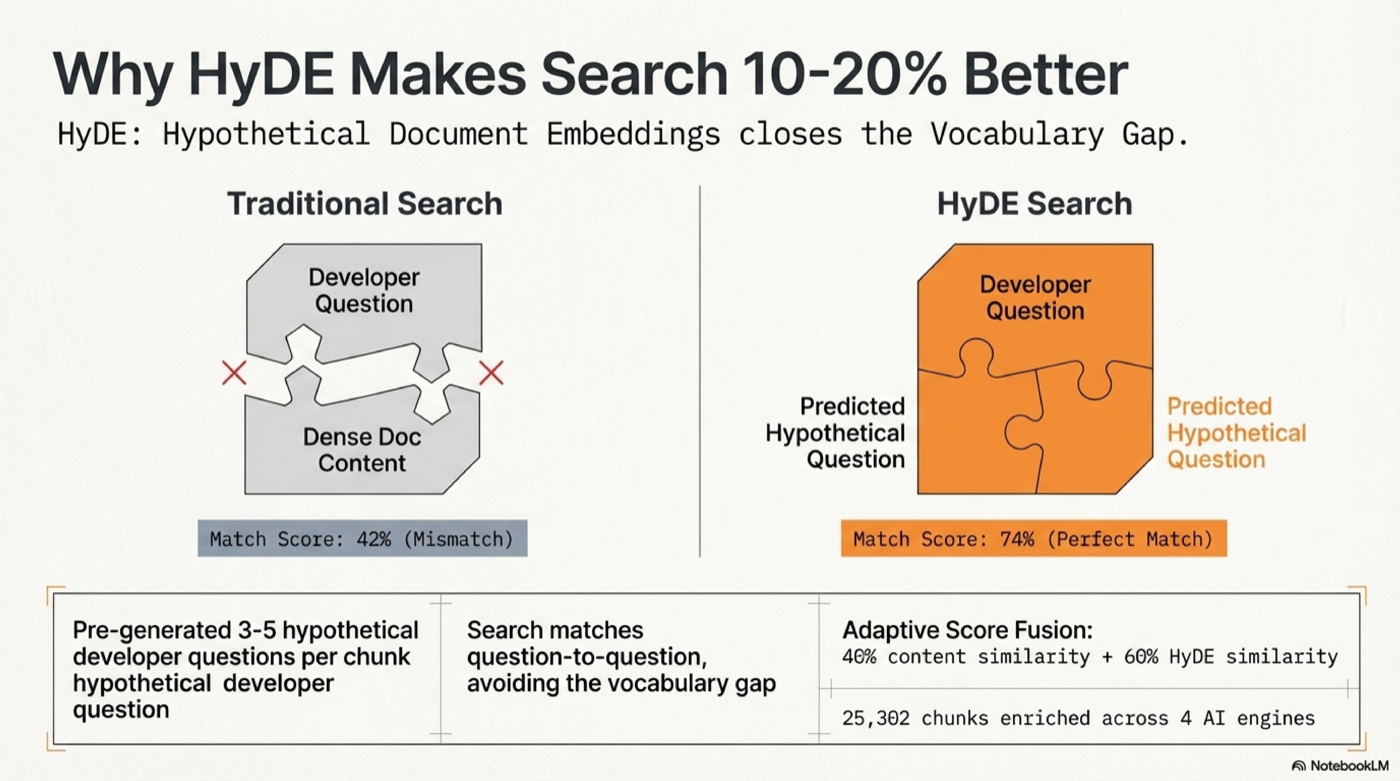
How It Works
Query → Synonym expansion → OpenAI embedding (cached) → Durable Object SQLite
  → Cosine similarity (content × 0.4 + HyDE × 0.6, adaptive weighting)
  → Title/heading boost → MMR diversity dedup → Ranked results
- 28,182 chunks from 6,225 MDX files across 99 Cloudflare products
- 25,302 HyDE-enriched chunks with hypothetical developer questions
- 416 glossary terms with definitions
- text-embedding-3-large (3072 dimensions) for maximum retrieval quality
- 41 synonym mappings — "lambda" → Workers, "s3" → R2, "sqlite" → D1, etc.
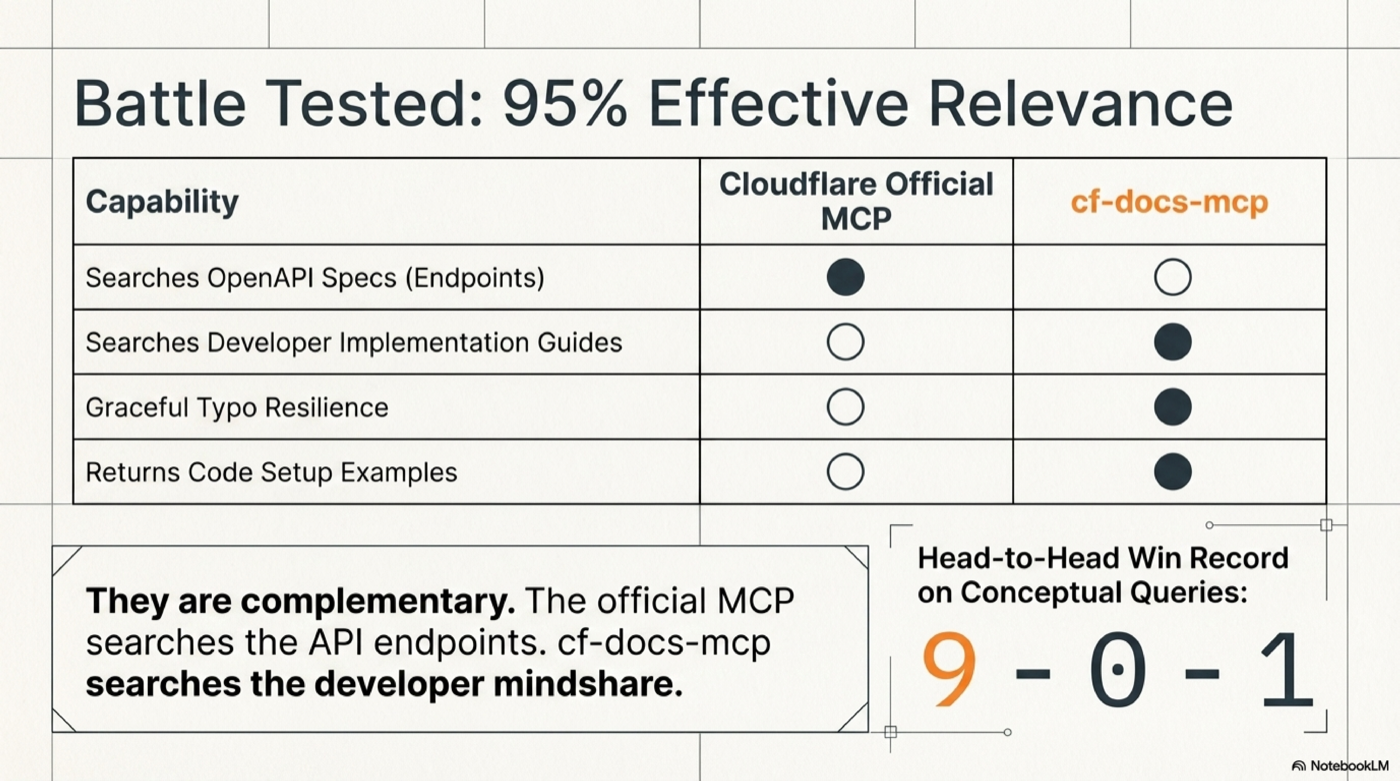
Why this beats Cloudflare's official MCP
Cloudflare's official MCP server at mcp.cloudflare.com searches the OpenAPI spec (API endpoints). This server searches the developer documentation (guides, tutorials, concepts, examples).
Battle-tested head-to-head: cf-docs wins 9-0-1 on documentation queries. They're complementary — use both.
Architecture
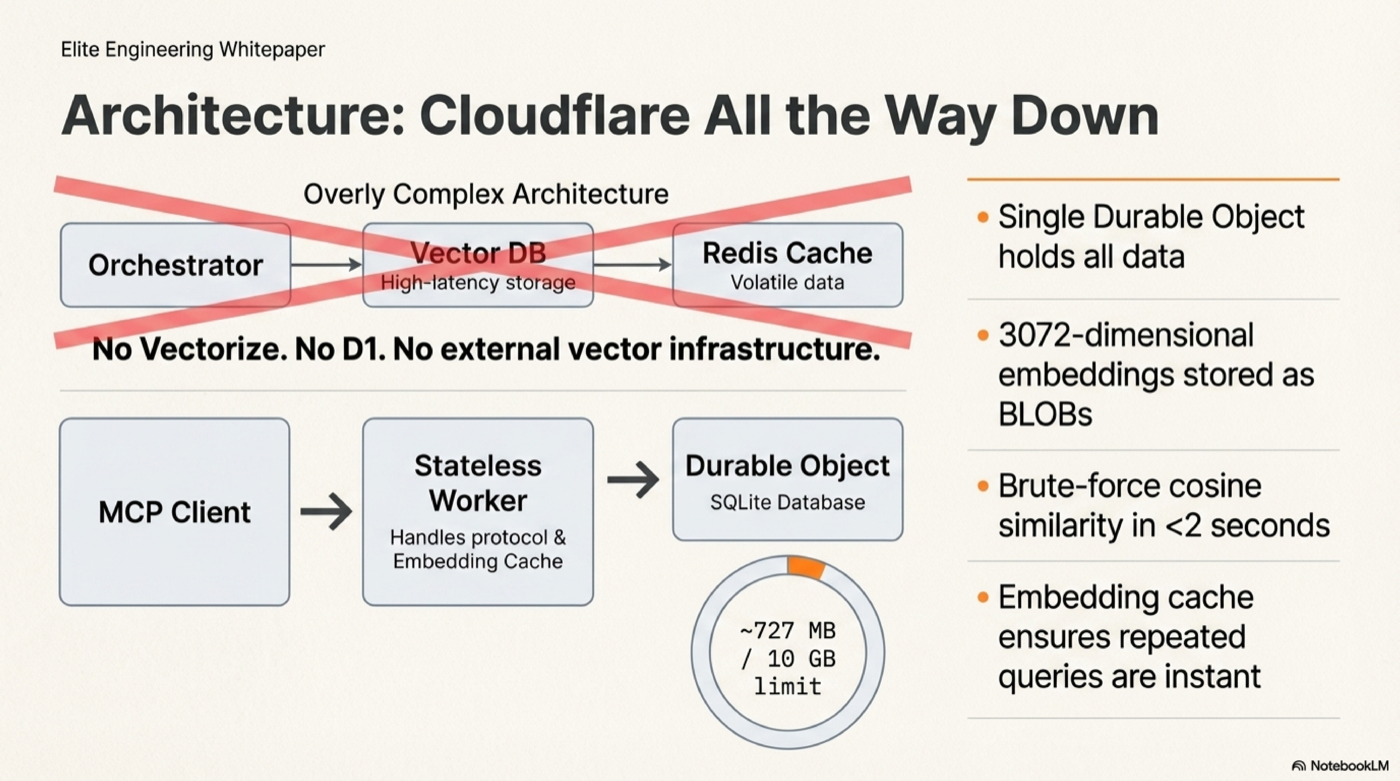
┌─────────────────────┐     ┌──────────────────────────────────────┐
│   MCP Client        │     │   Cloudflare Worker                  │
│   (Claude, Cursor)  │────▶│   createMcpHandler (stateless)       │
│                     │     │     ↓                                │
│                     │◀────│   OpenAI embed (cached 30min LRU)    │
│                     │     │     ↓                                │
│                     │     │   Durable Object (CfDocsMcp)         │
│                     │     │     └─ SQLite: 28k chunks + BLOBs   │
│                     │     │     └─ Brute-force cosine sim        │
│                     │     │     └─ Score fusion + MMR dedup      │
└─────────────────────┘     └──────────────────────────────────────┘
No Vectorize, no D1, no external vector DB. All data lives in one Durable Object's SQLite (~727 MB, well within the 10 GB limit). Brute-force cosine similarity over 28k chunks in <2 seconds.
Deploy Your Own
Prerequisites
- Node.js v20+
- A Cloudflare account (Workers Paid plan for DO storage)
- An OpenAI API key (for query-time embedding)
Step 1: Clone and deploy
git clone https://github.com/AdrianWilliamsGH/cf-docs-mcp.git
cd cf-docs-mcp/worker
npm install
npx wrangler deploy
Step 2: Set your OpenAI API key
npx wrangler secret put OPENAI_API_KEY
Step 3: Seed with pre-built data
The entire enriched dataset is included in the repo as plain-text NDJSON files in data/. No external downloads, no compressed formats — every line is inspectable JSON you can audit.
node scripts/seed-from-data.mjs --url https://cf-docs-mcp.YOUR.workers.dev
Takes ~10 minutes to upload all 28,182 chunks + embeddings.
Step 4: Verify
curl -s https://cf-docs-mcp.YOUR.workers.dev/health
# {"status":"ok","service":"cf-docs-mcp","version":"2.0.0"}

curl -s https://cf-docs-mcp.YOUR.workers.dev/admin/status
# {"chunks":28182,"embedded":28182,"hyde":25302,"glossary":416}
Alternative: Build the index from scratch (~$3.27, ~47 min)
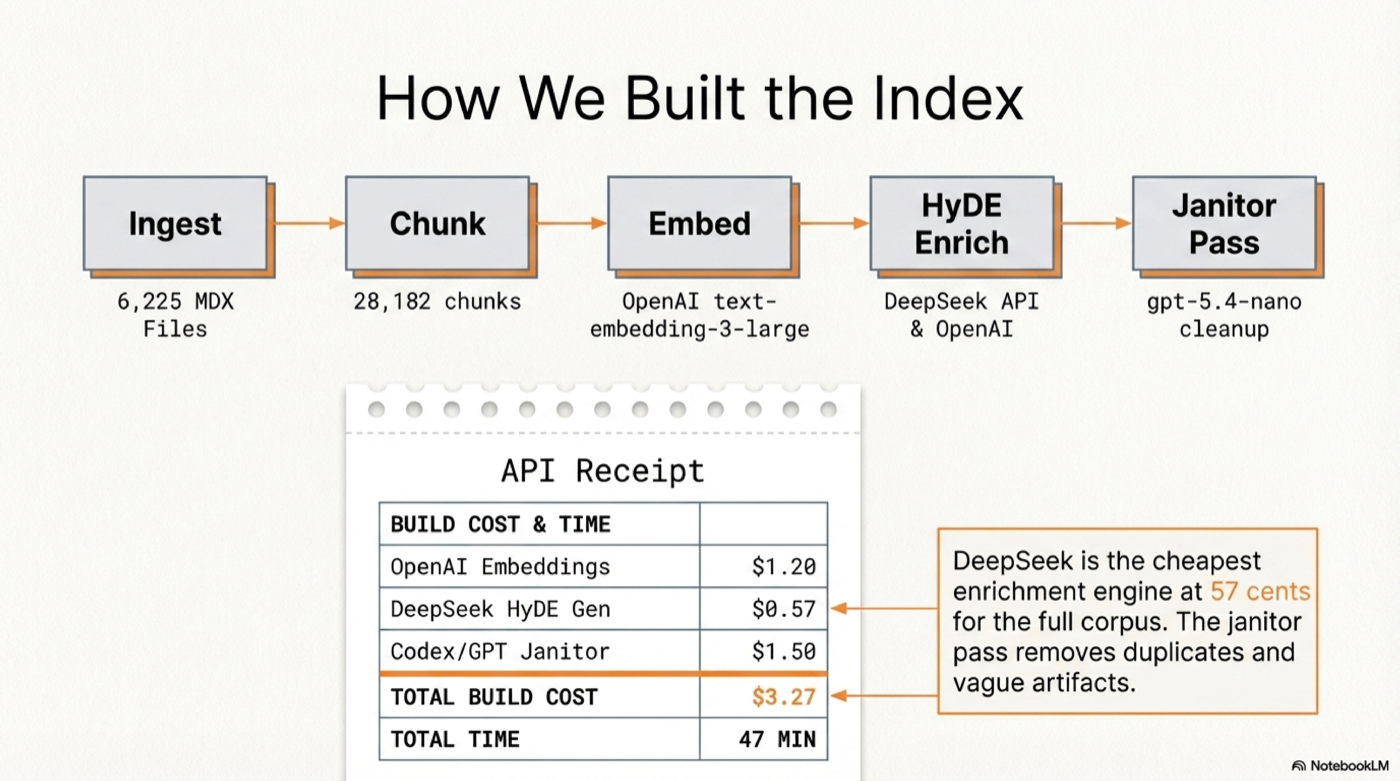
If you want to build your own index from the raw Cloudflare docs:
# Install the CLI
cd ../cli
npm install
npm link

# Clone Cloudflare docs
git clone --depth 1 --filter=blob:none --sparse \
  https://github.com/cloudflare/cloudflare-docs.git /tmp/cloudflare-docs
cd /tmp/cloudflare-docs
git sparse-checkout set src/content/docs

# Set your OpenAI key
mkdir -p ~/.cf-docs
echo "OPENAI_API_KEY=sk-your-key-here" > ~/.cf-docs/.env

# Run the pipeline
cf-docs ingest /tmp/cloudflare-docs/src/content/docs  # Parse + chunk
cf-docs embed                                          # Embed (~$1.40)
cf-docs enrich-deepseek --api-key YOUR_KEY             # HyDE questions (~$0.57)
cf-docs janitor-openai                                 # Cleanup (~$0.10)
cf-docs embed-hyde                                     # Embed HyDE (~$1.20)
cf-docs status                                         # Verify

# Seed the Worker
cd ../../worker
node scripts/seed.mjs --url https://cf-docs-mcp.YOUR.workers.dev
Keeping Your Index Fresh
cd /tmp/cloudflare-docs && git pull
cf-docs ingest /tmp/cloudflare-docs/src/content/docs
cf-docs embed
cf-docs enrich-deepseek --api-key YOUR_KEY
cf-docs embed-hyde
node scripts/seed-from-data.mjs --url https://your-worker.workers.dev
The hosted server is refreshed regularly so you don't have to.
Data Format
The data/ directory contains the full enriched dataset as plain-text NDJSON (one JSON object per line). Each line contains:
{
  "id": 1,
  "product": "workers",
  "file_path": "workers/get-started/guide.mdx",
  "title": "Get started",
  "heading_hierarchy": "Get started > CLI",
  "content": "Set up and deploy your first Worker...",
  "chunk_index": 0,
  "url": "https://developers.cloudflare.com/workers/get-started/guide/",
  "pcx_content_type": "get-started",
  "embedding": "<base64 Float32Array, 3072 dims>",
  "hyde_questions": "[\"How do I create my first Cloudflare Worker?\", ...]",
  "hyde_embedding": "<base64 Float32Array, 3072 dims>"
}
15 shard files (47-65MB each), all under GitHub's 100MB file limit. No compression — fully auditable.
Troubleshooting
| Issue | Fix |
|-------|-----|
| MCP not showing up in client | Restart the client after adding config |
| "Rate limit exceeded" | Wait 60 seconds (30 req/min per IP) |
| Slow first query (~2s) | Normal — Durable Object cold start + OpenAI embedding. Subsequent cached queries are instant. |
| No results returned | Try broader terms, or use ask_docs instead of search_docs |
| Seed script EPIPE errors | Normal on long uploads — script retries automatically |
Project Structure
cf-docs-mcp/
├── data/                   # Pre-built enriched dataset (plain NDJSON)
│   ├── chunks-001.ndjson   # 2000 chunks per shard
│   ├── ...                 # 15 shards total
│   ├── glossary.ndjson     # 416 glossary terms
│   └── manifest.json       # Shard index
├── cli/                    # Local CLI for building the search index
│   ├── bin/cf-docs.mjs
│   └── src/
│       ├── cli.mjs         # Command routing
│       ├── db.mjs          # SQLite storage
│       ├── embed.mjs       # OpenAI embedding pipeline
│       ├── enrich.mjs      # HyDE enrichment (DeepSeek, OpenAI, Codex)
│       ├── ingest.mjs      # MDX parsing + chunking
│       ├── search.mjs      # Local vector search
│       └── format.mjs      # Terminal output
├── worker/                 # Cloudflare Worker MCP server
│   ├── src/
│   │   ├── index.ts        # DO + MCP tools + admin endpoints
│   │   ├── search.ts       # Vector search + score fusion
│   │   ├── synonyms.ts     # CF synonym map
│   │   └── types.ts
│   ├── scripts/
│   │   ├── seed.mjs        # Seed from local SQLite
│   │   └── seed-from-data.mjs  # Seed from repo data/
│   └── wrangler.jsonc
├── scripts/
│   └── export-data.mjs     # Export SQLite → NDJSON shards
└── README.md
License
MIT