Gemini API (Gemini 3, Gemini 2.5, Nano Banana)MCP Server & DeepNLP OneKey MCP Router Support
Gemini API MCP Server & DeepNLP OneKey MCP Router Support
This MCP server is a API wrapper of Official Gemini API, supports various Gemini Models (Gemini 2.5, Gemini 3 for text, images, speech, etc)
Website-Playground Gemini 3 Nano Banana MCP
Nano Banana MCP Server


| Model | OneKey MCP Router Website| | ---- | ---- | | Gemini 2.5 Flash (Nano Banana) | Gemini 2.5 Flash Image MCP Website | | Gemini 3 Pro Image Preview (Nano Banana Pro) | Gemini 3 Pro Image MCP Website |
Usage
1.1 Client + URL (No Installation Are Needed)
HttpStreaming MCP OneKey Router: Use Google Gemini Image Preview(Nano Banana) on OneKey MCP Router
See OneKey MCP Router Document Usage Document and Register Keys
Website-Playground Gemini 3 Nano Banana MCP
MCP Client (Cursor, Claude Desktop, VS Code, etc)
Use DeepNLP OneKey MCP Router Access Key to use Nano Banana on Cursor and other clients
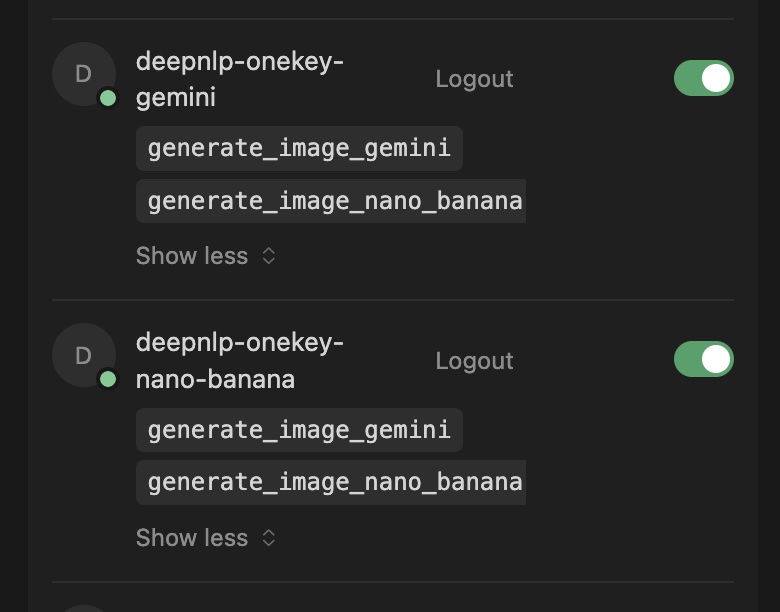
Gemini MCP Server on DeepNLP OneKey Router
{
	"mcpServers":{
		"gemini": {
			"url": "https://agent.deepnlp.org/mcp?server_name=gemini&onekey={DEEPNLP_ONEKEY_ROUTER_ACCESS}"
		}
	}
}
or Alias (server_name=nano_banana)
{
	"mcpServers":{
		"nano-banana": {
			"url": "https://agent.deepnlp.org/mcp?server_name=nano_banana&onekey={DEEPNLP_ONEKEY_ROUTER_ACCESS}"
		}
	}
}
Beta Test Key
We are running beta test right now.
DEEPNLP_ONEKEY_ROUTER_ACCESS=BETA_TEST_KEY_OCT_2025


{
	"mcpServers":{
		"nano-banana": {
			"url": "https://agent.deepnlp.org/mcp?server_name=nano_banana&onekey=BETA_TEST_KEY_OCT_2025"
		},
		"gemini": {
			"url": "https://agent.deepnlp.org/mcp?server_name=gemini&onekey=BETA_TEST_KEY_OCT_2025"
		}
	}
}
1.2 Locally Install (Python/UV)
Run From Source Code: Put Below Information into your client
{
        "gemini": {
            "command": "uv",
            "args": ["--directory", "/path_to_mcp/gemini_mcp_onekey/src/gemini_mcp_onekey", "run", "server.py"]
        },
        "gemini-nano-banana": {
            "command": "uv",
            "args": ["--directory", "/path_to_mcp/gemini_mcp_onekey/src/gemini_mcp_onekey", "run", "server.py"]
        }
}
Install From Pypi
pip install gemini_mcp_onekey

pip install nano_banana_mcp_onekey
mcp_config.json
{
	"mcpServers":{
	    "gemini": {
	      "command": "uvx",
	      "args": [
	          "gemini_mcp_onekey"
	      ],
	      "env": {
	          "GOOGLE_API_KEY": "YOUR_GOOGLE_API_KEYS"
	      }
	    },
	}
}
Tools
1. generate_image_gemini
Parameters
model: The image generation model to use. Defaults to "gemini-2.5-flash-image". Supported Models such as follows Google Gemini Doc, such as "gemini-3-pro-image-preview", "gemini-2.5-flash-image", note that nano-banana is the alias name of the Gemini Image Model. Nano banana 3 Pro refers to Gemini 3 pro preview, and Nono Banana 2.5 refers to Gemini 2.5. Unless specified by user to use Gemini 3 model preview, general 'Neno Banana' image models, please use 'gemini-2.5-flash-image' for more stable and fast response.
prompt: A detailed text description for the image to be generated.
image_name: The filename for the output image, can be a relative path, such as "./new_gemini_image.png", etc. Defaults to "gemini_output_images.png".
output_folder: The optional folder path where the image will be saved. Please use the users' personal directory for this path. If None, uses a default location to the root folder of the server/image
aspect_ratio: The aspect ratio of the generated image (e.g., '16:9', '1:1', '4:3'), defaults to '16:9'.
image_size: The size/resolution of the generated image (e.g., '1K', '2K', '4K'), defaults to '1K'.
2. generate_image_nano_banana
Identical to the generate_image_gemini tool with alias as 'generate_image_nano_banana'
Demo
q=Use Gemini 3 Image Tool to Generate a picture of Christmas Tree turns into a dream eating monster q=Use Nano Banana to Generate a picture of Christmas Tree turns into a protector of the family again evils, dark back grounds, high resolution, etc.
Related
Gemini 3 Nano Banana AI Agent Marketplace GitHub Image Generator