A high-performance security gateway for the Model Context Protocol.
MCP Proxy
A high-performance security gateway for the Model Context Protocol



Why MCP Proxy?
As AI agents gain access to more powerful tools, security becomes critical. MCP Proxy sits between your AI agents and MCP servers, providing:
🛡️ Policy EnforcementFine-grained access control using OPA policies. Define exactly what tools each agent can access and under what conditions. |
📋 Audit LoggingComplete audit trail of every tool call. Know exactly what your agents are doing, when, and why. |
⚡ High PerformanceSub-microsecond routing latency. Your agents won't even notice it's there. |
📊 ObservabilityPrometheus metrics and health endpoints. Full visibility into your AI infrastructure. |
✨ Features
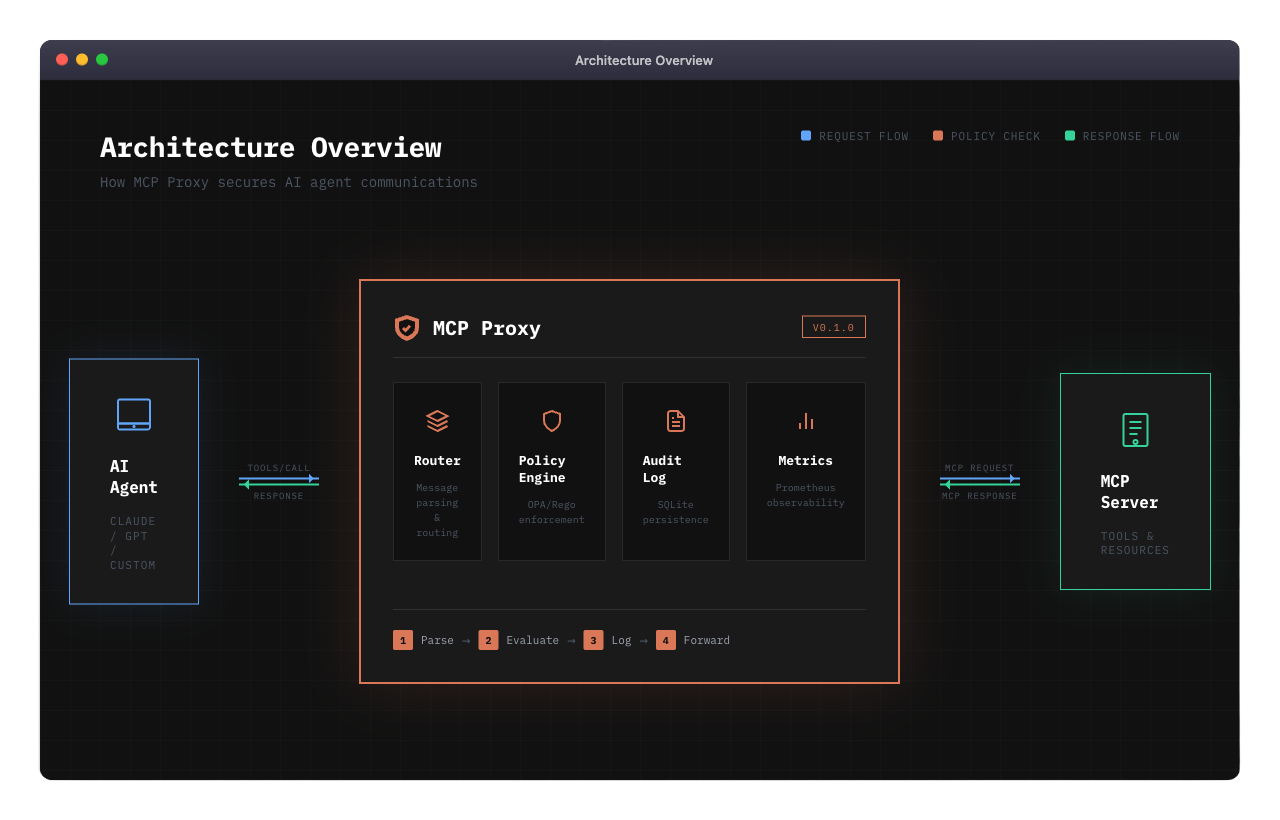
| Feature | Description | |---------|-------------| | OPA Policy Engine | Write policies in Rego for fine-grained access control | | SQLite Audit Store | Persistent, queryable audit logs with configurable retention | | SSE Transport | Server-Sent Events for real-time bidirectional communication | | Session Management | Secure session handling with TTL and connection limits | | Prometheus Metrics | Request latency, policy decisions, error rates | | Health Checks | Kubernetes-ready liveness and readiness probes | | TLS Support | Encrypted communications for production deployments |
🚀 Quick Start
Option 1: Go Install
go install github.com/agentfacts/mcp-proxy/cmd/proxy@latest
Option 2: Build from Source
git clone https://github.com/agentfacts/mcp-proxy.git
cd mcp-proxy
make build
./bin/mcp-proxy --config config/proxy.yaml
Option 3: Docker
docker run -p 3000:3000 ghcr.io/agentfacts/mcp-proxy:latest
Docker Compose (Development Stack)
# Start PostgreSQL, Redis, and supporting services
make docker-up

# Or with the full stack including the proxy
docker-compose --profile full up -d
⚙️ Configuration
Create a config.yaml file:
version: "1.0"

server:
  listen:
    address: "0.0.0.0"
    port: 3000
  transport: "sse"

upstream:
  url: "http://your-mcp-server:8080"
  transport: "sse"

policy:
  enabled: true
  mode: "enforce"      # "audit" to log only, "enforce" to block
  policy_dir: "policies"

audit:
  enabled: true
  db_path: "audit.db"
Environment Variables
All configuration can be overridden via environment variables:
| Variable | Description | Default |
|----------|-------------|---------|
| MCP_SERVER_PORT | Proxy listen port | 3000 |
| MCP_UPSTREAM_URL | Upstream MCP server URL | - |
| MCP_POLICY_MODE | Policy mode (audit/enforce) | enforce |
| MCP_POLICY_ENABLED | Enable policy engine | true |
| MCP_AUDIT_ENABLED | Enable audit logging | true |
| MCP_LOGGING_LEVEL | Log level (debug/info/warn/error) | info |
| MCP_METRICS_ENABLED | Enable Prometheus metrics | false |
| MCP_HEALTH_ENABLED | Enable health endpoints | false |
Full Configuration Reference
See config/proxy.yaml for a complete configuration example with all available options.
📜 Writing Policies
Policies are written in Rego, OPA's declarative policy language.
Example: Restrict File System Access
package mcp.policy

default allow = false

# Allow read operations for agents with read capability
allow {
    input.method == "tools/call"
    startswith(input.tool, "read_")
    has_capability("read:*")
}

# Block write operations to sensitive directories
deny {
    input.method == "tools/call"
    input.tool == "write_file"
    startswith(input.arguments.path, "/etc/")
}

# Helper: check if agent has capability
has_capability(cap) {
    input.agent.capabilities[_] == cap
}
Example: Rate Limiting
package mcp.policy

# Limit to 100 requests per session
deny {
    input.session.request_count > 100
}
See policies/ for more examples.
📈 Performance
MCP Proxy is designed for minimal overhead:
| Operation | Latency | Allocations | |-----------|---------|-------------| | Route Message | ~1 µs | 26 allocs | | Parse Request | ~337 ns | 5 allocs | | Generate Request ID | ~87 ns | 1 alloc |
Run Benchmarks
go test -bench=. -benchmem ./internal/router/...
📊 Observability
Metrics (Prometheus)
Enable with metrics.enabled: true:
curl http://localhost:9090/metrics
Available metrics:
mcp_proxy_requests_total- Total requests by method and statusmcp_proxy_request_duration_seconds- Request latency histogrammcp_proxy_policy_decisions_total- Policy decisions by resultmcp_proxy_active_sessions- Current active sessions
Health Checks
Enable with health.enabled: true:
# Liveness probe
curl http://localhost:8080/health

# Readiness probe
curl http://localhost:8080/ready
🗂️ Project Structure
mcp-proxy/
├── cmd/proxy/           # Application entry point
├── config/              # Configuration files
├── docs/                # Documentation
├── internal/
│   ├── audit/           # SQLite audit store
│   ├── config/          # Configuration loading
│   ├── observability/   # Metrics & health checks
│   ├── policy/          # OPA policy engine
│   ├── router/          # Message routing
│   ├── session/         # Session management
│   ├── transport/sse/   # SSE transport
│   └── upstream/        # Upstream client
├── policies/            # Example Rego policies
└── scripts/             # Utility scripts
📚 Documentation
| Document | Description | |----------|-------------| | Setup Guide | Detailed installation and configuration | | Contributing | How to contribute | | Changelog | Version history | | Security | Security policy |
🗺️ Roadmap
- [x] SSE transport support
- [x] OPA policy engine
- [x] SQLite audit logging
- [x] Prometheus metrics
- [ ] STDIO transport
- [ ] HTTP transport
- [ ] WebSocket transport
- [ ] AgentFacts verification
- [ ] Policy hot-reload
- [ ] Admin API
- [ ] Web dashboard
🤝 Contributing
We welcome contributions! Please see our Contributing Guidelines.
# Clone the repo
git clone https://github.com/agentfacts/mcp-proxy.git
cd mcp-proxy

# Install dependencies
go mod download

# Run tests
make test

# Run linter
make lint
📄 License
MIT License - see LICENSE for details.
Made with ❤️ by AgentFacts