A Model Context Protocol (MCP) server that enables Large Language Models (LLMs) to directly query and analyze a PostgreSQL sales database through natural language conversations.
🔧 MCP Sales Analytics Server
A Model Context Protocol (MCP) server that enables Large Language Models (LLMs) to directly query and analyze a PostgreSQL sales database through natural language conversations.
Built with Python, the official MCP SDK, psycopg3, and Docker.




🧩 The Challenge
Business teams rely on sales data to make strategic decisions — identifying top customers, tracking revenue trends, monitoring sales rep performance, and spotting growth opportunities. However, accessing this data typically requires:
- SQL expertise — writing complex queries with joins, aggregations, and filters
- Database access — navigating credentials, connections, and security policies
- Context switching — moving between BI tools, spreadsheets, and communication platforms
- Rigid dashboards — pre-built reports that can't answer ad-hoc questions
This creates a bottleneck where business stakeholders depend on data analysts or engineers for every new question, slowing down decision-making.
💡 The Solution
This project implements a Model Context Protocol (MCP) server that acts as a bridge between an LLM and a PostgreSQL database. It allows users to ask questions about sales data in plain English and get accurate, real-time answers.
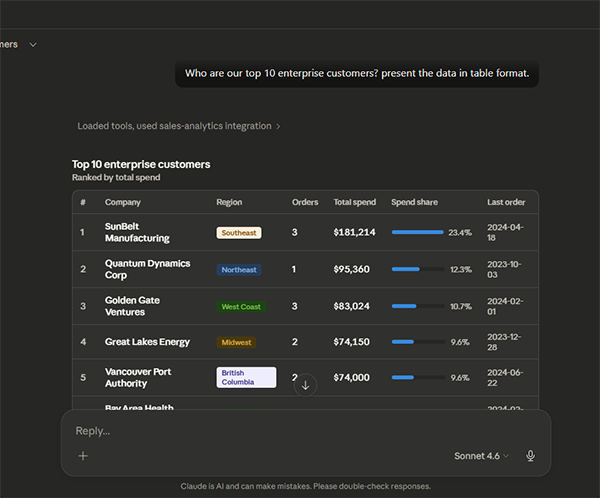
Using this tool, users can ask questions like "Who are our top 10 enterprise customers?" or "Tell me everything about [Customer], including their order history." in plain English and get Real Time results and analysis directly from a chatbot.
How It Works
- User asks a question in Claude Desktop (e.g., "Show me Q1 revenue by region")
- Claude interprets the question and selects the appropriate MCP tool
- MCP Server receives the tool call, executes a parameterized SQL query
- PostgreSQL returns the results
- MCP Server formats the data and sends it back to Claude
- Claude presents the results in a clear, conversational format
✨ Features
- 🗣️ Natural Language Queries — Ask questions in plain English
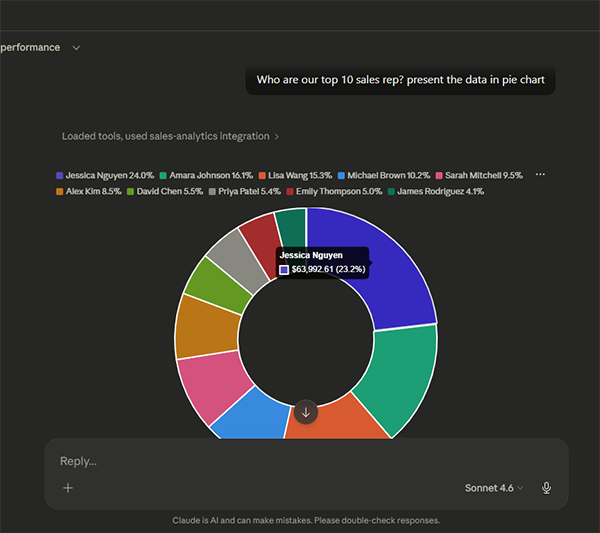
- 🔧 12 Pre-built Tools — Revenue analysis, customer insights, rep performance, and more
- 🛡️ Read-Only Safety — Database connection enforces SELECT-only queries
- 🔒 SQL Injection Prevention — All queries use parameterized placeholders
- ⏱️ Query Timeout — 30-second limit prevents runaway queries
- 🏊 Connection Pooling — Efficient database connection management
- 🐳 Docker Compose — One-command setup for the entire stack
- 📊 Realistic Sample Data — 30 customers, 51 orders, 12 reps, 22 products
- 🧠 Schema-as-Resource — LLM has access to full database documentation
📋 Prerequisites
- Docker Desktop (v4.0+)
- Claude Desktop (v0.7+)
🚀 Installation
Docker (Recommended)
The fastest way to get everything running. Docker handles PostgreSQL, data seeding, and the MCP server automatically.
  git clone https://github.com/sumarditjhai-sys/mcpserver.git
  cd mcpserver
  docker compose --env-file .env.docker up --build -d
To Connect the MCP server with Claude, open Claude Desktop go to "Settings" then "Developer" then "Edit Config". Replace "claude_desktop_config.json" contents with
{
  "mcpServers": {
    "sales-analytics": {
      "command": "docker",
      "args": [
        "exec",
        "-i",
        "mcp-sales-server",
        "python",
        "-m",
        "mcp_sales.server"
      ]
    }
  }
}
Restart Claude, and you are ready to chat. Try sending these questions:
-Show me revenue by region for 2024
-How is Sarah Mitchell performing against her quota?
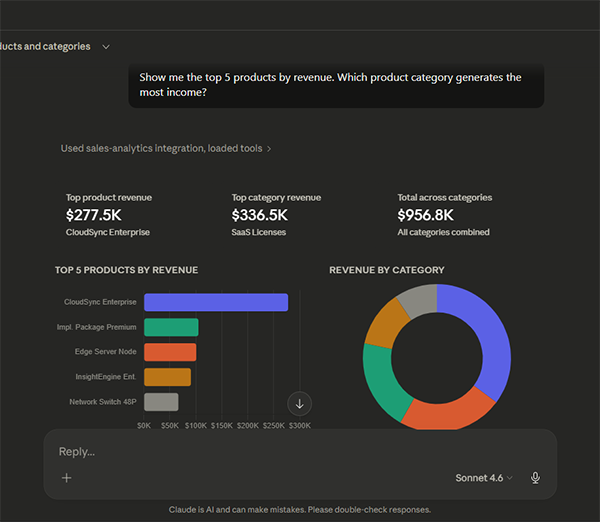
-Show me the top 5 products by revenue. Which product category generates the most income?
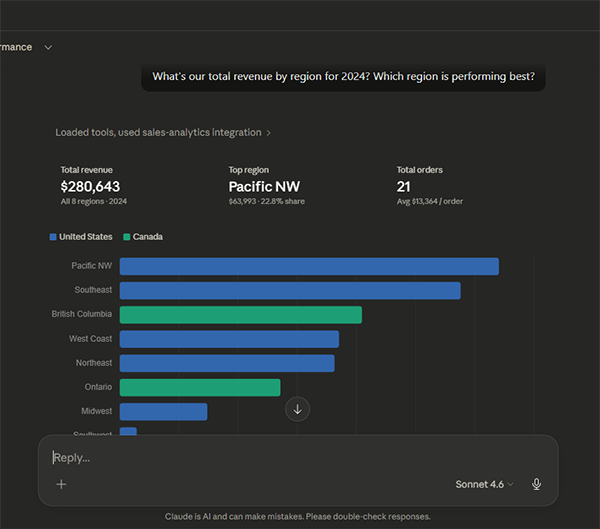
-What's our total revenue by region for 2024? Which region is performing best?
-Show me the top 5 products by revenue. Which product category generates the most income?