MCP server by shiharuharu
cli-agent-mcp
Unified MCP (Model Context Protocol) server for CLI AI agents. Provides a single interface to invoke Codex, Gemini, Claude, and OpenCode CLI tools.
Features
- Unified Interface: Single MCP server exposing multiple CLI agents
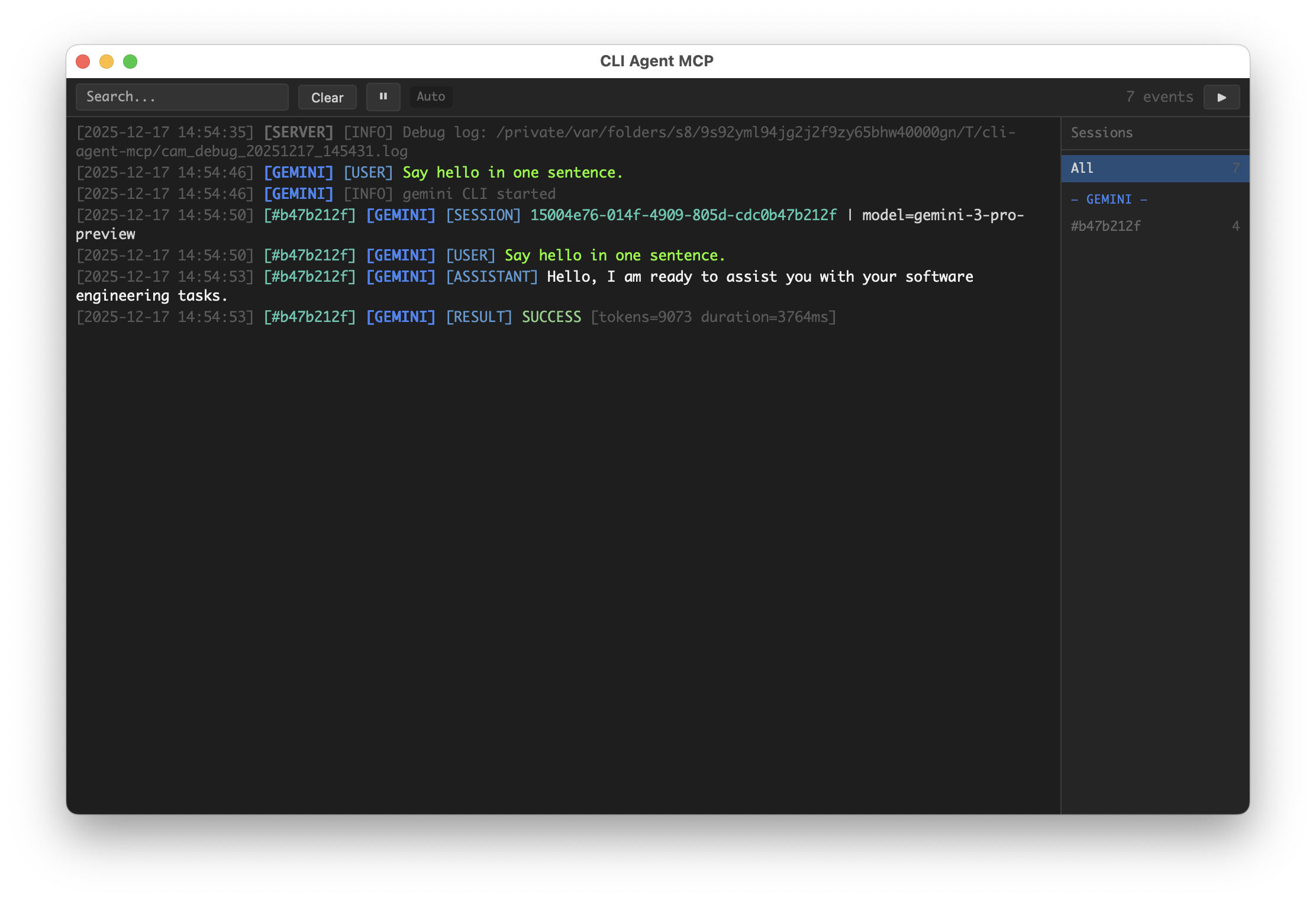
- GUI Dashboard: Real-time task monitoring with pywebview
- Request Isolation: Per-request execution context for safe concurrent usage
- Signal Handling: Graceful cancellation via SIGINT without killing the server
- Debug Logging: Comprehensive subprocess output capture for debugging
Screenshot
Installation
# Install from PyPI (when published)
uvx cli-agent-mcp

# Install from GitHub
uvx --from git+https://github.com/shiharuharu/cli-agent-mcp.git cli-agent-mcp

# Install from source (editable mode for development)
uvx --from /path/to/cli-agent-mcp cli-agent-mcp

# Or use pip
pip install -e .
Configuration
Configure via environment variables:
| Variable | Description | Default |
|----------|-------------|---------|
| CAM_TOOLS | Comma-separated list of allowed tools (empty = all) | "" (all) |
| CAM_GUI | Enable GUI dashboard | true |
| CAM_GUI_DETAIL | GUI detail mode | false |
| CAM_GUI_KEEP | Keep GUI on exit | false |
| CAM_DEBUG | Include debug info in MCP responses | false |
| CAM_LOG_DEBUG | Write debug logs to temp file | false |
| CAM_SIGINT_MODE | SIGINT handling (cancel/exit/cancel_then_exit) | cancel |
| CAM_SIGINT_DOUBLE_TAP_WINDOW | Double-tap exit window (seconds) | 1.0 |
Tools
codex
Invoke OpenAI Codex CLI agent for deep code analysis and critical review.
Best for: Code review, bug hunting, security analysis
| Parameter | Type | Required | Default | Description |
|-----------|------|----------|---------|-------------|
| prompt | string | ✓ | - | Task instruction for the agent |
| workspace | string | ✓ | - | Absolute path to the project directory |
| permission | string | | read-only | Permission level: read-only, workspace-write, unlimited |
| model | string | | "" | Model override (only specify if explicitly requested) |
| save_file | string | | "" | Save agent output to file path |
| save_file_with_prompt | boolean | | false | Include analysis prompt in saved file |
| full_output | boolean | | false | Return detailed output including reasoning |
| image | array | | [] | Absolute paths to image files for visual context |
| session_id | string | | "" | Session ID to resume previous conversation |
| task_note | string | | "" | Display label for GUI |
| debug | boolean | | (global) | Override debug setting for this call |
gemini
Invoke Google Gemini CLI agent for UI design and comprehensive analysis.
Best for: UI mockups, image analysis, requirement discovery, full-text analysis
| Parameter | Type | Required | Default | Description |
|-----------|------|----------|---------|-------------|
| prompt | string | ✓ | - | Task instruction for the agent |
| workspace | string | ✓ | - | Absolute path to the project directory |
| permission | string | | read-only | Permission level: read-only, workspace-write, unlimited |
| model | string | | "" | Model override |
| save_file | string | | "" | Save agent output to file path |
| save_file_with_prompt | boolean | | false | Include analysis prompt in saved file |
| full_output | boolean | | false | Return detailed output including reasoning |
| session_id | string | | "" | Session ID to resume previous conversation |
| task_note | string | | "" | Display label for GUI |
| debug | boolean | | (global) | Override debug setting for this call |
claude
Invoke Anthropic Claude CLI agent for code implementation.
Best for: Feature implementation, refactoring, code generation
| Parameter | Type | Required | Default | Description |
|-----------|------|----------|---------|-------------|
| prompt | string | ✓ | - | Task instruction for the agent |
| workspace | string | ✓ | - | Absolute path to the project directory |
| permission | string | | read-only | Permission level: read-only, workspace-write, unlimited |
| model | string | | "" | Model override (sonnet, opus, or full model name) |
| save_file | string | | "" | Save agent output to file path |
| save_file_with_prompt | boolean | | false | Include analysis prompt in saved file |
| full_output | boolean | | false | Return detailed output including reasoning |
| system_prompt | string | | "" | Complete replacement for the default system prompt |
| append_system_prompt | string | | "" | Additional instructions appended to default prompt |
| agent | string | | "" | Specify agent name (overrides default agent setting) |
| session_id | string | | "" | Session ID to resume previous conversation |
| task_note | string | | "" | Display label for GUI |
| debug | boolean | | (global) | Override debug setting for this call |
opencode
Invoke OpenCode CLI agent for full-stack development.
Best for: Rapid prototyping, multi-framework projects
| Parameter | Type | Required | Default | Description |
|-----------|------|----------|---------|-------------|
| prompt | string | ✓ | - | Task instruction for the agent |
| workspace | string | ✓ | - | Absolute path to the project directory |
| permission | string | | read-only | Permission level: read-only, workspace-write, unlimited |
| model | string | | "" | Model override (format: provider/model) |
| save_file | string | | "" | Save agent output to file path |
| save_file_with_prompt | boolean | | false | Include analysis prompt in saved file |
| full_output | boolean | | false | Return detailed output including reasoning |
| file | array | | [] | Absolute paths to files to attach |
| agent | string | | build | Agent type: build, plan, etc. |
| session_id | string | | "" | Session ID to resume previous conversation |
| task_note | string | | "" | Display label for GUI |
| debug | boolean | | (global) | Override debug setting for this call |
Permission Levels
| Level | Description | Codex | Claude | OpenCode |
|-------|-------------|-------|--------|----------|
| read-only | Can only read files | --sandbox read-only | --tools Read,Grep,Glob | edit: deny, bash: deny |
| workspace-write | Can modify files within workspace | --sandbox workspace-write | --tools Read,Edit,Write,Bash | edit: allow, bash: ask |
| unlimited | Full system access (use with caution) | --sandbox danger-full-access | --tools default | edit: allow, bash: allow |
Debug Mode
Enable debug mode to get detailed execution information:
# Enable debug info in responses
export CAM_DEBUG=true

# Enable detailed log file
export CAM_LOG_DEBUG=true
When CAM_LOG_DEBUG=true, logs are written to:
/tmp/cli-agent-mcp/cam_debug_YYYYMMDD_HHMMSS.log
Debug output includes:
- Full subprocess command
- Complete stdout/stderr output
- Return codes
- MCP request/response summaries
MCP Configuration
Add to your MCP client configuration (e.g., Claude Desktop claude_desktop_config.json):
Basic Configuration
{
  "mcpServers": {
    "cli-agent-mcp": {
      "command": "uvx",
      "args": ["cli-agent-mcp"]
    }
  }
}
Install from GitHub
{
  "mcpServers": {
    "cli-agent-mcp": {
      "command": "uvx",
      "args": [
        "--from",
        "git+https://github.com/shiharuharu/cli-agent-mcp.git",
        "cli-agent-mcp"
      ]
    }
  }
}
With Debug Mode
{
  "mcpServers": {
    "cli-agent-mcp": {
      "command": "uvx",
      "args": [
        "--from",
        "git+https://github.com/shiharuharu/cli-agent-mcp.git",
        "cli-agent-mcp"
      ],
      "env": {
        "CAM_DEBUG": "true",
        "CAM_LOG_DEBUG": "true"
      }
    }
  }
}
Disable GUI
{
  "mcpServers": {
    "cli-agent-mcp": {
      "command": "uvx",
      "args": ["cli-agent-mcp"],
      "env": {
        "CAM_GUI": "false"
      }
    }
  }
}
Limit Available Tools
{
  "mcpServers": {
    "cli-agent-mcp": {
      "command": "uvx",
      "args": ["cli-agent-mcp"],
      "env": {
        "CAM_TOOLS": "claude,gemini"
      }
    }
  }
}
Project Structure
cli-agent-mcp/
├── shared/                  # Source of truth (for distribution)
│   ├── gui/
│   ├── invokers/
│   └── parsers/
├── src/cli_agent_mcp/       # Main package
│   ├── shared/              # ← Synced copy (do not edit directly)
│   ├── server.py
│   ├── config.py
│   └── gui_manager.py
├── tests/
└── shared_sync.sh
Important: Never edit src/cli_agent_mcp/shared/ directly. Always edit shared/ and run the sync script.
Development
# Install dev dependencies
pip install -e ".[dev]"

# Run tests
pytest

# Sync shared modules (runs tests first)
./shared_sync.sh
License
MIT