MCP server for SSH orchestration across multiple servers
MCP SSH Orchestrator
Zero-Trust SSH Orchestration for AI Assistants
Enforce declarative policy-as-code and audited access for Claude Desktop, Cursor, and any MCP-aware client.
Launch in minutes with Docker + MCP tooling, deny-by-default controls, and hardened SSH key management.










What Problem Does This Solve?
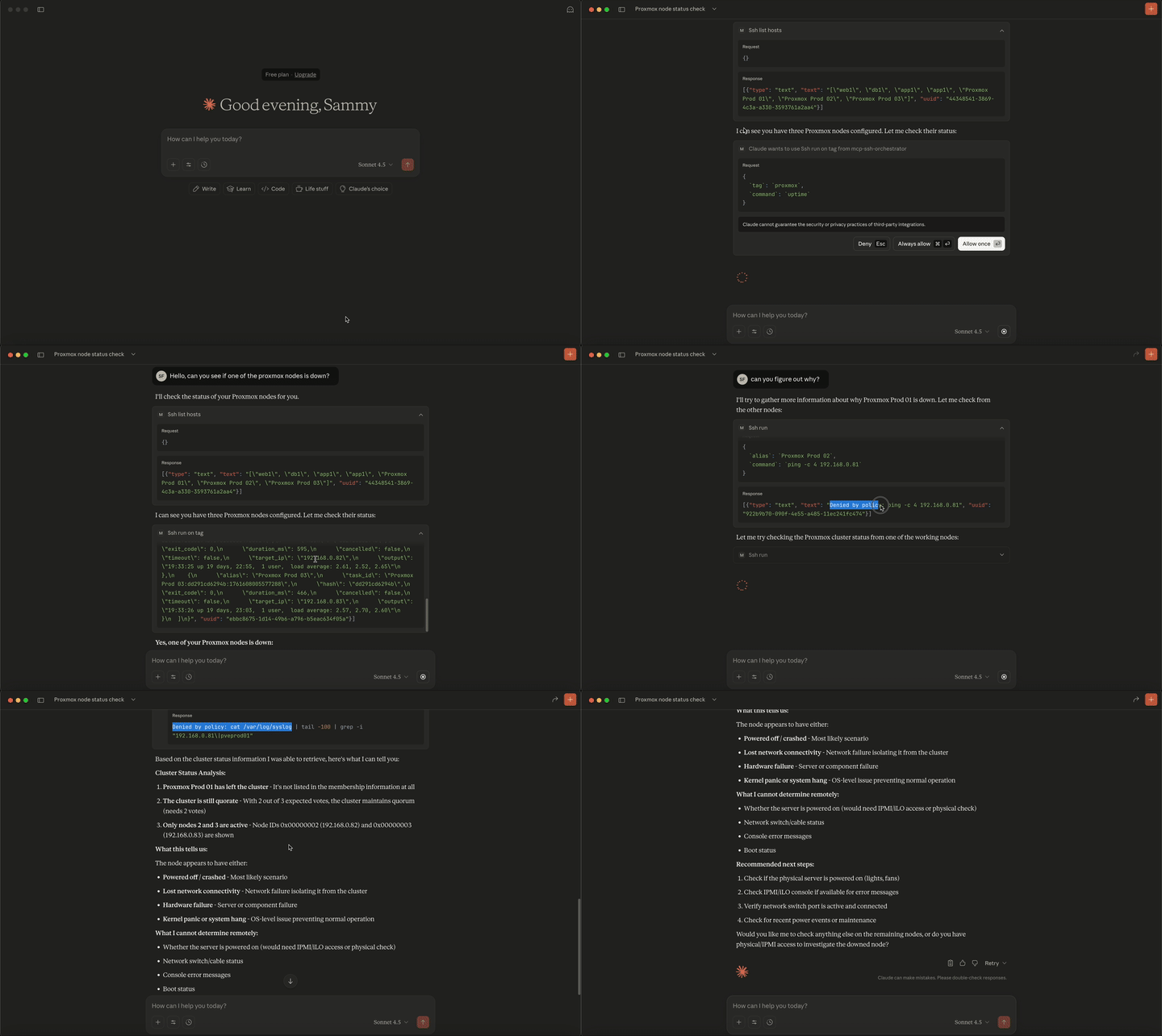
Imagine this: Your AI assistant (Claude, ChatGPT, etc.) can access your servers, but you're terrified of what it might do. rm -rf /? Delete your databases? Change firewall rules?
Now imagine this: Your AI has governed, auditable access to your infrastructure. It can check logs, restart services, and manage your fleet, but only if your security policies allow it.
That's exactly what MCP SSH Orchestrator provides: the power of AI-driven server management with deny-by-default access control, IP allowlists, host key verification, and comprehensive audit logging backed by declarative YAML policy-as-code (config/servers.yml, config/credentials.yml, config/policy.yml).
Why This Matters
Zero-Trust Security Model
- Deny-by-default: Nothing runs unless explicitly allowed
- Network controls: IP allowlists prevent lateral movement
- Command whitelisting: Only approved commands can execute
- Declarative policy-as-code: Versioned YAML files define hosts, credentials, and allowed commands
- Comprehensive audit trails: Every action is logged in JSON
Prevents Common Attack Vectors
- Dangerous commands blocked:
rm -rf,dd, file deletions - Network isolation: Servers can't access external internet
- No privilege escalation: Runs as non-root in containers
- Resource limits: CPU and memory caps prevent DOS
Production-Ready Audit & Security
- OWASP LLM Top 10 protected: Mitigates LLM07 (Insecure Plugin Design), LLM08 (Excessive Agency), LLM01 (Prompt Injection)
- MITRE ATT&CK aligned: Prevents T1071 (Application Layer Protocol), T1659 (Content Injection)
- Structured JSON audit logs: Complete audit trail with timestamps, hashes, and IPs
- Forensics ready: Command hashing, IP tracking, detailed metadata
- Real-time monitoring: Progress logs for long-running tasks
Who Is This For?
Homelab Enthusiasts
- Automate routine server maintenance with AI
- Safely manage Proxmox, TrueNAS, Docker hosts
- Get help troubleshooting without losing SSH security
Security Engineers
- Audit and control AI access to infrastructure
- Implement zero-trust principles with declarative policy-as-code configs
- Meet compliance requirements with structured logging
DevOps Teams
- Let AI handle routine tasks: log checks, service restarts, updates
- Manage fleets of servers through conversational interface
- Reduce manual toil while maintaining security standards
Platform Engineers
- Enable AI-powered infrastructure management
- Provide secure self-service access to developers
- Bridge the gap between AI and infrastructure securely
Real-World Use Cases
Scenario 1: Homelab Automation (Homelab Enthusiasts)
You say: "Claude, my Proxmox host is running slow. Can you check disk usage and memory on all my VMs?"
What happens
- Policy allows
df -handfree -mon Proxmox hosts - Network check: Private IP allowlist permits access
- Tag-based execution checks all hosts tagged
proxmox - Commands execute safely with no destructive operations
- Complete audit trail stored in JSON logs
Scenario 2: Incident Response (DevOps Teams)
You say: "We're seeing 500 errors. Check nginx logs across all production web servers and show me the last 100 error lines."
What happens
- Tag-based execution:
tail -n 100 /var/log/nginx/error.logruns on allweb-prodservers - Network isolation enforced: No external API calls or egress allowed
- Real-time progress logs stream via MCP context events
- Structured output aggregates results for quick triage
- Full audit trail with timestamps for post-incident review
Scenario 3: Fleet-Wide Maintenance (Platform Engineers)
You say: "Update system packages on all staging servers, but show me what would change first before running the upgrade."
What happens
- Use
ssh_planto previewapt list --upgradableacrossstagingtagged hosts - Review dry-run output to see pending updates
- Policy validates
apt update && apt upgrade -yis allowed on staging - Tag-based execution runs upgrade on all staging servers in parallel
- Audit logs track which servers were updated and when
Quick Start
1. Prepare local configuration (one-time)
# Optional: bootstrap everything with the compose helper script
# (runs from the repo root or from your target config directory)
./compose/setup.sh enduser

# Or download it separately
curl -fsSLO https://raw.githubusercontent.com/samerfarida/mcp-ssh-orchestrator/main/compose/setup.sh
chmod +x setup.sh
./setup.sh enduser
If you prefer to lay things out manually, follow the steps below.
# Pull the latest release
docker pull ghcr.io/samerfarida/mcp-ssh-orchestrator:latest

# Create directories for config, keys, and secrets
mkdir -p ~/mcp-ssh/{config,keys,secrets}

# Copy example configs to get started quickly
cp examples/example-servers.yml ~/mcp-ssh/config/servers.yml
cp examples/example-credentials.yml ~/mcp-ssh/config/credentials.yml
cp examples/example-policy.yml ~/mcp-ssh/config/policy.yml

# Add your SSH key (replace with your private key file)
cp ~/.ssh/id_ed25519 ~/mcp-ssh/keys/
chmod 0400 ~/mcp-ssh/keys/id_ed25519

# (Optional) Pin trusted hosts and prepare secret files
cp ~/.ssh/known_hosts ~/mcp-ssh/keys/known_hosts

# Option 1: Individual secret files (Docker secrets compatible)
cat > ~/mcp-ssh/secrets/prod_db_password.txt <<'EOF'
CHANGE-ME
EOF
chmod 600 ~/mcp-ssh/secrets/prod_db_password.txt

# Option 2: Consolidated .env file (recommended for easier management)
cat > ~/mcp-ssh/secrets/.env <<'EOF'
# SSH Passwords
prod_db_password=CHANGE-ME
lab_password=CHANGE-ME-TOO

# SSH Key Passphrases
prod_key_passphrase=CHANGE-ME-PASSPHRASE
EOF
chmod 600 ~/mcp-ssh/secrets/.env
# Note: .env file supports KEY=value format, comments, and quoted values
# See docs/wiki/06.2-credentials.yml.md for details
2. Launch the orchestrator container
docker run -d --name mcp-ssh-orchestrator \
  -v ~/mcp-ssh/config:/app/config:ro \
  -v ~/mcp-ssh/keys:/app/keys:ro \
  -v ~/mcp-ssh/secrets:/app/secrets:ro \
  ghcr.io/samerfarida/mcp-ssh-orchestrator:latest
Restart later with docker start mcp-ssh-orchestrator. Prefer disposable containers? Use docker run -i --rm ... instead.
3. Connect your MCP client
- Cursor: Add to
~/.cursor/mcp.json
{
  "mcpServers": {
    "mcp-ssh-orchestrator": {
      "command": "docker",
      "args": ["start", "-a", "mcp-ssh-orchestrator"],
      "env": {"PYTHONUNBUFFERED": "1"}
    }
  }
}
- Claude Desktop (macOS): Update
~/Library/Application Support/Claude/claude_desktop_config.json
{
  "mcpServers": {
    "ssh-orchestrator": {
      "command": "docker",
      "args": [
        "run", "-i", "--rm",
        "-v", "/Users/YOUR_USERNAME/mcp-ssh/config:/app/config:ro",
        "-v", "/Users/YOUR_USERNAME/mcp-ssh/keys:/app/keys:ro",
        "-v", "/Users/YOUR_USERNAME/mcp-ssh/secrets:/app/secrets:ro",
        "ghcr.io/samerfarida/mcp-ssh-orchestrator:latest"
      ]
    }
  }
}
(Windows path: %APPDATA%\\Claude\\claude_desktop_config.json.)
More examples (Docker Desktop, multi-environment, SDK usage) live in the Integrations guide.
4. Test the connection
# List configured hosts through the MCP server
echo '{"jsonrpc":"2.0","method":"tools/call","params":{"name":"ssh_list_hosts","arguments":{}},"id":1}' | \
  docker run -i --rm \
    -v ~/mcp-ssh/config:/app/config:ro \
    -v ~/mcp-ssh/keys:/app/keys:ro \
    -v ~/mcp-ssh/secrets:/app/secrets:ro \
    ghcr.io/samerfarida/mcp-ssh-orchestrator:latest
Cursor/Claude should now show the orchestrator as connected. Jump to the Usage Cookbook for guided scenarios.
How Security Works (The Technical Details)
Policy-as-code workflow: config/servers.yml, config/credentials.yml, and config/policy.yml are parsed on startup, enforced during every ssh_* tool invocation, and mirrored in the structured audit logs so the same declarative files you review in Git gate what your AI can execute.
Defense-in-Depth Architecture
graph TB
    subgraph "Layer 1: Transport Security"
        L1A[stdio Communication]
        L1B[Container Isolation]
    end
    subgraph "Layer 2: Network Security"
        L2A[IP Allowlists]
        L2B[Host Key Verification]
    end
    subgraph "Layer 3: Policy Security"
        L3A[Deny-by-Default]
        L3B[Pattern Matching]
    end
    subgraph "Layer 4: Application Security"
        L4A[Non-Root Execution]
        L4B[Resource Limits]
    end

    L1A --> L2A
    L1B --> L2B
    L2A --> L3A
    L2B --> L3B
    L3A --> L4A
    L3B --> L4B

    style L1A fill:#e1f5ff
    style L1B fill:#e1f5ff
    style L2A fill:#d4edda
    style L2B fill:#d4edda
    style L3A fill:#fff3cd
    style L3B fill:#fff3cd
    style L4A fill:#f8d7da
    style L4B fill:#f8d7da
What Gets Blocked
# Dangerous commands automatically denied
deny_substrings:
# Destructive operations
  - "rm -rf /"
  - ":(){ :|:& };:"
  - "mkfs "
  - "dd if=/dev/zero"
  - "shutdown -h"
  - "reboot"
  - "userdel "
  - "passwd "
# Lateral movement / egress tools
  - "ssh "
  - "scp "
  - "rsync -e ssh"
  - "curl "
  - "wget "
  - "nc "
  - "nmap "
  - "telnet "
  - "kubectl "
  - "aws "
  - "gcloud "
  - "az "

# Network isolation enforced
network:
  allow_cidrs:
    - "10.0.0.0/8"      # Only private IPs
    - "192.168.0.0/16"
  block_ips: []         # Explicit IP blocks (if needed)
What Gets Allowed (Examples)
# Safe, read-only commands (using simple_binaries)
rules:
  - action: "allow"
    aliases:
      - "*"
    tags:
      - "observability"
    simple_binaries:
      - uptime
      - whoami
      - hostname
    simple_max_args: 6

# Disk and memory inspection (using structured rules)
  - action: "allow"
    aliases:
      - "*"
    tags:
      - "observability"
    binary: "df"
    arg_prefix: ["-h"]
    allow_extra_args: false

  - action: "allow"
    aliases:
      - "*"
    tags:
      - "observability"
    binary: "free"
    arg_prefix: ["-m"]
    allow_extra_args: false

# Log inspection (using structured rules with path restrictions)
  - action: "allow"
    aliases:
      - "*"
    tags:
      - "observability"
    binary: "tail"
    arg_prefix: ["-n", "200"]
    allow_extra_args: false
    path_args:
      indices: [3]
      patterns:
        - "/var/log/*"

# Service management (controlled)
  - action: "allow"
    aliases:
      - "web-*"
      - "db-*"
    tags:
      - "production"
      - "critical-service"
    binary: "systemctl"
    arg_prefix: ["restart", "nginx"]
    allow_extra_args: false

  - action: "allow"
    aliases:
      - "web-*"
      - "db-*"
    tags:
      - "production"
      - "critical-service"
    binary: "systemctl"
    arg_prefix: ["status"]
    allow_extra_args: true
Protection Against Real Threats
MCP SSH Orchestrator directly addresses documented vulnerabilities in the MCP ecosystem:
- CVE-2025-49596: Localhost-exposed MCP services → Mitigated with stdio-only transport
- CVE-2025-6514: Command injection in MCP servers → Mitigated with policy-based validation
- 43% of MCP servers have command injection flaws → Zero-trust security model
Full Security Model Documentation | Security Risks Analysis
Documentation
Complete Documentation Wiki
| Section | What You'll Learn | |---------|-------------------| | Quick Start & Examples | Practical examples and common workflows | | Architecture | How it works under the hood | | Security Model | Zero-trust design and controls | | Configuration | Setting up hosts, credentials, policies | | Observability & Audit | Logging, monitoring, compliance | | Deployment | Production setup guide |
Supply Chain Integrity
Signed release artifacts: Every tarball/zip in GitHub Releases ships with a detached GPG signature produced by the maintainer key (openpgp4fpr:6775BF3F439A2A8A198DE10D4FC5342A979BD358). Import the key and verify before unpacking:
gpg --receive-keys 4FC5342A979BD358
gpg --verify mcp-ssh-orchestrator-v1.0.0.tar.gz.asc mcp-ssh-orchestrator-v1.0.0.tar.gz
Cosign-signed container images: The images under ghcr.io/samerfarida/mcp-ssh-orchestrator are signed via Sigstore keyless signing in the release workflow. Verify the signature (and optional attestations) before deploying:
COSIGN_EXPERIMENTAL=1 cosign verify \
  --certificate-identity-regexp "https://github.com/samerfarida/mcp-ssh-orchestrator/.github/workflows/release.yml@.*" \
  --certificate-oidc-issuer https://token.actions.githubusercontent.com \
  ghcr.io/samerfarida/mcp-ssh-orchestrator:latest
Image digests and signatures are published with every tag in GitHub Packages so you can pin exact references when promoting builds between environments (package feed).
OpenSSF Scorecard: The repository maintains an automated Scorecard run to track security posture across dependencies, build settings, branch protections, and more (scorecard summary).
What Can AI Do With This? (MCP Tools)
Your AI assistant gets 13 powerful tools with built-in security:
Discovery & Planning
ssh_list_hosts- See all available serversssh_describe_host- Get host details and tagsssh_plan- Test commands before running (dry-run mode)
Execution
ssh_run- Execute single command on one serverssh_run_on_tag- Run command on multiple servers (e.g., all "web" servers)ssh_run_async- Start long-running tasks in background
Monitoring & Control
ssh_get_task_status- Check progress of async tasksssh_get_task_output- Stream output in real-timessh_get_task_result- Get final result when donessh_cancel- Stop a running synchronous task safelyssh_cancel_async_task- Stop a running async task safely
Management
ssh_reload_config- Update hosts/credentials without restartssh_ping- Verify connectivity to a host
MCP Resources + Context
ssh://hosts– discover sanitized host inventory (alias, tags, description, credential presence)ssh://host/{alias}– inspect a single host without exposing credentialsssh://host/{alias}/tags– fetch tag-only view for planning tag executionsssh://host/{alias}/capabilities– derived policy summary, limits, and sample command allowances per host
Context-aware logging: Streams lightweight ctx.debug / ctx.info events (task start, completion, cancellations) in supported clients for ssh_run, ssh_run_on_tag, config reloads, and async task polling—all without exposing raw commands or secrets.
LLM-friendly hints: Policy/network denials (and ssh_plan previews) include helpful hints so assistants automatically retry with ssh_plan, consult the orchestrator prompts, or ask whether a policy/network update is appropriate instead of looping on blocked commands.
Complete Tools Reference with Examples
Learn More
Key Differentiators
- Production-Ready Security: OpenSSF Scorecard 7.5+ score
- Zero-Trust Architecture: Deny-by-default, allow-by-exception
- OWASP LLM Top 10 Protected: Mitigates insecure plugin design, excessive agency, prompt injection
- MITRE ATT&CK Aligned: Prevents content injection and unauthorized protocol usage
- Security-Focused: Built on security-first principles against real CVEs (CVE-2025-49596, CVE-2025-6514)
- Easy Integration: Works with Claude, ChatGPT, and any MCP client
- Open Source: Apache 2.0 licensed, community-driven
What Users Are Saying
"Finally, I can let Claude manage my Proxmox cluster without fear!" - Homelab Admin
"This is what infrastructure-as-code should have been. Declarative security for AI access." - Platform Engineer
"The structured audit logs make incident response so much easier." - Security Engineer
Contributing
We welcome contributions! See our Contributing Guide for:
- Development setup
- Code of conduct
- How to submit PRs
- Architecture decisions
License
Apache 2.0 - See LICENSE for details.
Links
- GitHub Repository - Star us on GitHub!
- Issue Tracker - Report bugs or request features
- CHANGELOG - Version history and release notes
- MCP Specification - Learn about MCP
- Docker MCP Security Guide - Security best practices
Ready to give AI secure server access?
Start with our Usage Cookbook →