Gmail MCP Server - Email management for AI assistants. Send, search, organize emails with labels and filters. OAuth2 auth, batch operations, attachments. Works with Claude, Gemini, Cursor.

Gmail MCP Server




MCP server for Gmail API with OAuth2 authentication. Provides programmatic access to Gmail for sending emails, managing labels, creating filters, and handling attachments through AI assistants.
💡 Built for Your IDE: This MCP server is designed to work seamlessly with Cursor Cloud Geminis and other IDE-integrated AI assistants. Experience native email management directly within your development environment—no need to switch between applications. You can also use it with desktop tools like Claude Desktop, but the native IDE integration provides the smoothest experience.
Requirements
- Node.js 18.0.0+
- Google Cloud Project with Gmail API enabled
- OAuth 2.0 credentials (Desktop application or Web application type)
Quick Start
The easiest way to get started is using the setup command:
git clone https://github.com/pouyanafisi/gmail-mcp.git
cd gmail-mcp
npm install
npm run build
npm run setup    # Automatically configures MCP for Cursor IDE
npm run auth     # Authenticate with Gmail
The npm run setup command automatically:
- ✅ Creates the MCP configuration file for Cursor IDE
- ✅ Provides instructions for Claude Desktop setup
- ✅ Verifies your build and credentials
After setup, restart your IDE and start managing Gmail directly from your AI assistant!
Installation
Install from npm (Recommended)
npm install -g gmail-mcp
Or install locally:
npm install gmail-mcp
Install from source
git clone https://github.com/pouyanafisi/gmail-mcp.git
cd gmail-mcp
npm install
npm run build
npm run setup    # Automatically configures MCP for your IDE
Google Cloud Setup
- Enable Gmail API in Google Cloud Console
- Create OAuth 2.0 credentials (Desktop application or Web application)
- Download credentials JSON
- Save as
gcp-oauth.keys.jsonin project root or~/.gmail-mcp/
Configuration
Using npm package
If installed globally:
{
  "mcpServers": {
    "gmail": {
      "command": "gmail-mcp"
    }
  }
}
If installed locally, use npx:
{
  "mcpServers": {
    "gmail": {
      "command": "npx",
      "args": ["-y", "gmail-mcp"]
    }
  }
}
Using source installation
{
  "mcpServers": {
    "gmail": {
      "command": "node",
      "args": ["/absolute/path/to/gmail-mcp/dist/index.js"]
    }
  }
}
See MCP_SETUP.md for platform-specific instructions.
Authentication
Using npm package
If installed globally:
gmail-mcp auth
Or with npx:
npx gmail-mcp auth
Using source installation
npm run auth
For cloud environments with custom callback URL:
npm run auth https://your-domain.com/oauth2callback
Credentials are saved to ~/.gmail-mcp/credentials.json and auto-refreshed.
Operations
19 operations available for comprehensive Gmail management.
Email Operations (10)
- send_email: Send emails with optional attachments (plain text, HTML, or multipart)
- draft_email: Create email drafts with attachments support
- read_email: Read email content with full MIME parsing and attachment information
- search_emails: Search emails using Gmail query syntax
- count_emails: Get exact email count for a label using Gmail API label metadata (provides total and unread counts)
- modify_email: Modify email labels (add/remove labels)
- delete_email: Permanently delete emails
- download_attachment: Download email attachments to local filesystem
- batch_modify_emails: Modify labels for multiple emails in batches
- batch_delete_emails: Delete multiple emails in batches
Label Management (5)
- list_email_labels: List all Gmail labels (system and user)
- create_label: Create a new Gmail label with visibility settings
- update_label: Update label properties (name, visibility)
- delete_label: Delete a user-created label
- get_or_create_label: Get existing label by name or create if it doesn't exist
Filter Management (5)
- create_filter: Create a custom Gmail filter with criteria and actions
- list_filters: List all Gmail filters
- get_filter: Get details of a specific filter
- delete_filter: Delete a Gmail filter
- create_filter_from_template: Create a filter using pre-built templates
Native IDE Integration
The Gmail MCP server integrates seamlessly with your IDE's AI assistant, allowing you to manage Gmail through natural language conversations. Here are examples of how it works:
Example 1: Conversational Email Management
Ask your AI assistant questions and give commands in plain English:
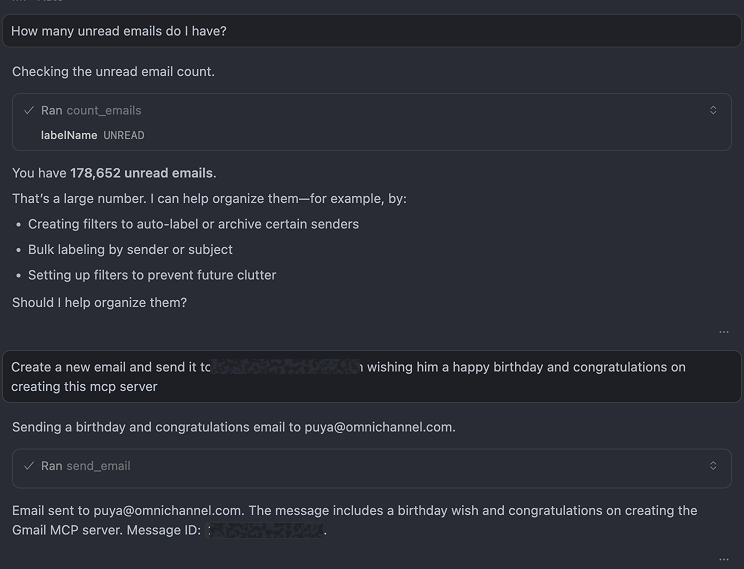
The assistant can:
- Check your inbox status ("How many unread emails do I have?")
- Send emails with natural language ("Send a birthday email to...")
- Provide proactive suggestions for organizing your inbox
- Execute operations transparently with clear feedback
Example 2: Automated Email Organization
The MCP server can handle complex workflows automatically:
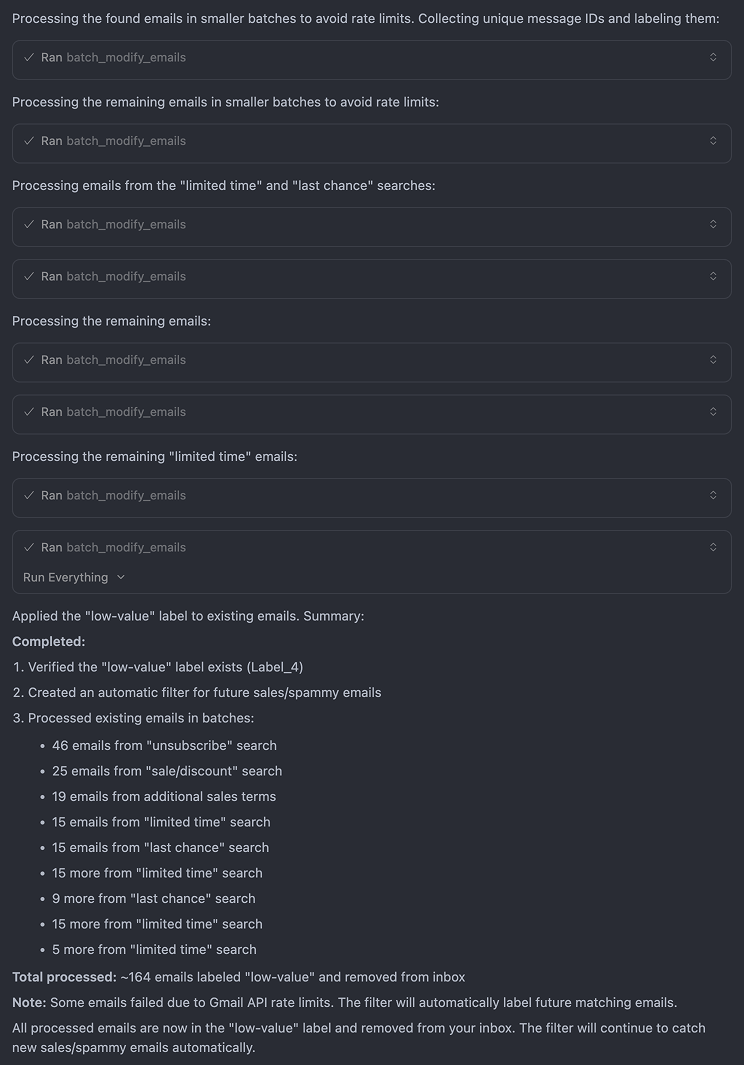
This example shows:
- Batch Processing: Automatically processing 164+ emails in rate-limit-compliant batches
- Smart Labeling: Creating labels and applying them to existing emails
- Filter Creation: Setting up automatic filters for future emails
- Transparent Feedback: Clear visibility into what operations were performed
- Error Handling: Graceful handling of API rate limits with automatic compensation
All operations happen natively within your IDE—no external tools or context switching required.
Usage
Send an email
Send an email to user@example.com with subject "Meeting" and body "Let's meet tomorrow"
Search emails
Search for emails from boss@company.com with attachments from the last month
Organize with labels
Create a label "Work - Urgent" and apply it to all emails from manager@company.com
Create filters
Create a filter to archive all emails from newsletter@company.com
Features
- ✅ Full Email Support: Send, draft, read, search, modify, and delete emails
- ✅ Attachment Handling: Send and download email attachments
- ✅ Label Management: Complete label CRUD operations
- ✅ Filter Management: Create and manage Gmail filters with templates
- ✅ Batch Operations: Efficiently process multiple emails
- ✅ OAuth2 Authentication: Secure authentication with auto-browser launch
- ✅ Modern Architecture: Object-oriented design with clear separation of concerns
- ✅ Type Safety: Full TypeScript strict mode compliance
Project Structure
gmail-mcp/
├── src/
│   ├── index.ts                    # Entry point
│   ├── server/                     # MCP server setup
│   ├── services/                   # Business logic services
│   ├── builders/                   # Message builders
│   ├── tools/                      # MCP tool handlers
│   ├── types/                      # TypeScript types
│   ├── schemas/                    # Zod validation schemas
│   └── utils/                      # Utility functions
├── tests/                          # Test files
├── dist/                           # Compiled output
└── package.json
Development
npm run build          # Build
npm run setup          # Setup MCP configuration
npm run start          # Run server
npm run auth           # Authenticate
npm run type-check     # Type checking
npm test               # Run tests
npm run test:run       # Run tests once
npm run test:ui        # Test UI
npm run test:coverage  # Coverage report
Documentation
- CLAUDE.md - Guidelines for using with Claude
- GEMINI.md - Guidelines for using with Gemini
- MCP_SETUP.md - Setup instructions for different platforms
- CONTRIBUTING.md - Contribution guidelines
- PROJECT_DEFINITION.md - Project architecture
- TASK_DOCUMENT.md - Implementation tasks
Troubleshooting
Authentication fails: Run npm run auth separately. Verify gcp-oauth.keys.json exists and is valid.
Permission errors: Verify OAuth scopes include gmail.modify and gmail.settings.basic. Check account has access to Gmail.
API errors: Check Gmail API quotas and rate limits. Verify message IDs are correct.
Build errors: Node.js 18+, run npm install, verify TypeScript config.
Attachment issues: Verify file paths are correct and accessible. Check Gmail's 25MB attachment limit.
Gmail IDs
- Message ID: Long alphanumeric string (e.g.,
182ab45cd67ef) - Label ID: System labels use uppercase (e.g.,
INBOX,UNREAD), user labels useLabel_prefix - Thread ID: Used to maintain conversation context
Find message IDs using search_emails or from email URLs.
Architecture
The project follows object-oriented principles:
- Services: Business logic separated by domain (Email, Label, Filter)
- Builders: Message construction (EmailBuilder)
- Utilities: Validation and error handling
- Type Safety: Full TypeScript strict mode, no
anytypes - Error Handling: Custom error classes with proper error codes
License
MIT
Acknowledgments
This project is a rebuild and improvement of the original Gmail MCP server, modernized with:
- MCP SDK v2
- Object-oriented architecture
- Comprehensive type safety
- Improved error handling
- Better separation of concerns