A Model Context Protocol (MCP) server that provides personal research assistance capabilities with ChromaDB vector storage. This server enables AI assistants to save, retrieve, and manage research content efficiently using vector embeddings.
KAVI RESEARCH
Your Premium AI Research Librarian




Features • Installation • Configuration • Usage • Contributing
🚀 Overview
KAVI RESEARCH is a premium Model Context Protocol (MCP) server designed to transform your AI into a dedicated research assistant.
Stop losing track of important findings. KAVI RESEARCH enables your AI to save, organize, search, and synthesize high-volume research materials using a local vector database. Whether you are using OpenAI or local Ollama models, KAVI RESEARCH keeps your knowledge accessible, private, and secure.
Newly Added in v2.1: Large Document Support! KAVI RESEARCH now automatically chunks massive PDFs and files into manageable semantic segments to bypass LLM context limits.
✨ Features
- 🧠 Dual Backend Support: seamless switching between OpenAI (Cloud) and Ollama (Local/Private).
- 🗣️ RAG Capabilities: "Chat" with your research topics using advanced Retrieval-Augmented Generation.
- 📚 Smart Storage: Automatic content deduplication and vector embedding using ChromaDB.
- 🔍 Semantic Search: Find what you need using natural language, not just keywords.
- 📂 Topic Organization: Keep different research streams (e.g., "AI Agents", "React Patterns") isolated and organized.
- ⚡ Fast & Efficient: Built on
fastmcpandlangchainfor high performance.
📦 Installation
Recommended: using uv (Fastest)
# Run the AI Agent (MCP Server)
uvx kavi-research-assistant-mcp

# Run the Web UI (Gradio)
uv run kavi-research-ui
Using pip
pip install kavi-research-assistant-mcp
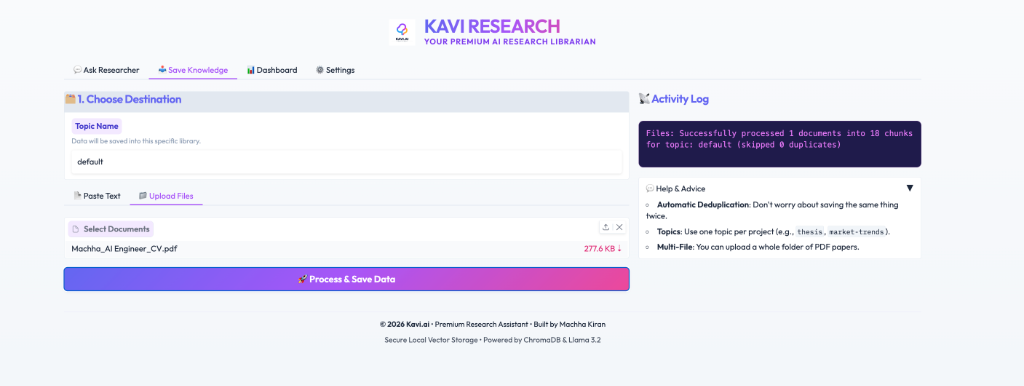
🎨 Web Interface (UI)
We provide a beautiful, colorful web interface to manage your research.
uv run kavi-research-ui
- 🎓 Ask Researcher: Chat with your research librarian.
- 💾 Save Knowledge: Easily paste and save new notes.
- 📊 Dashboard: View summaries and manage your topics.
⚙️ Configuration
You can configure the agent to use either OpenAI (default) or a local Ollama instance.
Option 1: OpenAI (Default)
Powerful, zero-setup (requires API Key).
export OPENAI_API_KEY=sk-...
export RESEARCH_DB_PATH=~/research_db
export LLM_PROVIDER=openai
Option 2: Ollama (Local & Private)
Run entirely on your machine. No API keys required.
-
Pull Models:
ollama pull llama3.2 ollama pull nomic-embed-text -
Configure Environment:
export RESEARCH_DB_PATH=~/research_db
export LLM_PROVIDER=ollama
# Optional overrides
# export OLLAMA_BASE_URL=http://localhost:11434
Claude Desktop Setup
Add this to your claude_desktop_config.json:
{
  "mcpServers": {
    "kavi-research": {
      "command": "uvx",
      "args": ["kavi-research-assistant-mcp"],
      "env": {
        "RESEARCH_DB_PATH": "/Users/username/research_db",
        "OPENAI_API_KEY": "sk-..."
      }
    }
  }
}
🛠️ MCP Tool Reference
Model Context Protocol (MCP) allows Kavi to act as a bridge between your AI and a private knowledge base. Below are the tools provided:
1. 📥 Data Ingestion
save_research_data(content: List[str], topic: str): Saves raw text or snippets.- Usecase: Saving paper abstracts or news headlines.
save_research_files(file_paths: List[str], topic: str): Parses and vectorizes documents.- Supported Formats:
.pdf,.txt,.docx. - Usecase: Ingesting a folder of research PDF papers.
- Supported Formats:
2. 🔍 Knowledge Retrieval & RAG
ask_research_topic(query: str, topic: str): Answers questions using Retrieval Augmented Generation.- Usecase: "What does my research say about Agentic Workflows?"
summarize_topic(topic: str): Generates a high-level executive summary of an entire library.- Usecase: Periodic review of a project topic.
3. 📋 Management
list_research_topics(): Returns a list of all libraries and their document counts.search_research_data(query: str, topic: str): Performs raw semantic similarity search for specific chunks.
🧪 Testing & Usage Steps
Step 1: Initialize the Environment
Ensure your preferred LLM backend is running. For Ollama:
ollama serve
ollama pull llama3.2
ollama pull nomic-embed-text
Step 2: Launch the Assistant
You can interact via the MCP Inspector (Command Line) or the Web UI.
To test via MCP Inspector:
npx @modelcontextprotocol/inspector uv run kavi-research-assistant-mcp
Once the inspector opens in your browser, you can manually trigger tools like list_research_topics.
Step 3: Populate with Knowledge
Ask your AI (via Claude Desktop or the UI) to save information:
"Save the following text to my 'ai-market' topic: [Your Text Here]"
Step 4: Validate RAG (The "Proof of Work")
Ask a question that only your saved data could answer:
"Based on my 'ai-market' data, what was the projected growth for 2026?"
Step 5: Dashboard Review
Open the UI to see your topic cards visualized gracefully.
uv run kavi-research-ui
💡 Typical Usecase Scenarios
- Academic Research: Upload 50 PDF papers into a topic called
thesis. Useask_research_topicto find contradictions or common methodologies across all papers. - Market Intelligence: Save daily news snippets about competitors into
competitor-intel. Every Friday, runsummarize_topicto get a weekly briefing. - Code Library: Save documentation for obscure libraries into
dev-docs. Use Kavi to answer "How do I implement X using Y?" without the LLM hallucinating.
👨💻 Author & Credits
Machha Kiran
- 📧 Email: machhakiran@gmail.com
- 🐙 GitHub: @machhakiran
Branding:
- Copyright © 2025 kavi.ai. All rights reserved.
kavi.aiand the Kavi logo are trademarks of kavi.ai.
📄 License
This project is licensed under the MIT License - see the LICENSE file for details.