MCP server by krsatyam99
SentryMCP






Multi-domain compliance agent — ask audit questions in plain English or by voice, route to the right subsystem via MCP, get a structured verdict from AWS Bedrock, hear it aloud with Amazon Polly.
| | | |---|---| | Stack | Python · FastAPI · MCP · Bedrock · Polly | | Domains | FinTech · Healthcare · HR | | Pattern | Clean / Hexagonal architecture (ports & adapters) |
🎬 Demo: (Add GIF here — screen record the voice-to-verdict flow)
Table of Contents
- Why
- What
- Architecture
- Prerequisites
- Quick Start with Docker
- Setup & Installation
- Running Modes
- Usage
- Sample Output
- Project Layout
- API Reference
- Tests
- Troubleshooting
- Documentation
Why
Compliance teams jump between siloed systems — ledgers, patient records, HR policies. Checks are slow, inconsistent, and hard to audit. SentryMCP gives one interface for natural-language compliance triage with explainable JSON verdicts (CLEARED · FLAGGED · ACTION_REQUIRED).
What
- Text or voice audits through a built-in web UI (
GET /) - MCP routing to domain-specific tools (mock data in this POC)
- LLM reasoning with Bedrock + free-model fallback chain
- Multi-turn chat — follow-ups like "What about their flagged transactions?" keep context
- Voice-to-voice — browser speech recognition in, Polly TTS out
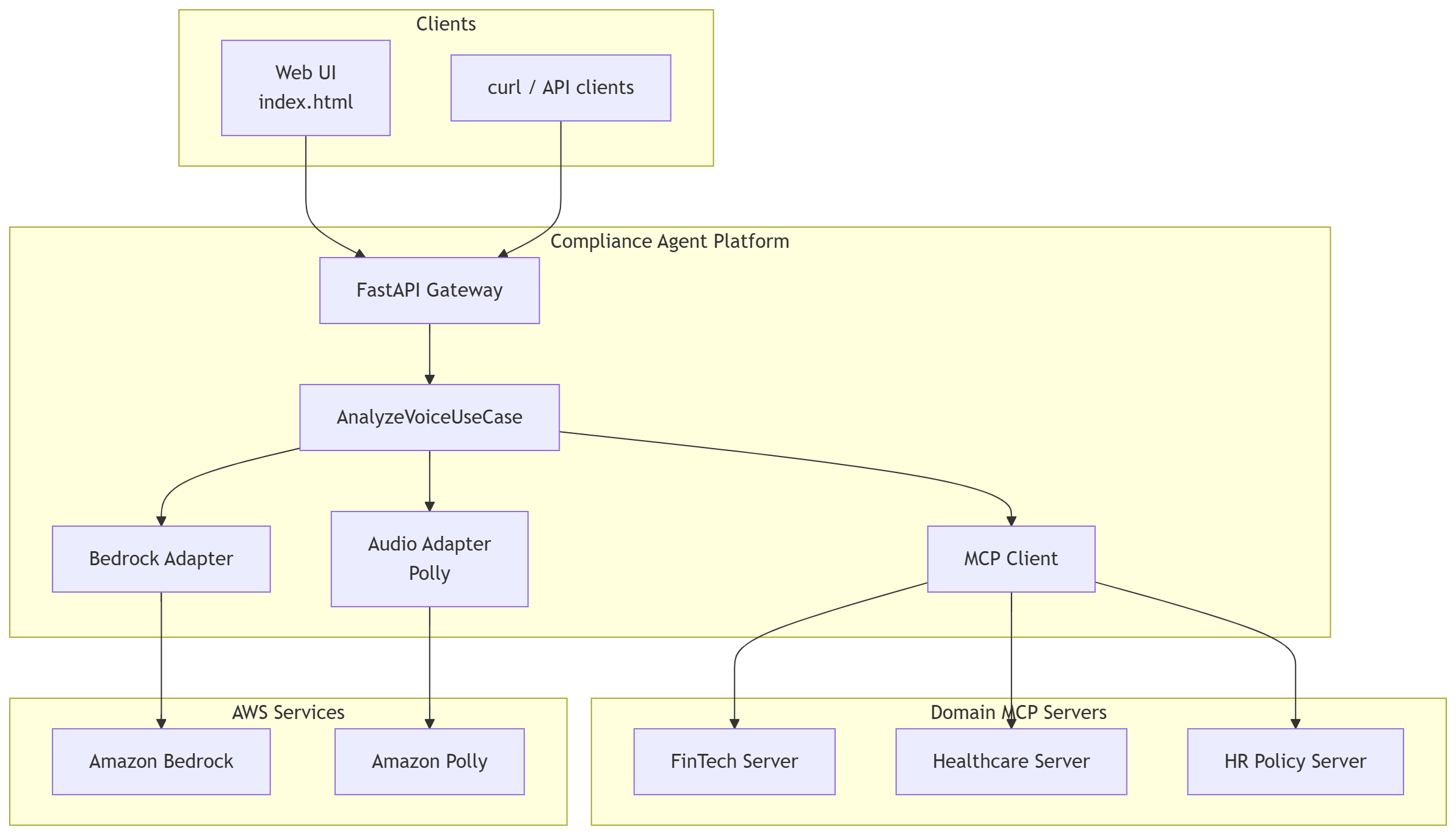
30-second architecture view:
Operator → Web UI / API → FastAPI → AnalyzeVoiceUseCase
    → MCP server (FinTech | Healthcare | HR)
    → Bedrock LLM → structured verdict → (optional) Polly TTS
Architecture
Core business logic in the center; HTTP, MCP, and AWS at the edges. New industries = new MCP server, no core rewrite needed.
HLD — System Overview
LLD — Sequence Flows
| Flow | Diagram |
|------|---------|
| Text chat | 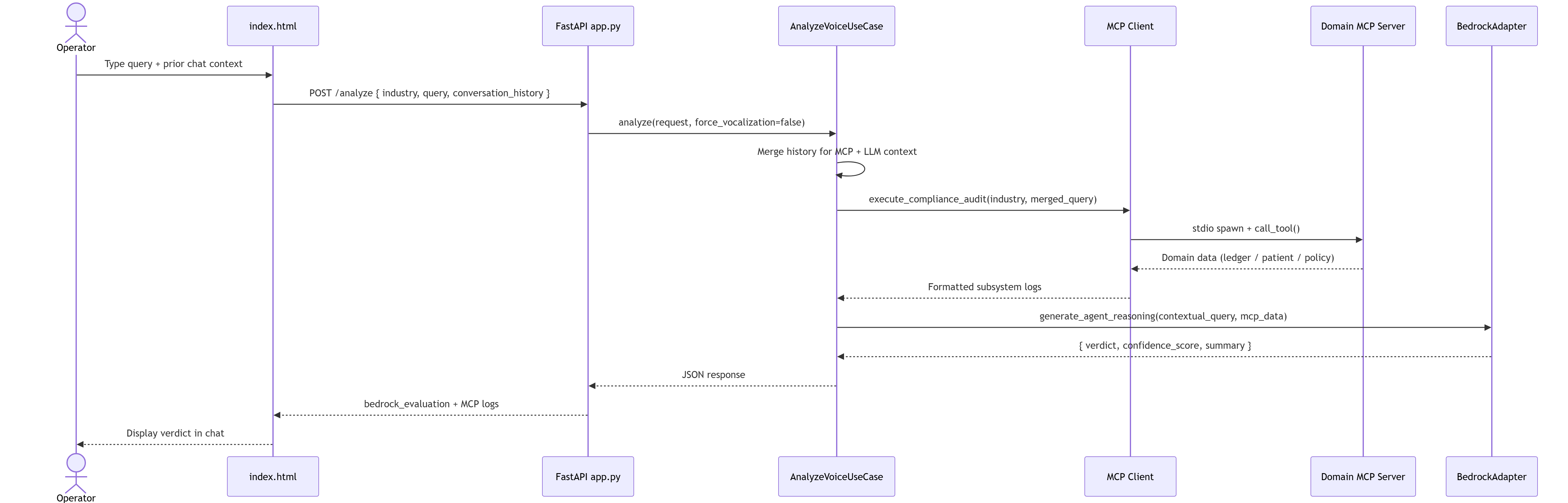 |
| Voice + Polly |
|
| Voice + Polly | 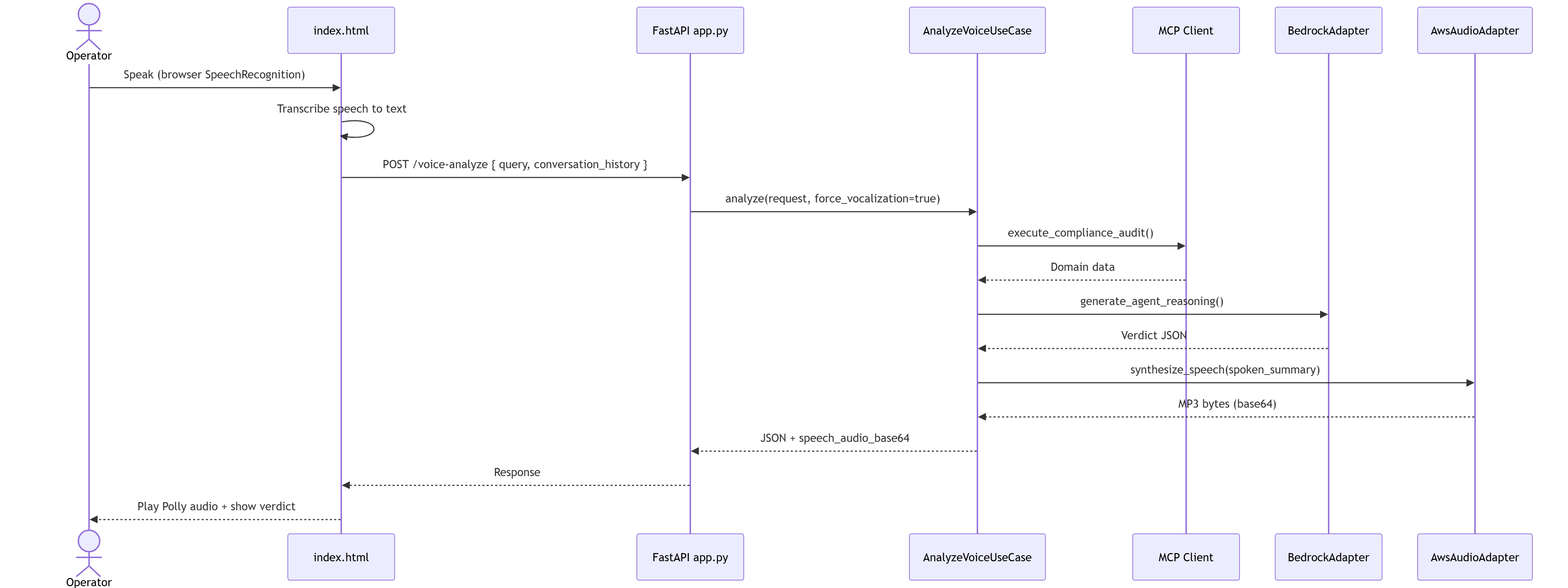 |
| Conversation memory |
|
| Conversation memory | 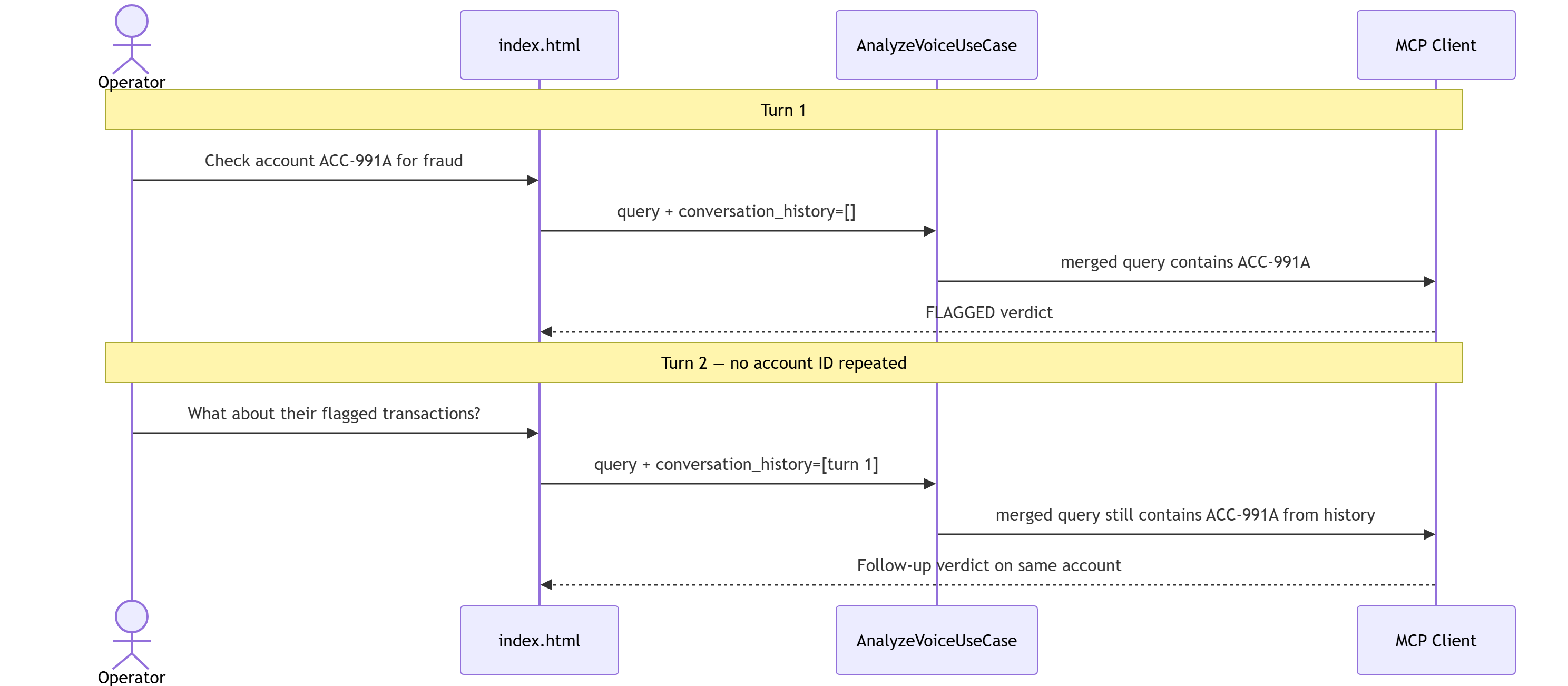 |
|
Prerequisites
Make sure you have the following installed before starting:
| Requirement | Version | Check |
|---|---|---|
| Python | 3.11+ | python --version |
| pip | latest | pip --version |
| Git | any | git --version |
| AWS CLI (optional, Bedrock mode only) | v2+ | aws --version |
No AWS account? Run in Local mode — no cloud setup needed.
Quick Start with Docker
The fastest way to run SentryMCP — no Python setup needed.
Prerequisites: Docker Desktop installed and running.
Local mode (no AWS)
# 1. Clone
git clone https://github.com/krsatyam99/SentryMCP.git
cd SentryMCP

# 2. Copy env file (defaults to local mode — no AWS needed)
cp .env.example .env        # macOS/Linux
copy .env.example .env      # Windows

# 3. Build and run
docker compose up --build
Open http://localhost:8000/ — done. ✅
Bedrock + Polly mode (AWS)
# Edit .env first
LLM_PROVIDER=bedrock
POLLY_ENABLED=true
AWS_ACCESS_KEY_ID=your_key
AWS_SECRET_ACCESS_KEY=your_secret

# Then run
docker compose up --build
Dev mode (hot reload)
docker compose --profile dev up sentrymcp-dev
Server runs on http://localhost:8001/ and reloads on code changes.
Useful Docker commands
# Run in background
docker compose up -d

# View logs
docker compose logs -f

# Stop
docker compose down

# Rebuild after dependency changes
docker compose up --build
Setup & Installation
1. Clone the repo
git clone https://github.com/krsatyam99/SentryMCP.git
cd SentryMCP
2. Create virtual environment
Windows (PowerShell):
python -m venv .venv
.venv\Scripts\activate
macOS / Linux:
python -m venv .venv
source .venv/bin/activate
You should see (.venv) in your terminal prompt.
3. Install dependencies
pip install -r requirements.txt
pip install -e .
4. Configure environment variables
Copy the example env file and fill in your values:
Windows:
copy .env.example .env
macOS / Linux:
cp .env.example .env
Then open .env and set your values:
# ── LLM Provider ─────────────────────────────────────────
# Use "local" for free OpenRouter fallback (no AWS needed)
# Use "bedrock" for AWS Bedrock (requires AWS credentials below)
LLM_PROVIDER=local

# ── Voice Output ─────────────────────────────────────────
# Set to true to enable Amazon Polly TTS (requires AWS credentials)
POLLY_ENABLED=false

# ── AWS Credentials (only needed for bedrock or Polly) ───
AWS_ACCESS_KEY_ID=your_access_key_here
AWS_SECRET_ACCESS_KEY=your_secret_key_here
AWS_DEFAULT_REGION=us-east-1

# ── Bedrock Model ─────────────────────────────────────────
BEDROCK_MODEL_ID=amazon.nova-micro-v1:0
5. Run the server
# Windows
$env:PYTHONPATH = "src"
python -m uvicorn agentai.adapters.inbound.api.app:app --host 0.0.0.0 --port 8000
# macOS / Linux
PYTHONPATH=src python -m uvicorn agentai.adapters.inbound.api.app:app --host 0.0.0.0 --port 8000
You should see:
INFO:     Started server process [xxxx]
INFO:     Application startup complete.
INFO:     Uvicorn running on http://0.0.0.0:8000
Open http://localhost:8000/ in Chrome or Edge.
Running Modes
Local mode (no AWS)
No AWS account needed. Uses a free OpenRouter model fallback chain.
LLM_PROVIDER=local
POLLY_ENABLED=false
Note: Free models may be rate-limited or return slower responses.
Bedrock mode (AWS)
Full production-like setup with AWS Bedrock for LLM reasoning and Polly for voice output.
Step 1 — Configure AWS credentials:
# Windows PowerShell
$env:AWS_ACCESS_KEY_ID="your_access_key"
$env:AWS_SECRET_ACCESS_KEY="your_secret_key"
$env:AWS_DEFAULT_REGION="us-east-1"
Or use the AWS CLI:
aws configure
Step 2 — Set env vars:
LLM_PROVIDER=bedrock
POLLY_ENABLED=true
BEDROCK_MODEL_ID=amazon.nova-micro-v1:0
Step 3 — Ensure your IAM user has these permissions:
bedrock:InvokeModelpolly:SynthesizeSpeech
Usage
| URL | Purpose | |-----|---------| | http://localhost:8000/ | Web UI (chat + voice) | | http://localhost:8000/docs | Interactive API explorer |
Try these sample queries:
# FinTech
Check account ACC-991A for possible fraud
What about their flagged transactions?

# Healthcare
Check patient PAT-204B for compliance risk

# HR
What is the data privacy policy?
Summarize the whistleblower policy
Sample Output
{
  "verdict": "FLAGGED",
  "confidence": 0.91,
  "domain": "fintech",
  "account": "ACC-991A",
  "reason": "Offshore transaction TX-302 ($95,000) flagged for manual review. Compliance status: UNDER_REVIEW.",
  "compliance_note": "CRITICAL: Escalate to compliance officer within 24 hours.",
  "mcp_source": "fintech_server"
}
Verdict values:
| Verdict | Meaning |
|---|---|
| CLEARED | No compliance issues detected |
| FLAGGED | Suspicious activity — review recommended |
| ACTION_REQUIRED | Immediate escalation needed |
Project Layout
SentryMCP/
├── backend/
│   └── mcp_servers/          # Domain MCP plugins (stdio transport)
│       ├── fintech_server.py
│       ├── healthcare_server.py
│       └── hr_server.py
├── src/agentai/
│   ├── core/                 # Entities, ports, use cases (pure Python)
│   ├── adapters/
│   │   ├── inbound/          # FastAPI routes
│   │   └── outbound/         # MCP client, Bedrock, Polly adapters
│   └── static/               # Web UI (index.html)
├── docs/                     # Technical guide (DOCX) + diagrams
├── tests/
├── Dockerfile
├── docker-compose.yml
├── .dockerignore
├── .env.example
├── requirements.txt
└── setup.py
API Reference
Full interactive docs at http://localhost:8000/docs
POST /analyze
{
  "industry": "fintech",
  "query": "Check account ACC-991A for possible fraud"
}
Response: structured verdict JSON (see Sample Output)
Tests
pytest
# With coverage
pytest --cov=src/agentai tests/
Troubleshooting
claude or uvicorn not recognized:
# Refresh PATH in current session
$env:PATH += ";C:\Users\<you>\.local\bin"
Port 8000 already in use:
netstat -ano | findstr :8000
taskkill /PID <PID> /F
AWS credentials error:
- Confirm
AWS_ACCESS_KEY_IDandAWS_SECRET_ACCESS_KEYare set correctly - Check IAM permissions include
bedrock:InvokeModelandpolly:SynthesizeSpeech - Switch to
LLM_PROVIDER=localto test without AWS
Free model rate limit (429):
- Expected behavior — the system falls back automatically through the model chain
- Switch to
LLM_PROVIDER=bedrockfor reliable responses
MCP server not found:
- Ensure you ran
pip install -e .from the repo root - Check
PYTHONPATH=srcis set before running uvicorn
Documentation
For deep-dive technical reference (architecture decisions, MCP plug-in guide, full API, AWS setup, demo script):
📄 docs/SentryMCP-Technical-Guide.docx
Open in Microsoft Word or Google Docs.
Package: cross-industry-voice-dataguard v0.1.0
Built with: Python · FastAPI · MCP · AWS Bedrock · Amazon Polly