Android Dev Agent Toolkit: CLI and MCP helpers for AI coding agents working on Android projects.
droid-mcp
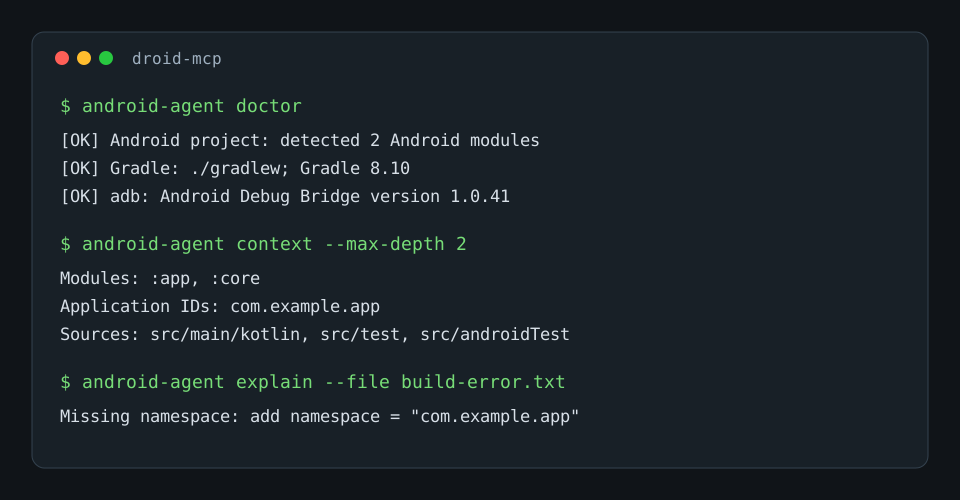
Android Dev Agent Toolkit for AI coding agents.
droid-mcp provides a practical local CLI and MCP stdio server that helps tools like Codex, Claude Code, Cursor, and other AI development agents inspect, build, test, and debug Android projects.
The goal is simple: give an AI agent the same first-pass Android context a human developer would check before editing code.
Features
- Detect Android and Gradle project structure.
- Find Android modules, manifests, source directories, package names, and application IDs.
- Check local Java, Gradle, Android SDK,
adb, and device readiness. - Run Gradle tasks through the checked-in wrapper when available.
- Collect, filter, and summarize
adb logcat. - List connected devices and configured Android emulators.
- Start an emulator, launch an installed app, and capture screenshots.
- Explain common Android and Gradle build errors with concrete next steps.
- Generate compact project context markdown for AI coding tools.
- Expose core actions as MCP tools over stdio.
Why this exists
AI coding tools often work well in Android repositories, but Android projects have local state that matters:
- The project may have multiple Gradle modules.
- The Gradle wrapper version matters more than global Gradle.
- Java, Android Gradle Plugin, Kotlin, and SDK versions need to line up.
- Runtime crashes usually require
logcat, not just source inspection. - Build errors are verbose, but the useful cause is usually a known Android pattern.
droid-mcp packages those checks into a small tool an agent can call repeatedly.
Installation
Clone the repository and install it in editable mode:
git clone https://github.com/iskshadow195563/droid-mcp.git
cd droid-mcp
python -m pip install -e .
Verify the CLI:
android-agent --help
The package also installs an alias:
droid-mcp --help
Requirements
Minimum:
- Python 3.9 or newer.
- Git.
For Android automation:
- JDK installed and available on
PATH. - Android SDK installed.
ANDROID_HOMEorANDROID_SDK_ROOTset.adbavailable onPATH.- A Gradle wrapper in the Android project, or global Gradle available.
- Android Emulator available on
PATHif using emulator commands.
Run this first inside any Android project:
android-agent doctor
Quick start
Run commands from the root of an Android project.
# Check Java, Gradle, adb, Android SDK, and connected devices
android-agent doctor

# Generate a compact markdown summary for an AI coding agent
android-agent context --output android-project-context.md

# Run Gradle through ./gradlew or gradlew.bat when present
android-agent gradle assembleDebug --stacktrace

# Clear logcat before reproducing a bug
android-agent logcat --clear

# Capture and summarize recent error logs for an app
android-agent logcat --package com.example.app --level E --lines 200

# Explain a common Android/Gradle build failure
android-agent explain --file build-error.txt
CLI reference
doctor
Checks the local Android development environment.
android-agent doctor
It reports:
- Whether an Android or Gradle project was detected.
- Java availability and version output.
- Gradle wrapper or global Gradle availability.
adbavailability.- Android SDK environment variables.
- Connected devices or booted emulators.
context
Generates a markdown summary of the Android project.
android-agent context
android-agent context --max-depth 2
android-agent context --output android-project-context.md
The generated context includes:
- Project root.
- Settings file.
- Gradle wrapper.
- Detected Android modules.
- Build files.
- Application IDs.
- Manifest package names.
- Source directories.
- A compact project tree.
- Notes for AI coding agents.
gradle
Runs Gradle tasks from the detected project root.
android-agent gradle assembleDebug
android-agent gradle testDebugUnitTest --stacktrace
android-agent gradle :app:connectedDebugAndroidTest --stacktrace
If a wrapper exists, droid-mcp uses it. Otherwise it falls back to global Gradle.
logcat
Reads and summarizes adb logcat.
android-agent logcat --lines 300
android-agent logcat --package com.example.app --level E --lines 200
android-agent logcat --clear
Useful flow:
android-agent logcat --clear
# reproduce the crash
android-agent logcat --package com.example.app --level E --lines 300
devices
Lists connected Android devices and emulators.
android-agent devices
emulator
Lists or starts Android Virtual Devices.
android-agent emulator list
android-agent emulator start Pixel_8_API_35
android-agent emulator start Pixel_8_API_35 --wait
launch
Launches an installed app.
android-agent launch com.example.app
android-agent launch com.example.app --activity .MainActivity
If no activity is provided, the command uses monkey to start the launcher activity.
screenshot
Captures a device screenshot through adb.
android-agent screenshot --output artifacts/current-screen.png
explain
Explains common Android or Gradle build errors.
android-agent explain --file build-error.txt
android-agent gradle assembleDebug --stacktrace | android-agent explain
Current hints cover common failures such as:
- Missing Android SDK path.
- Unsupported Java or Gradle versions.
- Duplicate classes.
- Manifest merge failures.
- Kotlin metadata mismatch.
- Missing AGP namespace.
- Dependency resolution failures.
- Android resource linking failures.
- D8, R8, and multidex failures.
MCP server
Start the MCP server:
android-agent mcp
Example MCP config:
{
  "mcpServers": {
    "droid-mcp": {
      "command": "android-agent",
      "args": ["mcp"]
    }
  }
}
MCP tools
| Tool | Purpose |
| --- | --- |
| android_doctor | Check Android, Gradle, adb, SDK, and connected-device readiness. |
| android_context | Generate compact Android project context markdown. |
| android_gradle | Run Gradle tasks using the project wrapper when available. |
| android_logcat | Read, filter, and summarize logcat output. |
| android_screenshot | Capture a device screenshot through adb. |
| android_explain_error | Explain common Android or Gradle build errors. |
Recommended AI-agent workflow
Use this prompt inside an Android repository after configuring the MCP server:
Use droid-mcp before editing this Android project.

1. Call android_doctor.
2. Call android_context.
3. If you change production code, run the smallest relevant Gradle build or test task.
4. If the app crashes, clear logcat, reproduce the crash, then call android_logcat.
5. If Gradle fails, call android_explain_error with the first useful failure block.
If your AI tool cannot use MCP, paste this into the conversation:
android-agent doctor
android-agent context --max-depth 3
Examples
Generate agent context:
android-agent context --output android-project-context.md
Run a module build:
android-agent gradle :app:assembleDebug --stacktrace
Capture only recent app errors:
android-agent logcat --package com.example.app --level E --lines 150
Explain the included sample error:
android-agent explain --file sample-errors/namespace.txt
Development
Install locally:
python -m pip install -e .
Run tests:
python -m unittest discover -s tests
Run without installing:
PYTHONPATH=src python -m droid_mcp --help
On PowerShell:
$env:PYTHONPATH = "src"
python -m droid_mcp --help
Project layout
src/droid_mcp/
  android_tools.py   Android, Gradle, adb, emulator, launch, screenshot helpers
  cli.py             CLI parser and command dispatch
  explain.py         Android/Gradle error hint engine
  mcp_server.py      Minimal MCP stdio server
  project.py         Android project discovery and context generation
  utils.py           Shared command and filesystem utilities
tests/
  test_cli.py
  test_explain.py
  test_project.py
sample-errors/
  namespace.txt
Security and privacy
droid-mcp runs local developer commands. It does not send source code, logs, screenshots, or project metadata to a remote service by itself.
Be careful with:
- Sharing generated context from private repositories.
- Publishing
logcatoutput that may contain tokens, emails, URLs, or device identifiers. - Uploading screenshots from apps that display personal data.
Roadmap
- Add structured JSON output for every CLI command.
- Group logcat crashes into stack traces instead of individual lines.
- Parse Gradle variants and test tasks more deeply.
- Add APK install and uninstall helpers.
- Add Android Studio project metadata hints.
- Add optional MCP resources for generated project context.
- Add recipes for common Android agent workflows.
- Publish demo GIFs for README and social previews.
Contributing
Issues and pull requests are welcome.
Good first contributions:
- Add a new Android build error hint in
explain.py. - Improve module detection for complex Gradle builds.
- Add JSON output for a command.
- Add tests for a real Android project layout.
- Improve README examples for Codex, Claude Code, or Cursor.
Before opening a PR:
python -m unittest discover -s tests
git diff --check
License
MIT. See LICENSE.