MCP server for Apple App Store Connect — edit listings (keywords, descriptions, screenshots), track analytics (downloads, revenue, subscriptions), run a fleet-wide ASO audit, dry-run changes, and reach the full API. Works with any AI agent.


App Store Connect MCP
Run App Store Connect by talking to your AI. An MCP server that turns Apple's App Store Connect API into plain-language actions — edit your listings, track downloads, revenue & subscriptions, audit your whole portfolio, and reach the entire API, from whatever AI agent you already use.
✨ What makes it stand out
🚀 Audit your whole portfolio in one shot. "Audit all my apps for ASO gaps" → a ranked report across every app: empty keyword fields, missing subtitles, under-used 100‑char keyword space, single‑locale listings, missing screenshots. Built for indies shipping dozens of apps — not one at a time.
🛡️ See every change before it ships. Dry-run mode returns the exact diff (old → new) with Apple's character limits pre-checked, so nothing hits your live listing by surprise.
📊 Track performance, not just listings. Pull downloads, proceeds, subscriptions & retention, and engagement straight from the Sales, Finance, and Analytics report APIs — parsed into rows, gzip handled for you.
🌐 The whole API, not a curated slice. First-class tools for the daily work (keywords, descriptions, titles, subtitles, screenshots, versions) plus a
raw_requestescape hatch for everything else — TestFlight, pricing, in-app purchases, customer reviews (read & reply), and more.
🔒 Safe by default if you want it. Worried about a write-capable tool touching your live apps? Set
APPSTORE_MCP_READ_ONLY=trueand it physically cannot write — only reads, audits, and reports run. Or block just the risky bits (releases, pricing, public review replies). It's enforced by the server, so even a misbehaving agent can't get around it. → Safe mode
💬 Just ask
“Set the keywords for my budgeting app to budget, expenses, money tracker.” “Which of my apps are missing a subtitle or screenshots?” “Dry-run a shorter description for MyApp, then upload these 6.7″ screenshots.”
⚙️ Built right
- 🤖 Any MCP client — Claude, Codex, Cursor, Windsurf, Antigravity, Gemini CLI, Amazon Q, Goose, Zed, VS Code… → docs/CLIENTS.md
- ⚡ One-line install (
npx, no build) — or paste a prompt and let your agent set it up for you - 🔒 Keys never leave your machine — calls go straight to Apple, nothing proxied; optional read-only mode
- 📦 MIT · published with provenance · actively maintained
Table of contents
- Quick start — incl. agent-assisted setup
- Supported clients → full guide in docs/CLIENTS.md
- Getting your API key → full guide in docs/SETUP.md
- Configuration — incl. 🛡️ Safe mode (read-only)
- Tools → full reference in docs/TOOLS.md
- What you can ask — ready-made prompts in docs/RECIPES.md
- Analytics & reports setup — roles, Vendor Number, examples
- Common workflows
- Security → details in docs/SECURITY.md
- Troubleshooting
- Development
Quick start
Requirements: Node.js ≥ 18 and an Apple Developer account with an
App Store Connect API key. Everything works from any
OS — except the optional build & ship tools (archive_app / upload_build),
which additionally need a Mac with Xcode.
🤖 Easiest: let your AI agent set it up (works with any agent)
Don't want to touch config files? Paste this into your coding agent (Claude, Codex, Cursor, Windsurf, Antigravity, Gemini CLI, …), fill in your three values, and it will configure your client and verify it:
Set up the "appstore-api-mcp" App Store Connect MCP server for me.

My App Store Connect API credentials:
- Key ID:    <YOUR_KEY_ID>
- Issuer ID: <YOUR_ISSUER_ID>
- Path to my .p8 private key file: <ABSOLUTE_PATH_TO_AuthKey_XXXX.p8>

Please:
1. If any of the three values above are still placeholders or I didn't provide
   them, do NOT stop with an error — guide me to get them, then wait for me:
     - Key ID & Issuer ID: go to App Store Connect → Users and Access →
       Integrations tab → "App Store Connect API". The Issuer ID is shown at the
       top of that page; the Key ID is listed next to each key.
     - No key yet? Click the + to generate one, give it the "App Manager" role
       (enough to edit metadata/keywords/screenshots), then Download the .p8
       file — you can only download it once, so save it somewhere safe.
     - The .p8 path is the absolute path to wherever you saved that file.
2. Detect which MCP client I'm using and add the server to its config (run it
   with: npx -y appstore-api-mcp).
3. Pass these env vars: ASC_KEY_ID, ASC_ISSUER_ID, and ASC_PRIVATE_KEY_PATH
   (point ASC_PRIVATE_KEY_PATH at my .p8 path — reference the PATH, do not
   inline the key contents).
4. Install it at user/global scope (for Claude Code use `--scope user`).
5. Do NOT print, echo, log, or commit the key. Keep the .p8 outside any git repo.
6. When done, verify by listing my App Store apps and report the result.

Config formats per client: https://github.com/fil-technology/appstore-api-mcp/blob/main/docs/CLIENTS.md
Give the file path, not the key contents — that keeps the private key off the chat transcript. More detail + a remote/cloud variant in docs/AGENT-SETUP.md.
Prefer to do it manually? See below.
Manual setup — any MCP client
This is a standard stdio MCP server, so every MCP client uses the same
command (npx -y appstore-api-mcp) and the same three ASC_* env vars. Most
clients (Cursor, Cline, Windsurf, Claude Desktop, Gemini CLI, Antigravity, …)
take this exact block — just put it in that client's config file:
{
  "mcpServers": {
    "appstore-api": {
      "command": "npx",
      "args": ["-y", "appstore-api-mcp"],
      "env": {
        "ASC_KEY_ID": "YOUR_KEY_ID",
        "ASC_ISSUER_ID": "YOUR_ISSUER_ID",
        "ASC_PRIVATE_KEY_PATH": "/absolute/path/to/AuthKey_XXXXXXXXXX.p8"
      }
    }
  }
}
A few clients differ (VS Code uses servers, Codex uses TOML, Zed uses
context_servers) — see the Supported clients table and
docs/CLIENTS.md for each exact format/location.
Claude Code has a one-line CLI shortcut instead of editing a file:
# --scope user installs it for ALL your projects (recommended).
# Remove the --scope user line to install for the current project only.
claude mcp add appstore-api \
  --scope user \
  --env ASC_KEY_ID=YOUR_KEY_ID \
  --env ASC_ISSUER_ID=YOUR_ISSUER_ID \
  --env ASC_PRIVATE_KEY_PATH=/absolute/path/to/AuthKey_XXXXXXXXXX.p8 \
  -- npx -y appstore-api-mcp
After configuring, restart the client and ask it to "list my App Store apps" to confirm it works.
Supported clients
This is a standard stdio MCP server — it works with any MCP-compatible agent.
The command (npx -y appstore-api-mcp) and the three ASC_* env vars are always
the same; only each client's config format/location differs.
| Client | Where to configure |
| --- | --- |
| Claude Code | claude mcp add … (see above) |
| Claude Desktop | claude_desktop_config.json → mcpServers |
| OpenAI Codex CLI | ~/.codex/config.toml → [mcp_servers.appstore-api] |
| Cursor | .cursor/mcp.json → mcpServers |
| Cline (VS Code) | cline_mcp_settings.json → mcpServers |
| Windsurf | ~/.codeium/windsurf/mcp_config.json → mcpServers |
| VS Code (agent mode) | .vscode/mcp.json → servers (note: not mcpServers) |
| Zed | settings.json → context_servers |
| Continue | ~/.continue/config.yaml → mcpServers |
| Gemini CLI | ~/.gemini/settings.json → mcpServers |
| Google Antigravity | MCP settings → mcpServers |
| Amazon Q Developer CLI | ~/.aws/amazonq/mcp.json → mcpServers |
| Goose | ~/.config/goose/config.yaml → extensions |
| Kiro / Roo Code / Trae / JetBrains AI / Warp / others | standard mcpServers block — see docs |
| Custom agent (MCP SDK / Agents SDK / LangChain) | spawn the stdio command with the env vars |
Copy-paste config snippets for each are in docs/CLIENTS.md.
Getting your API key
- Go to App Store Connect → Users and Access → Integrations → App Store Connect API.
- Click + to generate a key. Give it a name and the least privilege role you need — App Manager is enough to edit metadata, keywords and screenshots. (Avoid Admin unless you truly need it.)
- Note the Issuer ID (top of the page) and the Key ID (next to the key).
- Download the
.p8file — you can only download it once. Store it somewhere safe.
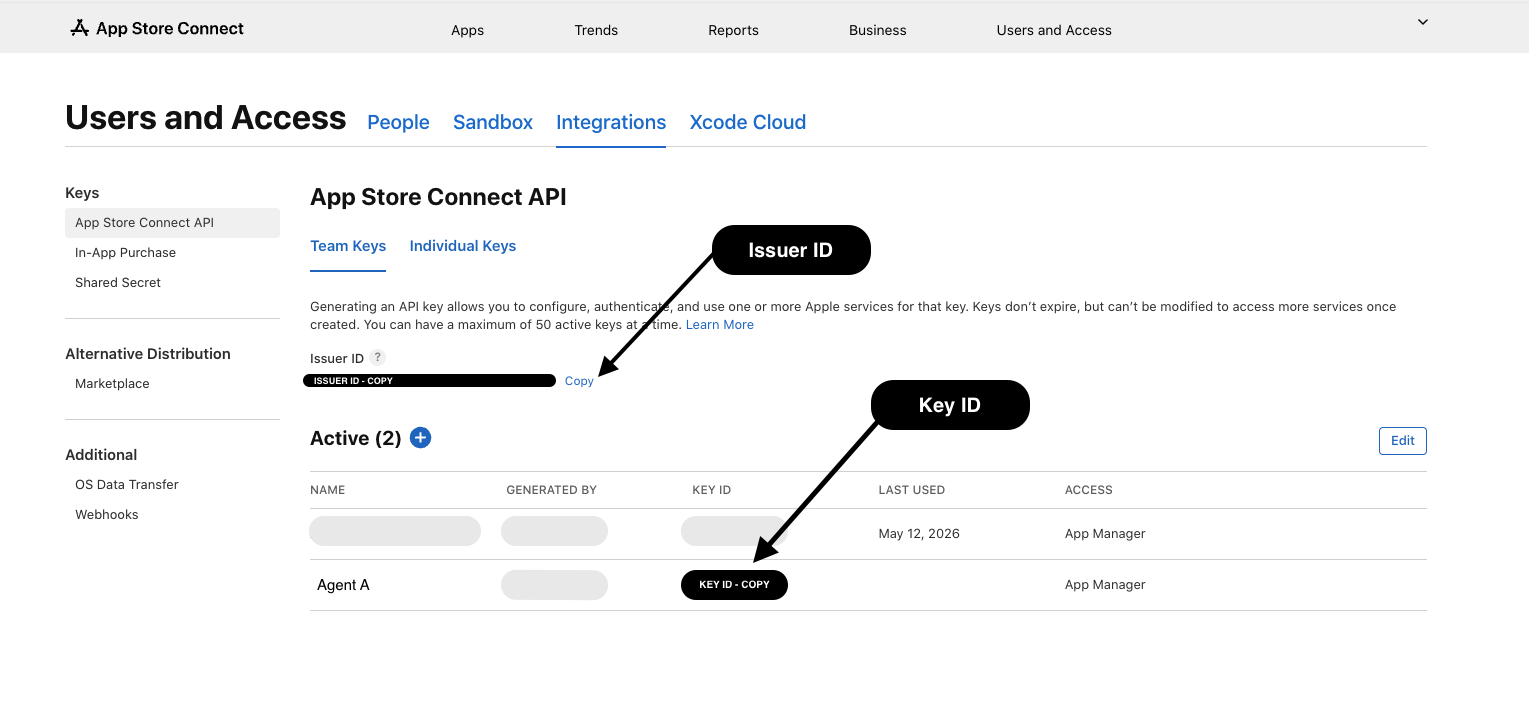
The Issuer ID is at the top of the page; each key's Key ID is in its row. The
.p8is downloaded from the + / key actions. These map toASC_ISSUER_ID,ASC_KEY_ID, andASC_PRIVATE_KEY_PATH.
Full walkthrough with screenshots-worth of detail: docs/SETUP.md.
Configuration
All configuration is via environment variables.
| Variable | Required | Description |
| --- | --- | --- |
| ASC_KEY_ID | yes | The key's ID (short alphanumeric) |
| ASC_ISSUER_ID | yes | The issuer UUID from the Integrations page |
| ASC_PRIVATE_KEY_PATH | one of these three | Absolute path to the .p8 file |
| ASC_PRIVATE_KEY | one of these three | The raw PEM contents of the key |
| ASC_PRIVATE_KEY_BASE64 | one of these three | Base64 of the .p8 (base64 -i AuthKey.p8) — easiest for env vars |
| ASC_VENDOR_NUMBER | optional | Default Vendor Number for sales/finance reports (8–9 digits; App Store Connect → Payments and Financial Reports) |
See .env.example for a copy-paste template.
Safe mode
You can run this read-only. Tool-level guardrails — enforced by the server, not "please ask the agent" — so even a misbehaving agent can't write. Recommended for shared machines, demos, or CI. Set any of these env vars to lock things down:
| Variable | Effect |
| --- | --- |
| APPSTORE_MCP_READ_ONLY=true | Blocks every write — only reads/reports/audits run |
| APPSTORE_MCP_ALLOW_RELEASE=false | Blocks release_version / set_phased_release |
| APPSTORE_MCP_ALLOW_PRICE_CHANGES=false | Blocks set_app_price |
| APPSTORE_MCP_ALLOW_REVIEW_REPLIES=false | Blocks posting public review replies |
| APPSTORE_MCP_ALLOW_EXTERNAL_TESTFLIGHT=false | Blocks submit_beta_review |
Blocked calls return a clear error explaining which flag to change. Run the
doctor tool to see the active mode and verify your whole setup.
Reports need a higher-privilege key. The sales/subscription/finance/analytics tools require an API key with the Admin, Finance, or Sales role — an App Manager key (fine for metadata/keywords/screenshots) returns
403for reports. Sales/finance also need your Vendor Number (App Store Connect → Payments and Financial Reports) viaASC_VENDOR_NUMBERor thevendorNumberargument. Full walkthrough: docs/ANALYTICS.md.
Tools
A compact set of high-level tools, plus raw_request for everything else.
Full parameter reference: docs/TOOLS.md.
| Tool | What it does |
| --- | --- |
| list_apps / get_app | Browse your apps |
| list_app_infos / list_app_info_localizations | Find/read the record holding name, subtitle & privacy policy per locale |
| update_app_info_localization / create_app_info_localization | Update or add a locale's name, subtitle, privacy policy |
| list_app_store_versions / create_app_store_version | List versions and their states; start a new version |
| list_app_store_version_localizations / get_app_store_version_localization | Read description / keywords / etc. per locale |
| update_app_store_version_localization / create_app_store_version_localization | Update or add a locale's keywords, description, promo text, what's-new, URLs |
| bulk_update_version_localizations | 🌍 Update listing copy across many locales at once (creates missing ones); dryRun to preview |
| list_screenshot_sets / create_screenshot_set | Manage per-device screenshot sets |
| list_screenshots / upload_screenshot / delete_screenshot | Manage screenshots (upload handles the full reserve→upload→commit flow) |
| get_screenshot | 👁️ Fetch a live screenshot as an image the agent can see — review/compare what's on a listing |
| audit_apps | 🩺 Fleet ASO audit — scan all apps for missing subtitle/keywords/description, under-used keyword field, single-locale listings, missing screenshots. Read-only |
| apps_review_status | 🗂️ Fleet review board — every app's current version + state (waiting / in-review / rejected / ready) in one call |
| submit_for_review / release_version / set_phased_release | 🚀 Submit a version to Apple review (full flow), release an approved build, and control phased rollout |
| doctor | 🩺 Diagnose setup: Node, creds, key works, role capabilities, vendor number, Mac build tools, write mode |
| snapshot_app_metadata / diff_app_metadata_snapshot / restore_app_metadata | 💾 Save / compare / restore an app's text metadata — reversible ASO edits |
| release_readiness_check | ✅ One-call go/no-go report — build, metadata, ASO, screenshots, compliance, TestFlight, reviews |
| aso_opportunity_report / portfolio_growth_report | 📈 Rank the easiest ASO wins across all apps; portfolio snapshot of units sold per app |
| add_build_to_beta_group / submit_beta_review | ✈️ Assign a build to a TestFlight group; submit for beta review |
| get_sales_report / get_subscription_report / get_finance_report | 📊 Units/downloads, proceeds, subscriptions & retention, earnings by region. Needs a Vendor Number + Admin/Finance/Sales key |
| request_analytics_report → list_analytics_reports → list_analytics_report_instances → get_analytics_report_data | 📈 The async Analytics Reports API — downloads, sessions, active devices, App Store engagement |
| list_customer_reviews / reply_to_customer_review | ⭐ Read reviews (filter by rating/territory, shows if you've replied) and post public replies |
| list_builds / list_beta_groups / list_beta_testers / add_beta_tester | ✈️ TestFlight — builds, beta groups, testers, and inviting testers |
| list_in_app_purchases / update_in_app_purchase | 🛒 In-app purchase products — list and edit name / review note |
| list_app_price_points / set_app_price / get_app_price_schedule / list_available_territories / get_age_rating | 💵 Pricing (find price points, set base price), territory availability, and age rating |
| list_app_store_version_experiments | 🧪 Product Page Optimization — list A/B tests (experiments) |
| list_game_center_leaderboards / list_game_center_achievements | 🎮 Game Center leaderboards & achievements |
| signing_health | 🔐 Flag certificates & profiles expiring soon (or invalid) across the account — catches CI breakage early |
| list_bundle_ids / register_bundle_id / list_devices / register_device / list_certificates / create_certificate / revoke_certificate / list_profiles / create_profile / download_profile / delete_profile | 🔏 Provisioning & code signing — bundle IDs, devices, certificates, and provisioning profiles |
| bump_build_number / archive_app / upload_build | 🛠️ Build & ship from a Mac — bump the build number (agvtool), archive + export a signed .ipa (xcodebuild), and upload to App Store Connect (altool, using your existing API key). Requires Xcode; tools explain how to install it if missing |
| raw_request | 🧰 Any method/path against the API — app previews, matchmaking, Xcode Cloud, anything not above |
⚙️ Rate-limit aware: the client automatically backs off and retries on App Store Connect's
429(hourly quota), so large sweeps (e.g. auditing 60+ apps) don't fall over.
🛡️ Dry-run: the
update_*tools acceptdryRun: true— they return a field-by-field diff (old → new) with length/limit checks and write nothing. Drop the flag to apply.
What you can ask
Once it's connected, just talk to your agent in plain language. A few things to try:
Listings & ASO
- "Which of my apps are missing a subtitle or screenshots?" (fleet audit)
- "Tighten the keywords for — dry-run it first so I can confirm."
- "Show me 's current screenshots and flag any that look outdated."
- "Translate 's description and keywords into German and French." (bulk localization)
Performance & feedback
- "How many downloads did all my apps get last week?"
- "Pull last month's proceeds broken down by country."
- "How many active subscribers do I have, and what's the recent churn?"
- "Summarize this week's 1-star reviews and draft polite replies."
Release management
- "Which of my apps are waiting for review, rejected, or ready to release?" (fleet review board)
- "Create a new App Store version 1.4.0 for , then submit it for review."
- "Release — it's approved and waiting for manual release."
- "List my latest TestFlight builds and which beta groups can see them."
Pipeline & accounts
- "Are any of my certificates or provisioning profiles expiring soon?" (signing health)
- "What's 's price, and which territories is it available in?"
🛠️ Build & ship — additional, Mac-only (see note below)
- "Bump SpeakerMate's build number, archive it, and upload the new build to App Store Connect."
- "Create an archive of and export a signed .ipa."
- "Upload this .ipa to App Store Connect."
Dedicated tools cover it all: app management, localization, screenshots (incl. seeing them), sales/subscriptions/analytics, ASO audit, dry-run, customer reviews, TestFlight, in-app purchases, pricing, availability, age-rating, submit/release, and signing health. Anything else in the App Store Connect API is still reachable through the
raw_requestescape hatch — just ask.🛠️ Build & ship is different — it's an optional, local add-on. Almost every tool here talks to Apple's API and works from any machine. The three build tools (
bump_build_number,archive_app,upload_build) instead run local Xcode commands, so they only work on a Mac with Xcode installed and an Xcode project on disk. If those aren't present the tools tell you exactly what to install; everything else keeps working regardless.
Common workflows
Update keywords or description
list_apps→ get the app idlist_app_store_versions(filterPREPARE_FOR_SUBMISSION) → the editable version idlist_app_store_version_localizations→ the locale's localization idupdate_app_store_version_localizationwithkeywordsand/ordescription
In practice you just ask: "set the keywords for MyApp to a, b, c" and the model chains these for you.
Update the app name or subtitle
list_app_infos → list_app_info_localizations → update_app_info_localization.
Upload screenshots
list_app_store_version_localizations → list_screenshot_sets
(or create_screenshot_set) → upload_screenshot with an absolute image path.
Audit your whole portfolio (the indie superpower)
Just ask: "Audit all my apps for ASO gaps." One audit_apps call returns a
ranked report — which apps are missing keywords, subtitles, descriptions, or
under-using the 100-char keyword field — plus an account-wide summary. Add
checkScreenshots: true to also flag apps with no screenshots.
// returns { summary: { appsAudited, appsWithIssues, issuesByType, … }, findings: [ … ] }
{ "name": "audit_apps", "arguments": { "checkScreenshots": false } }
Preview before you write (dry-run)
Every update_* tool takes dryRun: true. You get the exact diff and length
checks, and nothing is written — so you (or the model) can confirm first:
{ "name": "update_app_store_version_localization",
  "arguments": { "localizationId": "…", "keywords": "todo,tasks,planner", "dryRun": true } }
// → { dryRun:true, changes:[{ field:"keywords", from:"…", to:"…", newLength:18, limit:100, exceedsLimit:false }], warnings:[] }
Anything else
Use raw_request, e.g. read customer reviews:
GET /apps/{id}/customerReviews. The whole API surface is reachable this way.
Field limits (enforced by Apple)
| Field | Limit | | --- | --- | | App name | 30 chars | | Subtitle | 30 chars | | Keywords (comma-separated, combined) | 100 chars | | Promotional text | 170 chars | | Description / What's New | 4000 chars |
Metadata only saves on a version in an editable state (e.g.
PREPARE_FOR_SUBMISSION) — except promotional text, which can change live.
Edits go to the draft; they go public only after you submit and Apple approves.
Security
- Your API key is powerful — it can rewrite your live store listings. Treat it like a password.
- Credentials are read from env vars and used only to talk to Apple directly. Nothing is sent anywhere else.
- Never commit your
.p8or credentials. This repo's.gitignoreand npmfileswhitelist are set up to prevent that. - Use a dedicated, least-privilege key (App Manager), and revoke it anytime in App Store Connect.
More: docs/SECURITY.md.
Troubleshooting
| Symptom | Fix |
| --- | --- |
| ASC_KEY_ID is required etc. | An env var is missing — recheck your config. |
| 401/403 errors | Wrong issuer/key id, wrong .p8, or the key's role lacks permission. |
| 409 on metadata update | The version isn't in an editable state — create/select a PREPARE_FOR_SUBMISSION version. |
| npx can't find the package | Ensure Node ≥ 18 and that the package name is published/correct. |
| Tools don't appear | MCP servers load at client startup — restart the client / start a new session. |
Development
git clone https://github.com/fil-technology/appstore-api-mcp.git
cd appstore-api-mcp
npm install
cp .env.example .env   # fill in your credentials
node src/index.js      # runs the server on stdio (Ctrl-C to stop)
The server is plain ES modules, no build step. Source:
src/index.js— tool definitions + MCP wiringsrc/client.js— JWT (ES256) auth, request/paging helpers, asset upload
Companion & credits
Some App Store essentials live outside App Store Connect and can't be set through this API — a hosted privacy policy or terms of use page, a contact form, or a way to collect user feedback.
AppMate generates hosted pages for exactly those (and has its own MCP server), so it pairs naturally with this one when you're filling out a listing.
Built by Sviatoslav (Sviat) Fil — filsv.com — indie iOS apps & developer tools.
License
MIT © Sviatoslav Fil — see LICENSE.