A Model Context Protocol (MCP) server that exposes your Matomo Analytics API to Claude and other MCP-compatible AI assistants.
MCP Matomo


A Model Context Protocol (MCP) server that exposes your Matomo Analytics API to Claude and other MCP-compatible AI assistants.
Sponsors
 Natalia 24/7 AI voice and whatsapp agent for customer services |
 NoBullshitConseil 360° tech consulting |
 Hook0 Open-Source Webhooks-as-a-Service |
 France-Nuage Sovereign cloud hosting in France |
Interested in sponsoring? Get in touch
Overview
This project provides an MCP server that exposes all available Matomo API methods as tools.
Quick Start
Prerequisites
- Rust stable (install)
- A Matomo instance with API access
- A Matomo API token (
token_auth)
1. Build the project
git clone https://github.com/FGRibreau/mcp-matomo.git
cd mcp-matomo
cargo build --release
2. Run the MCP server
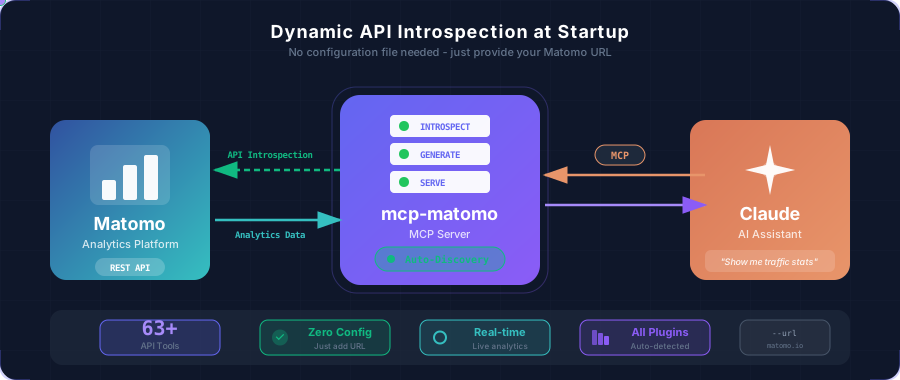
The server can introspect your Matomo instance directly at startup:
./target/release/mcp-matomo \
  --url https://your-matomo-instance.com \
  --token YOUR_API_TOKEN
The server will:
- Connect to your Matomo instance
- Fetch all available API methods
- Generate the tool definitions dynamically
- Start listening on stdin/stdout for MCP messages
How to get your Matomo API token
- Log in to your Matomo instance
- Go to Settings (gear icon) → Personal → Security
- Scroll down to Auth tokens
- Click Create new token
- Give it a name and copy the generated token
Alternative: Use a pre-generated OpenAPI specification
If you prefer faster startup times (skipping the introspection step), you can use a pre-generated OpenAPI spec:
# Use a pre-generated spec
./target/release/mcp-matomo \
  --openapi matomo-api.json \
  --token YOUR_API_TOKEN
Note: You can generate an OpenAPI spec by running the server with
--urland saving the output, or by using an external OpenAPI generator.
Configuration
Claude Code
Add the following to your Claude Code MCP settings. You can do this via the CLI:
# Dynamic introspection (recommended)
claude mcp add matomo \
  --command /path/to/mcp-matomo \
  --args "--url" "https://your-matomo-instance.com" \
  --env "MCP_MATOMO_TOKEN=YOUR_API_TOKEN"
Or with a pre-generated OpenAPI spec for faster startup:
claude mcp add matomo \
  --command /path/to/mcp-matomo \
  --args "--openapi" "/path/to/matomo-api.json" \
  --env "MCP_MATOMO_TOKEN=YOUR_API_TOKEN"
Or manually add it to your MCP settings file:
{
  "mcpServers": {
    "matomo": {
      "command": "/path/to/mcp-matomo",
      "args": ["--url", "https://your-matomo-instance.com"],
      "env": {
        "MCP_MATOMO_TOKEN": "YOUR_API_TOKEN"
      }
    }
  }
}
Claude Desktop
Add to ~/Library/Application Support/Claude/claude_desktop_config.json (macOS) or %APPDATA%\Claude\claude_desktop_config.json (Windows):
{
  "mcpServers": {
    "matomo": {
      "command": "/absolute/path/to/mcp-matomo",
      "args": ["--url", "https://your-matomo-instance.com"],
      "env": {
        "MCP_MATOMO_TOKEN": "YOUR_API_TOKEN"
      }
    }
  }
}
Usage Examples
Once configured, you can ask Claude questions like:
- "How many visitors did I have yesterday?"
- "Show me the top 10 countries by visits this month"
- "What are my most popular pages this week?"
- "Compare last week's traffic to the week before"
- "Which devices are my visitors using?"
Claude will automatically use the appropriate Matomo API tools to fetch and analyze your analytics data.
Available Tools
The MCP server dynamically generates tools based on your Matomo instance's API. Below is the complete list of supported Matomo API methods exposed as MCP tools:
Visits & Traffic Overview
| Tool | Description |
|------|-------------|
| VisitsSummary_get | General overview of visitor behavior (visits, pageviews, bounce rate, time on site) |
| VisitFrequency_get | Compare returning visitors vs new visitors metrics |
| API_get | All available metrics in one comprehensive call |
| MultiSites_getAll | Overview metrics for all your websites |
| MultiSites_getOne | Overview metrics for a specific website |
Pages & Content Analytics
| Tool | Description |
|------|-------------|
| Actions_get | Basic overview of visitor actions on your website |
| Actions_getPageUrls | Most visited page URLs (hierarchical folder structure) |
| Actions_getPageTitles | Page titles that have been visited |
| Actions_getEntryPageUrls | Entry pages (first page viewed during visits) |
| Actions_getEntryPageTitles | Titles of entry pages |
| Actions_getExitPageUrls | Exit pages (last page viewed during visits) |
| Actions_getExitPageTitles | Titles of exit pages |
| Actions_getDownloads | Downloaded files tracking |
| Actions_getOutlinks | Outbound links clicked by visitors |
| Contents_getContentNames | Content names viewed and interacted with |
| Contents_getContentPieces | Content pieces viewed and interacted with |
| PagePerformance_get | Page load times and performance metrics |
Site Search
| Tool | Description |
|------|-------------|
| Actions_getSiteSearchKeywords | Keywords searched on your internal search engine |
| Actions_getSiteSearchNoResultKeywords | Search keywords that returned no results |
| Actions_getSiteSearchCategories | Search categories selected by visitors |
| Actions_getPageUrlsFollowingSiteSearch | Pages clicked after internal search |
| Actions_getPageTitlesFollowingSiteSearch | Page titles clicked after internal search |
Traffic Sources & Referrers
| Tool | Description |
|------|-------------|
| Referrers_get | Acquisition channels overview |
| Referrers_getAll | All referrers (websites, keywords, campaigns) unified |
| Referrers_getReferrerType | Distribution by channel type (direct, search, social, etc.) |
| Referrers_getKeywords | Search keywords used to find your website |
| Referrers_getSearchEngines | Search engines that referred visitors |
| Referrers_getWebsites | Referring websites |
| Referrers_getSocials | Social networks that led visitors to your site |
| Referrers_getCampaigns | Marketing campaigns performance |
| Referrers_getAIAssistants | AI assistants that led visitors to your website |
Visitor Location & Demographics
| Tool | Description |
|------|-------------|
| UserCountry_getCountry | Visitors by country |
| UserCountry_getContinent | Visitors by continent |
| UserCountry_getRegion | Visitors by region/state |
| UserCountry_getCity | Visitors by city |
| UserLanguage_getLanguage | Browser language settings |
| UserLanguage_getLanguageCode | Exact language codes |
Devices & Technology
| Tool | Description |
|------|-------------|
| DevicesDetection_getType | Device types (desktop, mobile, tablet) |
| DevicesDetection_getBrand | Device brands/manufacturers |
| DevicesDetection_getModel | Device models |
| DevicesDetection_getBrowsers | Browser types |
| DevicesDetection_getBrowserVersions | Browser versions |
| DevicesDetection_getBrowserEngines | Browser rendering engines |
| DevicesDetection_getOsFamilies | Operating system families |
| DevicesDetection_getOsVersions | Operating system versions |
| DevicePlugins_getPlugin | Browser plugins enabled |
| Resolution_getResolution | Screen resolutions |
| Resolution_getConfiguration | OS + browser + resolution combinations |
Visitor Engagement
| Tool | Description |
|------|-------------|
| VisitorInterest_getNumberOfVisitsPerPage | Visits by number of pageviews |
| VisitorInterest_getNumberOfVisitsPerVisitDuration | Visits by duration |
| VisitorInterest_getNumberOfVisitsByVisitCount | Visitors by visit count (Nth visit) |
| VisitorInterest_getNumberOfVisitsByDaysSinceLast | Returning visitors by days since last visit |
Time-based Analytics
| Tool | Description |
|------|-------------|
| VisitTime_getVisitInformationPerServerTime | Visits by server time |
| VisitTime_getVisitInformationPerLocalTime | Visits by visitor's local time |
| VisitTime_getByDayOfWeek | Visits by day of week |
Goals & Conversions
| Tool | Description |
|------|-------------|
| Goals_get | Goal conversion overview |
| Goals_getDaysToConversion | Days before visitors convert |
| Goals_getVisitsUntilConversion | Number of visits before conversion |
Events Tracking
| Tool | Description |
|------|-------------|
| Events_getCategory | Event categories |
| Events_getAction | Event actions |
| Events_getName | Event names |
Users & AI
| Tool | Description |
|------|-------------|
| UserId_getUsers | Metrics per individual User ID |
| AIAgents_get | AI agents tracking |
Note: The exact tools available depend on your Matomo instance configuration and installed plugins. Use
--urlto dynamically discover all available methods for your specific instance.
CLI Reference
The MCP server can either introspect Matomo dynamically or use a pre-generated OpenAPI spec:
mcp-matomo [OPTIONS]

Options:
  -u, --url <URL>            Matomo instance URL (e.g., https://matomo.example.com)
                             When provided, introspects the Matomo API at startup
                             [env: MCP_MATOMO_URL]

  -o, --openapi <OPENAPI>    Path to a pre-generated OpenAPI JSON file
                             Use for faster startup with a cached spec
                             [env: MCP_MATOMO_OPENAPI_FILE]

  -t, --token <TOKEN>        Matomo API token (token_auth)
                             [env: MCP_MATOMO_TOKEN]

  -s, --site-id <SITE_ID>    Site ID for API introspection [default: 1]
                             [env: MCP_MATOMO_SITE_ID]

  -h, --help                 Print help
  -V, --version              Print version
Note: Either --url or --openapi must be provided.
Development
# Build debug version
cargo build

# Run tests
cargo test

# Run with logging
RUST_LOG=debug ./target/debug/mcp-matomo --openapi matomo-api.json --token YOUR_TOKEN
Troubleshooting
"No tools available"
If using dynamic introspection (--url):
- Verify your Matomo instance is accessible
- Check that your API token has the correct permissions
- Try specifying a different
--site-idif you have multiple sites
If using a pre-generated spec (--openapi):
- Make sure your OpenAPI JSON file is valid and contains paths
- Try using
--urlinstead to regenerate the spec dynamically
"401 Unauthorized" errors
- Verify your API token is correct
- Check that the token has sufficient permissions (at least "view" access)
- Ensure the token is being passed correctly (via
--tokenflag orMCP_MATOMO_TOKENenv var)
"Connection refused" or timeouts
- Verify your Matomo instance is accessible from your machine
- Check for firewalls or VPN requirements
- If using
--url, ensure the URL is correct and includes the protocol (https://) - If using
--openapi, ensure the URL in the spec matches your current Matomo URL
Contributing
Contributions are welcome! Please feel free to submit a Pull Request.
License
MIT License - see LICENSE for details.
Acknowledgments
- Built with rmcp - Rust MCP SDK
- Inspired by the Model Context Protocol specification