Conversational fitness coaching with Claude, grounded in Garmin data and your stated Context
Garmin MCP
Conversational training coaching with Claude, grounded in your real Garmin data and your stated context.
The watch sees the numbers. You know the goal, the phase, the rules, the constraints. This project is the bridge: an MCP server that gives Claude both, a personalised coach that's actually looking at your HRV, your sleep, your week, in the context of your training.
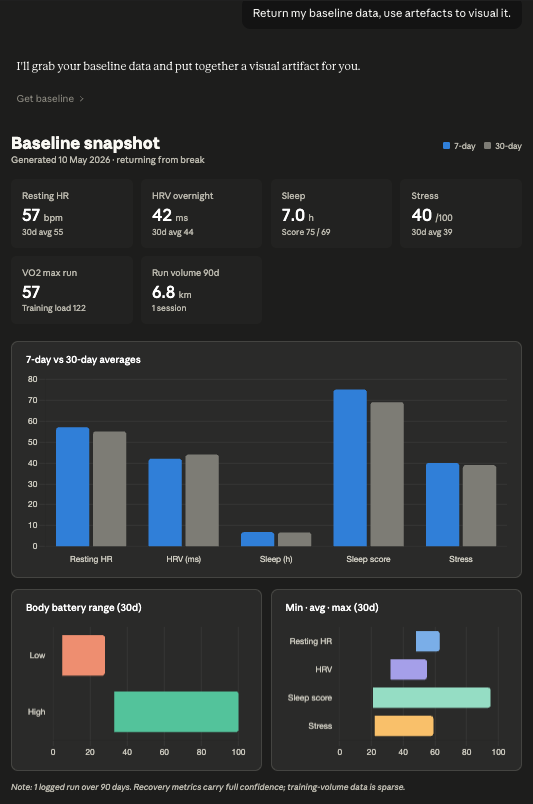
Claude reading your auto-derived baseline and rendering it as an interactive snapshot, returning-from-break flag detected, recovery-metrics confidence noted, 7-day drift visible against the 30-day baseline. None of this required pulling fresh API data; it's all from the local
baseline.jsoncached on disk.
Why this exists / How it's different
Most fitness apps are dashboards: they show you that your HRV is down and your training load is up, but they can't reason about those two facts together against a goal you set six weeks ago. Garmin Connect is a fine data store and a competent visualiser. It is not a coach. A coach asks why, holds context across weeks, knows you're three weeks from a half-marathon and tapering, and answers questions in your terms. That's the gap this project fills.
The technical idea that makes that possible is a small personalisation system, not the MCP plumbing. There are three pieces: an auto-derived baseline (garmin-mcp-baseline script writes baseline.json — the things the watch already knows: resting HR, HRV, sleep, weekly volume, VO2 max), a stated profile (profile.md — the things only you know: goals, phase, training rules, coaching preferences, red flags), and a propose-then-apply update pattern (Claude proposes profile rewrites when conversation reveals durable changes; the user reviews and applies via a CLI; [auto] fields are off-limits to hand-editing because they refresh by re-running the baseline script). The result: every analytical conversation starts from real data plus real context, and the profile drifts when you drift, but only with your authorship.
Setup
~10 minutes. Step 3 builds your baseline; step 4 turns this from a Garmin wrapper into a personalised coaching system. Don't skip them.
1. Install
git clone https://github.com/YOURUSERNAME/garmin-mcp.git
cd garmin-mcp
python3 -m venv .venv
source .venv/bin/activate
pip install -e .
2. Log in once
garmin-mcp-login
You'll be prompted for your Garmin Connect email and password (and an MFA code if you have it on). Tokens are cached at ~/.garminconnect/garmin_tokens.json and auto-refresh from there. The MCP server itself never sees your password.
3. Auto-derive your baselines
garmin-mcp-baseline
Writes ~/.garmin-mcp/baseline.json with stats from your last 7/30/90 days: resting HR, HRV, sleep, weekly volume, dominant activity types, VO2 max, body battery range. Takes ~50 seconds (paced to avoid Garmin's rate limits). The interview in step 4 reads this so it doesn't ask you for anything the watch already knows.
4. Build your training profile
Open a Claude Desktop conversation and paste the contents of setup_interview.md. The interview reads your baseline.json, asks you the things the watch can't see (goals, phase, training rules, coaching preferences), reconciles divergent 7d/30d numbers as coaching questions rather than silently picking one, and emits a complete profile.md.
At the end of the interview, Claude offers to call create_initial_profile() and write the file directly. Heads-up: this tool currently times out occasionally on Claude Desktop (tracked as v0.2.1 in TODO.md). If it hangs, fall back to the manual path:
# Copy the profile content from the Claude conversation, then:
mkdir -p ~/.garmin-mcp
pbpaste > ~/.garmin-mcp/profile.md
In v0.3 the interview itself becomes a
/setup_interviewslash command — until then, it's a paste.
Prefer to skip the interview? Hand-edit the template instead:
mkdir -p ~/.garmin-mcp
cp profile.example.md ~/.garmin-mcp/profile.md
$EDITOR ~/.garmin-mcp/profile.md
The template carries [auto] / [user] / [default — refine] / [historical] markers, keep them. They're load-bearing for propose_profile_update(), which refuses to overwrite [auto] fields because those refresh by re-running garmin-mcp-baseline, not by hand.
5. Wire up Claude Desktop
Edit ~/Library/Application Support/Claude/claude_desktop_config.json and add:
{
  "mcpServers": {
    "garmin": {
      "command": "/absolute/path/to/garmin-mcp/.venv/bin/garmin-mcp-server"
    }
  }
}
Restart Claude Desktop. You should see "garmin" listed in the tool selector.
Available tools
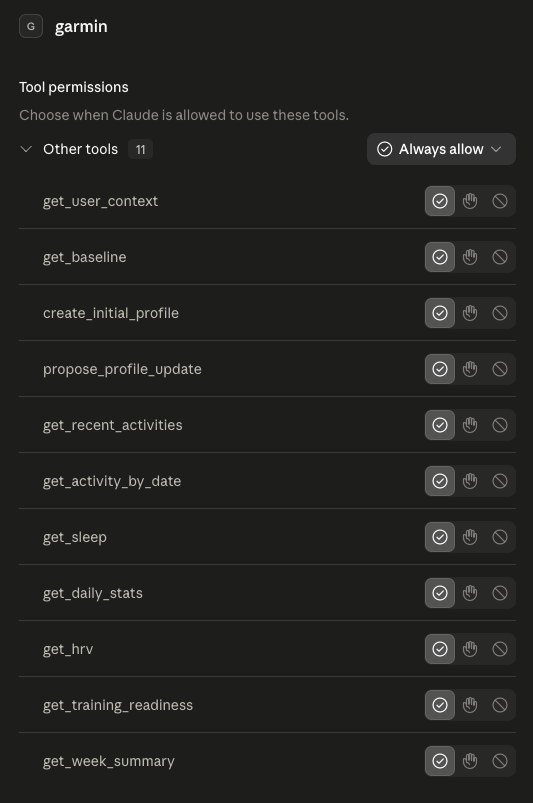
11 tools across data fetching (activities, sleep, HRV, daily stats), personalisation (user context, baseline, profile create/update), and aggregation (week summary).
| Tool | What it does |
|---|---|
| get_user_context | Reads your training profile (~/.garmin-mcp/profile.md). Claude is instructed to call this first in any analytical conversation. |
| get_baseline | Reads your auto-derived baselines (~/.garmin-mcp/baseline.json) — RHR, HRV, sleep, training volume, fitness markers, edge-case flags. Pair with get_user_context for full context. |
| create_initial_profile | Writes the initial profile.md at the end of the setup interview. Write-once: refuses if a profile already exists. |
| propose_profile_update | Proposes a profile rewrite when conversation reveals a durable change. Refuses to touch [auto] fields. Returns content for user review; does not write. |
| get_recent_activities | Last N activities (default 5; max 20). |
| get_activity_by_date | All activities on a given date. |
| get_sleep | Sleep duration, stages, score, HRV (defaults to last night). |
| get_daily_stats | Steps, resting HR, body battery, stress for a given date. |
| get_hrv | HRV summary with status vs baseline. |
| get_training_readiness | Garmin's 0–100 readiness score with input factors. |
| get_week_summary | 7-day rollup of steps, sleep, RHR, body battery, stress. |
Things to ask Claude
- "How were my runs this week? Any concerning patterns?"
- "My HRV has been low. Walk me through what Garmin is showing and whether I should back off."
- "Compare my sleep over the last 7 days. Is my body battery recovering properly?"
- "Look at my training readiness today and my last activity, should I do the planned hard run, or swap it for a recovery day?"
The point is conversational continuity. Claude can call several tools in one turn, hold the data in context alongside your profile and baseline, and reason across them.
Why I built this on python-garminconnect and not garth
Originally planned to use garth, the most popular Python client for Garmin. Mid-build I checked the repo and found garth was deprecated as of early 2026, Garmin changed their auth flow and the maintainer stepped away. The same author then released garth-mcp-server on PyPI in February 2026, but that inherits the same broken auth.
python-garminconnect (v0.3.x, late 2025) replaced its garth dependency with a native auth engine that uses TLS impersonation (curl_cffi) to bypass Garmin's Cloudflare blocking. It's actively maintained and currently the working unofficial path.
The lesson for the portfolio: when picking a dependency for a niche, reverse-engineered API, always check the maintenance status before you build on top of it. Cost me 10 minutes; would have cost a weekend if I hadn't checked until something broke.
Unofficial API caveat
This uses Garmin's internal mobile API, not their public Health API. That means:
- Garmin can change or block it at any time without notice.
- It's against Garmin's TOS to scrape Connect for commercial purposes, this is a personal-use tool only.
- If your account gets flagged, you may need to log in via the official app to clear it.
For commercial / production use, register for the Garmin Health API, which is the supported path.
Architecture
┌──────────────┐  JSON-RPC over stdio  ┌─────────────────┐  HTTPS  ┌─────────────┐
│ Claude       │ ─────────────────────▶ │ garmin-mcp      │ ──────▶ │ Garmin      │
│ Desktop      │ ◀───────────────────── │ (Python, MCP)   │ ◀────── │ Connect API │
└──────────────┘                        └─────────────────┘          └─────────────┘
                                                │
                                                ▼
                                  ~/.garminconnect/garmin_tokens.json
                                  ~/.garmin-mcp/{profile.md, baseline.json}
The work is split across four files:
auth.py— one-off interactive login. Run once, writes token file.baseline.py—garmin-mcp-baselineCLI. Pulls 7/30/90-day windows and writesbaseline.jsonwith confidence flags and edge cases.server.py— the MCP server. Reads cached token, exposes 11 tools.formatters.py— turns Garmin's massive JSON blobs into compact, LLM-friendly summaries. The single biggest quality lever.
See also
Other Garmin-via-Claude projects worth knowing about — surveyed before building:
garmy-mcp— heavier abstraction with a local SQLite cache and dashboards. Good if you want offline analysis; this project chose a thinner server with Claude doing the analysis instead.garth-mcp-server— wraps the now-deprecatedgarthlibrary; auth is broken on current Garmin endpoints.
License
MIT.