aws redshift remote mcp solutions on bedrock agentcore and general solutions for local mcp
AWS Redshift Remote MCP Server
将本地 stdio MCP Server 通过 FastMCP Proxy 包装为远程 Streamable HTTP 服务,部署到 AWS Bedrock AgentCore,实现 Cognito JWT 鉴权的生产级远程 MCP 服务。
这套模式不限于 Redshift — 任何 stdio MCP Server 都可以用同样的方式变成云端远程服务。
为什么需要 Remote MCP
AWS Labs MCP Servers 提供了丰富的 MCP 工具(Redshift、S3、DynamoDB 等),为开发者在本地快速集成 AI Agent 与 AWS 服务提供了便捷的起点。这些工具基于 stdio 协议设计,非常适合本地开发和测试。当需要将这些能力延伸到生产环境时,会面临一些新的挑战:
- 无法部署到云端,不支持水平扩展和多用户并发
- 无法穿透 VPC,企业数据源通常在私有子网内,本地 Agent 无法直接访问
- 缺乏统一鉴权和审计,AI 直连数据库是高风险操作
而企业级 AI Agent 需要的是:以标准化、可扩展、安全的方式访问数据。这就需要将 Local MCP 升级为 Remote MCP — 从本地 CLI 工具变成云原生的 HTTP 服务。
Remote MCP 带来的核心转变
| 维度 | Local MCP(stdio) | Remote MCP(HTTP) | |------|-------------------|-------------------| | 运行环境 | 开发者本地 | 云端托管(AgentCore Runtime) | | 访问方式 | 仅本地 Agent | 任意远程 MCP 客户端 | | 网络能力 | 无法穿透 VPC | 部署在 VPC 内,安全访问私有数据源 | | 扩展性 | 单进程 | 弹性扩缩,支持多用户 | | 安全治理 | 无 | Cognito JWT 鉴权 + IAM 权限控制 + CloudWatch 审计 | | 本质定位 | 开发测试工具 | 生产级 AI 服务接口 |
这个项目做了什么
本项目基于 AWS Bedrock AgentCore Runtime,实现了从 Local MCP 到 Remote MCP 的完整转换:
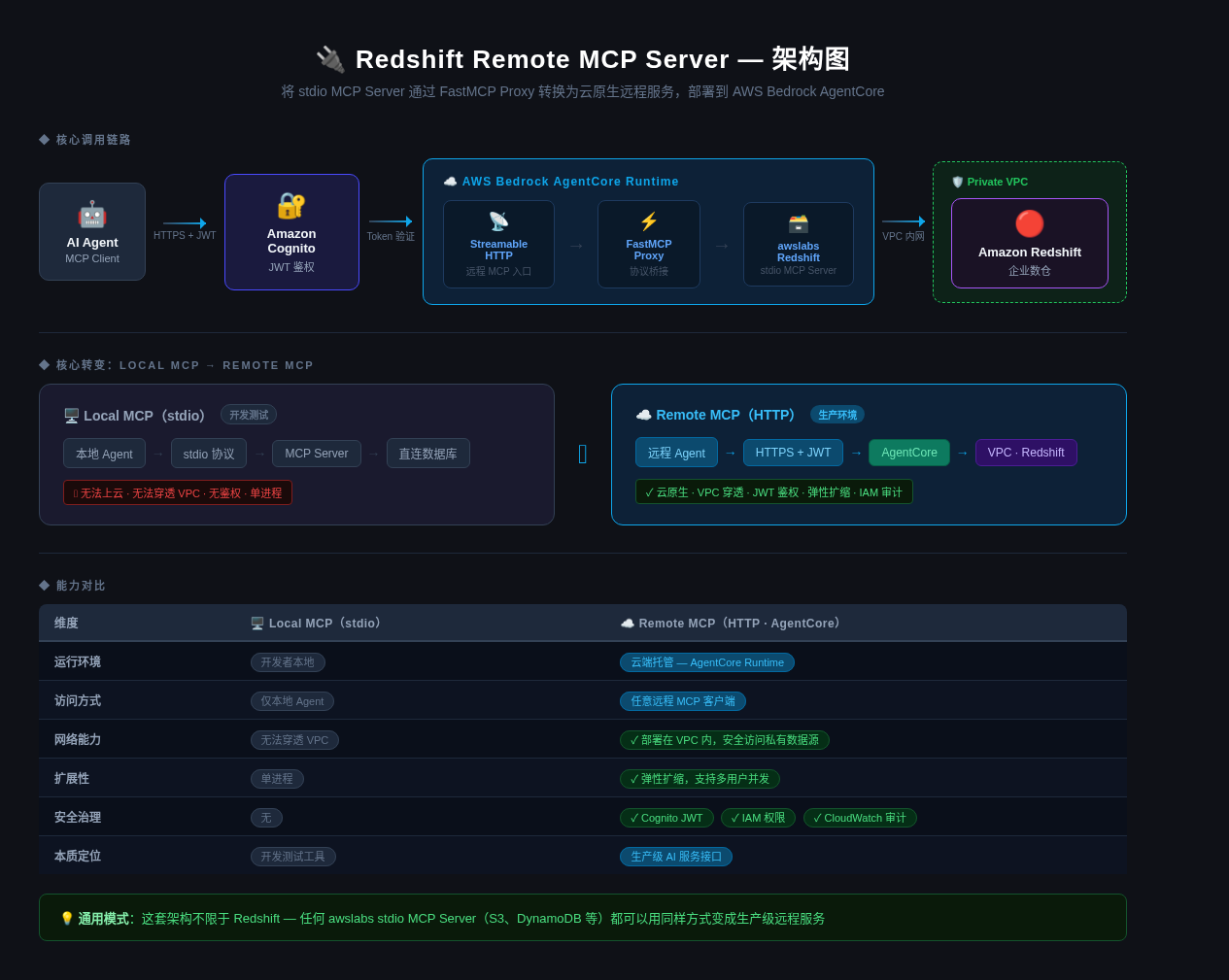
以 awslabs.redshift-mcp-server 为例,将其包装为带鉴权的远程 HTTP 服务,让 AI Agent 能够安全地访问企业 Redshift 数据仓库。同样的模式适用于任何 AWS Labs MCP Server。
这也是 MCP 生态正在发生的趋势:OpenSearch 3.0 已内置 Remote MCP,Splunk 等平台也在跟进。MCP 正在从开发者工具演进为 AI 时代的标准服务接口 — 类似 OpenAPI 在 Web 时代的角色。
项目结构
.
├── src/
│   └── redshift-remote-mcp.py      # 核心:FastMCP Proxy Server
├── tests/
│   ├── test_local.py                # 本地测试(stdio + HTTP proxy)
│   └── test_remote.py               # 远程测试(AgentCore Runtime)
├── scripts/
│   ├── auth/
│   │   ├── setup_cognito_s2s.sh     # Cognito S2S 鉴权配置
│   │   └── get_token.sh             # 获取 Bearer Token
│   ├── deploy/
│   │   └── attach_redshift_policy.sh # 附加 Redshift IAM 权限
│   └── infra/
│       └── setup_redshift_serverless.sh # 创建 demo 用 Redshift Serverless
├── docs/
│   ├── use-cases/
│   │   ├── agentic-bi.md           # 应用案例:Agentic BI
│   │   └── opensearch-mcp.md       # 应用案例:OpenSearch MCP
│   ├── deployment.md                # 完整部署指南
│   └── research-summary.md          # 技术调研汇总
├── requirements.txt
├── .env.example
└── .gitignore
工作原理
AI Agent / MCP Client
        │
        │  Streamable HTTP + Bearer Token
        ▼
AgentCore Runtime(托管容器)
        │
        │  FastMCP create_proxy()
        ▼
awslabs.redshift-mcp-server(stdio 协议)
        │
        │  Redshift Data API
        ▼
Amazon Redshift Serverless
FastMCP 的 create_proxy() 将底层 stdio server 的所有 tools/resources/prompts 透传为 HTTP 接口,AgentCore Runtime 提供托管运行环境,Cognito 提供 service-to-service JWT 鉴权。
快速开始
前置条件
- Python 3.10+
- AWS CLI 已配置
bedrock-agentcore-starter-toolkit >= 0.3.0
安装依赖
pip install -r requirements.txt
本地运行
python src/redshift-remote-mcp.py
Server 启动后监听 http://0.0.0.0:8000/mcp,在另一个终端验证:
python tests/test_local.py
部署到 AgentCore Runtime
完整步骤见 docs/deployment.md,核心流程:
# 1. 配置 Cognito S2S 鉴权
source scripts/auth/setup_cognito_s2s.sh us-east-1

# 2. 配置 AgentCore
agentcore configure \
  --entrypoint src/redshift-remote-mcp.py \
  --name redshift_remote_mcp \
  --protocol MCP \
  --requirements-file requirements.txt \
  --authorizer-config '{"customJWTAuthorizer":{"discoveryUrl":"<DISCOVERY_URL>","allowedClients":["<CLIENT_ID>"]}}' \
  --disable-memory \
  --region us-east-1 \
  --non-interactive

# 3. 部署
agentcore deploy

# 4. 附加 Redshift 权限
bash scripts/deploy/attach_redshift_policy.sh us-east-1

# 5. 验证
python tests/test_remote.py
透传的 MCP 工具
部署后,以下 Redshift MCP 工具通过 HTTP 远程可用:
| 工具 | 说明 |
|------|------|
| list_clusters | 发现所有 Redshift 集群和 Serverless workgroup |
| list_databases | 列出指定集群的数据库 |
| list_schemas | 列出指定数据库的 Schema |
| list_tables | 列出指定 Schema 的表 |
| list_columns | 列出指定表的列信息 |
| execute_query | 执行 SQL 查询(只读) |
应用案例
Agentic BI
结合 Amazon QuickSight(AWS Quick Suite)的传统 BI 能力和 Agent 通过 MCP 的全局数据访问能力,实现从"人工选数"到"Agent 自主分析"的 Agentic BI。
OpenSearch MCP
OpenSearch MCP 从内置(3.0+)到 Standalone 再到 AgentCore 远程托管的演进路径,验证了 Remote MCP 模式的通用性。
可扩展性
这套模式适用于任何 stdio MCP Server。替换 src/redshift-remote-mcp.py 中的底层 server 即可:
# Redshift(当前)
transport = StdioTransport(
    command="python",
    args=["-c", "from awslabs.redshift_mcp_server.server import main; main()"],
    env=build_server_env()
)

# S3
# pip install awslabs.s3-mcp-server
# transport = StdioTransport(command="awslabs.s3-mcp-server", ...)

# DynamoDB
# pip install awslabs.dynamodb-mcp-server
# transport = StdioTransport(command="awslabs.dynamodb-mcp-server", ...)
其余代码(proxy、部署配置、鉴权)无需修改。
技术栈
| 组件 | 技术 | |------|------| | MCP 框架 | FastMCP >= 3.2.0 | | MCP 协议 | mcp >= 1.27.0 | | 底层 Server | awslabs.redshift-mcp-server | | 部署平台 | AWS Bedrock AgentCore Runtime | | 鉴权 | Amazon Cognito(client_credentials) | | 部署工具 | bedrock-agentcore-starter-toolkit >= 0.3.0 |