MCP server by ch998244353
Thread Contract MCP Server
Screenshots
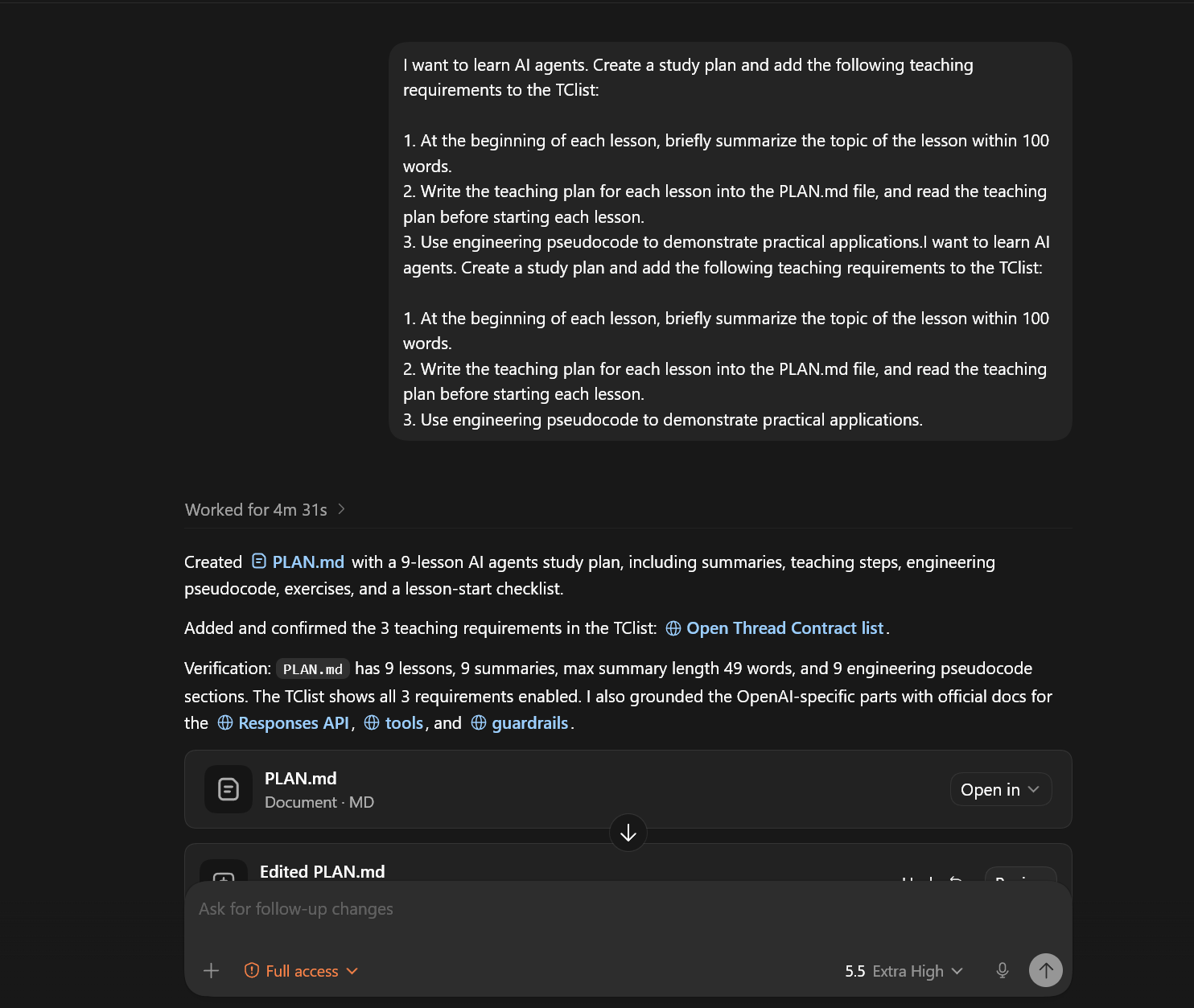
Thread Contract rules can be added and confirmed from a coding-agent thread:
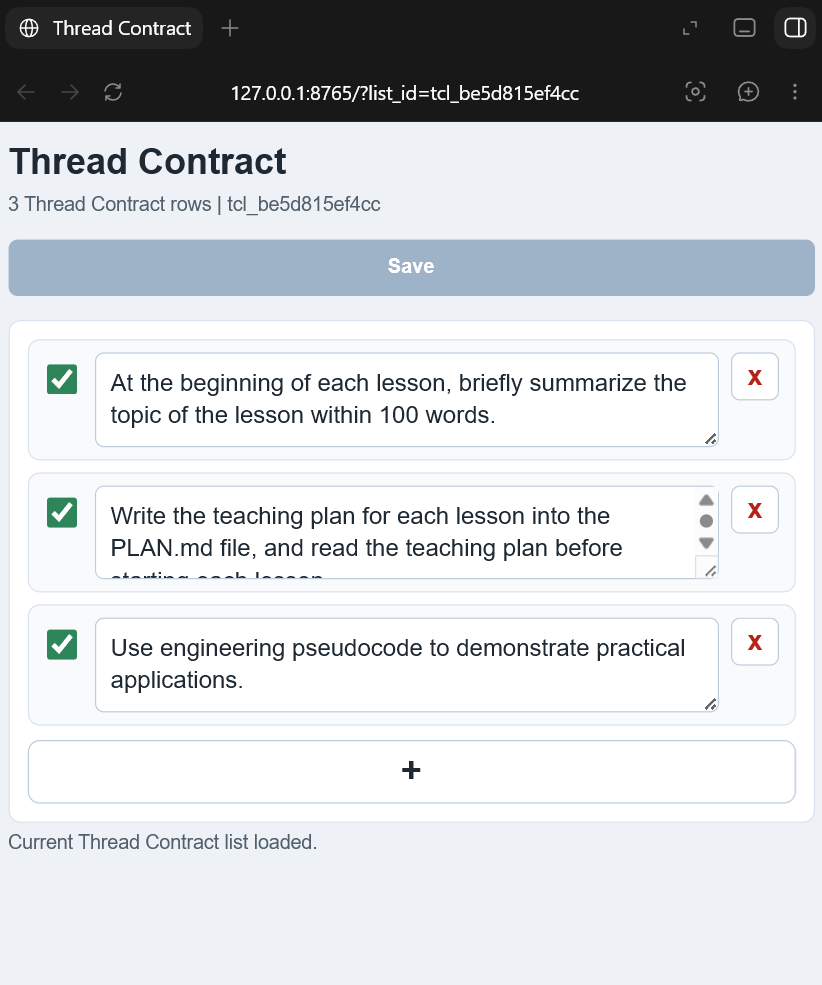
The same list can be edited in the local Web UI:
English
Thread Contract is a local runtime contract layer for AI coding-agent threads. It lets users pin explicit, thread-scoped rules such as "do not commit unless I ask" or "read PLAN.md before editing" without turning those rules into project policy or long-term memory.
Thread Contract stores rules in local SQLite, exposes management tools through
MCP, provides a small local Web UI, and can inject active rules before every
Codex or Claude Code user turn through a UserPromptSubmit hook.
Why It Exists
AGENTS.md and CLAUDE.md are good places for stable project rules. Long-term
memory is good for durable user preferences and facts. Some instructions are
neither: they should persist only inside one coding-agent thread.
Thread Contract is for that middle layer:
- Keep temporary task rules visible across long threads.
- Avoid writing short-lived instructions into repository files.
- Avoid hidden memory capture; every rule is explicitly user-controlled.
- Keep different sessions and thread ids isolated.
What It Provides
- Stdio MCP server with Thread Contract management tools.
- Codex plugin manifest, bundled MCP config, and
UserPromptSubmithook. - Claude Code plugin manifest, bundled MCP config, and hook adapter.
- Local Web UI for viewing and editing a Thread Contract list.
- Importable Python SDK for custom local agent runtimes.
- SQLite storage with cleanup for stale lists and capped local data size.
The server exposes these MCP tools:
threadcontract_open_turnthreadcontract_commit_turn_listthreadcontract_list_turnshow_threadcontract_listthreadcontract_add_turn_itemthreadcontract_update_turn_itemthreadcontract_copy_list_textthreadcontract_get_list_web_urlthreadcontract_delete_thread_list
Current Scope
Version 0.1.0 is source-install first:
- Supported: GitHub clone, editable Python install, stdio MCP config, Codex plugin adapter, Claude Code plugin adapter, Web UI, and Python SDK import.
- Not included yet: PyPI publishing, MCP Registry publishing, Docker image, or hosted sync service.
Repository Layout
threadcontract-mcp/
  .codex-plugin/plugin.json      # Codex plugin manifest
  .claude-plugin/plugin.json     # Claude Code plugin manifest
  .codex-mcp.json                # Codex bundled MCP server config
  .mcp.json                      # Claude Code bundled MCP server config
  hooks/                         # Codex and Claude Code hook adapters
  src/                           # MCP server, service layer, Web API, SDK
  web/                           # Source Web UI assets for plugin/source runs
  docs/                          # Installation, architecture, security docs
  examples/                      # MCP, Codex, Claude Code, and SDK examples
  scripts/                       # Local install helpers
  tests/                         # Unit, hook, stdio, Web UI, and acceptance tests
Install From Source
Requirements:
- Python 3.10 or newer.
- Codex or Claude Code for host integration.
- Optional:
mcpPython package only if you want the alternate SDK-backed MCP server entrypoint.
Clone and install:
git clone https://github.com/ch998244353/Thread-Contract-mcp.git threadcontract-mcp
cd threadcontract-mcp
python -m pip install -e .
Run the handwritten stdio MCP server:
threadcontract-mcp
Run the local Web UI:
threadcontract-web --port 8765
Open:
http://127.0.0.1:8765/
By default, Thread Contract stores SQLite data at:
~/.codex/threadcontract.sqlite3
Override it with THREADCONTRACT_DB:
$env:THREADCONTRACT_DB = "$HOME\.codex\threadcontract-dev.sqlite3"
Codex Setup
For source/plugin development, this repository already includes:
.codex-plugin/plugin.json
.codex-mcp.json
hooks/codex_hooks.json
hooks/user_prompt_submit.py
Use the helper script to add this checkout as a local Codex plugin marketplace:
.\scripts\install-codex-plugin.ps1
Then restart Codex, install or enable the Thread Contract plugin from the
local marketplace, open /hooks, review the bundled hook, and trust it. Codex
does not run non-managed plugin hooks until the current hook definition is
trusted.
For MCP-only setup, add this to ~/.codex/config.toml after installing the
package:
[mcp_servers.threadcontract]
command = "threadcontract-mcp"
enabled = true
startup_timeout_sec = 10
tool_timeout_sec = 30
enabled_tools = [
  "threadcontract_open_turn",
  "threadcontract_commit_turn_list",
  "threadcontract_list_turn",
  "show_threadcontract_list",
  "threadcontract_add_turn_item",
  "threadcontract_update_turn_item",
  "threadcontract_copy_list_text",
  "threadcontract_get_list_web_url",
  "threadcontract_delete_thread_list",
]
See docs/codex-adapter.md and docs/mcp-config.md.
Claude Code Setup
The Claude Code plugin files live at the repository root:
.claude-plugin/plugin.json
.mcp.json
hooks/claude_hooks.json
hooks/claude_user_prompt_submit.py
Validate locally:
claude plugin validate . --strict
Run a development session:
claude --plugin-dir .
Python SDK
The importable SDK is for local agent runtimes that want Thread Contract without MCP:
from threadcontract_sdk import ThreadContractClient

client = ThreadContractClient(db_path="threadcontract.sqlite3")
thread = client.open_thread(
    thread_id="thread-a",
    workspace="/path/to/repo",
    user_message="start",
)
client.add_item(thread=thread, content="Answer with the conclusion first.")
client.commit_items(thread=thread)

context = client.build_context(thread=thread, user_message="next request")
print(context)
The stable public SDK exports only:
ThreadContractClientThreadContractThread
Alternate MCP SDK Server
The default plugin config uses src/server.py, a small handwritten stdio MCP
server with no runtime dependency outside the standard library.
An alternate server using the MCP Python SDK is available:
python -m pip install -e ".[sdk-server]"
threadcontract-mcp-sdk-server
Tests
Run the unit suite and acceptance smoke:
python -m unittest discover -s tests -v
python tests\acceptance.py
Build verification:
python -m pip install -e ".[dev]"
python -m build
Security And Privacy
Thread Contract is local-first. It stores explicit user-created rules and audit events in SQLite. It does not capture conversation history automatically and it does not create cross-thread long-term memory.
Hooks can inject extra context before a prompt is sent to the model. Review and trust hook code before enabling it. See SECURITY.md and docs/security.md.
Documentation
- docs/install.md
- docs/quickstart.md
- docs/mcp-config.md
- docs/codex-adapter.md
- docs/architecture.md
- docs/security.md
License
MIT. See LICENSE.
中文
Thread Contract 是一个面向 AI coding agent 线程的本地运行时约束层。它让用户可以固定明确的、仅在当前线程内生效的规则,例如“除非我要求,否则不要提交代码”或“修改前先阅读 PLAN.md”,而不必把这些临时规则写成项目长期规范或长期记忆。
Thread Contract 会把规则存储在本地 SQLite 中,通过 MCP 暴露管理工具,提供一个轻量的本地 Web UI,并且可以通过 UserPromptSubmit hook 在每一轮 Codex 或 Claude Code 用户请求开始前注入启用中的规则。
为什么需要它
AGENTS.md 和 CLAUDE.md 适合保存稳定的项目规则。长期记忆适合保存持久的用户偏好和事实。但有些指令不属于这两类:它们只应该在某一个 coding-agent 线程中持续生效。
Thread Contract 解决的就是这个中间层问题:
- 让临时任务规则在长线程中持续可见。
- 避免把短期指令写进仓库文件。
- 避免隐藏式记忆捕获;每条规则都由用户明确控制。
- 让不同 session 和 thread id 之间保持隔离。
提供的能力
- 带有 Thread Contract 管理工具的 stdio MCP server。
- Codex 插件 manifest、内置 MCP 配置和
UserPromptSubmithook。 - Claude Code 插件 manifest、内置 MCP 配置和 hook adapter。
- 用于查看和编辑 Thread Contract 列表的本地 Web UI。
- 面向自定义本地 agent runtime 的可导入 Python SDK。
- SQLite 本地存储,支持清理过期列表并限制本地数据总量。
server 暴露以下 MCP 工具:
threadcontract_open_turnthreadcontract_commit_turn_listthreadcontract_list_turnshow_threadcontract_listthreadcontract_add_turn_itemthreadcontract_update_turn_itemthreadcontract_copy_list_textthreadcontract_get_list_web_urlthreadcontract_delete_thread_list
当前范围
版本 0.1.0 以源码安装为主:
- 已支持:GitHub clone、Python editable install、stdio MCP 配置、Codex 插件适配、Claude Code 插件适配、Web UI 和 Python SDK import。
- 暂未包含:PyPI 发布、MCP Registry 发布、Docker 镜像或托管同步服务。
仓库结构
threadcontract-mcp/
  .codex-plugin/plugin.json      # Codex 插件 manifest
  .claude-plugin/plugin.json     # Claude Code 插件 manifest
  .codex-mcp.json                # Codex 内置 MCP server 配置
  .mcp.json                      # Claude Code 内置 MCP server 配置
  hooks/                         # Codex 和 Claude Code hook adapter
  src/                           # MCP server、服务层、Web API、SDK
  web/                           # plugin/source 运行用的 Web UI 源资源
  docs/                          # 安装、架构、安全文档
  examples/                      # MCP、Codex、Claude Code 和 SDK 示例
  scripts/                       # 本地安装辅助脚本
  tests/                         # 单元、hook、stdio、Web UI 和验收测试
从源码安装
要求:
- Python 3.10 或更新版本。
- 用于 host 集成的 Codex 或 Claude Code。
- 可选:只有在使用基于 MCP Python SDK 的替代 server 入口时,才需要安装
mcpPython package。
克隆并安装:
git clone https://github.com/ch998244353/Thread-Contract-mcp.git threadcontract-mcp
cd threadcontract-mcp
python -m pip install -e .
运行手写的 stdio MCP server:
threadcontract-mcp
运行本地 Web UI:
threadcontract-web --port 8765
打开:
http://127.0.0.1:8765/
默认情况下,Thread Contract 会把 SQLite 数据存储在:
~/.codex/threadcontract.sqlite3
可以通过 THREADCONTRACT_DB 覆盖:
$env:THREADCONTRACT_DB = "$HOME\.codex\threadcontract-dev.sqlite3"
Codex 设置
用于源码或插件开发时,本仓库已包含:
.codex-plugin/plugin.json
.codex-mcp.json
hooks/codex_hooks.json
hooks/user_prompt_submit.py
使用辅助脚本把当前 checkout 添加为本地 Codex plugin marketplace:
.\scripts\install-codex-plugin.ps1
然后重启 Codex,在本地 marketplace 中安装或启用 Thread Contract 插件,打开 /hooks,检查内置 hook,并信任它。Codex 在 hook 定义被信任之前,不会运行非托管插件 hook。
如果只需要 MCP 配置,安装 package 后把以下内容加入 ~/.codex/config.toml:
[mcp_servers.threadcontract]
command = "threadcontract-mcp"
enabled = true
startup_timeout_sec = 10
tool_timeout_sec = 30
enabled_tools = [
  "threadcontract_open_turn",
  "threadcontract_commit_turn_list",
  "threadcontract_list_turn",
  "show_threadcontract_list",
  "threadcontract_add_turn_item",
  "threadcontract_update_turn_item",
  "threadcontract_copy_list_text",
  "threadcontract_get_list_web_url",
  "threadcontract_delete_thread_list",
]
参见 docs/codex-adapter.md 和 docs/mcp-config.md。
Claude Code 设置
Claude Code 插件文件位于仓库根目录:
.claude-plugin/plugin.json
.mcp.json
hooks/claude_hooks.json
hooks/claude_user_prompt_submit.py
本地验证:
claude plugin validate . --strict
运行开发会话:
claude --plugin-dir .
Python SDK
可导入 SDK 面向那些希望在不使用 MCP 的情况下接入 Thread Contract 的本地 agent runtime:
from threadcontract_sdk import ThreadContractClient

client = ThreadContractClient(db_path="threadcontract.sqlite3")
thread = client.open_thread(
    thread_id="thread-a",
    workspace="/path/to/repo",
    user_message="start",
)
client.add_item(thread=thread, content="Answer with the conclusion first.")
client.commit_items(thread=thread)

context = client.build_context(thread=thread, user_message="next request")
print(context)
稳定的公开 SDK 只导出:
ThreadContractClientThreadContractThread
替代 MCP SDK Server
默认插件配置使用 src/server.py,这是一个小型的手写 stdio MCP server,运行时不依赖标准库之外的 package。
也可以使用基于 MCP Python SDK 的替代 server:
python -m pip install -e ".[sdk-server]"
threadcontract-mcp-sdk-server
测试
运行单元测试和验收冒烟测试:
python -m unittest discover -s tests -v
python tests\acceptance.py
构建验证:
python -m pip install -e ".[dev]"
python -m build
安全和隐私
Thread Contract 是 local-first 的。它会把用户明确创建的规则和审计事件存储在 SQLite 中。它不会自动捕获对话历史,也不会创建跨线程的长期记忆。
hook 可以在 prompt 发送给模型之前注入额外上下文。启用前请检查并信任 hook 代码。参见 SECURITY.md 和 docs/security.md。
文档
- docs/install.md
- docs/quickstart.md
- docs/mcp-config.md
- docs/codex-adapter.md
- docs/architecture.md
- docs/security.md
许可证
MIT。参见 LICENSE。
日本語
Thread Contract は、AI coding agent のスレッド向けのローカルなランタイム契約レイヤーです。「依頼されるまで commit しない」や「編集前に PLAN.md を読む」といった明示的でスレッド単位のルールを、プロジェクトポリシーや長期記憶に変えずに固定できます。
Thread Contract はルールをローカル SQLite に保存し、MCP 経由で管理ツールを公開し、小さなローカル Web UI を提供します。また、UserPromptSubmit hook によって、Codex または Claude Code の各ユーザーターンの前に有効なルールを注入できます。
なぜ必要か
AGENTS.md と CLAUDE.md は安定したプロジェクトルールを置く場所として適しています。長期記憶は継続的なユーザー設定や事実に向いています。一方で、一部の指示はそのどちらでもありません。1 つの coding-agent スレッドの中だけで持続すべき指示があります。
Thread Contract はこの中間レイヤーのための仕組みです。
- 長いスレッドでも一時的なタスクルールを見える状態に保つ。
- 短期的な指示をリポジトリファイルに書き込まない。
- 隠れた記憶取得を避ける。すべてのルールはユーザーが明示的に管理する。
- 異なる session と thread id を分離する。
提供する機能
- Thread Contract 管理ツールを備えた stdio MCP server。
- Codex plugin manifest、同梱 MCP config、
UserPromptSubmithook。 - Claude Code plugin manifest、同梱 MCP config、hook adapter。
- Thread Contract リストを表示、編集するローカル Web UI。
- 独自のローカル agent runtime 向けに import できる Python SDK。
- 古いリストのクリーンアップとローカルデータサイズ上限を備えた SQLite storage。
server は次の MCP tools を公開します。
threadcontract_open_turnthreadcontract_commit_turn_listthreadcontract_list_turnshow_threadcontract_listthreadcontract_add_turn_itemthreadcontract_update_turn_itemthreadcontract_copy_list_textthreadcontract_get_list_web_urlthreadcontract_delete_thread_list
現在のスコープ
Version 0.1.0 は source install を優先しています。
- 対応済み: GitHub clone、editable Python install、stdio MCP config、Codex plugin adapter、Claude Code plugin adapter、Web UI、Python SDK import。
- 未対応: PyPI publishing、MCP Registry publishing、Docker image、hosted sync service。
リポジトリ構成
threadcontract-mcp/
  .codex-plugin/plugin.json      # Codex plugin manifest
  .claude-plugin/plugin.json     # Claude Code plugin manifest
  .codex-mcp.json                # Codex bundled MCP server config
  .mcp.json                      # Claude Code bundled MCP server config
  hooks/                         # Codex and Claude Code hook adapters
  src/                           # MCP server, service layer, Web API, SDK
  web/                           # Source Web UI assets for plugin/source runs
  docs/                          # Installation, architecture, security docs
  examples/                      # MCP, Codex, Claude Code, and SDK examples
  scripts/                       # Local install helpers
  tests/                         # Unit, hook, stdio, Web UI, and acceptance tests
ソースからインストール
要件:
- Python 3.10 以降。
- host integration 用の Codex または Claude Code。
- 任意: 代替の SDK-backed MCP server entrypoint を使う場合のみ、
mcpPython package が必要です。
clone して install します。
git clone https://github.com/ch998244353/Thread-Contract-mcp.git threadcontract-mcp
cd threadcontract-mcp
python -m pip install -e .
手書きの stdio MCP server を起動します。
threadcontract-mcp
ローカル Web UI を起動します。
threadcontract-web --port 8765
開きます。
http://127.0.0.1:8765/
デフォルトでは、Thread Contract は SQLite data を次の場所に保存します。
~/.codex/threadcontract.sqlite3
THREADCONTRACT_DB で上書きできます。
$env:THREADCONTRACT_DB = "$HOME\.codex\threadcontract-dev.sqlite3"
Codex セットアップ
source/plugin development 用に、このリポジトリには次のファイルが含まれています。
.codex-plugin/plugin.json
.codex-mcp.json
hooks/codex_hooks.json
hooks/user_prompt_submit.py
helper script を使って、この checkout をローカル Codex plugin marketplace として追加します。
.\scripts\install-codex-plugin.ps1
その後 Codex を再起動し、ローカル marketplace から Thread Contract plugin を install または enable します。/hooks を開き、同梱 hook を確認して trust してください。Codex は、現在の hook 定義が trust されるまで、non-managed plugin hooks を実行しません。
MCP-only setup の場合は、package install 後に次を ~/.codex/config.toml に追加します。
[mcp_servers.threadcontract]
command = "threadcontract-mcp"
enabled = true
startup_timeout_sec = 10
tool_timeout_sec = 30
enabled_tools = [
  "threadcontract_open_turn",
  "threadcontract_commit_turn_list",
  "threadcontract_list_turn",
  "show_threadcontract_list",
  "threadcontract_add_turn_item",
  "threadcontract_update_turn_item",
  "threadcontract_copy_list_text",
  "threadcontract_get_list_web_url",
  "threadcontract_delete_thread_list",
]
docs/codex-adapter.md と docs/mcp-config.md も参照してください。
Claude Code セットアップ
Claude Code plugin files はリポジトリルートにあります。
.claude-plugin/plugin.json
.mcp.json
hooks/claude_hooks.json
hooks/claude_user_prompt_submit.py
ローカルで validate します。
claude plugin validate . --strict
development session を起動します。
claude --plugin-dir .
Python SDK
importable SDK は、MCP を使わずに Thread Contract を利用したいローカル agent runtime 向けです。
from threadcontract_sdk import ThreadContractClient

client = ThreadContractClient(db_path="threadcontract.sqlite3")
thread = client.open_thread(
    thread_id="thread-a",
    workspace="/path/to/repo",
    user_message="start",
)
client.add_item(thread=thread, content="Answer with the conclusion first.")
client.commit_items(thread=thread)

context = client.build_context(thread=thread, user_message="next request")
print(context)
安定した public SDK exports は次の 2 つだけです。
ThreadContractClientThreadContractThread
代替 MCP SDK Server
デフォルトの plugin config は src/server.py を使います。これは標準ライブラリ以外に runtime dependency を持たない、小さな手書きの stdio MCP server です。
MCP Python SDK を使う代替 server も利用できます。
python -m pip install -e ".[sdk-server]"
threadcontract-mcp-sdk-server
Tests
unit suite と acceptance smoke を実行します。
python -m unittest discover -s tests -v
python tests\acceptance.py
build verification:
python -m pip install -e ".[dev]"
python -m build
Security And Privacy
Thread Contract は local-first です。ユーザーが明示的に作成したルールと audit events を SQLite に保存します。conversation history を自動的に取得せず、cross-thread long-term memory も作成しません。
hooks は、prompt が model に送信される前に追加 context を注入できます。有効化する前に hook code を確認し、trust してください。SECURITY.md と docs/security.md を参照してください。
Documentation
- docs/install.md
- docs/quickstart.md
- docs/mcp-config.md
- docs/codex-adapter.md
- docs/architecture.md
- docs/security.md
License
MIT. See LICENSE.