A purple-team lab for the Model Context Protocol (MCP): build, attack, and defend MCP servers with local + cloud LLMs — with a native desktop GUI.
🟣 PurpleMCP
Build it. Attack it. Defend it. — a hands-on lab for the Model Context Protocol (MCP).
PurpleMCP teaches you the full lifecycle of MCP, the protocol that lets AI models call real tools. It does three things, and the third is what makes it purple (red team + blue team together):
| Pillar | What it gives you | | --- | --- | | 🏗️ Build & Connect | A multi-provider host that connects local models (Ollama) and cloud models (Claude, GPT, Gemini, OpenRouter) to MCP servers — plus clean example servers and a one-command installer. | | 🔴 Attack (lab only) | Intentionally vulnerable MCP servers + working exploits for the major MCP threat classes, so you can see how the protocol gets abused. | | 🔵 Defend | A reusable hardening library, hardened twins of every vulnerable server, and a static security scanner for MCP servers. |
[!WARNING] The
attacks/folder contains intentionally vulnerable code for security education. It only runs onlocalhost, refuses to start without an explicit opt-in flag, and "exfiltrates" only to a fake local sink. Read ETHICS.md before using it. Only test systems you own.
What is MCP, in one paragraph?
The Model Context Protocol is an open standard (think "USB-C for AI tools"). An MCP server exposes tools, resources, and prompts. An MCP host (the thing running the model) connects to those servers and lets the model call the tools. So instead of an LLM that can only talk, you get one that can read files, hit APIs, query databases — whatever the servers expose. That power is exactly why the security story matters: every tool is a new way in.
Architecture
        LOCAL                  CLOUD
     ┌─────────┐   ┌───────────────────────────────────┐
     │ Ollama  │   │ Claude · GPT · Gemini · OpenRouter │   ← bring your own key
     └────┬────┘   └─────────────────┬─────────────────┘
          │                          │
          └───────────┬──────────────┘
                      ▼
        ┌──────────────────────────────┐
        │     PurpleMCP Host            │   purplemcp/
        │  providers/  →  one interface │   • normalizes tool-calling across LLMs
        │  host/agent  →  the loop      │   • discovers tools, runs the call loop
        └───────────────┬──────────────┘
                        │  MCP (stdio / streamable-http)
        ┌───────────────┼───────────────────────────────┐
        ▼               ▼                                ▼
  ┌───────────┐   ┌───────────┐                   ┌─────────────┐
  │  servers/ │   │ attacks/ ⚠│                   │  defense/   │
  │  (clean)  │   │(vulnerable)│  ───── fix ────▶ │ (hardened)  │
  └───────────┘   └───────────┘                   └─────────────┘
The same host can point at a clean server, a vulnerable one, or its hardened twin — that side-by-side is the whole teaching method.
Quickstart
Prerequisites: Python 3.11+, and Ollama if you want
local models (you already have it if ollama --version works).
# 1. Install PurpleMCP (editable, so edits take effect immediately)
python3 -m venv .venv
source .venv/bin/activate
pip install -e ".[gui]"     # include the desktop GUI; use `pip install -e .` for CLI-only

# 2. Configure keys (only the providers you want; Ollama needs none)
cp .env.example .env       # then edit .env

# 3. Pull a local model for tool-use (skip if you only use cloud)
ollama pull llama3.1

# 4. See what's available
purplemcp providers        # which LLMs are configured/ready
purplemcp servers          # which MCP servers are registered
purplemcp tools --server calculator   # list a server's tools

# 5. Let a model actually USE a server
purplemcp ask "what is 19% of 4,200 plus the square root of 144?" \
    --provider ollama --server calculator

# 6. Interactive chat with tools from multiple servers
purplemcp chat --provider ollama --server calculator --server notes

# 7. ...or skip the flags entirely and drive it all from the desktop app
purplemcp gui
Want Claude/GPT instead of local? Put the key in .env and swap
--provider anthropic (or openai, gemini, openrouter).
🖥️ Desktop GUI
Prefer clicking to typing? purplemcp gui opens a native, dark purple-team
security console (PySide6) over the exact same core the CLI uses — no separate
server, no browser.
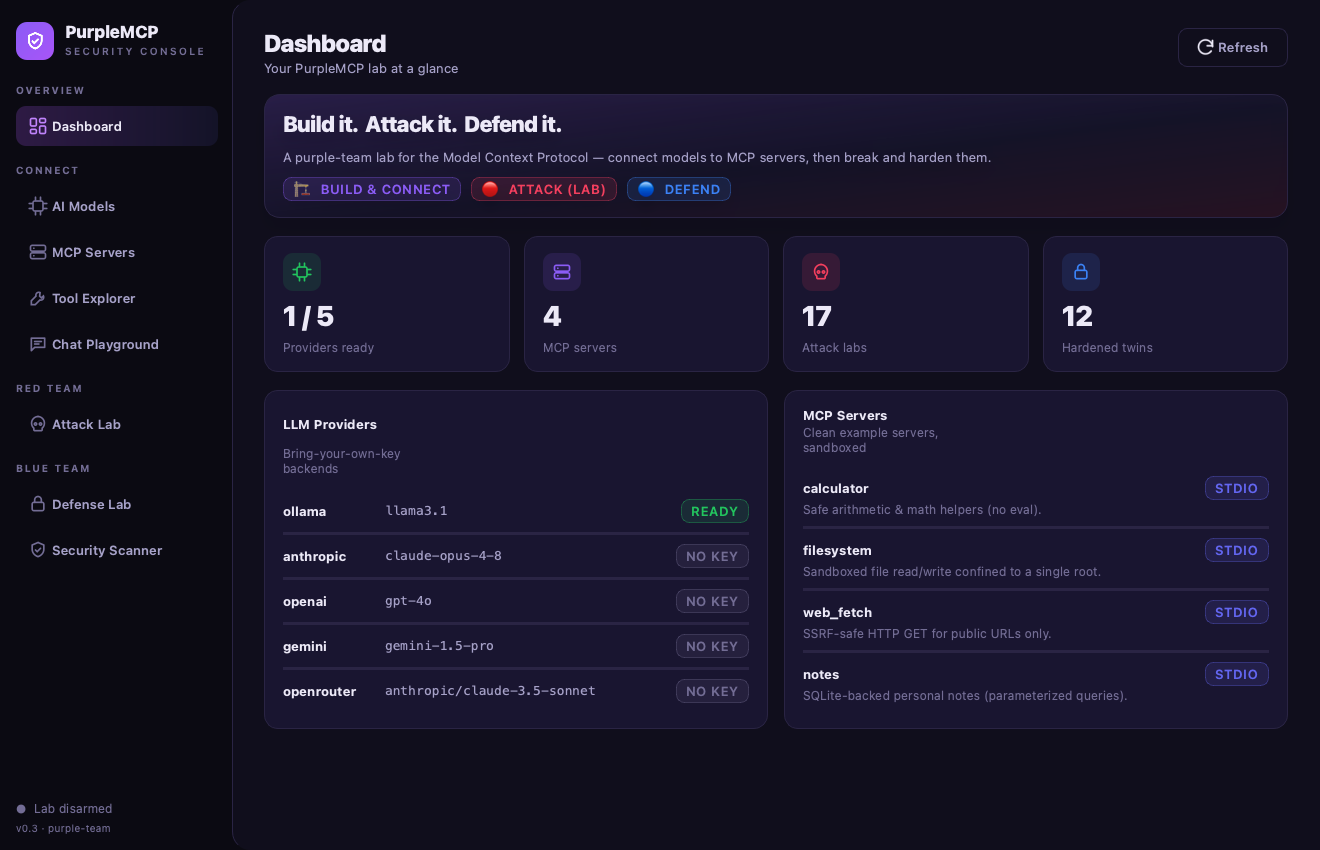
It organizes all of PurpleMCP into clear sections:
| Section | Page | What it does |
| --- | --- | --- |
| Overview | Dashboard | Provider readiness, registered servers, and lab stats at a glance. |
| Connect | AI Models | Install/run local Ollama models (list, pull with live progress, test, delete) and set/test cloud API keys (saved to .env). |
| Connect | MCP Servers | View the registry, add your own servers, one-click add from a catalog of real published servers, and install into Claude Desktop. |
| Connect | Tool Explorer | Browse a server's tools, inspect each JSON schema, and call any tool through an auto-generated form — no model required. |
| Connect | Chat Playground | Chat with any provider/model and watch the agent's tool calls + results stream live as inline cards. |
| Red team | Attack Lab | Browse all 17 attacks by family and run the real exploit for each, streaming its output live (lab-gated). |
| Blue team | Defense Lab | For each attack: the guardrail source code (syntax-highlighted), how the fix works, and a Verify that replays the payload at the vulnerable server and its hardened twin — exploited, then blocked. |
| Blue team | Security Scanner | Run the static + dynamic scanner with a severity chart, summary pills, and per-finding cards. |
The Defense Lab — the guardrail, plus red-vs-blue proof:
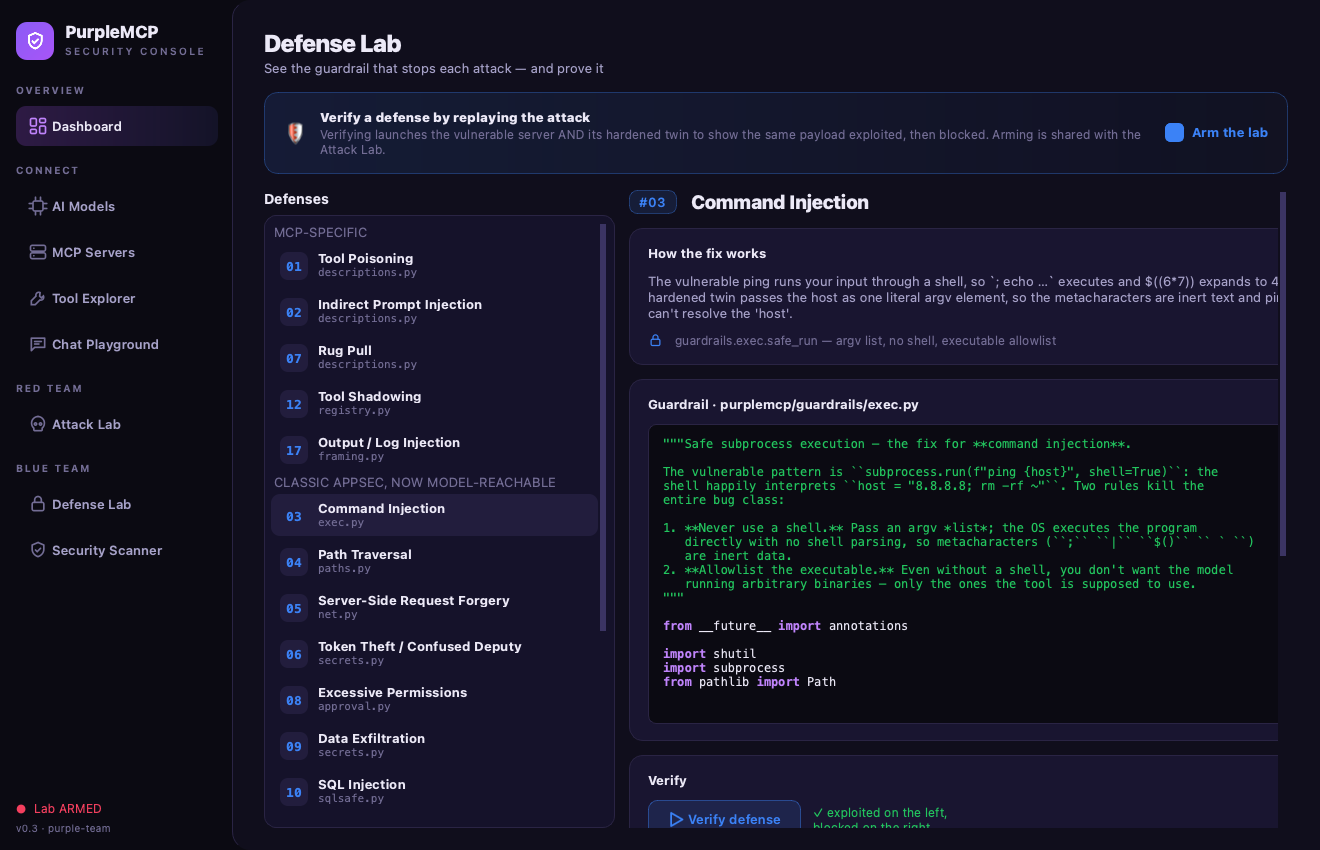
The Attack Lab and Defense Lab only launch intentionally-vulnerable servers after you explicitly arm the lab in the UI — the same opt-in friction as the CLI lab flag. See docs/06-gui.md for a full tour, and ETHICS.md.
pip install -e ".[gui]"   # one-time: pull in PySide6
purplemcp gui             # or:  python -m purplemcp.gui
Repository layout
purplemcp/            CORE package (installable)
  providers/          one uniform interface over Ollama/Anthropic/OpenAI/Gemini/OpenRouter
  host/               MCP client manager + the agent tool-calling loop
  installer/          wire MCP servers into Claude Desktop & other hosts
  guardrails/         the reusable hardening library (used by defense/)
  gui/                the PySide6 desktop app (`purplemcp gui`)
  scanner.py          static + dynamic MCP security analyzer
  cli.py              the `purplemcp` command

servers/              CLEAN, safe-by-default example MCP servers
attacks/   ⚠️         LAB-ONLY vulnerable servers + exploits (see ETHICS.md)
defense/              hardened twins, the security playbook + checklist, scanner docs
docs/                 deep dives: what-is-mcp, architecture, installing models,
                      the attack catalog, the defense playbook, and the GUI tour
tests/                pytest suite that proves the guardrails block the attacks
🏗️ Pillar 1 — Build & Connect
The core idea: one host, any model, any server. Each provider is a small
adapter implementing the same interface, so the tool-calling loop in
purplemcp/host/agent.py doesn't care whether it's
driving a local Llama or cloud Claude.
purplemcp providers                      # readiness of each LLM
purplemcp tools --server filesystem      # introspect a server
purplemcp call  --server calculator --tool add --args '{"a":2,"b":3}'   # call a tool directly, no LLM
purplemcp ask   "summarize my notes" --provider openai --server notes
purplemcp install claude-desktop --server calculator   # add to Claude Desktop config
See docs/03-installing-models.md.
🔴 Pillar 2 — Attack (lab only)
Seventeen self-contained modules, each a vulnerable server + an exploit + a writeup:
| # | Attack | What the attacker achieves |
| --- | --- | --- |
| 01 | Tool poisoning | Hidden instructions in a tool description hijack the model |
| 02 | Indirect prompt injection | Malicious text in returned data steers the model |
| 03 | Command injection | A tool that shells out runs attacker commands |
| 04 | Path traversal | A file tool reads /etc/passwd outside its root |
| 05 | SSRF | A fetch tool is tricked into hitting 169.254.169.254 / internal hosts |
| 06 | Token theft / confused deputy | A tool leaks the credentials it was trusted with |
| 07 | Rug pull | A tool changes its behavior after you approved it |
| 08 | Excessive permissions | Over-broad scopes turn a small bug into a big breach |
| 09 | Data exfiltration | Sensitive data is smuggled out through tool arguments |
| 10 | SQL injection | A search tool builds SQL from input and dumps hidden rows |
| 11 | Template / format-string injection | str.format on a caller's template reaches secrets/globals |
| 12 | Tool shadowing | A 2nd server registers the same tool name and intercepts calls |
| 13 | Insecure deserialization | A tool pickle.loads an attacker blob → code execution |
| 14 | Broken access control (IDOR) | A tool returns any record by id, ignoring the caller |
| 15 | Unrestricted file write | A save tool escapes its root and overwrites startup files |
| 16 | Weak randomness | "Secure" tokens minted from time/PRNG are forgeable |
| 17 | Output / log injection | Tool output forges log lines / control chars into context |
Full catalog with mechanics: docs/04-attack-catalog.md.
Each lives in attacks/NN_*/ and is gated by the safety switch.
🔵 Pillar 3 — Defend
Every attack above has a hardened twin in defense/ that imports
the reusable primitives in purplemcp/guardrails/:
| Threat | Guardrail |
| --- | --- |
| Path traversal | guardrails.paths.safe_resolve() — canonicalize + confine to root |
| SSRF | guardrails.net.safe_get() — block private/link-local IPs, scheme allowlist |
| Command injection | guardrails.exec.run() — no shell, arg allowlist |
| Tool poisoning / rug pull | guardrails.descriptions — sanitize + pin tool definitions |
| Credential leak | guardrails.secrets.scrub() — strip secrets from outputs |
| Over-trust | guardrails.approval — human-in-the-loop for dangerous tools |
| Abuse / runaway | guardrails.ratelimit — per-tool rate limiting |
| SQL injection | guardrails.sqlsafe — parameterized queries + identifier/LIKE escaping |
| Template / SSTI | guardrails.templating.safe_format() — $name only, no attribute access |
| Tool shadowing | guardrails.registry — detect name collisions, allowlist (server, tool) |
| Insecure deserialization | guardrails.serialization.safe_loads() — JSON only, refuses pickle |
| Broken access control | guardrails.authz.assert_owner() — bind every access to the caller |
| Unrestricted file write | guardrails.paths.safe_resolve() — confine writes to a root |
| Weak randomness | guardrails.tokens.new_token() — CSPRNG + constant-time compare |
| Output / log injection | guardrails.framing.sanitize_output() — strip control chars, frame data |
And a scanner that flags risky MCP servers before you ever run them:
purplemcp scan attacks/03_command_injection/vulnerable_server.py   # static analysis
purplemcp scan --server calculator                                 # live tool inspection
Playbook: docs/05-defense-playbook.md · Checklist: defense/checklist.md.
Suggested learning path
- docs/01-what-is-mcp.md — the protocol, concretely.
- Build — run the clean servers;
purplemcp tools/ask/chat. - Attack — pick one module, read its writeup, run the exploit, watch it work.
- Defend — run its hardened twin, run the same exploit, watch it fail.
- Scan — point
purplemcp scanat both and compare findings. - Build your own — copy a clean server, then scan + harden it yourself.
License & disclaimer
MIT — see LICENSE. This project includes intentionally vulnerable software for education; the authors accept no liability for misuse. Use only on systems you own or are authorized to test. See ETHICS.md.